
Subclip
Subclip is an all-in-one AI video editor that automates editing, captioning, and dubbing in multiple languages to save you time and effort.
Visit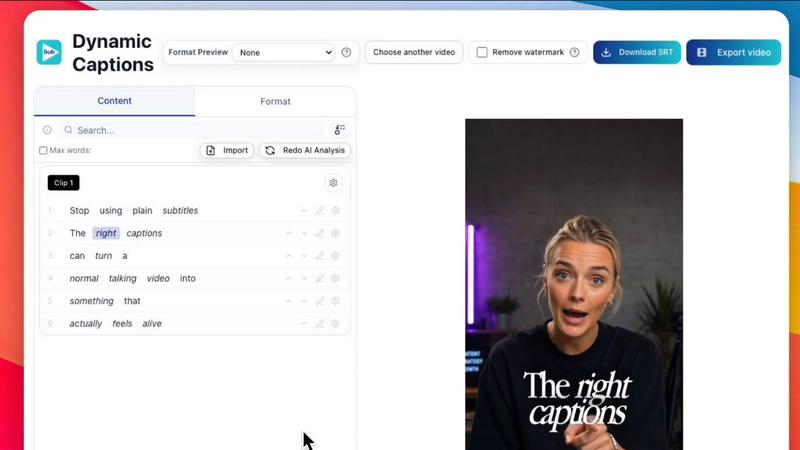
About Subclip
Subclip is an innovative AI-powered video editing platform designed specifically for creators, marketers, and educators. It fundamentally changes the video editing process, allowing users to edit videos as easily as editing a document by simply dragging and dropping a transcript. Subclip offers a suite of robust features, including voice cloning to re-record video segments, one-click removal of silences and filler words, and the ability to generate accurate subtitles automatically. Additionally, it facilitates multi-language dubbing while preserving the original background music, making it a versatile tool for diverse content creators. Whether you are a YouTuber, podcaster, course creator, or part of a content team, Subclip streamlines your entire video production workflow, significantly reducing the time and effort typically required for video editing. Built with speed and simplicity in mind, Subclip replaces the complexity of traditional editing tools with intuitive, AI-driven features that save countless hours of work. With a freemium pricing model that includes a free tier and affordable paid plans, Subclip is accessible to creators at all levels.
Features of Subclip
AI Clipping
Subclip's AI Clipping feature automatically identifies high-energy segments, punchlines, and key emotional shifts in your videos, allowing you to quickly find and utilize the most engaging content. This feature transforms long videos into short, high-retention clips in a matter of minutes, saving you time and enhancing viewer engagement.
One-Click Unlimited Captions
With Subclip, generating subtitles is a breeze. The One-Click Unlimited Captions feature allows you to produce unlimited subtitles and seamlessly export video minutes with local transcription in over 48 languages. This ensures that your content is accessible to a broader audience, enhancing your reach and engagement.
AI Dubbing with Voice Clone
Subclip takes video localization to a new level with its AI Dubbing feature, which allows you to translate your voice into more than 21 languages while maintaining your original tone and emotion. This unique capability enables creators to easily produce content for diverse audiences without the need for re-recording.
Enhanced Audio Processing
The Enhanced Audio Processing feature in Subclip allows users to clean noisy recordings, boost clarity, and remove silences with a single click. This ensures that your video and audio quality are professional-grade, making your content more polished and enjoyable for viewers.
Use Cases of Subclip
For Content Creators
Content creators can utilize Subclip to quickly edit long-form videos into engaging short clips that attract more viewers. The AI Clipping feature makes it easy to highlight the best moments without tedious manual scrubbing, allowing creators to focus on content quality and engagement.
For Educators and Coaches
Educators and coaches can use Subclip to dub recorded lectures, courses, or training videos into multiple languages, making their content accessible to a global audience. The voice cloning feature allows them to maintain their authentic voice, ensuring a consistent and personalized learning experience.
For Podcasters
Podcasters can leverage Subclip to enhance their audio quality by removing background noise and silences, resulting in clearer sound. The platform's ability to generate unlimited captions also helps in reaching wider audiences by making episodes more searchable and accessible.
For Agencies and Freelancers
Agencies and freelancers can significantly boost their output with Subclip's collaborative features. With unlimited transcription, export options, and team collaboration capabilities, they can streamline workflows and deliver high-quality video content more efficiently, all while reducing costs.
Frequently Asked Questions
How does Subclip simplify video editing?
Subclip simplifies video editing by allowing users to edit videos using a text transcript, making the process intuitive and similar to editing a document. Its AI-driven features automate tedious tasks, saving time and reducing complexity.
What languages does Subclip support for dubbing?
Subclip supports dubbing in over 21 languages, enabling creators to translate their content while preserving their original tone and emotion. This feature makes it easy to reach diverse audiences without the need for extensive re-recording.
Can I collaborate with my team using Subclip?
Yes, Subclip offers collaboration features that allow users to share projects with their teams, collect feedback, and work together in a unified workspace. This enhances teamwork and streamlines the editing process.
Is there a free version of Subclip available?
Yes, Subclip offers a freemium pricing model that includes a free tier, allowing users to access basic features without any cost. There are also affordable paid plans available for those who need additional capabilities.
Similar to Subclip


HubVanta is a free AI creative toolkit for generating images, videos, voices, and visual edits from one browser workspace.

Oravaa automates inbound support, outbound lead qualification, and operational calls 24/7 with a human-like Voice AI platform.

Hush Touch is an offline voice-to-text app for macOS that learns your vocabulary and delivers smart, accurate.

Glossa provides fast, accurate AI translation of sermons in 100+ languages, breaking language barriers for churches.

Bantr is an offline, unlimited text-to-speech app for Mac that ensures privacy with expressive, natural-sounding voices.

KaiCalls is your 24/7 AI phone agent that captures leads and answers calls, texts, and messages instantly.

Vowen transforms your speech into text, actions, and workflows, streamlining productivity through voice commands.