
KPI Studio
KPI Studio transforms raw data into polished video charts for editing timelines in under 60 seconds with no keyframes.
Visit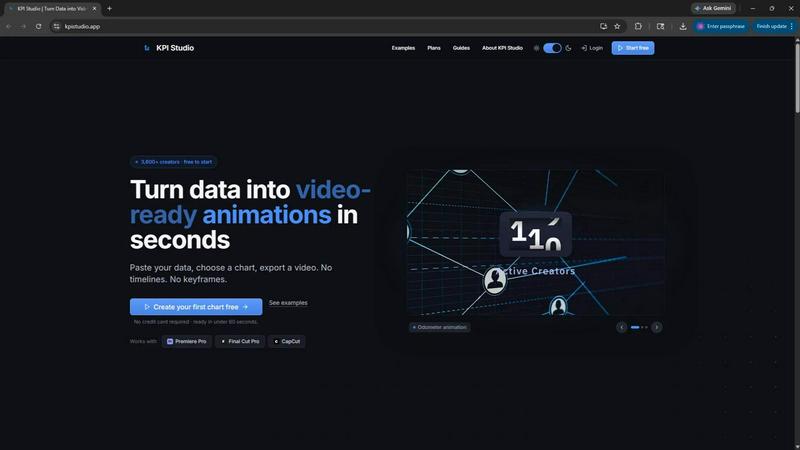
About KPI Studio
KPI Studio is a specialized software tool designed for data-driven video creators who need to integrate animated charts and data visualizations into their video content but lack the time or expertise for complex motion design. The product addresses a fundamental workflow problem: traditional methods for creating data visuals are either amateurish, inflexible, time-consuming, or expensive. Screenshots look unprofessional, Canva templates are rigid, After Effects requires hours of keyframing, and hiring freelancers introduces delays and costs. KPI Studio eliminates this entire process by allowing users to paste their data, choose a chart style, and export a fully animated, video-ready visual in under 60 seconds. There are no timelines, no keyframes, and no setup required. The tool is built for creators on a publish schedule who need charts ready today, not tomorrow. It supports transparent background exports, enabling direct placement into professional editing software like Premiere Pro, Final Cut Pro, and CapCut without additional editing. For advanced users, JSON export provides deeper integration into custom pipelines. KPI Studio serves over 3,600 creators and offers a free tier to get started.
Features of KPI Studio
Instant Video-Ready Exports
KPI Studio generates fully animated, video-ready exports in under 60 seconds from raw data input. Users can export in multiple formats including MP4, MOV with transparency, GIF, and PNG sequences. These exports drop directly into professional video editing timelines like Premiere Pro, Final Cut Pro, and CapCut with zero additional editing required. The transparent background feature ensures charts integrate seamlessly over existing video footage.
No Timeline or Keyframe Complexity
The tool completely removes the need for motion design skills. There are no timelines to manage, no keyframes to set, and no complex animation parameters to configure. Users simply paste their data, customize the chart appearance, and export. This eliminates the steep learning curve associated with professional animation software and dramatically reduces production time for data-driven video content.
Flexible Data Input and Chart Types
KPI Studio supports a variety of chart types including count-up numbers, growing bar charts, and drawing line charts. Users can animate milestone numbers like subscriber counts, revenue totals, or progress metrics. Bar charts reveal comparisons across competitors, time periods, or product lines as bars rise on screen. Line charts show revenue trends, audience growth, or any metric changing over time as a self-drawing line.
Advanced JSON Export for Custom Pipelines
For users with more complex workflows, KPI Studio offers JSON export functionality. This allows for deeper editing and integration into custom production pipelines. Advanced users can take the exported JSON data and further manipulate it within their own systems, enabling automated workflows, custom animation tweaks, or integration with other software tools. This feature bridges the gap between quick exports and professional-grade customization.
Use Cases of KPI Studio
YouTube and Social Media Content Creation
Data-driven YouTube creators and social media influencers can rapidly produce animated charts for their videos. Whether revealing subscriber milestones, comparing monthly analytics, or showing revenue growth, KPI Studio enables creators to add professional-looking data visuals to their content without hiring a motion designer. The 60-second export time keeps production schedules on track.
Business Reporting and Presentation Videos
Corporate teams producing quarterly business review videos, investor updates, or internal training materials can use KPI Studio to convert spreadsheet data into engaging animated visuals. The tool supports standard aspect ratios like 16:9 and 4:3, making it suitable for presentations in PowerPoint and Google Slides, as well as video-first formats.
eLearning and Educational Content
Educators and instructional designers creating video-based learning materials can incorporate animated data visualizations to explain concepts more effectively. Animated charts help maintain viewer engagement and improve information retention compared to static visuals. The transparent background feature allows seamless integration into existing educational video content.
Client Deliverables and Agency Work
Freelancers and creative agencies handling client projects can use KPI Studio to quickly generate animated KPIs for client videos, case studies, and promotional content. The tool eliminates the need to outsource motion design work, reducing turnaround times and costs. The Creator Pack pricing model supports occasional exports for project-based work.
Frequently Asked Questions
What file formats does KPI Studio support for export?
KPI Studio supports multiple export formats including MP4, MOV with alpha channel transparency, GIF, and PNG sequences. Each format is optimized for different use cases: MP4 for standard video, MOV for transparent overlays in professional editors, GIF for lightweight web animations, and PNG sequences for frame-by-frame editing or integration into other software.
Can I change the data after exporting a chart?
Yes, KPI Studio is designed for rapid iteration. If your data changes, you can simply update the numbers, customize the chart again, and re-export. There is no need to redo keyframes or restart a complex animation project. This makes it ideal for creators who need to update metrics frequently, such as weekly subscriber counts or monthly revenue figures.
Is KPI Studio compatible with all video editing software?
KPI Studio exports are designed to work with all major video editing platforms. The transparent background MOV files are directly compatible with Premiere Pro, Final Cut Pro, and CapCut. MP4 exports work universally across all editors. The tool also supports aspect ratios suitable for YouTube (16:9), Instagram (1:1), TikTok (9:16), and standard presentations (4:3).
Do I need any design or animation experience to use KPI Studio?
No, KPI Studio is specifically built for users without motion design experience. The workflow consists of three simple steps: paste your data, customize the chart appearance, and export the video. There are no timelines, keyframes, or complex animation settings to configure. The tool handles all animation automatically based on your data input.
What types of animated charts are available?
KPI Studio offers several chart types including count-up numbers that animate milestone metrics, growing bar charts that reveal comparisons, and drawing line charts that show trends over time. Each chart type is fully customizable with colors, fonts, and animation styles to match your brand or video aesthetic.
Can I use KPI Studio for commercial projects?
Yes, KPI Studio can be used for commercial projects. The Creator Pack and Pro subscriptions include commercial usage rights. The Free tier allows you to test the tool with limited exports before committing to a paid plan. There are no watermarks on paid exports, making them suitable for client deliverables and professional content.
Pricing of KPI Studio
KPI Studio offers three pricing tiers designed for different usage levels. The Free plan is available at $0 per month and includes unlimited PNG exports, 3 free animated exports, all chart types, and real-time preview. The Creator Pack is a one-time purchase at $11.99 that includes everything in Free plus 10 video exports (GIF, MP4, WebM, and MOV), no watermark, 1080p export resolution, and no expiry on credits. The Pro plan is the most popular option at $19.99 per month and includes everything in Free plus unlimited video exports, no watermark, 4K export resolution, and the ability to cancel anytime.
Similar to KPI Studio

Generate and edit production-ready images with GPT Image 2 API using detailed prompts, reference images, clear text rendering, and developer-friendly

AI enhancer for photos, images, videos, creative effects, and shared asset workflows.

Create cinematic AI videos from text or images with Seedance 2.5 Free.

Create high-quality Kling AI videos from text, images, audio, and motion references with Kling 3.0, Motion Control, Lip Sync, task tracking, and API a

Motiofy is an AI creative workspace that helps creators and teams turn ideas into polished visual stories.

ProfileLoom turns one photo into platform-ready AI portraits for professional, social, and creator profiles, with presets and built-in editing.

Free AI Image is a free text-to-image AI generator for creating clean visual drafts from prompts with no sign-up required.
