
HypeShare
HypeShare enables fast, secure file transfers up to 10GB with end-to-end encryption and no signup required.
Visit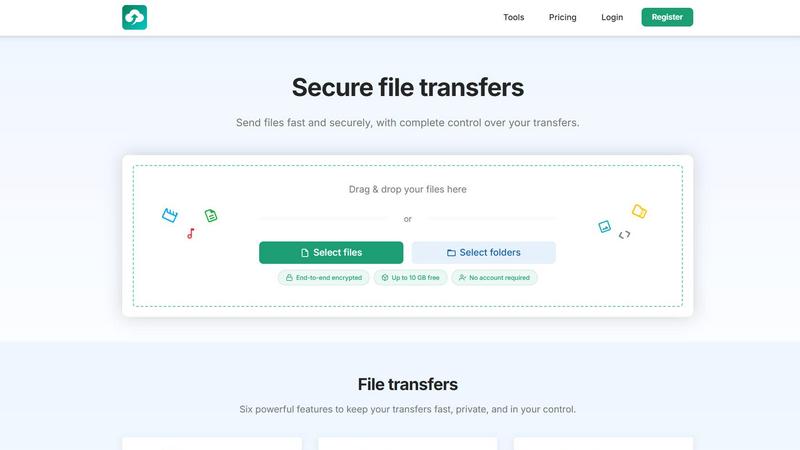
About HypeShare
HypeShare is a secure file transfer platform engineered for speed, privacy, and user control. It enables individuals and teams to send files up to 10GB without creating an account, or register for free to unlock 20GB of storage with encrypted transfers, custom expiry links, and file request pages. The platform is designed to eliminate the friction and bloat found in traditional file-sharing tools, offering a streamlined alternative for freelancers, agencies, and teams who need fast, reliable, and private file exchange. HypeShare prioritizes end-to-end encryption for all transfers, ensuring that data remains secure from upload to download. Beyond basic sending, the platform provides powerful features such as password protection, automatic expiration dates, download limits, and email notifications. A standout capability is the File Requests feature, which allows users to create a personalized upload page. Anyone can upload files directly to this page without needing an account, making it ideal for collecting assets from clients, collaborators, or event attendees. HypeShare also offers a tiered pricing structure, starting with a free Guest option and scaling up to a Pro plan that includes unlimited transfers, 1000GB storage, and branded downloads. The platform is built for those who value both speed and security, providing a no-friction experience that respects user privacy while delivering robust functionality. HypeShare is also positioned as a direct alternative to services like WeTransfer, Dropbox, Google Drive, SendAnywhere, and Smash, offering comparable or superior features with a focus on simplicity and control.
Features of HypeShare
End-to-End Encrypted Transfers
All files transferred through HypeShare are protected with end-to-end encryption. This ensures that your data is secure from the moment it leaves your device until it is decrypted by the intended recipient. No third party, including HypeShare, can access the contents of your files, providing a high level of privacy and security for sensitive information such as legal documents, financial records, or personal media.
File Requests for Inbound Uploads
HypeShare allows you to create a personalized file request page with a custom link. Share this link with anyone, and they can upload files directly to your HypeShare dashboard without needing to create an account. You can set an expiry date for the request, accept any file type, and receive email notifications every time a new upload is received. This feature is perfect for collecting client deliverables, contest entries, or collaborative assets.
Customizable Transfer Controls
Every transfer on HypeShare comes with a suite of control options. You can set a password to protect the transfer from unauthorized access, define an automatic expiration date after which the link becomes inactive, and specify a download limit to control how many times the file can be downloaded. These settings give you granular control over who accesses your files and for how long.
Email Integration for Direct Sending
HypeShare simplifies the sending process by allowing you to send transfer links directly via email from within the platform. You can compose a secure email with your transfer link attached, ensuring that the recipient receives a fast and secure link to download your files. This feature streamlines the workflow by eliminating the need to copy and paste links into a separate email client.
Use Cases of HypeShare
Freelancer Client Deliverables
Freelancers can use HypeShare to send final project files, such as high-resolution images, video edits, or design assets, directly to clients. The platform's encryption ensures that sensitive work remains private, while features like download limits and expiration dates provide control over access. The File Requests feature is also ideal for receiving client feedback materials or raw assets without requiring the client to sign up for an account.
Team Collaboration on Large Projects
Agencies and teams can leverage HypeShare for sharing large files that exceed email attachment limits, such as marketing materials, presentation decks, or software builds. With the Pro plan's unlimited transfers and 1000GB storage, teams can collaborate seamlessly. The ability to set passwords and expiration dates on shared links ensures that project files are only accessible to authorized team members for a defined period.
Collecting User-Generated Content
Event organizers, contest managers, or content creators can use the File Requests feature to collect submissions from a large number of people. By creating a single, shareable upload page with an expiry date, they can efficiently gather photos, videos, or documents from participants. The email notification feature alerts them immediately when a new submission is received, streamlining the collection and review process.
Secure Data Exchange for Businesses
Businesses handling sensitive data, such as legal firms, accounting offices, or healthcare providers, can use HypeShare for secure file transfers. The end-to-end encryption ensures compliance with data privacy regulations, while features like password protection and download limits add an extra layer of security. The platform provides a fast and reliable alternative to insecure email attachments or physical media.
Frequently Asked Questions
How do I send a file without creating an account?
You can send files up to 10GB as a Guest user without creating an account. Simply visit the HypeShare homepage, drag and drop your files or select them, and generate a transfer link. You can then share this link with your recipient via email or any other method. Guest users are limited to 5 transfers per month and 10 files per transfer.
What is the difference between the Free and Pro plans?
The Free plan offers 10 transfers per month, 20GB of storage, and 10GB per transfer with 100 downloads per transfer. The Pro plan, priced at 8.99 USD per month, provides unlimited transfers, 1000GB of storage, 200GB per transfer, unlimited downloads, and 50 emails per transfer. Pro also includes branded downloads, priority support, and the ability to use custom domains.
How does the File Requests feature work?
File Requests allow you to create a personalized upload page with a custom link. You share this link with others, and they can upload files directly to your dashboard without needing a HypeShare account. You can set an expiry date for the request, accept any file type, and receive email notifications for each upload. This is ideal for collecting files from clients or collaborators.
Are my files secure during transfer and storage?
Yes, all files transferred and stored on HypeShare are protected with end-to-end encryption. This means your data is encrypted on your device before it is uploaded and can only be decrypted by the intended recipient. HypeShare cannot access the contents of your files. Additionally, you can add password protection and set expiration dates for an extra layer of security.
Pricing of HypeShare
HypeShare offers three distinct pricing tiers to accommodate different user needs. The Guest plan requires no account and allows 5 transfers per month with 10 files per transfer, 10GB per transfer, and 100 downloads per transfer. The Free plan requires registration and offers 10 transfers per month, 10 files per transfer, 20GB of storage, 10GB per transfer, and 100 downloads per transfer. The most popular Pro plan is priced at 8.99 USD per month (billed monthly or yearly) and includes unlimited transfers, unlimited files, 1000GB of storage, 200GB per transfer, unlimited downloads, and 50 emails per transfer. Pro also unlocks additional features such as branded downloads, priority support, custom domains, and unlimited data retention. All plans include end-to-end encryption, file requests, and no ads.
Similar to HypeShare

A free launch checklist for SaaS, apps, AI tools and more. Every step says why it matters and when you can skip it.

Whop Trends identifies trending products daily, enabling you to capitalize on market insights and maximize your.

Blueberry is an all-in-one Mac app that integrates your editor, terminal, and browser for seamless web app development.

Shrinkpad batch compresses images and videos on Mac, saving space and time with optimal quality and zero manual effort.

Skene transforms your codebase into a seamless growth engine, automating user activation and feature adoption.

Yellow Systems delivers tailored AI and software solutions to drive growth for startups and enterprises alike.

MVPable simplifies MVP development with tailored plans and tools to efficiently build your product idea.

Agenta is an open-source platform that streamlines LLM development for collaborative, reliable AI app creation.