
Looktara
Looktara is your personal AI photographer, transforming your images into stunning, professional photos tailored to your.
Visit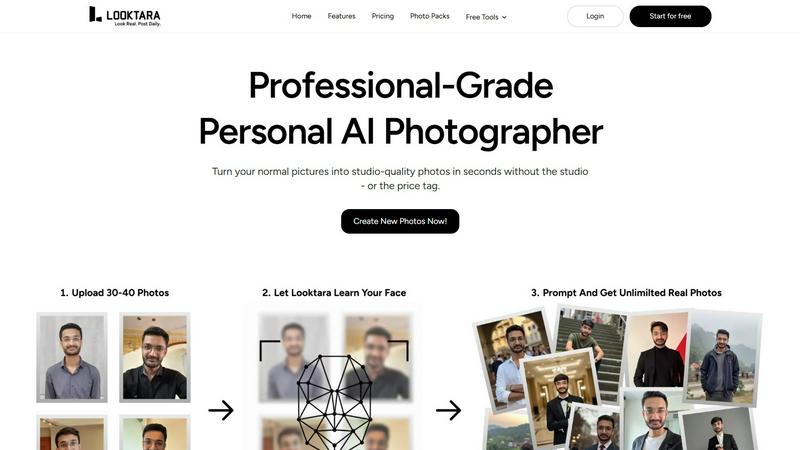
About Looktara
Looktara is a groundbreaking personal AI photographer tailored specifically for individual professionals and creators. Unlike traditional AI image generators that produce generic results, Looktara creates a unique, encrypted model trained solely on your individual characteristics. The user-friendly process involves uploading approximately 30 photos of yourself, after which Looktara takes just about 10 minutes to generate a personalized AI model that understands your unique facial features, expressions, and overall essence. With this model, you can generate high-quality, studio-grade solo photos in approximately 5 seconds by simply entering a descriptive prompt. The core value of Looktara lies in its exceptional level of personalization and control, delivering visuals that genuinely reflect who you are while avoiding common issues associated with AI imagery, such as unnatural skin textures or odd facial expressions. It caters to anyone needing consistent, high-quality visuals across various digital platforms, thereby eliminating the need for costly and time-consuming photoshoots.
Features of Looktara
Personalized AI Model
Looktara builds a custom AI model specifically for you, trained on your unique facial features and expressions. This ensures that every image generated reflects your individuality, allowing for a level of personalization that generic AI tools simply cannot match.
Quick Photo Generation
The platform boasts an impressive speed in photo generation. After the initial model training, you can create professional-grade images in about 5 seconds, making it an efficient solution for busy professionals and creators who need high-quality visuals on demand.
Contextual Styling Options
Looktara allows you to tailor the tone and style of your photos to suit various contexts. Whether you need authoritative visuals for professional use or warm, approachable shots for social media, you can customize each image to match your specific needs.
Consistent Quality Assurance
With Looktara, you no longer have to worry about inconsistent backgrounds or poor lighting. The AI model generates images that maintain a consistent look and feel, ensuring your personal brand remains professional and cohesive across different platforms.
Use Cases of Looktara
Professional Branding
Looktara is perfect for professionals looking to enhance their personal brand. With high-quality images that reflect authenticity and professionalism, you can confidently present yourself on platforms like LinkedIn.
Social Media Content Creation
Creators on platforms such as Instagram and Twitter can use Looktara to generate engaging visuals that resonate with their audience. The ability to customize images allows for a consistent aesthetic that attracts followers.
Event Promotion
If you are hosting an event or speaking at a conference, Looktara can provide you with polished, professional images for promotional materials. This ensures that your visuals are on-brand and high-quality, enhancing your event's appeal.
Personal Projects
Whether you're working on a blog, portfolio, or personal website, Looktara helps you create stunning visuals that capture your essence. This is essential for delivering a cohesive and authentic image to your audience.
Frequently Asked Questions
How does Looktara ensure the privacy of my images?
Looktara creates an encrypted AI model that is trained solely on the images you upload. Your data is securely processed, ensuring your personal photos remain confidential.
Can I use Looktara for different styles of photography?
Yes, Looktara offers customizable options for various styles. You can tailor your photos to fit different contexts, whether for professional use or personal branding.
What if I don't have 30 photos to upload?
While 30 photos are recommended for optimal results, you can still upload fewer images. However, the quality and personalization of the AI model may be reduced with a smaller dataset.
Is there a limit to how many photos I can generate?
No, you can generate as many photos as you need after your AI model is created. The platform is designed for quick and unlimited photo creation, allowing you to produce images on demand.
Explore more in this category:
Similar to Looktara

AI image and video studio. Generate from a prompt, animate stills, swap faces, restyle clips and edit — one credit pool, no subscription.

ProfileLoom turns one photo into platform-ready AI portraits for professional, social, and creator profiles, with presets and built-in editing.

Free AI Image is a free text-to-image AI generator for creating clean visual drafts from prompts with no sign-up required.

Create polished AI images and videos from prompts or references for social posts, ads, flyers, album covers, and campaigns.

AI photo editor for removing objects and backgrounds, enhancing images, expanding scenes, and creating visuals.

Create AI videos and images in the browser, compare models, and scale production with stable APIs.

Private browser-based AI image generation and editing with text-to-image, targeted edits, and multi-image references.

An online AI image tool that enhances photos and illustrations at their original size or upscales them by 2x or 4x.