
Imgezy
Imgezy is an AI photo editor that effortlessly removes objects and changes backgrounds for stunning, professional.
Visit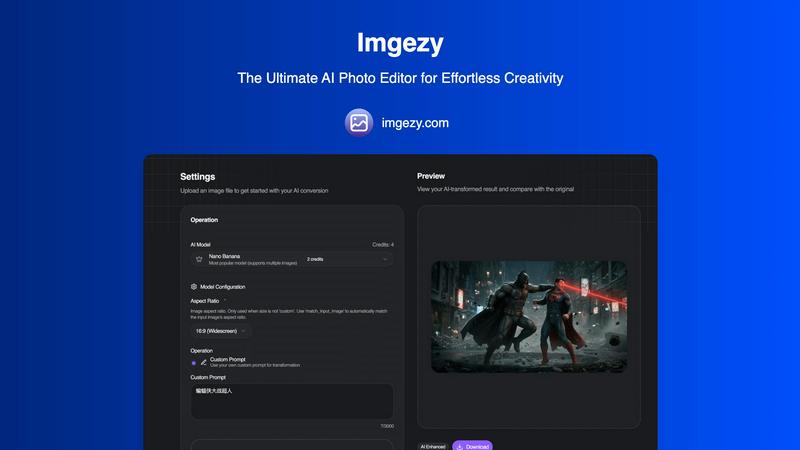
About Imgezy
Imgezy is an innovative AI-powered photo editing platform that revolutionizes the way users manipulate images. Designed to make professional-grade photo editing accessible to everyone, Imgezy allows users to make complex edits through simple text-based instructions. Whether you want to remove a distracting object or change the background to a picturesque landscape, Imgezy transforms your verbal description into a stunningly edited image within seconds. This platform caters to a diverse audience, including individual creators, social media influencers, e-commerce entrepreneurs, and professional photographers, all seeking to enhance their visual content without the steep learning curve associated with traditional editing software. With over 200,000 satisfied users, Imgezy emphasizes speed, simplicity, and high-quality output, enabling anyone, regardless of their technical skill level, to produce beautiful images effortlessly. Its powerful algorithms ensure pixel-perfect accuracy in tasks like object removal and background replacement, ultimately streamlining workflows and enhancing productivity.
Features of Imgezy
Object Removal
Imgezy's object removal feature utilizes advanced AI to identify and eliminate unwanted elements from photos. Whether it's distracting tourists or unwanted objects, the AI reconstructs the background seamlessly, ensuring your images look pristine and professional.
Background Replacement
This feature allows users to change backgrounds instantly, transforming ordinary scenes into extraordinary ones. Users can select from a range of stunning landscapes or solid colors, providing endless creative possibilities for their photos.
Photo Enhancement
Imgezy automatically enhances photos by adjusting colors, lighting, and sharpness, making images more vibrant and visually appealing. This feature ensures that your photos pop, giving them a polished and professional look without any manual adjustments.
Batch Processing
With the batch processing feature, users can edit multiple images simultaneously, saving significant time on large projects. This is particularly beneficial for professionals who need to edit a series of images quickly and efficiently while maintaining high-quality standards.
Use Cases of Imgezy
Social Media Content Creation
Social media influencers and marketers can use Imgezy to create eye-catching content quickly. With the ability to edit and enhance images in seconds, they can consistently produce high-quality visuals that engage their followers and elevate their brand.
E-commerce Product Photography
E-commerce entrepreneurs can leverage Imgezy to enhance product images, remove distractions, and create appealing backgrounds. This ensures that their products stand out, ultimately increasing sales and customer interest.
Travel Photography
Travel enthusiasts can use Imgezy to enhance their travel photos by removing unwanted objects or adjusting backgrounds to reflect their experiences accurately. This helps in creating memorable visuals that encapsulate their adventures.
Event Photography
Photographers working on events can utilize Imgezy to quickly edit images by removing photobombers or enhancing the overall aesthetics of the photos. This feature allows them to deliver professional-quality images to clients in a fraction of the time.
Frequently Asked Questions
How does Imgezy work?
Imgezy uses advanced AI algorithms to analyze your image and execute edits based on your text-based instructions. Simply describe what you want, and the AI does the rest.
What types of images can I edit with Imgezy?
Imgezy supports all major image formats, including JPG, PNG, and WebP, allowing you to upload and edit a wide range of photos effortlessly.
Is there a limit to how many images I can edit?
Imgezy offers various pricing plans with different credit allocations. Depending on your plan, you can edit anywhere from a few hundred to thousands of images each month.
Do I need any prior editing experience to use Imgezy?
No, Imgezy is designed for users of all skill levels. You only need to describe the edits you want, and the AI will handle the technical aspects of photo editing for you.
Similar to Imgezy

ProfileLoom turns one photo into platform-ready AI portraits for professional, social, and creator profiles, with presets and built-in editing.

Free tool to instantly resize, compress, and format signatures for SSC, UPSC & other govt exams. Meets strict KB and pixel limits easily!

AI photo editor for removing objects and backgrounds, enhancing images, expanding scenes, and creating visuals.

Free AI image editor that edits, retouches, and transforms photos with natural-language text prompts.

Private browser-based AI image generation and editing with text-to-image, targeted edits, and multi-image references.

An online AI image tool that enhances photos and illustrations at their original size or upscales them by 2x or 4x.

StopScroll is an AI thumbnail maker that generates YouTube thumbnail concepts from a URL, title, or prompt.
