
EditTextImage
EditTextImage lets you replace text in images online while perfectly preserving font, color, lighting, and perspective in seconds.
Visit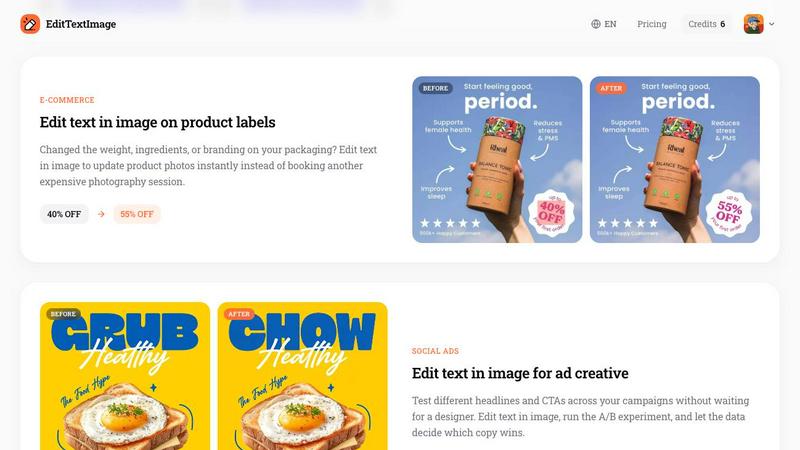
About EditTextImage
EditTextImage is an online AI-powered tool that allows users to edit text within image files without needing any design software like Photoshop, Canva, or access to original source files. The core value proposition is simple: upload an image, specify the original text and the replacement text, and the AI will sample the typography directly from the pixels to change the text while perfectly preserving the original font, color, size, perspective, drop shadow, and background. This tool is designed for anyone who has ever needed to fix a typo, update a date, swap a headline, or localize text on a finished poster, screenshot, product photo, or document but lost the original design file. It eliminates the need for font files, design subscriptions, or technical skills. The entire process takes approximately 10 seconds, and the output is delivered at 2K resolution. EditTextImage is built for speed, accuracy, and accessibility, offering a free first edit with no credit card required and a simple one-time purchase model for additional edits. It is ideal for marketers, designers, e-commerce sellers, event planners, and anyone who needs to make quick, pixel-perfect text changes in images.
Features of EditTextImage
AI-Powered Font Sampling from Pixels
The core technology of EditTextImage is its ability to sample the typeface directly from the pixels of the uploaded image. Unlike traditional image editors that require you to have the exact font file installed, this AI analyzes the visual characteristics of the existing text, including its style, weight, and serifs. It then generates the replacement text using the same typeface, even if it is a paid or rare font, or even hand-lettering. This ensures that the new text blends seamlessly with the original design without any visual mismatch.
Pixel-Perfect Preservation of Layout and Effects
When you edit text in an image, the tool goes beyond just matching the font. It meticulously preserves every other visual element around the text. This includes the original color, size, drop shadow, perspective, lighting, and background texture. The result is that the area where the old text was removed and the new text is placed appears completely natural, with no smearing, warping, or color bleeding. This pixel-perfect accuracy is what sets EditTextImage apart from basic image editors or simple text overlay tools.
Rapid Processing and High-Resolution Output
Speed is a key differentiator for EditTextImage. The entire process of uploading an image, entering text, and generating the result averages around 12 seconds. This rapid turnaround makes it suitable for production workflows and quick fixes. Despite the speed, the tool does not compromise on quality. All outputs are generated at 2K resolution, ensuring that the edited image is sharp, clear, and suitable for professional use, whether for printing, digital display, or social media.
Simple Three-Step Workflow with No Design Skills Required
The user interface is designed for maximum simplicity and accessibility. The workflow consists of just three steps: first, upload your image in PNG, JPEG, or WebP format up to 10 MB. Second, type the original text you want to replace and the new replacement text. Third, click generate. There are no complex layers, masks, or tools to learn. This intuitive process makes the tool accessible to anyone, from professional designers who need a quick fix to individuals with no design background who just need to change a word on a flyer.
Use Cases of EditTextImage
Document Fixes and Corrections
One of the most practical use cases for EditTextImage is correcting errors in documents when the original source file is lost. Users can upload a screenshot or scan of a contract, invoice, or report and edit text in image to fix a typo in a name, update an invoice number, or correct a date. This is invaluable for administrative tasks, legal corrections, and any scenario where a document needs a quick, professional-looking edit without the ability to access the original design program.
Updating Posters and Flyers for Events
Event materials often need last-minute changes. A speaker drops out, a venue changes, or a date is moved, but the designer is unavailable. EditTextImage allows event planners to edit text in image directly on the finished poster or flyer. They can update the event name, change the date, or swap out a headline without reopening the design file. This saves significant time and money, preventing the need for a full redesign or a costly rush order from a designer.
App Screenshot Localization for Global Markets
App developers and marketers need to provide screenshots for app stores in multiple languages. Instead of rebuilding every UI mockup for each language, EditTextImage enables them to edit text in image on existing screenshots. They can simply swap the English text for French, German, or any other language. The AI preserves the exact font, color, and button styling, resulting in pixel-perfect localized screenshots that look native, saving hours of repetitive design work.
A/B Testing for Social Media and Ad Creative
Marketers constantly test different headlines and calls to action (CTAs) to optimize ad performance. EditTextImage allows them to quickly create multiple variations of an ad creative by editing text in image. They can change the headline from "GRUB" to "CHOW" or update a discount percentage from "40% OFF" to "55% OFF" without waiting for a designer. This enables rapid A/B testing, allowing marketers to iterate on copy and let data drive their creative decisions.
Frequently Asked Questions
What file formats are supported for uploading?
EditTextImage supports PNG, JPEG, and WebP file formats for upload. The maximum file size allowed is 10 MB. These formats cover the vast majority of common use cases, including screenshots, photos, posters, and digital documents. If you have a file in a different format, you would need to convert it to one of these supported types before uploading.
Is a credit card required to start using the tool?
No, a credit card is not required to start. EditTextImage offers 1 free credit to all new users, and you can sign in with Google to claim it. This allows you to test the tool and see the quality of the output before making any purchase. The free credit is a risk-free way to evaluate if the tool meets your needs for editing text in image files.
How does the AI handle paid fonts or custom hand-lettering?
The AI technology in EditTextImage samples the typeface directly from the pixels of the image. This means it does not need to identify or have access to the font file itself. It analyzes the visual characteristics of the existing text, such as stroke width, serif style, and overall shape, and then generates the replacement text to match those characteristics. This process works for paid fonts that are not installed on your computer and for unique hand-lettering styles.
What are the acceptable use policies for the tool?
Users must confirm they own or are licensed to edit the uploaded image and that the edit is not intended to deceive a third party. This includes prohibitions on altering images for visa or immigration submissions, fake refund or transaction proofs, and email or chat screenshots to falsify sender or content. The tool also does not process IDs, passports, official seals, bank statements, or tampered receipts. Violations can result in account termination and logs may be shared with law enforcement.
Pricing of EditTextImage
EditTextImage operates on a simple, one-time purchase model rather than a subscription. New users receive 1 free credit to edit text in image with no credit card required. After using the free credit, you can purchase a pack of 30 edits for a one-time fee of $9.90. This is a pay-as-you-go system with no recurring charges. The credits you purchase never expire, and commercial use of the edited images is included in the price. This pricing structure is designed to be affordable for occasional users and cost-effective for professionals who need to edit text in image files on a regular basis.
Similar to EditTextImage

Generate and edit production-ready images with GPT Image 2 API using detailed prompts, reference images, clear text rendering, and developer-friendly

Fast AI image generation for photorealistic visuals, bilingual posters, ecommerce content, and social graphics.

Turn flat images into editable transparent layers with AI.

AI enhancer for photos, images, videos, creative effects, and shared asset workflows.


AI image and video studio. Generate from a prompt, animate stills, swap faces, restyle clips and edit — one credit pool, no subscription.

ProfileLoom turns one photo into platform-ready AI portraits for professional, social, and creator profiles, with presets and built-in editing.

Free AI Image is a free text-to-image AI generator for creating clean visual drafts from prompts with no sign-up required.