
Easymotion - AI Motion Graphic Generator
Easymotion uses AI to transform static images, data, and ideas into professional motion graphics, map animations, and social media videos in minutes.
Visit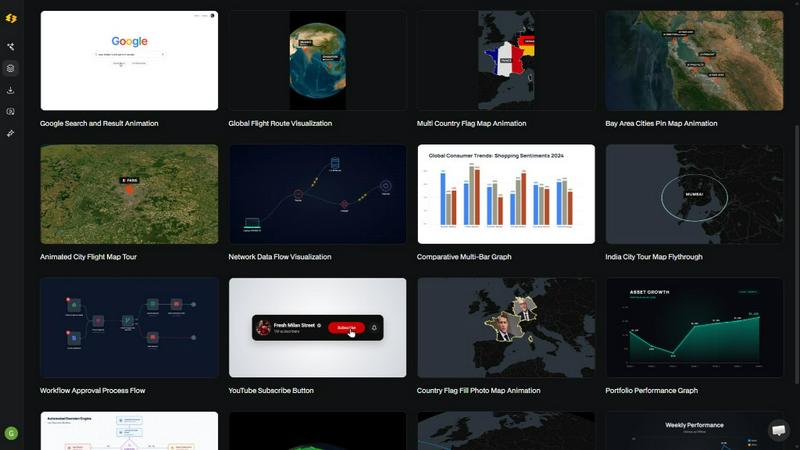
About Easymotion - AI Motion Graphic Generator
Easymotion is an AI-powered motion graphics generator and map animation platform designed for content creators, video editors, founders, marketers, and data storytellers who need professional animated videos without the complexity of traditional editing software. The platform eliminates the steep learning curve of tools like After Effects by allowing users to create polished animations simply by chatting with AI. Instead of manually adjusting keyframes, timelines, and animation curves, users describe their vision in plain English and the AI handles the technical execution. Easymotion supports a wide range of motion graphics including SaaS product promos, flowcharts, animated charts, UI explainers, quizzes, and map animations for flight routes, location pins, and geographic storytelling. Users can start from scratch using a text prompt, or convert static images, spreadsheets, and PDFs into animation-ready scenes. After generating an animation, users can refine every aspect by chatting with the AI to adjust colors, pacing, labels, layout, and visual style. The platform also includes a premium template library for proven motion graphics layouts that can be customized for brand, campaign, or client content. Export options include MP4 and MOV formats, with support for transparent backgrounds that integrate directly into editing workflows. Aspect ratios cover 16:9 for YouTube, 9:16 for TikTok and Reels, 1:1 for square social posts, and 4:5 for feed-friendly vertical formats. Easymotion is built entirely in the browser, requiring no downloads or installations, and is trusted by over 10,000 creators who produce videos in under five minutes on average.
Features of Easymotion - AI Motion Graphic Generator
AI-Powered Chat Interface
Instead of wrestling with complex timeline editors and keyframe animations, users simply describe the video they want in natural language. The AI interprets the request and generates a complete motion graphic with appropriate pacing, transitions, and visual elements. Users can then refine the output by continuing the conversation, asking for color changes, layout adjustments, or style modifications without ever touching a traditional editing interface.
Image to Animation Conversion
Upload a static image such as a logo, product screenshot, or illustration and the AI instantly animates it with smooth motion effects. This feature breathes life into existing visual assets, transforming them into engaging video content suitable for social media posts, presentations, or client deliverables. The AI intelligently identifies movement opportunities within the image and applies professional-grade animation curves.
Data to Animation Transformation
Users can upload CSV or XLSX spreadsheet files and the AI automatically converts raw data into animated charts, graphs, and data visualizations. This feature is particularly valuable for data storytellers and marketers who need to present insights in a visually compelling format. The AI handles data parsing, chart selection, and animation timing, turning boring spreadsheets into scroll-stopping video content.
Map Animation Generator
Create professional map animations for flight routes, travel itineraries, location pins, and geographic storytelling with ease. The AI generates animated maps that show paths between cities, highlight specific regions with flag fills, and animate location markers. This feature is ideal for travel content creators, logistics companies, and anyone needing to visualize geographic data in motion.
Use Cases of Easymotion - AI Motion Graphic Generator
Social Media Content Creation
Content creators and social media managers can rapidly produce platform-specific videos for YouTube, TikTok, Instagram Reels, and Facebook. By simply describing the desired content, users can generate promotional videos, educational clips, and engaging visual stories in minutes. The platform supports all major aspect ratios including 16:9, 9:16, 1:1, and 4:5, ensuring videos are optimized for each platform without additional editing.
Marketing Campaign Video Production
Marketing teams can create and iterate on campaign videos without waiting for designers or freelancers. From product promos and feature explainers to animated charts showing growth metrics, Easymotion enables same-day campaign launches. The ability to customize colors, logos, and assets ensures brand consistency across all video content while dramatically reducing production time from days to minutes.
Data Storytelling and Reporting
Analysts, researchers, and business professionals can transform static charts and spreadsheet data into animated data visualizations that capture audience attention. Animated bar charts, line graphs, and flowcharts make complex information more digestible and engaging for presentations, reports, and social media sharing. Video posts featuring animated data visualizations typically generate five times more engagement than static images.
Travel and Geographic Content
Travel bloggers, tourism boards, and logistics companies can create stunning animated route maps showing flight paths, road trips, or shipping routes. The map animation feature allows users to highlight multiple destinations, animate location pins, and add flag fills to emphasize specific countries or regions. These animations are perfect for travel reels, itinerary presentations, and geographic storytelling on social platforms.
Frequently Asked Questions
What is Easymotion and who is it for?
Easymotion is an AI-powered motion graphics generator that allows users to create professional animated videos simply by chatting with AI. It is designed for content creators, video editors, marketers, founders, and data storytellers who need to produce motion graphics, map animations, and social media videos without using complex software like After Effects. The platform eliminates the need for design skills or technical animation knowledge.
How does the AI motion graphics generation process work?
The process involves three simple steps. First, describe the animation you want in plain English using the chat interface. Second, refine the result by continuing the conversation to adjust colors, timing, map styles, or visual assets. Finally, export your completed video as MP4 or with a transparent background. The AI handles all keyframes, animation curves, and technical details automatically.
What types of videos can I create with Easymotion?
You can create a wide variety of motion graphics including SaaS product promos, animated flowcharts, data visualizations from spreadsheets, UI explainers, quizzes, and social media videos. The platform also specializes in map animations for flight routes, travel itineraries, location pins, and geographic storytelling. Additionally, you can upload static images and convert them into animated scenes.
What export formats and aspect ratios are supported?
Easymotion supports export as MP4 and MOV video formats, including videos with transparent backgrounds for direct integration into editing software. Aspect ratio options include 16:9 for YouTube and landscape content, 9:16 for TikTok and Instagram Reels, 1:1 for square social posts, and 4:5 for feed-friendly vertical formats. This ensures your videos are optimized for any platform or editing workflow.
Similar to Easymotion - AI Motion Graphic Generator

Explore open-source creative software by workflow, platform and development stage, with comparisons and official project links.

Your AI agent picks relevant directories, submits your product in your browser and tracks every step. One-time purchase.

Create and edit AI images through conversation, using text or reference images and refining results in chat.

Clone any webpage pixel-perfect, export HTML/CSS/ZIP or React/Vue components.

All-in-one AI workspace to generate images, videos, and audio with multiple leading AI models.

An adaptive AI tutor that turns topics or your materials into courses, lessons, and answers tailored to how you learn.

Generate iOS and Android app icons from any image and export all platform sizes for free.

Free, open-source 2D CAD app in Rust: command-line drafting, layers, dimensions, DWG/DXF support, and AI-agent automation via MCP/CLI.