
Browser Notes
Browser Notes keeps your notes, sticky boards, and mind maps saved locally in your browser with no account or cloud needed.
Visit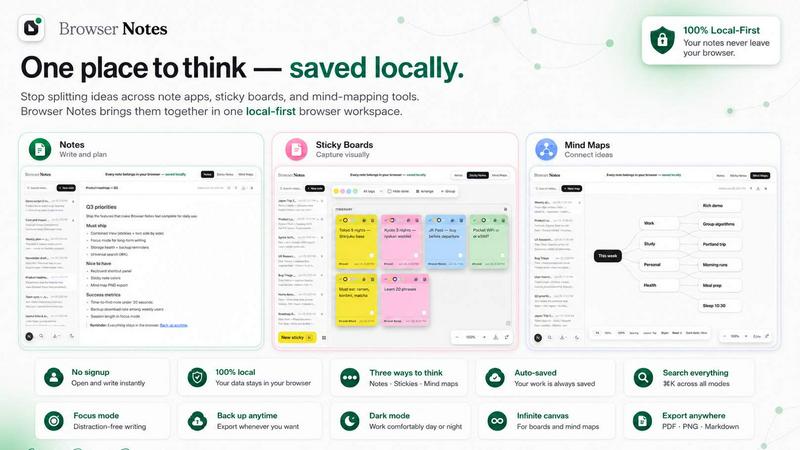
About Browser Notes
Browser Notes is a revolutionary local-first workspace designed to consolidate your scattered ideas, notes, and visual thinking tools into one unified environment. Unlike traditional note-taking applications that rely on cloud accounts, subscriptions, or third-party servers, Browser Notes operates entirely within your browser, storing all data locally on your device. This means no account creation, no tracking, no forced synchronization, and complete privacy for your personal thoughts and professional projects. The product serves a wide audience including students, researchers, writers, project managers, and creative professionals who value data sovereignty and offline accessibility. Browser Notes offers three distinct modes of thinking: a markdown editor for structured writing, a sticky note canvas for freeform brainstorming, and a mind map tool for hierarchical idea branching. All three modes work seamlessly offline, ensuring your productivity never depends on an internet connection. Additionally, you can back up your entire workspace at any time, giving you full control over your data. Whether you are outlining a novel, planning a business strategy, or organizing study materials, Browser Notes provides a secure, versatile, and clutter-free environment. The extension integrates directly into your browser, making it instantly accessible without switching between apps. With a focus on simplicity, privacy, and flexibility, Browser Notes redefines how you capture and organize information in the digital age.
Features of Browser Notes
Markdown Notes Editor
The markdown notes editor provides a clean, distraction-free writing environment with full formatting support including headers, bold, italic, lists, code blocks, and links. You can create structured documents, meeting notes, journal entries, or technical documentation with ease. All content is saved locally in real-time, ensuring no data loss. The editor also supports keyboard shortcuts for efficient navigation and formatting, making it ideal for power users who prefer typing over clicking. Whether you are drafting a blog post or compiling research, the markdown editor offers the precision and flexibility of a dedicated writing tool without the overhead of cloud dependency.
Sticky Notes Canvas
The sticky notes canvas transforms your browser into a freeform brainstorming board. You can create, move, resize, and color-code sticky notes to visually organize ideas, tasks, or concepts. This feature is perfect for rapid ideation sessions, project planning, or creative mapping where linear thinking is insufficient. The canvas supports infinite scrolling and zooming, allowing you to expand your board as ideas grow. Unlike physical sticky notes, these digital versions never fall off, and you can easily group, delete, or rearrange them. The canvas works entirely offline, making it a reliable tool for workshops, classroom activities, or solo brainstorming.
Mind Map Creator
The mind map creator enables you to visually branch ideas from a central topic, creating hierarchical structures that mirror natural thought processes. You can add nodes, sub-nodes, and connections with simple clicks or keyboard shortcuts. Each node supports text and can be expanded or collapsed to manage complexity. This feature is invaluable for project planning, problem solving, studying complex subjects, or outlining presentations. The mind maps are saved locally and can be exported or backed up at any time. The intuitive interface ensures that even beginners can start mapping ideas within seconds, while advanced users can create intricate diagrams for detailed analysis.
Local-First Data Management
All data in Browser Notes is stored exclusively in your browser's local storage, meaning nothing is sent to external servers or the cloud. You have complete ownership and control over your information. The extension provides a built-in backup and restore function, allowing you to export your entire workspace as a file and import it later on any device. This is particularly useful when switching browsers, clearing cache, or setting up a new computer. There are no accounts to manage, no privacy policies to accept, and no risk of data mining. The local-first approach ensures that your notes remain accessible even without an internet connection, making Browser Notes a truly private and resilient note-taking solution.
Use Cases of Browser Notes
Academic Research and Study
Students and researchers can use Browser Notes to organize lecture notes, research papers, and study materials in one place. The markdown editor allows for detailed note-taking with citations and code blocks, while mind maps help visualize complex topics like historical timelines or scientific processes. Sticky notes are perfect for creating study flashcards or brainstorming essay outlines. Since everything is stored locally, students can study offline in libraries or remote areas without worrying about internet access. The backup feature ensures that months of research are never lost due to browser issues.
Creative Writing and Content Planning
Writers, bloggers, and content creators can leverage Browser Notes to draft articles, plan story arcs, or organize character profiles. The markdown editor provides a distraction-free environment for long-form writing, while mind maps help map out plot structures or content calendars. Sticky notes are ideal for capturing sudden inspirations or dialogue snippets that can later be organized into a cohesive piece. The offline capability is crucial for writers who prefer working in cafes or nature without reliable Wi-Fi. The local storage ensures that creative work remains private and free from cloud-based surveillance.
Project Management and Team Collaboration
Project managers and team leads can use Browser Notes to plan projects, track tasks, and brainstorm solutions. Mind maps allow for breaking down large projects into manageable tasks, while sticky notes can represent individual assignments or deadlines. The markdown editor is perfect for writing project briefs, meeting minutes, or status reports. Although Browser Notes is single-user, the backup feature enables sharing of project files securely via email or file transfer, without exposing data to third-party servers. This makes it a lightweight alternative to complex project management software for small teams or independent consultants.
Personal Knowledge Management
Individuals looking to build a second brain or personal knowledge base can use Browser Notes to capture ideas, book summaries, travel plans, or daily journals. The three tools work together seamlessly: mind maps for connecting concepts, sticky notes for quick reminders, and markdown for detailed entries. The local-first design ensures that personal thoughts, passwords, or sensitive information never leave your device. You can categorize and tag your notes for easy retrieval, and the backup function allows you to maintain a permanent archive of your intellectual growth over time.
Frequently Asked Questions
Is Browser Notes completely free to use?
Yes, Browser Notes is completely free to use with no hidden costs, subscriptions, or premium tiers. There are no account requirements, no data limits, and no feature restrictions. You can use all three tools (notes, sticky notes, and mind maps) without any payment. The extension is supported by the developer's commitment to privacy and local-first software. There are no ads, no tracking, and no data monetization. You can download and install the Chrome Extension at no cost and start using it immediately.
Can I access my notes from multiple devices?
Browser Notes stores all data locally in your browser's storage on a single device. To access notes from multiple devices, you must use the built-in backup feature to export your workspace as a file, then transfer that file to another device and import it via the extension. This manual process ensures your data never touches the cloud unless you explicitly choose to share it. There is no automatic sync feature, which is intentional to maintain maximum privacy and control over your information.
How do I back up or restore my data in Browser Notes?
To back up your data, open the Browser Notes extension and navigate to the backup option in the settings menu. Click "Export backup" to download a single file containing all your notes, sticky notes, and mind maps. To restore, install Browser Notes on a new device or after clearing your browser data, then select "Import backup" and choose the previously exported file. This process is quick and ensures you never lose your work. We recommend backing up regularly, especially after significant changes to your workspace.
Does Browser Notes work offline?
Yes, Browser Notes works fully offline. Since all data is stored locally in your browser's storage, you do not need an internet connection to create, edit, or view your notes, sticky notes, or mind maps. The extension loads from your browser's local cache after the initial installation. This makes it ideal for use on airplanes, in remote areas, or any location with unreliable internet. The only time you need internet is to install the extension from the Chrome Web Store or to download a backup file to another device.
Pricing of Browser Notes
Browser Notes is completely free to use. There are no pricing plans, subscription tiers, or paid features. The extension is available at no cost on the Chrome Web Store. All functionality including the markdown editor, sticky notes canvas, mind map creator, and backup/restore features are included without any limitations. The developer maintains the product as a privacy-focused, local-first tool without monetization through ads or data collection.
Explore more in this category:
Similar to Browser Notes

Panzoe is an all-in-one AI platform for personal productivity, business automation, AI assistants, content creation, and custom AI solutions.

AI Email Filter sorts incoming mail into folders using plain-language prompts you write. Works with any IMAP mailbox; bring your own LLM if you want.

No-code 2D game editor: visual node logic, drag-and-drop scenes, live preview. Exports to Windows, macOS, Linux, Android, iOS, Web.

Free collection of online developer utilities, code formatters, and digital converters designed to streamline your daily workflow.

Online tally counter for tracking attendance, workouts, inventory, visitors, sports scores, habits, and everyday counting tasks.

The #1 Native Form Builder Plugin for Framer - No Code, No Embeds, No External Platforms.

A free launch checklist for SaaS, apps, AI tools and more. Every step says why it matters and when you can skip it.

Practical, independent guides to home repairs, maintenance, costs, troubleshooting, and everyday fixes.