
SimpleDraw vs vaethat
Side-by-side comparison to help you choose the right product.

SimpleDraw
Create accurate floor plans and scale drawings online for free with no experience needed.
Last updated: March 1, 2026

vaethat
Vaethat is an AI tool that effortlessly enhances 3D architectural renders, improving clarity and detail while.
Last updated: February 26, 2026
Visual Comparison
SimpleDraw
vaethat

Feature Comparison
SimpleDraw
Dedicated Floor Plan Mode
This specialized mode is tailored for architectural planning, allowing users to construct detailed floor plans with ease. Users can draw walls and add standardized doors, windows, and a library of interior fixtures for kitchens, bathrooms, and living spaces with single clicks. Real-time measurements are displayed as you draw and adjust elements, ensuring spatial accuracy from the initial sketch to the final layout, all within a purpose-built environment.
Intelligent Smart Alignment System
The Smart Alignment System assists users in achieving precision effortlessly. As you move your cursor, the tool intelligently snaps points and lines to logical positions, such as endpoints, midpoints, and perpendicular angles, providing clear visual cues. For ultimate control, you can zoom in for finer detail or use keyboard shortcuts to lock movements to strictly horizontal or vertical axes, guaranteeing perfectly aligned drawings.
Flexible Zoom & Variable Precision
SimpleDraw offers seamless zoom functionality, allowing you to focus on any area of your drawing. The tool's alignment precision automatically adapts based on your zoom level, but can also be manually controlled. This gives you the flexibility to work on broad layouts or make minute, detailed adjustments with the same toolset, ensuring accuracy at every stage of your project.
Non-Destructive Editing & Complete Control
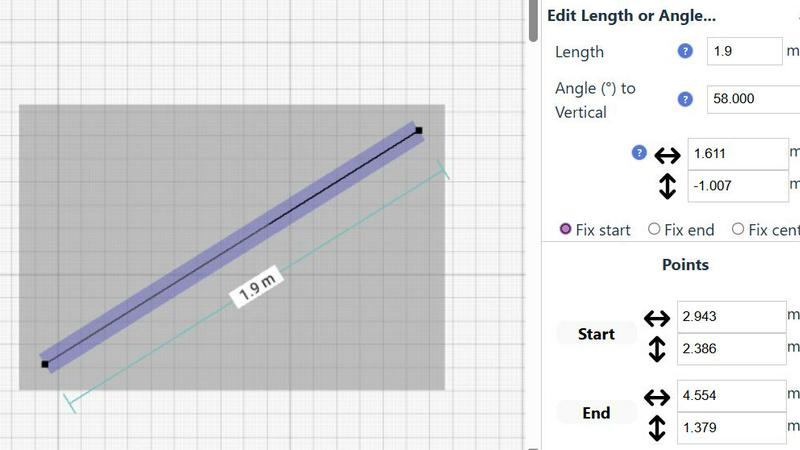
Every element in a SimpleDraw project is fully editable at any time. The platform supports unlimited undo and redo actions, allowing for risk-free experimentation. Elements can be grouped, moved, copied, and pasted to streamline repetitive tasks. For numerical precision, any element's position, line length, or angle can be edited via direct keyboard input, providing a perfect blend of intuitive mouse control and exact numerical specification.
vaethat
AI Render Upscaling
Vaethat utilizes advanced AI algorithms to upscale the resolution of 3D architectural renders. This feature enhances both clarity and sharpness while maintaining the geometry's integrity. Users can expect crisp images that showcase intricate architectural details without distortion.
Detail Refinement
This feature focuses on enhancing fine textures, edges, and small architectural elements within the render. By refining details, Vaethat produces a more polished and professional look, making it easier to convey the intended design aesthetic and quality.
Material and Lighting Enhancement
Vaethat boosts the perceived realism of architectural images through improved material definition and balanced lighting. This feature enhances color contrast and depth, resulting in visuals that more accurately represent the materials and lighting conditions of the original design.
Noise and Artifact Cleanup
The software is equipped with capabilities to reduce noise and common rendering artifacts, delivering cleaner presentation-ready images. This feature is essential for ensuring that the final output is visually appealing and free from disruptive visual elements that could detract from the overall quality.
Use Cases
SimpleDraw
Home Renovation & Remodel Planning
Homeowners and DIYers can use SimpleDraw to plan room additions, kitchen remodels, or bathroom renovations. By creating accurate, to-scale drawings, users can experiment with different layouts, appliance placements, and fixture arrangements before committing to physical changes. This visual planning helps in budgeting, purchasing correctly sized materials, and communicating ideas clearly with contractors.
Furniture Arrangement & Space Planning
Before purchasing new furniture, users can design their room layout to ensure everything fits perfectly. SimpleDraw allows you to place scaled representations of sofas, beds, tables, and storage units within your room's dimensions. This prevents costly mistakes and helps visualize traffic flow and functional use of the space, making interior design decisions more confident and informed.
Creating Property Listings & Apartment Plans
Real estate agents, landlords, and homeowners can generate clear, professional floor plans for rental listings or property sales. An accurate scale drawing provides potential buyers or tenants with a better understanding of the space than photographs alone. This use case enhances marketing materials and sets realistic expectations regarding room sizes and layout.
Garden & Landscape Design
SimpleDraw is an excellent tool for planning outdoor spaces. Users can map out their garden plot, plan the placement of patios, decks, plant beds, and outdoor furniture, or design a new landscape layout. Creating a scaled overview helps in calculating material quantities, understanding sun exposure, and creating a cohesive design for yards and outdoor living areas.
vaethat
Architectural Presentations
Vaethat is ideal for creating high-quality images for architectural presentations. Its ability to enhance renders ensures that clients and stakeholders receive visuals that accurately represent the proposed designs, making a strong impact during pitches and approvals.
Portfolio Development
Architects and visualizers can use Vaethat to enhance their portfolios. By upscaling and refining their 3D renders, professionals can showcase their best work with images that highlight their design skills and attention to detail.
Marketing Materials
For marketing campaigns, Vaethat allows users to create stunning visuals that attract attention. The enhanced images can be used in brochures, websites, and social media, helping to effectively communicate the quality and uniqueness of architectural projects.
Client Feedback and Revisions
Vaethat simplifies the process of obtaining client feedback on architectural designs. By providing enhanced images, architects can present clearer visuals that facilitate discussions and make it easier for clients to provide constructive feedback on design elements.
Overview
About SimpleDraw
SimpleDraw is a free, web-based scale drawing application engineered to democratize the creation of precise technical drawings. It functions as a powerful yet intuitive floor plan creator and drafting tool that operates entirely within your browser, eliminating the need for software downloads, installations, or user account registration. The core mission of SimpleDraw is to bridge the gap between the complexity of professional CAD software and the simplicity of pen-and-paper sketching. It is specifically designed for DIY enthusiasts, homeowners, students, and casual users who require accurate visualizations for planning and design projects without facing a steep learning curve. By offering a streamlined set of smart, specialized tools, SimpleDraw empowers users to produce accurate floor plans, room layouts, elevations, and technical diagrams to scale. Its development is community-driven, actively incorporating user feedback to ensure the tool evolves in direct response to real-world needs and practical applications, making digital drafting accessible to everyone.
About vaethat
Vaethat is an advanced AI-powered tool designed specifically for architectural visualization professionals. The software focuses on upscaling and enhancing 3D renders, allowing architects and visualizers to produce high-quality images that capture the essence of their designs. By leveraging AI technology, Vaethat improves the clarity, sharpness, and realism of architectural images without compromising the original composition. Its user-friendly interface allows users to upload their renders effortlessly and apply enhancements with just a few clicks. This streamlined process not only saves time but also ensures that the final outputs are presentation-ready, making it ideal for portfolios, client approvals, and marketing materials. With its specialized focus on architectural visualization, Vaethat stands out as an essential tool for professionals looking to elevate their rendering quality.
Frequently Asked Questions
SimpleDraw FAQ
Is SimpleDraw really free to use?
Yes, SimpleDraw is completely free. There is no cost associated with using any of its core features, including the Floor Plan Mode, smart alignment tools, and measurement systems. The tool operates on a free-access model with no requirement for account creation or software purchase, making it accessible for all users directly from their web browser.
Do I need to download any software or create an account?
No, you do not need to download any software or create a user account. SimpleDraw is a 100% web-based application. You can start drawing immediately by visiting the website in your modern browser (like Chrome, Firefox, or Edge). Your drawings are saved locally in your browser's storage on your device.
What units of measurement does SimpleDraw support?
SimpleDraw offers a comprehensive measurement system that supports both metric (meters, centimeters) and standard US units (feet and inches). You can choose your preferred unit system, and the tool will display all measurements and dimensions accordingly, including dynamic contextual measurements as you draw.
Can I share or export the drawings I create?
Drawings are saved locally in your browser. You can share them by exporting your work. SimpleDraw provides functionality to export your scale drawings as image files (like PNG) or in vector formats, allowing you to print them, include them in documents, or share them via email or other digital platforms for collaboration or presentation.
vaethat FAQ
How does the AI render enhancer calculate credits?
The AI render enhancer uses a credit system based on the number of images processed. Each enhancement applied to an image will deduct a specific amount of credits from the user's balance, allowing for flexible usage depending on project needs.
Can I use the archviz AI upscaler with V-Ray, Lumion, Enscape, 3ds Max, and SketchUp?
Yes, Vaethat is compatible with various rendering software, including V-Ray, Lumion, Enscape, 3ds Max, and SketchUp. Users can easily import their renders from these platforms into Vaethat for enhancement.
What makes this AI post-production tool different from manual editing?
Vaethat eliminates the complexity of manual editing by automating the enhancement process. Unlike traditional methods that require extensive adjustments and time, Vaethat allows users to upload and enhance images with just a few clicks, saving both time and effort.
Can I upgrade or downgrade my AI enhancement plan anytime?
Yes, users have the flexibility to upgrade or downgrade their AI enhancement plans at any time based on their project requirements. This ensures that professionals can adapt their usage according to changing needs without any hassle.
Alternatives
SimpleDraw Alternatives
SimpleDraw is a free, web-based tool for creating accurate scale drawings and floor plans. It falls into the category of accessible design and drafting software, offering a balance of precision and ease of use directly in a browser without any downloads or sign-ups. Users often explore alternatives for various reasons. Some may require advanced features for professional architectural work, while others might need offline functionality or prefer a different pricing model. Platform compatibility, such as dedicated mobile apps or integration with other software, is another common driver for seeking different solutions. When evaluating alternatives, consider your primary use case, required precision level, and budget. Key factors include the tool's learning curve, collaboration features, export capabilities, and whether it operates online or requires software installation. The best choice aligns with your project's complexity and your personal or professional workflow needs.
vaethat Alternatives
Vaethat is an AI-powered tool designed specifically for architectural visualization (archviz) professionals. This innovative software enhances 3D renders by upscaling images, refining details, and improving overall clarity while maintaining the original design intent. With its advanced features, Vaethat serves as a valuable resource for those looking to elevate their architectural presentations. Users often seek alternatives to Vaethat for various reasons, including pricing considerations, specific feature requirements, or compatibility with different platforms. When searching for an alternative, it is essential to evaluate factors such as ease of use, the quality of enhancements, and the ability to integrate seamlessly into existing workflows. Understanding these aspects can help users find the right tool that meets their unique needs.