
Fusedash vs Master Metrics
Side-by-side comparison to help you choose the right product.

Fusedash transforms raw data into interactive dashboards and charts for instant insights and informed decision-making.
Last updated: March 4, 2026

Master Metrics
Master Metrics is an AI analytics tool that streamlines data management, reporting, and alerts for marketing and sales.
Last updated: February 28, 2026
Visual Comparison
Fusedash

Master Metrics
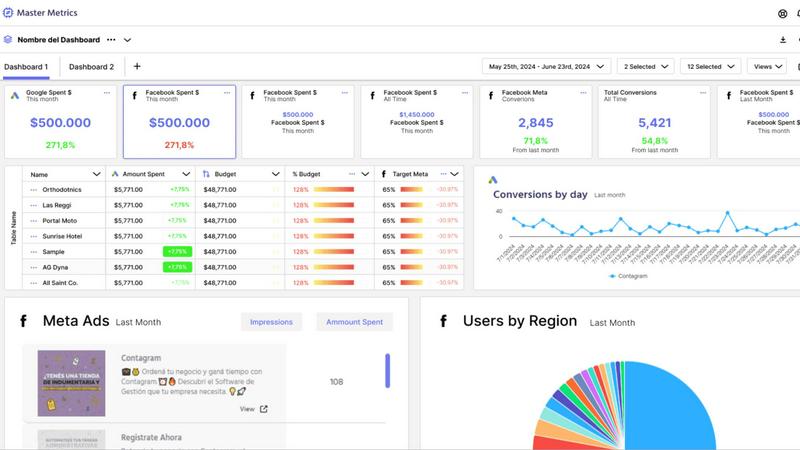
Feature Comparison
Fusedash
Flexible Views
Fusedash allows users to create tailored dashboards, charts, maps, or report-style views from the same dataset, ensuring that different teams receive the specific insights they need without unnecessary back and forth. This customization enables stakeholders to focus on what matters most to them.
AI Chart Generator
The AI Chart Generator in Fusedash enables users to swiftly create clear and compelling visuals from CSVs or APIs. It helps users select the appropriate chart type, apply necessary comparisons, and refine labels, ensuring that the charts accurately communicate the intended story. Generated charts can be easily integrated into dashboards or used as standalone visuals.
Dashboard Software
Fusedash combines the capabilities of dashboards and reporting in a single workspace. This feature allows users to monitor KPIs while also providing contextual narrative reporting that explains changes, their significance, and future implications. This integration helps maintain alignment among teams and reduces discrepancies in reporting.
AI Chat
With the AI Chat feature, Fusedash enables users to engage with their data using plain language. Users can ask questions, explore breakdowns, and receive suggestions for relevant charts or metrics, transforming insights into shareable dashboard views that can be utilized immediately.
Master Metrics
Smart Dashboards
Master Metrics provides users with intuitive dashboards that transform complex data into easily digestible insights. Users can customize these dashboards to highlight the metrics that matter most to their business, allowing for quick assessments of performance and trends.
Automated Reporting
Users can automate their reporting processes with Master Metrics, enabling them to set up custom alerts and receive updates at scheduled intervals. This feature eliminates the need for manual reporting, saving time and increasing efficiency.
Data Integration
The platform seamlessly integrates with various marketing tools, allowing users to connect their data sources effortlessly. This integration ensures that users can pull data from multiple platforms and refresh it automatically, providing real-time insights.
AI-Driven Presentations
With Master Metrics, users can generate Google Slides presentations using AI technology. By selecting data sources and metrics, users receive visually appealing and editable presentations that can be customized according to their needs in just a few clicks.
Use Cases
Fusedash
Marketing Performance Monitoring
Marketing teams can leverage Fusedash to create dynamic dashboards that track campaign performance in real time. By visualizing key metrics and trends, marketers can swiftly adjust strategies to optimize ROI and improve engagement.
Operational Efficiency Analysis
Operations teams can utilize Fusedash to visualize workflows and processes. By monitoring key performance indicators, they can identify bottlenecks and areas for improvement, leading to enhanced operational efficiency and productivity.
Financial Reporting
Finance teams can benefit from Fusedash by creating comprehensive financial reports and dashboards that provide a clear view of revenue, expenses, and key financial metrics. This transparency aids in informed decision-making and strategic planning.
Sales Performance Tracking
Sales teams can use Fusedash to analyze sales data and performance metrics. By creating dashboards that highlight top-performing products, sales trends, and regional performance, teams can adjust their strategies to drive sales growth effectively.
Master Metrics
Freelancers Managing Multiple Clients
Freelancers can leverage Master Metrics to manage analytics for multiple clients efficiently. The platform's features enable them to monitor various accounts in one place, ensuring they deliver insightful reports without overwhelming manual effort.
Agencies Tracking Campaign Performance
Marketing agencies can utilize Master Metrics to track the performance of different campaigns across various channels. The ability to automate reporting and receive alerts on key metrics helps agencies optimize their strategies and improve client outcomes.
E-commerce Businesses Monitoring Sales
E-commerce businesses can benefit from Master Metrics by keeping a close eye on sales performance and trends. With custom alerts set for critical metrics, they can react promptly to changes in sales patterns, ensuring they remain competitive.
Teams Creating Client Presentations
Teams can streamline the process of creating presentations for clients using Master Metrics. The AI-driven presentation feature allows them to compile comprehensive reports effortlessly, showcasing their insights and results in a professional format.
Overview
About Fusedash
Fusedash is an advanced AI-powered data visualization platform designed to streamline the process of transforming connected data into clear and actionable insights. It serves as a comprehensive workspace for teams to create visually engaging dashboards, interactive charts, detailed maps, and narrative reports without the need to replicate the same logic across multiple disconnected tools. The platform's core value proposition lies in providing consistency and efficiency; users can define key performance indicators (KPIs) and metrics once and then apply these consistent definitions across various views and reports. This ensures that all stakeholders, from leadership to marketing and operations, are aligned and relying on the same trustworthy data. Fusedash is particularly beneficial for teams tired of cumbersome manual reporting cycles and inconsistent data narratives. It empowers users to monitor real-time data and delve into the reasons behind trends by exploring segments, regions, or time periods. With integrated AI capabilities such as natural language data chat and smart visualization assistance, Fusedash simplifies data exploration and reporting, transforming raw data into a reliable source of truth that drives organizational alignment and action.
About Master Metrics
Master Metrics is an all-in-one management solution tailored for agencies and marketing teams seeking to enhance their marketing and sales analytics. Developed by seasoned marketers with deep expertise in the digital marketing landscape, this platform offers a streamlined approach to analyzing diverse marketing data. Master Metrics empowers users to make data-driven decisions effortlessly by consolidating analytics into user-friendly dashboards. It is designed for a wide range of users, from freelancers managing a few clients to large teams overseeing multiple accounts. Its main value proposition lies in simplifying workflows, automating reporting processes, and enabling users to derive actionable insights from various data sources. This allows marketing professionals to focus on crafting strategies that drive results, while managing their data and analytics with ease.
Frequently Asked Questions
Fusedash FAQ
What types of data can I connect to Fusedash?
Fusedash allows users to connect a variety of data sources, including CSV files, APIs, and even public datasets. This flexibility ensures that users can aggregate their data seamlessly for comprehensive analysis.
Is Fusedash suitable for non-technical users?
Yes, Fusedash is designed to be user-friendly and accessible, enabling non-technical users to create insightful dashboards and reports without needing advanced data skills. Its AI features further simplify the process of data visualization.
Can I share my dashboards with other team members?
Absolutely. Fusedash allows users to share dashboards and reports easily, ensuring that all stakeholders have access to consistent and transparent data views, which fosters collaboration and alignment across teams.
How does Fusedash ensure data consistency?
Fusedash enables users to define key metrics and KPIs once, which can then be reused across all views and reports. This eliminates discrepancies and ensures that all teams are referring to the same reliable data for their analyses.
Master Metrics FAQ
What types of data sources can Master Metrics connect to?
Master Metrics supports a wide range of data sources, allowing users to integrate data from various marketing platforms. This connectivity helps in pulling together insights from different channels for cohesive analysis.
Is there a free trial available for Master Metrics?
Yes, Master Metrics offers a free 7-day trial, enabling potential users to explore its features and functionalities before committing to a paid plan. This trial allows users to evaluate how the platform meets their analytics needs.
Can I customize my dashboards in Master Metrics?
Absolutely! Users can customize their dashboards to focus on specific metrics that are crucial to their business. This flexibility allows for tailored insights that align with individual goals and strategies.
How does the alert system work in Master Metrics?
The alert system in Master Metrics notifies users when specific metrics exceed or fall below defined thresholds. Users can set alerts for budget control, campaign performance, and other key indicators, ensuring they stay informed about essential changes.
Alternatives
Fusedash Alternatives
Fusedash is an AI-powered data visualization platform that falls within the Analytics & Data and Business Intelligence categories. It helps teams convert their raw data into actionable insights through clear dashboards and charts, promoting a unified workspace where metrics and KPIs are consistently applied across various reports and views. Users often seek alternatives to Fusedash for several reasons, including pricing, specific feature sets, or varying platform requirements that better fit their organizational needs. When choosing an alternative, it's essential to consider factors such as ease of use, integration capabilities, scalability, and the ability to provide real-time insights while maintaining data accuracy and consistency.
Master Metrics Alternatives
Master Metrics is an AI-driven analytics tool designed specifically for marketing teams and agencies. It simplifies the management of data, alerts, and reporting, allowing users to make informed, data-driven decisions efficiently. As an all-in-one solution, it helps streamline the complexities of marketing and sales analytics, making it suitable for both freelancers and larger teams. Users commonly seek alternatives to Master Metrics for various reasons, including pricing, specific feature sets, or compatibility with different platforms. When considering alternatives, it is essential to evaluate factors such as usability, integration capabilities, customer support, and the specific needs of your marketing strategy and team size. A suitable alternative should enhance your data management and analytics processes while remaining within budget.