
Master Metrics
Master Metrics is an AI analytics tool that streamlines data management, reporting, and alerts for marketing and sales.
Visit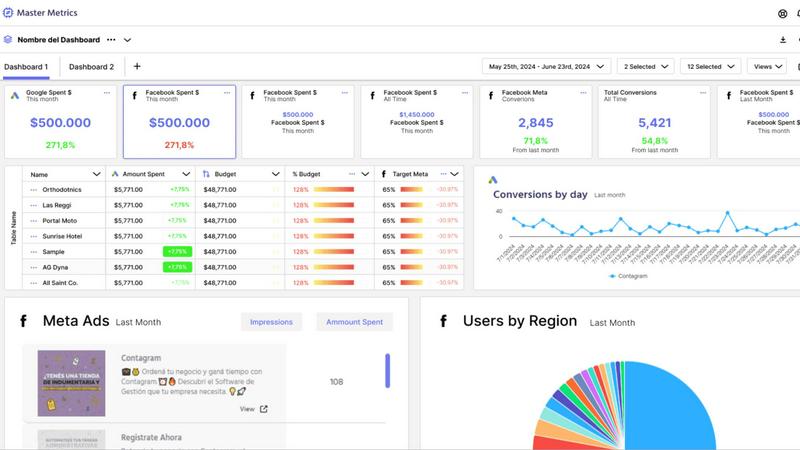
About Master Metrics
Master Metrics is an all-in-one management solution tailored for agencies and marketing teams seeking to enhance their marketing and sales analytics. Developed by seasoned marketers with deep expertise in the digital marketing landscape, this platform offers a streamlined approach to analyzing diverse marketing data. Master Metrics empowers users to make data-driven decisions effortlessly by consolidating analytics into user-friendly dashboards. It is designed for a wide range of users, from freelancers managing a few clients to large teams overseeing multiple accounts. Its main value proposition lies in simplifying workflows, automating reporting processes, and enabling users to derive actionable insights from various data sources. This allows marketing professionals to focus on crafting strategies that drive results, while managing their data and analytics with ease.
Features of Master Metrics
Smart Dashboards
Master Metrics provides users with intuitive dashboards that transform complex data into easily digestible insights. Users can customize these dashboards to highlight the metrics that matter most to their business, allowing for quick assessments of performance and trends.
Automated Reporting
Users can automate their reporting processes with Master Metrics, enabling them to set up custom alerts and receive updates at scheduled intervals. This feature eliminates the need for manual reporting, saving time and increasing efficiency.
Data Integration
The platform seamlessly integrates with various marketing tools, allowing users to connect their data sources effortlessly. This integration ensures that users can pull data from multiple platforms and refresh it automatically, providing real-time insights.
AI-Driven Presentations
With Master Metrics, users can generate Google Slides presentations using AI technology. By selecting data sources and metrics, users receive visually appealing and editable presentations that can be customized according to their needs in just a few clicks.
Use Cases of Master Metrics
Freelancers Managing Multiple Clients
Freelancers can leverage Master Metrics to manage analytics for multiple clients efficiently. The platform's features enable them to monitor various accounts in one place, ensuring they deliver insightful reports without overwhelming manual effort.
Agencies Tracking Campaign Performance
Marketing agencies can utilize Master Metrics to track the performance of different campaigns across various channels. The ability to automate reporting and receive alerts on key metrics helps agencies optimize their strategies and improve client outcomes.
E-commerce Businesses Monitoring Sales
E-commerce businesses can benefit from Master Metrics by keeping a close eye on sales performance and trends. With custom alerts set for critical metrics, they can react promptly to changes in sales patterns, ensuring they remain competitive.
Teams Creating Client Presentations
Teams can streamline the process of creating presentations for clients using Master Metrics. The AI-driven presentation feature allows them to compile comprehensive reports effortlessly, showcasing their insights and results in a professional format.
Frequently Asked Questions
What types of data sources can Master Metrics connect to?
Master Metrics supports a wide range of data sources, allowing users to integrate data from various marketing platforms. This connectivity helps in pulling together insights from different channels for cohesive analysis.
Is there a free trial available for Master Metrics?
Yes, Master Metrics offers a free 7-day trial, enabling potential users to explore its features and functionalities before committing to a paid plan. This trial allows users to evaluate how the platform meets their analytics needs.
Can I customize my dashboards in Master Metrics?
Absolutely! Users can customize their dashboards to focus on specific metrics that are crucial to their business. This flexibility allows for tailored insights that align with individual goals and strategies.
How does the alert system work in Master Metrics?
The alert system in Master Metrics notifies users when specific metrics exceed or fall below defined thresholds. Users can set alerts for budget control, campaign performance, and other key indicators, ensuring they stay informed about essential changes.
Similar to Master Metrics

Social media content engine that drives revenue. Publish everywhere, track clicks in real time, and let AI agents run it.

Online tally counter for tracking attendance, workouts, inventory, visitors, sports scores, habits, and everyday counting tasks.


The #1 Native Form Builder Plugin for Framer - No Code, No Embeds, No External Platforms.


Fast AI image generation for photorealistic visuals, bilingual posters, ecommerce content, and social graphics.

Create videos from prompts and images with RunwayAI, an independent runway ai video generator with practical output controls.

AI SEO platform for keyword research, content briefs, writing, grading, optimization and publishing.