
AI Formatter vs LuxSign
Side-by-side comparison to help you choose the right product.
AI Formatter
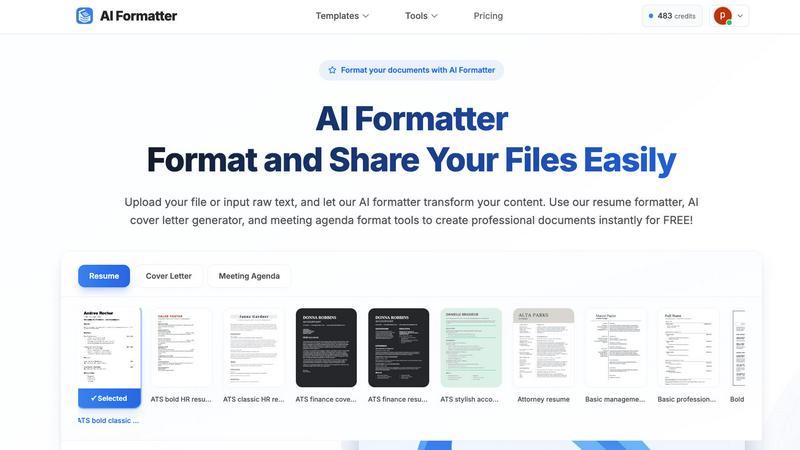
Effortlessly transform raw text into professional documents using AI Formatter's extensive library of templates.
Last updated: March 1, 2026

LuxSign offers secure, eIDAS-compliant electronic signatures for fast and legal document signing across the EU.
Last updated: February 26, 2026
Visual Comparison
AI Formatter
LuxSign

Feature Comparison
AI Formatter
Extensive Template Library
AI Formatter provides users with access to a vast library of over 162 professional templates. These templates are optimized for ATS compliance, ensuring that resumes, cover letters, and other documents pass automated screening systems effectively.
Real-Time Document Editing
With the built-in real-time editor, users can easily customize their formatted documents. This feature allows for immediate adjustments in fonts, colors, and layouts, ensuring that each document meets personal branding and professional standards.
Multi-Format Export Options
AI Formatter supports various export formats, including PDF, Word, and TXT. This flexibility allows users to download their documents in the format that best suits their needs, facilitating easy sharing and submission.
AI-Powered Formatting
The AI-driven formatting technology processes uploaded content and transforms it into a well-structured document within seconds. This automation saves users significant time while ensuring high-quality presentation and professional standards.
LuxSign
Multiple Signature Methods
LuxSign allows users to sign documents using various methods, including drawing with a mouse, typing their name, or uploading a signature image. This flexibility ensures that signing is quick and personalized, catering to different user preferences.
Advanced Security
With industry-standard encryption, LuxSign prioritizes the security of your documents. All files are securely stored in EU data centers, and the platform offers detailed audit trails, ensuring that every action taken on a document is recorded and traceable.
Collaboration Workspaces
LuxSign provides collaboration workspaces where teams can share documents and manage access. This feature allows for organized workflows, enabling members to collaborate seamlessly on signing processes and enhancing overall productivity.
Email Notifications
Automatic email notifications keep users informed about the status of their documents. Notifications are sent when documents are sent, viewed, and signed, allowing users to track progress in real-time and stay updated throughout the signing process.
Use Cases
AI Formatter
Job Seekers
Job seekers can utilize AI Formatter to create polished resumes and cover letters that align with industry standards. The ATS optimization feature ensures that their documents stand out during the application process.
Professionals
Professionals can benefit from AI Formatter by generating well-structured meeting agendas and reports, enhancing their communication and presentation skills in corporate environments.
Businesses
Businesses can create professional invoices and receipts using AI Formatter, streamlining their billing processes and improving client interactions with visually appealing documents.
Academics
Students and educators can use AI Formatter to format research papers, presentations, and other academic documents, ensuring that their work meets institutional standards and is presented professionally.
LuxSign
Real Estate Transactions
In the real estate industry, LuxSign can streamline the signing of contracts and agreements between buyers, sellers, and agents. The platform's compliance with eIDAS ensures that all signatures are legally valid, facilitating smooth transactions.
HR Onboarding
Human Resources departments can utilize LuxSign for onboarding new employees by sending offer letters and contracts for signature. The platform's multiple signature methods and automated notifications make the process efficient and user-friendly.
Legal Document Signing
Law firms and legal departments can benefit from LuxSign by signing and managing legal documents securely. The detailed audit trails provide necessary compliance records, while the end-to-end encryption safeguards sensitive information.
Financial Services
Financial institutions can leverage LuxSign for client agreements, loan documents, and other contracts. The platform's security features ensure that all transactions are protected, while its collaboration workspaces allow teams to work together efficiently.
Overview
About AI Formatter
AI Formatter, developed by Sun Sky LLC, is an innovative AI-driven document formatting platform tailored for individuals and businesses seeking to create professional documents with ease. This cloud-based SaaS solution significantly reduces the time and effort required to format unstructured text or uploaded files, including popular formats like Word, PDF, and TXT. The platform allows users to convert their content into polished, ATS-optimized documents in seconds, boasting an impressive ATS pass rate of over 95%. This feature is particularly beneficial for job seekers and professionals aiming to enhance their chances of securing interviews. With a library of over 100 templates designed for various professional documents such as resumes, cover letters, meeting agendas, and invoices, users can ensure their documents are visually appealing and tailored to their specific industry needs. The real-time online editor offers full customization options, enabling users to adjust fonts, colors, and layouts effortlessly. Furthermore, multi-format exports and secure sharing options make AI Formatter an indispensable tool for job seekers, professionals, businesses, and academics alike. Starting with 10 free credits, users can explore the platform's extensive capabilities, with subscription plans ranging from Free to Enterprise tier at $199.99 per month for unlimited formatting.
About LuxSign
LuxSign is a secure, cloud-based electronic signature platform developed specifically for businesses that require a high level of compliance with regulations. Designed and hosted in Luxembourg, LuxSign ensures that all documents are encrypted end-to-end and stored solely within the country, thus guaranteeing full compliance with GDPR. The platform adheres to eIDAS SES standards, providing legal validity for contracts across the European Union. LuxSign is ideal for businesses of all sizes looking to streamline their document signing processes while maintaining rigorous security standards. With features such as parallel or sequential signing workflows, drag-and-drop signature field placement, and automated email notifications, LuxSign simplifies the signing process. Advanced tiers provide additional functionalities including document templates, comprehensive audit trails, bulk signing capabilities, and collaboration workspaces, making it a versatile choice for organizations aiming to enhance their operational efficiency.
Frequently Asked Questions
AI Formatter FAQ
What file formats does AI Formatter support?
AI Formatter supports various file formats, including PDF, DOC, DOCX, and TXT, allowing users to upload their documents or input raw text for formatting.
Can I customize my formatted documents?
Yes, AI Formatter features a real-time editor that allows users to customize their documents. You can adjust fonts, colors, layouts, and other design elements to match your preferences.
Is there a free version of AI Formatter available?
Yes, AI Formatter offers a free tier which starts with 10 free credits. Users can explore the platform's capabilities before choosing a subscription plan that fits their needs.
How does AI Formatter ensure ATS compatibility?
AI Formatter uses a library of ATS-optimized templates and AI-driven formatting technology to create documents that meet the requirements of automated screening systems, enhancing the chances of getting noticed by recruiters.
LuxSign FAQ
How does LuxSign ensure document security?
LuxSign employs end-to-end encryption during the upload, storage, and transmission of documents. All files are stored on secure servers in Luxembourg, ensuring compliance with EU data protection regulations.
Is LuxSign compliant with GDPR?
Yes, LuxSign is fully compliant with GDPR and Luxembourg data protection laws, which means that your privacy and the security of your data are prioritized throughout the document signing process.
Can I use LuxSign for multiple signers?
Absolutely! LuxSign allows you to add up to four signers per document, and you can choose between parallel or sequential signing workflows, making it adaptable to your signing needs.
What types of documents can I sign with LuxSign?
LuxSign supports a variety of file formats, including PDF, DOC, and DOCX. Users can easily upload documents up to 10MB and utilize the platform's features to facilitate the signing process.
Alternatives
AI Formatter Alternatives
AI Formatter is a cloud-based SaaS tool developed by Sun Sky LLC, designed to revolutionize the document formatting process. It falls under the category of productivity and management software, offering users the ability to transform raw text into polished, ATS-optimized documents through a library of over 100 professional templates. Many users seek alternatives to AI Formatter for various reasons, including pricing, specific feature requirements, or compatibility with their existing platforms. When choosing an alternative, it is essential to consider factors such as template variety, customization options, user interface, and overall cost-effectiveness to ensure the selected tool meets their unique needs.
LuxSign Alternatives
LuxSign is an electronic signature platform designed for businesses that require a high level of compliance and security. It is particularly notable for its eIDAS SES compliance, which ensures that electronic signatures are legally valid in all EU member states. As a cloud-based solution based in Luxembourg, it emphasizes data protection and GDPR compliance, making it an attractive option for organizations across various sectors. Users often seek alternatives to LuxSign for a variety of reasons, including pricing considerations, specific feature requirements, or compatibility with other software platforms. When looking for an alternative, it is essential to evaluate factors such as compliance standards, ease of use, integration capabilities, and the range of features offered. Selecting a solution that aligns well with your business needs can significantly enhance productivity and streamline document management processes.