
AI Formatter
Effortlessly transform raw text into professional documents using AI Formatter's extensive library of templates.
VisitPublished on:
October 14, 2025
Pricing:
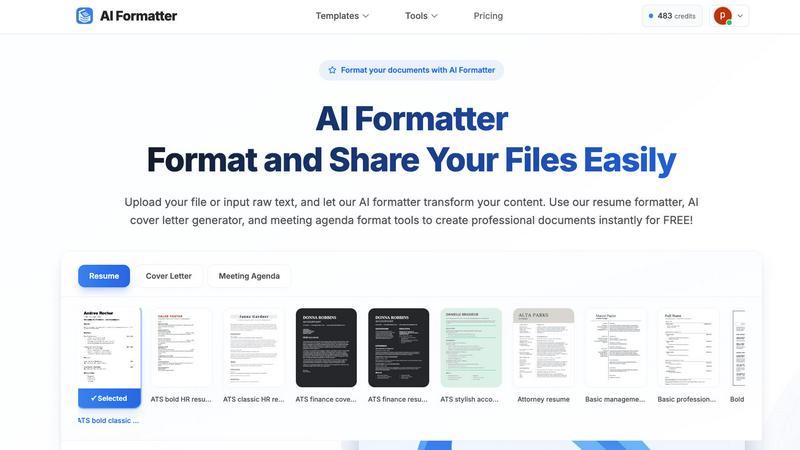
About AI Formatter
AI Formatter, developed by Sun Sky LLC, is an innovative AI-driven document formatting platform tailored for individuals and businesses seeking to create professional documents with ease. This cloud-based SaaS solution significantly reduces the time and effort required to format unstructured text or uploaded files, including popular formats like Word, PDF, and TXT. The platform allows users to convert their content into polished, ATS-optimized documents in seconds, boasting an impressive ATS pass rate of over 95%. This feature is particularly beneficial for job seekers and professionals aiming to enhance their chances of securing interviews. With a library of over 100 templates designed for various professional documents such as resumes, cover letters, meeting agendas, and invoices, users can ensure their documents are visually appealing and tailored to their specific industry needs. The real-time online editor offers full customization options, enabling users to adjust fonts, colors, and layouts effortlessly. Furthermore, multi-format exports and secure sharing options make AI Formatter an indispensable tool for job seekers, professionals, businesses, and academics alike. Starting with 10 free credits, users can explore the platform's extensive capabilities, with subscription plans ranging from Free to Enterprise tier at $199.99 per month for unlimited formatting.
Features of AI Formatter
Extensive Template Library
AI Formatter provides users with access to a vast library of over 162 professional templates. These templates are optimized for ATS compliance, ensuring that resumes, cover letters, and other documents pass automated screening systems effectively.
Real-Time Document Editing
With the built-in real-time editor, users can easily customize their formatted documents. This feature allows for immediate adjustments in fonts, colors, and layouts, ensuring that each document meets personal branding and professional standards.
Multi-Format Export Options
AI Formatter supports various export formats, including PDF, Word, and TXT. This flexibility allows users to download their documents in the format that best suits their needs, facilitating easy sharing and submission.
AI-Powered Formatting
The AI-driven formatting technology processes uploaded content and transforms it into a well-structured document within seconds. This automation saves users significant time while ensuring high-quality presentation and professional standards.
Use Cases of AI Formatter
Job Seekers
Job seekers can utilize AI Formatter to create polished resumes and cover letters that align with industry standards. The ATS optimization feature ensures that their documents stand out during the application process.
Professionals
Professionals can benefit from AI Formatter by generating well-structured meeting agendas and reports, enhancing their communication and presentation skills in corporate environments.
Businesses
Businesses can create professional invoices and receipts using AI Formatter, streamlining their billing processes and improving client interactions with visually appealing documents.
Academics
Students and educators can use AI Formatter to format research papers, presentations, and other academic documents, ensuring that their work meets institutional standards and is presented professionally.
Frequently Asked Questions
What file formats does AI Formatter support?
AI Formatter supports various file formats, including PDF, DOC, DOCX, and TXT, allowing users to upload their documents or input raw text for formatting.
Can I customize my formatted documents?
Yes, AI Formatter features a real-time editor that allows users to customize their documents. You can adjust fonts, colors, layouts, and other design elements to match your preferences.
Is there a free version of AI Formatter available?
Yes, AI Formatter offers a free tier which starts with 10 free credits. Users can explore the platform's capabilities before choosing a subscription plan that fits their needs.
How does AI Formatter ensure ATS compatibility?
AI Formatter uses a library of ATS-optimized templates and AI-driven formatting technology to create documents that meet the requirements of automated screening systems, enhancing the chances of getting noticed by recruiters.
Similar to AI Formatter

Build Mode is a Mac app that turns focused sessions into visible progress, so you can see the work adding up before the results arrive.

Capture any workflow in your browser and export a branded, step-by-step SOP with screenshots. €5 per document, no subscription.

PerPageFax lets you send a fax online from any browser for a flat $0.50 per page — no account, no subscription, no fax machine.

Track staff & time. Free trial. Cloud/on-prem.

Free construction calculators with transparent formulas, steps, assumptions, and metric or imperial units.

AI finds your lost links. Summarizes & tags URLs.

Follow news, blogs, newsletters, and podcasts in a free RSS reader, with AI summaries, top stories, full-text search, saved searches, and a catalog.

InstaBio is a free Instagram bio generator offering stylish Unicode fonts, attitude lines, and Hindi devotional bios (Radhe Krishna, Mahadev).