
TaleHug AI Story Generator for Kids
TaleHug turns a child's voice, drawing, or idea into a short illustrated AI storybook for safe co-reading.
Visit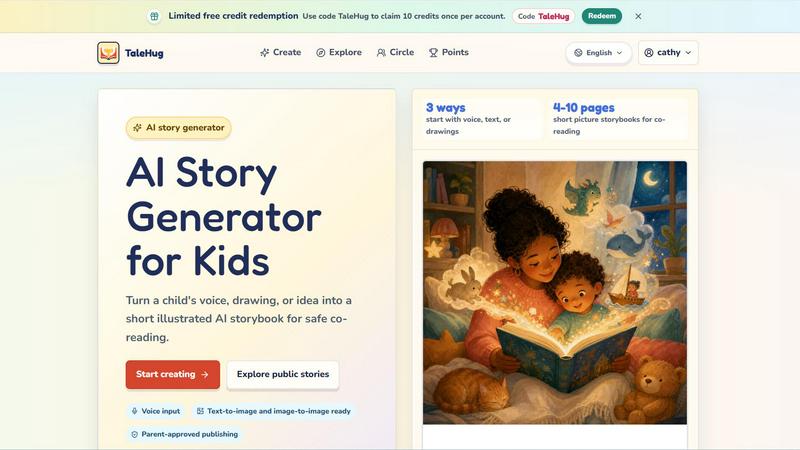
About TaleHug AI Story Generator for Kids
TaleHug is an innovative, AI-powered storytelling platform specifically designed for children, enabling them to craft their own illustrated storybooks using a blend of AI assistance, their own drawings, and boundless imagination. The platform transforms a child's simple idea, spoken words, or hand-drawn picture into a fully realized, short illustrated storybook suitable for safe co-reading with parents or guardians. Targeted primarily at preschool and kindergarten-aged children (ages 3-6), TaleHug emphasizes a kid-friendly, colorful, and intuitive interface that makes the entire story creation process engaging and approachable for young writers and readers. The core value proposition lies in its ability to foster creativity, literacy, and parent-child bonding through a safe, private-by-default environment. Children can start with voice input, text, or even upload their own drawings, which the AI then uses to generate a multi-page picture storybook. The platform includes robust safety features such as private drafts by default, parent approval before any public sharing, no public comments, and the use of safe display names. TaleHug also offers a public gallery of approved examples for inspiration, along with pre-made story prompts and scenes like "Moon rabbit bedtime" or "Garden courage" to help children get started. With limited free credits available and a focus on parent-guided sharing, TaleHug provides a structured yet creative digital space for young minds to explore storytelling.
Features of TaleHug AI Story Generator for Kids
Three Ways to Start: Voice, Text, or Drawings
Children are not limited to typing. They can speak their story idea directly into the platform, which uses voice input to capture their narrative. Alternatively, they can type a simple text prompt or upload a hand-drawn picture. The AI then processes this input to generate the story, making it accessible for pre-literate children who can speak but not yet write, and highly engaging for those who love to draw.
AI-Generated Picture Storybooks
TaleHug transforms a child's initial idea into a complete, illustrated storybook that is typically 4 to 10 pages long. Each page features a strong, colorful AI-generated image accompanied by one short, simple sentence. The platform is "text-to-image and image-to-image ready," meaning it can create illustrations from text or modify an uploaded drawing. This feature ensures that every story is visually rich and easy for young children to follow during co-reading sessions.
Parent-Approved Publishing with Privacy Controls
Safety is a core design principle. All story drafts are private by default. Before a story can be shared to a "Circle" (a private group) or made public, it requires explicit adult review and approval. The platform uses safe display names instead of real child names and collects no school names, addresses, or contact details. There are no public comments in the MVP, and the public gallery only features pre-approved examples, ensuring a secure environment.
Curated Story Prompts and Example Scenes
To help children overcome writer's block, TaleHug offers a library of pre-made, parent-approved story prompts and picture worlds. Examples include "Moon rabbit bedtime," "Sharing the red truck," "First school morning," and "Feelings under the sea." These prompts serve as a first draft or a starting point, guiding children toward specific themes like friendship, bravery, or emotions, while still allowing them to personalize the story.
Use Cases of TaleHug AI Story Generator for Kids
Bedtime Story Creation
Parents can use TaleHug to create personalized bedtime stories for their children. By simply speaking a prompt like "a moon rabbit who is sleepy," the AI generates a short, calming storybook with soothing illustrations. This turns the nightly routine into an interactive and creative experience, where the child can be the star of their own story, making bedtime more engaging and less of a struggle.
Classroom Literacy and Creativity Activities
Kindergarten and preschool teachers can integrate TaleHug into their lesson plans to encourage early literacy and creative expression. Children can work individually or in small groups to create stories about their day, a field trip, or a specific lesson topic. The voice input feature is particularly useful for students who are still developing their writing skills, allowing them to focus on narrative construction without the barrier of handwriting.
Therapeutic Storytelling for Emotional Development
TaleHug can be a valuable tool for helping children process emotions or navigate new experiences. Parents or therapists can use pre-made prompts like "Feelings under the sea" or "First school morning" to generate stories that address anxiety, sharing, or asking for help. The child can then see their own feelings reflected in a safe, illustrated narrative, which opens up conversations and promotes emotional intelligence.
Collaborative Family Storytelling
Families can use TaleHug as a bonding activity where multiple children or a parent and child collaborate on a single story. One child might draw a picture, another might suggest a character, and a parent can help refine the spoken idea. The AI then combines all inputs into a cohesive storybook. This collaborative process strengthens family connections, encourages teamwork, and creates a unique keepsake that the family can read together again and again.
Frequently Asked Questions
What age group is TaleHug designed for?
TaleHug is primarily designed for preschool and kindergarten-aged children, typically between the ages of 3 and 6. However, older children who enjoy creating illustrated stories may also find the platform engaging and useful. The interface and features, such as voice input and simple text, are built to be accessible for pre-literate and early-reader children.
How does the story generation process work?
A child starts by choosing one of three inputs: they can speak their idea, type a short text prompt, or upload a drawing. The AI processes this input to generate a complete storybook that is 4 to 10 pages long. Each page includes a colorful AI-generated illustration and a single, simple sentence. The child can then review the story, and an adult must approve it before it can be shared publicly or with a circle.
Is my child's data safe and private on TaleHug?
Yes, privacy and safety are fundamental to TaleHug. All story drafts are private by default. The platform uses safe display names instead of real child names and does not collect school names, addresses, or any child contact details. Parental approval is required before any story is published to a circle or the public gallery. Additionally, there are no public comments in the current version to prevent unwanted interaction.
How can I get started with TaleHug and are there any free credits?
You can get started by visiting the TaleHug website and logging in or creating an account. The platform offers limited free credits for new users to try the service. You can use the code "TaleHug" to claim 10 credits once per account. These credits can be used to generate storybooks and explore the core features of the platform before considering any paid options.
Pricing of TaleHug AI Story Generator for Kids
Based on the provided content, the only pricing information available is that there are "limited free credits" and a promotion code "TaleHug" that can be redeemed for 10 credits once per account. No specific paid plans, tiers, or ongoing subscription costs are mentioned in the provided context. Therefore, a detailed pricing section cannot be created.
Similar to TaleHug AI Story Generator for Kids

Master networking with interactive, hands-on practice directly in your browser. Solve real terminal challenges, debug routes, and build core IT skills

Free ad creative hub: 1,750+ prompts behind viral AI ads, 118 hook frameworks, teardowns, swipe files and 27 free AI ad tools. Copy, remix, ship.

AI growth tool for X and LinkedIn: write posts in your voice, schedule at your best times, find leads on X and see what works.

Turn a photo of your pet into new pictures or short animations with AI. Sign in for a free 1K image daily.

An interactive coding platform featuring bite-sized Python exercises designed to build real coding skills through hands-on practice.

PracticeSIEM.com is an interactive, browser-based hands-on cybersecurity learning platform designed for Security Operations Center (SOC) analysts.

SQLCrab (sqlcrab.com) is an interactive, browser-based SQL learning platform that lets you practice database queries directly in your browser.
