
SubtitlesFast
SubtitlesFast enables creators to quickly add stylish, auto-generated subtitles to videos, enhancing audience.
VisitPublished on:
August 30, 2025
Pricing:
About SubtitlesFast
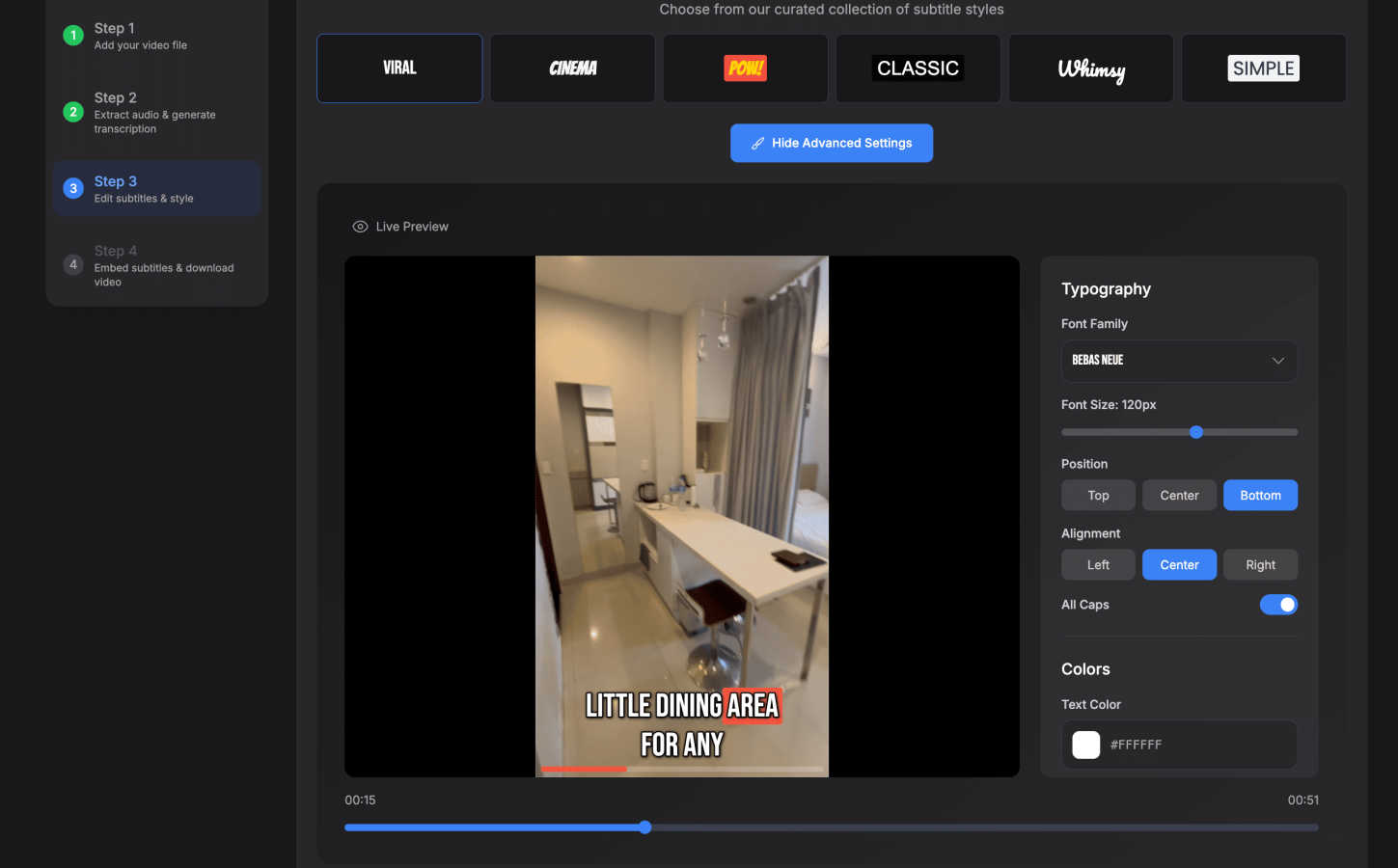
SubtitlesFast is an innovative online tool specifically designed to simplify the process of adding subtitles to videos, making it an invaluable asset for content creators, marketers, and anyone keen on boosting video engagement. By enabling users to upload their video files, SubtitlesFast automatically generates precise and easily readable subtitles in over 50 languages, thus broadening the reach of any video content. Tailored for individuals who frequently post videos, it eliminates the tedious tasks associated with traditional editing by offering a straightforward, user-friendly interface that operates entirely within your web browser. With features such as customizable styling options, quick one-click exports, and no software installation required, SubtitlesFast presents a fast and efficient method of producing polished video content. Whether you are a vlogger, educator, or a business professional, SubtitlesFast empowers you to create high-quality videos in mere minutes, ensuring your message remains clear, engaging, and accessible to a diverse audience.
Features of SubtitlesFast
Auto-Transcription
SubtitlesFast offers automatic transcription capabilities in over 50 languages, allowing users to generate subtitles effortlessly. This feature saves time and enhances productivity, eliminating the need for manual transcription and ensuring accuracy in the subtitles.
Customizable Styling Options
Users can customize their subtitles with a variety of styles, including over 30 animated options. This feature allows creators to match their subtitles with the aesthetic of their videos, ensuring a cohesive and professional look that enhances viewer engagement.
One-Click Export
With the one-click export feature, users can easily download their videos with subtitles burned in, making the publishing process seamless. This functionality is designed for efficiency, enabling quick uploads to platforms like YouTube, TikTok, and Instagram without the hassle of additional steps.
Simple Editor
SubtitlesFast provides a straightforward editing interface that allows users to add text, images, and music to their videos. This simplicity ensures that even those with little to no editing experience can produce high-quality content without a steep learning curve.
Use Cases of SubtitlesFast
Daily Video Creators
For vloggers and daily content creators, SubtitlesFast streamlines the process of adding subtitles to videos. With the ability to quickly upload and generate subtitles, creators can focus on producing content rather than getting bogged down in editing tasks.
Educators and Trainers
Educators can leverage SubtitlesFast to enhance their instructional videos. By providing subtitles, they ensure that their lessons are accessible to all students, including those who may benefit from reading along or require language support.
Marketers and Advertisers
Marketing professionals can use SubtitlesFast to create engaging promotional videos that reach a broader audience. By adding subtitles, they can capture the attention of viewers who may be watching without sound, thereby increasing engagement and message retention.
Social Media Influencers
Influencers on platforms like TikTok and Instagram can benefit from using SubtitlesFast to quickly add stylish subtitles to their clips. This feature helps them maintain high-quality video standards, making their content more appealing and shareable.
Frequently Asked Questions
How does SubtitlesFast generate subtitles?
SubtitlesFast utilizes advanced AI technology to automatically transcribe speech from uploaded videos into accurate subtitles. This process ensures that the subtitles are not only precise but also generated in a matter of minutes.
Can I customize the appearance of my subtitles?
Yes, SubtitlesFast offers a variety of customizable styling options for your subtitles. Users can choose from over 30 animated styles to ensure their subtitles match the branding and aesthetic of their videos.
Is there a limit to the video file size I can upload?
SubtitlesFast is designed to handle various video sizes, but specific file size limits may apply. It is recommended to check the platform's guidelines for any restrictions on video uploads.
Do I need to install any software to use SubtitlesFast?
No, SubtitlesFast is a web-based application, meaning you can access it directly through your browser without the need for software installation. This feature allows for ease of use and accessibility from any device.
Similar to SubtitlesFast

Build Mode is a Mac app that turns focused sessions into visible progress, so you can see the work adding up before the results arrive.

Motiofy is an AI creative workspace that helps creators and teams turn ideas into polished visual stories.

A directory of launch platforms: who each accepts, what disqualifies you, and how to submit. Free to read, and your agent can do the submitting.

Pixo is an AI video director that turns a prompt or script into a storyboard, consistent scenes, voiceover, and an edited final cut.

ProfileLoom turns one photo into platform-ready AI portraits for professional, social, and creator profiles, with presets and built-in editing.

Capture any workflow in your browser and export a branded, step-by-step SOP with screenshots. €5 per document, no subscription.


Free AI Image is a free text-to-image AI generator for creating clean visual drafts from prompts with no sign-up required.