
retroshelf
Retroshelf automatically logs your retro handheld gaming sessions and helps you discover trends and connect with other players.
Visit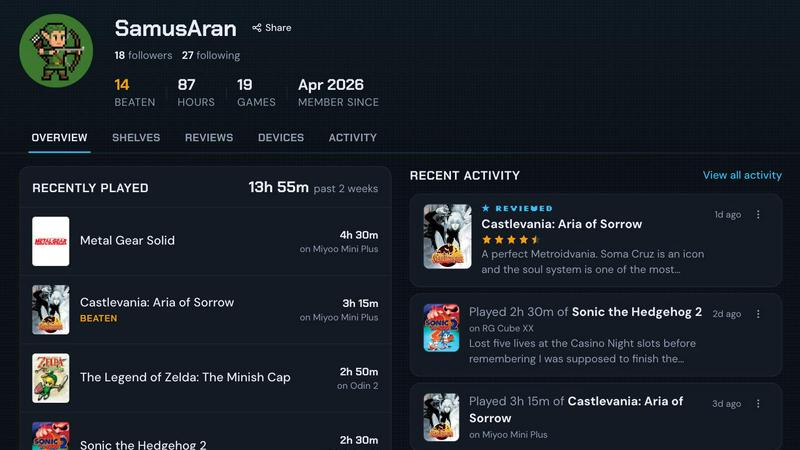
About retroshelf
retroshelf is an innovative play-tracking and discovery application designed specifically for the retro handheld gaming community. It transforms the way enthusiasts log, review, and share their gaming experiences across multiple handheld devices. Instead of relying on scattered notes, spreadsheets, or memory, retroshelf provides a centralized, automated solution that captures every gaming session with precision. The core value proposition lies in its tiny plugin that runs directly on supported handheld devices, automatically logging essential details such as the game title, playtime, and the specific handheld used. This creates a browsable, public shelf that showcases what a user is currently playing, has finished, is reviewing, or is replaying, all while maintaining device context. retroshelf is for anyone who owns retro handhelds from brands like Miyoo, Anbernic, and Odin, and who wants to build a comprehensive history of their gaming journey. It also fosters community connection by allowing users to see what others are picking up, finishing, and replaying, making it a social hub for retro gaming enthusiasts. The platform turns scattered sessions across different handhelds into a coherent timeline that users can browse later, complete with notes and ratings that reflect the specific device used. Whether you are a casual player or a dedicated collector, retroshelf ensures that every game you play is worth remembering.
Features of retroshelf
Automated Session Logging
A tiny plugin runs directly on your handheld device and captures every gaming session automatically. It logs the game title, the minutes played, and the specific handheld used, without any manual input. This eliminates the need for spreadsheets or memory, ensuring your play history is always accurate and up to date. Your shelf updates while you are still on the cushion, providing real-time tracking that is seamless and effortless.
Public Shelf with Device Context
Your retroshelf is a public display of your gaming activity, showing what you are currently playing, have finished, are reviewing, or are replaying. Crucially, each entry retains the device context, meaning viewers can see which handheld was used for each session. This adds a layer of detail that is invaluable for understanding how different devices influence the gaming experience, and it allows you to present a more complete picture of your collection and habits.
Browsable Timeline and History
retroshelf turns scattered sessions across multiple handhelds into a coherent, browsable timeline. You can look back on your year of play, see what you played, where you played it, and what you finished. This feature allows for reflection on your gaming journey, helping you identify trends, revisit favorite titles, and appreciate the breadth of your retro gaming library. The timeline is enriched with notes you leave along the way.
Community Discovery and Filtering
The platform enables you to discover new games by browsing the real shelves of other players. You can see which games are catching on with handheld players, what they are picking up, finishing, and replaying right now. Filtering by device is also supported, allowing you to see shelves specifically for Miyoo, Anbernic, Odin, and other gear. This turns the community into a curated discovery engine, helping you find your next favorite game.
Use Cases of retroshelf
Building a Comprehensive Gaming Diary
A dedicated retro handheld collector uses retroshelf to automatically log every session across their collection of devices. They no longer need to maintain a separate spreadsheet or rely on memory to remember what they played last week. The timeline provides a complete, browsable history of their gaming year, including notes and device context, allowing them to reflect on their journey and share it with fellow enthusiasts.
Discovering New Games through Community Shelves
A player looking for their next retro game can browse the public shelves of the retroshelf community. They can see what games are popular this week, which titles other players are finishing and replaying, and filter results by specific handheld devices. This social discovery method provides authentic recommendations based on real playtime and device context, far more useful than generic lists.
Sharing and Comparing Gaming Habits
Friends in the retro gaming hobby can follow each other's shelves to see what they are currently playing and on which device. They can compare playtimes, discuss reviews that include device context, and even challenge each other to finish certain titles. This turns a personal tracking tool into a social experience that deepens connections within the community.
Organizing Reviews with Hardware Context
A retro gaming reviewer uses retroshelf to leave star ratings for games they finish, but with a crucial difference: each rating is tied to the specific handheld used. This provides context that a simple number cannot convey, such as how a game performs on a Miyoo versus an Odin. The community can then see how people play and make more informed decisions about their own hardware and game choices.
Frequently Asked Questions
How does the automatic session logging work?
A tiny plugin is installed on your supported handheld device (currently muOS and OnionOS). You drop the plugin onto your SD card, link your device to your retroshelf account, and the plugin automatically captures each gaming session. It logs the game title, the minutes played, and the specific handheld used, updating your shelf in real time without any manual effort from you.
Which handheld devices are currently supported?
retroshelf currently supports devices running muOS and OnionOS. This covers a wide range of popular retro handhelds from brands like Miyoo and Anbernic. The team is actively working on expanding support to more operating systems and devices in the future, so the list of supported hardware is expected to grow as the platform evolves.
Is my shelf public, and can I control what others see?
Yes, your shelf is public by default, which is a core feature of the community discovery aspect of retroshelf. It allows other players to see what you are playing, finishing, and replaying. While the current design emphasizes public sharing, the platform may introduce privacy controls in future updates to give users more granular control over their displayed information.
How can I join the retroshelf closed beta?
retroshelf is currently in a closed beta phase. You can join the waitlist by visiting the retroshelf website and clicking the "Join beta" button. The team is opening access in small waves, prioritizing retro handheld players who want to help shape the community from the beginning. If you are already in, you can sign in directly from the website.
Explore more in this category:
Similar to retroshelf

Wery is an AI-powered virtual creative studio for entertainment content.

Snapkin is a calorie tracker you use by photographing your plate.

A free, no-signup spinner for names, numbers, colors, and yes/no decisions. Add entries, spin, and let chance decide instantly.

Adopt a virtual baby who grows, learns, and remembers you.

sorry100times.org is modern text repeater tool.


Anonymous Instagram viewer. Browse profiles, stories, and posts without an account or leaving a trace.

GeoRank combines live data layers and AI to help you compare places worldwide on sunshine, cost, taxes, and visas for relocation decisions.