
ProcessSpy
ProcessSpy is an advanced process monitor for Mac that offers real-time insights and detailed analysis of system processes.
Visit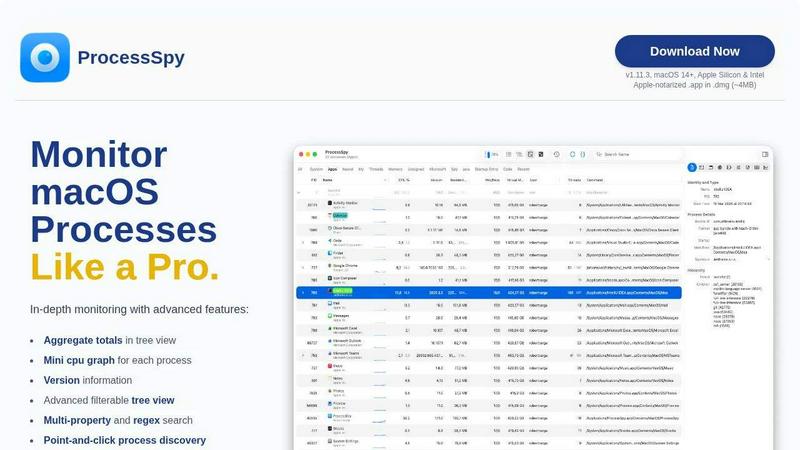
About ProcessSpy
ProcessSpy is a powerful process monitoring tool specifically designed for macOS, providing users with an advanced alternative to the standard Activity Monitor. It allows users to gain deeper insights into running processes, including detailed command-line information, version details, and environment variables, which are often obscured in traditional monitoring tools. Ideal for developers, system administrators, and power users, ProcessSpy enhances the ability to manage and troubleshoot applications effectively. With features such as a refined tree view and advanced filtering options, users can visualize process hierarchies, inspect open files, and quickly identify resource-heavy applications. By leveraging native macOS APIs, ProcessSpy ensures optimal performance and tight integration with the operating system, making it a vital tool for anyone looking to monitor and manage their Mac environment more efficiently.
Features of ProcessSpy
Advanced Tree View
The advanced tree view in ProcessSpy allows users to visualize process hierarchies in real time, complete with filtering and search capabilities. Users can easily see aggregate totals for CPU usage, memory consumption, and the number of threads, making it straightforward to identify resource-intensive applications.
JavaScript Filters
ProcessSpy introduces the ability to create complex filters using JavaScript, allowing users to define multiple conditions for their searches. This feature enables users to tailor their monitoring experience, ensuring that they can focus on exactly what they need, without unnecessary clutter.
Version Information
One of the standout features of ProcessSpy is its capability to display version information for each process directly in the main table. This feature is particularly useful for developers who need to distinguish between different versions of the same application, enhancing clarity and efficiency.
Process History Recording
With the paid version of ProcessSpy, users can record historical values for CPU and memory usage, as well as the status of applications over time. This history can be exported to CSV format for further analysis, allowing for better tracking of application performance and resource usage.
Use Cases of ProcessSpy
Enhanced Application Monitoring
Developers can utilize ProcessSpy to monitor multiple Java applications running on different JDK versions. By providing detailed command-line info and version details, it ensures that developers can distinguish between processes that would otherwise appear identical in standard tools.
Resource Management
System administrators can leverage ProcessSpy to manage server resources more effectively. By visualizing process trees and identifying applications consuming excessive CPU or memory, administrators can take appropriate action to optimize system performance.
Troubleshooting Software Issues
For tech support teams, ProcessSpy serves as an invaluable tool for diagnosing software issues. The ability to view environment variables, entitlements, and Info.plist details helps identify misconfigurations or compatibility problems rapidly.
Historical Performance Analysis
With the historical recording feature, users can analyze trends over time, such as CPU and memory usage spikes. This capability is crucial for identifying performance bottlenecks and planning system upgrades or optimizations based on actual usage data.
Frequently Asked Questions
Is ProcessSpy safe to install on my Mac?
Yes. ProcessSpy is Apple-notarized and provided as a signed .app within a .dmg file. It is verified for security and is safe to use on both Intel and Apple Silicon Macs.
Does ProcessSpy support older versions of macOS?
No, ProcessSpy is designed specifically for macOS 14 and newer versions. Users running older versions will not be able to install or use this tool.
What is the license model for ProcessSpy?
The licensing model for ProcessSpy allows for one user to install it on unlimited devices. The license includes lifetime updates and access to new features, ensuring users always have the latest tools at their disposal.
What additional features are available in the paid version of ProcessSpy?
The paid version of ProcessSpy unlocks several advanced features, including advanced process information, viewing environment variables, historical data recording, and the ability to remember finished processes for later review.
Similar to ProcessSpy

Search 20,000+ open-source and SaaS tools by the job you need done or the app you want to replace.

A comprehensive suite of browser-side financial planners, health trackers, and developer utilities running completely on your terms.

No-code 2D game editor: visual node logic, drag-and-drop scenes, live preview. Exports to Windows, macOS, Linux, Android, iOS, Web.

Moderation, routing, intent and scoring for any text over one Jev-compatible API, hosted in the EU.

A free directory of 950+ projects built on Laya, the open-source decision model. Updated daily.

A free browser-based toolkit for creating, cutting, converting, and previewing sprite sheet animations.

The #1 Native Form Builder Plugin for Framer - No Code, No Embeds, No External Platforms.

Generate and edit production-ready images with GPT Image 2 API using detailed prompts, reference images, clear text rendering, and developer-friendly