
Picture Enhancer
Picture Enhancer deblurs, upscales, and restores photos in your browser with three AI intensity levels, offering three free guest tries.
Visit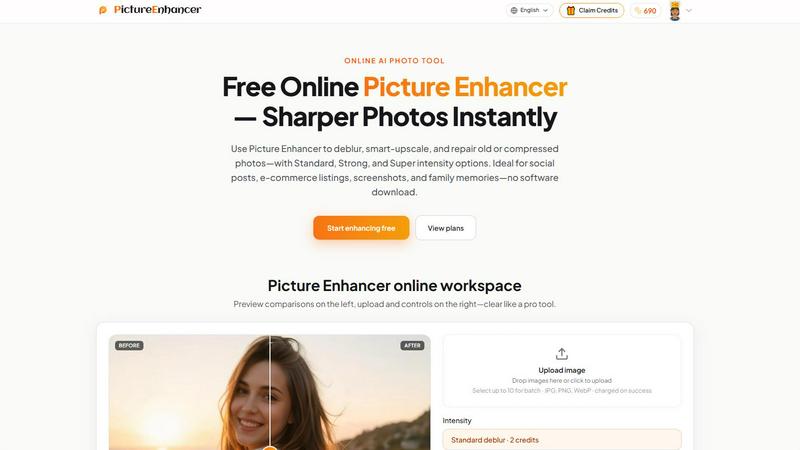
About Picture Enhancer
Picture Enhancer is a free online AI photo enhancement tool designed for creators, sellers, and everyday users who need sharper, clearer images quickly and without complicated software. The product addresses common image quality problems such as blur from camera shake, low resolution from small file sizes, and damage from aging or compression artifacts. Users simply upload a JPG, PNG, or WebP photo, choose one of three core modes—Deblur, Upscale, or Restore—and select an intensity level from Standard, Strong, or Super. The AI processes the image and presents a before-and-after comparison with a draggable slider, allowing users to inspect quality improvements before downloading a watermark-free result. Picture Enhancer operates entirely in the browser with no software download required, making it accessible from any device. The platform offers a generous free tier where guests receive three lifetime tries per IP address without any signup. For users who sign in, credits are used for each successful enhancement, with new accounts receiving starter credits. Credit costs are tiered: Standard uses 2 credits, Strong uses 4 credits, and Super uses 6 credits. Importantly, credits are only charged when the enhancement succeeds, ensuring users never pay for failed attempts. Paid subscribers unlock Super intensity tiers and batch processing capabilities of up to 10 images at once. Monthly subscription plans grant credits each billing cycle, while permanent credit packs never expire, offering flexibility for different usage patterns. The tool is ideal for social media posts, e-commerce product listings, screenshots, and preserving family photo memories. With private processing, results in seconds, and a clean, professional workspace, Picture Enhancer delivers professional-grade photo enhancement without the learning curve or cost of traditional editing software.
Features of Picture Enhancer
AI Deblur Mode
The AI Deblur mode intelligently rebuilds edges and texture details that have been lost due to camera shake, soft focus, or mild motion blur. This feature goes beyond simple sharpening by analyzing the specific type of blur present in the image and reconstructing the original clarity. Users can choose from Standard, Strong, or Super deblur intensity levels to match the severity of the blur. Faces become recognizable again, text becomes readable, and overall image sharpness is dramatically improved. This mode is particularly effective for photos taken in low light or with unsteady hands, where traditional sharpening tools often introduce artifacts or noise. The AI understands the difference between intentional softness and unwanted blur, preserving natural skin textures and gradients while eliminating fuzziness.
Smart Upscale Mode
Smart Upscale mode enables users to enlarge images by 2x or 4x while adding genuine detail rather than simply stretching pixels. This feature uses advanced AI upscaling algorithms that analyze the content of the image and predict what additional detail should exist at higher resolutions. When starting from a small file, such as a thumbnail or low-resolution download, the upscaler reconstructs fine details like hair strands, fabric textures, and product edges. The result is a larger image that maintains sharpness and clarity, suitable for social media cover photos, e-commerce hero shots, or print previews. Unlike traditional interpolation methods that produce blurry or blocky enlargements, Smart Upscale creates natural-looking results that can withstand close inspection. Users can apply Standard, Strong, or Super intensity to balance between speed and detail reconstruction.
Old Photo and Damage Restore Mode
The Restore mode is specifically designed to repair aged, damaged, or heavily compressed photographs. It intelligently reduces scratches, dust spots, fading, and compression artifacts that accumulate over time or through repeated digital saving. Strong and Super restore intensity levels are optimized to handle heavier damage commonly found on scanned family prints or old digital files. The AI distinguishes between intentional image content and damage, preserving original details while removing unwanted visual noise. This mode can significantly improve the appearance of vintage photographs, making them suitable for sharing on social media, printing for albums, or archiving. The restoration process is automatic and requires no manual selection of damaged areas, making it accessible to users with no photo editing experience.
Intensity Tiers and Batch Processing
Picture Enhancer offers three distinct intensity levels—Standard, Strong, and Super—for each enhancement mode, allowing users to fine-tune the processing power applied to their images. Standard intensity handles mild improvements efficiently, Strong tackles moderate issues, and Super delivers maximum correction for challenging images. Super tiers are available exclusively to paid users, along with batch processing capabilities. Batch processing allows subscribers and permanent pack buyers to enhance up to 10 images simultaneously, dramatically improving workflow efficiency for users who need to process multiple photos. The credit system charges only on successful results, meaning users never waste credits on failed enhancements. This tiered approach ensures that casual users have access to effective enhancement, while power users can access the most powerful tools for demanding projects.
Use Cases of Picture Enhancer
Portraits and Everyday Photos
Picture Enhancer is ideal for improving portraits and everyday photos captured with smartphones or basic cameras. Mild blur from movement, soft focus, or low light conditions can make faces appear indistinct and clothing textures look muddy. By applying the Deblur mode with appropriate intensity, users can restore clarity to facial features, making eyes sharper and skin textures more natural. This is particularly valuable for social media profiles, personal blogs, or portfolio websites where first impressions matter. The tool also handles group photos where some subjects may be slightly out of focus, ensuring everyone looks their best. The before-and-after comparison slider gives users confidence that the enhancement has improved rather than degraded the image, preserving the natural look while eliminating unwanted softness.
E-commerce and Product Shots
Online sellers and e-commerce professionals benefit significantly from Picture Enhancer's ability to upscale product images and reduce compression noise. Product listings often require high-resolution images that showcase detail, but many sellers work with photos taken on basic equipment or downloaded from suppliers at low resolution. The Smart Upscale mode enlarges product shots while adding genuine detail, making textures, logos, and fine print visible to potential buyers. The Deblur mode can also sharpen images that suffered from camera shake during quick product photography sessions. Cleaner, sharper product images lead to higher conversion rates and fewer returns due to misrepresentation. The batch processing feature is especially valuable here, allowing sellers to enhance multiple product images simultaneously for catalog updates or seasonal promotions.
Screenshots and UI Captures
Technical writers, customer support teams, and content creators frequently use screenshots in tutorials, documentation, and support threads. Screenshots captured at non-native resolutions or compressed by image hosting platforms often suffer from blurry text and fuzzy interface elements. Picture Enhancer's Deblur mode, particularly at Strong or Super intensity, sharpens text edges so that instructions remain readable and buttons are clearly defined. This is critical for software documentation where precision matters, or for social media posts that explain how to use an app. The tool also restores clarity to UI captures that have been resized or recompressed multiple times, ensuring that the visual guide accurately represents the intended interface. The watermark-free download ensures that documentation remains professional and clean.
Old Photo Memories
Preserving family memories is one of the most emotionally resonant use cases for Picture Enhancer. Old scanned photographs, printed snapshots, and digital images from early cameras often suffer from fading, scratches, dust spots, and compression artifacts that obscure the original content. The Restore mode intelligently reduces these imperfections while preserving the character and authenticity of the original image. Strong and Super intensity levels are particularly effective for heavily damaged prints or scans where scratches and fading are prominent. Users can restore images of grandparents, childhood homes, or historical events, making them suitable for sharing in family albums, printing for display, or posting on social media. The automatic restoration process requires no technical skill, allowing anyone to breathe new life into treasured memories.
Frequently Asked Questions
What is Picture Enhancer?
Picture Enhancer is a free online AI-powered photo enhancement tool that improves image quality through three main modes: Deblur, Smart Upscale, and Old Photo Restore. It is designed for creators, sellers, and everyday users who need sharper, clearer images without downloading software. Users upload a JPG, PNG, or WebP photo, select a mode and intensity level, and receive a watermark-free enhanced image that can be downloaded directly. The tool operates entirely in the browser with private processing, meaning uploaded images are only used to complete the enhancement request and are not stored or shared.
Can I try Picture Enhancer without signing in?
Yes, guests can try Picture Enhancer without signing in. Every unique IP address receives three free lifetime tries with no signup required. These guest tries allow users to test any of the three modes at Standard intensity to evaluate the quality of enhancement. After using the three free tries, users must sign in and use credits to continue enhancing images. New accounts receive starter credits upon signup, providing an additional opportunity to use the tool before committing to a paid plan.
How does billing work after sign-in?
After signing in, users enhance images using credits. Credits are charged only when an enhancement succeeds, so users never pay for failed attempts. The cost per enhancement depends on the intensity level selected: Standard uses 2 credits, Strong uses 4 credits, and Super uses 6 credits. New accounts receive starter credits to begin using the tool immediately. Users can purchase permanent credit packs that never expire, or subscribe to monthly plans that grant credits each billing cycle. Paid subscribers also unlock Super intensity tiers and batch processing capabilities for up to 10 images at once.
Which modes does Picture Enhancer support?
Picture Enhancer supports three core enhancement modes: AI Deblur, which rebuilds edges and texture from camera shake and soft focus; Smart Upscale, which enlarges images by 2x or 4x while adding genuine detail; and Old Photo and Damage Restore, which reduces scratches, fade, and compression artifacts. Each mode offers three intensity levels—Standard, Strong, and Super—allowing users to match the processing power to the severity of the image issue. Super intensity is available exclusively to paid users.
Pricing of Picture Enhancer
Picture Enhancer offers a free tier for guests with three lifetime tries per IP address with no signup required. After signup, new accounts receive starter credits to begin enhancing. Credit costs are per successful enhancement: Standard uses 2 credits, Strong uses 4 credits, and Super uses 6 credits. Paid users unlock Super intensity tiers and batch processing for up to 10 images. Monthly subscription plans grant credits each billing cycle, while permanent credit packs never expire and can be used at any time. Credits are only charged on successful enhancements, ensuring users never pay for failed attempts.
Explore more in this category:
Similar to Picture Enhancer

AI color previews and marker color suggestions for coloring pages.

Advanced AI image generation and editing with sharp typography, native 2K output, and localized edits with minimal drift.

ImageGPT is an all-in-one AI creative platform for generating, editing and transforming images and videos using AI.

Create release-ready album covers from a prompt or photo. Generate, refine, and export art for singles, EPs, mixtapes, and playlists.

A free browser-based toolkit for creating, cutting, converting, and previewing sprite sheet animations.

Generate and edit production-ready images with GPT Image 2 API using detailed prompts, reference images, clear text rendering, and developer-friendly

Fast AI image generation for photorealistic visuals, bilingual posters, ecommerce content, and social graphics.

Turn flat images into editable transparent layers with AI.