
PicSpeak
PicSpeak provides instant AI photography critiques on composition, lighting, and color to improve your photos.
VisitPublished on:
April 12, 2026
Pricing:
About PicSpeak
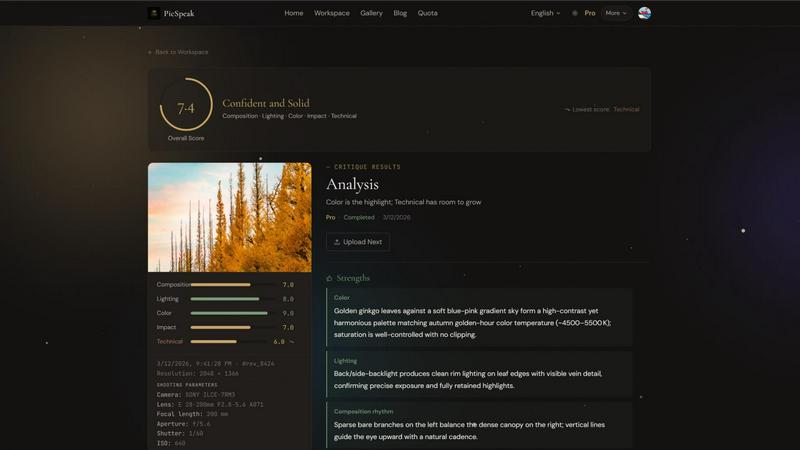
PicSpeak is an AI-powered photography critique platform designed to provide photographers of all skill levels with instant, professional-grade feedback on their images. It transforms the subjective art of photo critique into an objective, data-driven analysis, delivering actionable insights in seconds. The platform is built for hobbyists looking to improve, enthusiasts seeking validation and guidance, and even professionals who want a quick, unbiased second opinion on their work. Its core value proposition lies in democratizing expert-level photographic analysis, making what was once an exclusive service from seasoned professionals accessible to anyone with an internet connection. By uploading a photo, users receive a comprehensive breakdown across five key dimensions: Composition, Lighting, Color, Emotional Impact, and Technical Execution. PicSpeak goes beyond simple scoring, offering specific, contextual suggestions for improvement tailored to different photography genres. With features like a guest mode for instant access, a rich history to track progress, and a community gallery for inspiration, PicSpeak serves as a comprehensive digital mentor for photographers aiming to refine their craft systematically and effectively.
Features of PicSpeak
AI Critique by Category
PicSpeak's core engine provides detailed scoring and tailored suggestions across five critical photography categories: Composition, Lighting, Color, Emotional Impact, and Technical Execution. The analysis is genre-aware, meaning critiques for a portrait differ from those for a landscape. Users can choose between two modes: Flash Critique for a quick, precise scorecard, and Pro Analysis for a deep dive into creative intent with actionable improvement steps, such as specific camera adjustments or compositional changes.
Flexible Access & User Management
The platform offers tiered access to suit different user needs. Guest Mode allows anyone to start using the app instantly without any registration, perfect for trying the service. Registered users can sign in with Google for one-click authorization and enjoy higher usage limits. The system maintains separate daily and monthly usage quotas for guests and registered users, ensuring fair resource allocation and clear boundaries for free and paid plans.
Comprehensive Review History & Management
Every critique is saved for future reference. Users can browse their entire review history with advanced pagination and filtering options, including by time range, score range, and image type. This allows for tracking improvement over time. Key results can be saved to a dedicated Favorites page for easy access. Furthermore, the Re-analysis feature lets users re-run an AI critique on a previous photo or a new version, enabling direct comparison and progress quantification.
Real-Time Processing & Sharing
To enhance user experience, PicSpeak employs Direct Image Upload, sending files straight from the user's browser to secure object storage without routing through the backend, ensuring speed and privacy. During analysis, Real-Time Updates via WebSocket provide live progress on the critique task, eliminating the need for manual refreshing. Once complete, users can generate shareable links to their critique or export the structured review data for personal reuse or presentation.
Use Cases of PicSpeak
Skill Development for Hobbyist Photographers
Aspiring photographers can use PicSpeak as a daily practice tool. By regularly uploading photos and studying the AI-generated critiques on composition and technique, they can identify consistent weaknesses (e.g., poor lighting balance) and track their improvement over time using the review history. The specific suggestions provide a clear learning path, turning abstract concepts into practical steps.
Pre-Submission Review for Photography Enthusiasts
Enthusiasts participating in photo contests or online communities can use the Pro Analysis mode for a final check before submission. The in-depth critique on emotional impact and technical execution can reveal subtle flaws or highlight strengths they may have overlooked, giving them confidence and potentially increasing their chances of success with a polished entry.
Creative Experimentation and Comparison
Photographers experimenting with different settings (e.g., aperture, time of day) or edits on the same scene can use the Re-analysis feature. By uploading multiple versions of a photo, they can receive and compare objective scores and feedback, allowing them to make data-informed decisions about which technique yielded the best artistic and technical results.
Educational Resource and Community Inspiration
Users can supplement their learning by exploring the platform's Blog for professional tutorials and AI analysis insights. Additionally, the curated Community Gallery showcases outstanding works, serving as a source of inspiration. Analyzing the high-scoring images in the gallery helps users understand what elements constitute a great photograph according to the AI's trained criteria.
Frequently Asked Questions
What is the difference between Flash and Pro critique modes?
The Flash Critique mode is designed for speed, providing an instant overall score and a breakdown across the five core categories (Composition, Lighting, etc.) with brief notes. The Pro Analysis mode is more comprehensive, offering a deeper evaluation of creative intent and emotional impact, along with detailed, actionable suggestions for improvement, such as specific compositional adjustments or shooting conditions.
What are the differences between Guest, Free, and Pro accounts?
Guest accounts allow instant use without registration but are limited to 3 critiques per day and 30 per month, with access only to Flash mode and no saved history. Free registered accounts offer 60 critiques per month (up to 5 daily), include both Flash and Pro modes (with Pro limited to 10 per month), and retain 30 days of history. The Pro plan, for a monthly fee, provides unlimited critiques with no daily cap, permanent history retention, and priority queue access for faster processing.
Is my photo data secure?
Yes, PicSpeak prioritizes security and privacy. The platform uses Direct Image Upload, which means your photos are sent directly from your browser to a secure, dedicated object storage service without passing through or being stored on PicSpeak's backend servers. This architecture minimizes data handling and enhances privacy during the upload process.
How long are critique results saved?
The retention period for your critique history depends on your account type. Guest users have no saved history. Free registered users have their critique results and uploaded images saved for 30 days. Pro subscribers enjoy permanent history retention, allowing them to access all their past critiques and track their long-term progress indefinitely.
Similar to PicSpeak

Advanced AI image generation and editing with sharp typography, native 2K output, and localized edits with minimal drift.

Privacy-first, cookieless web analytics that ties your traffic and channels directly to real Stripe revenue.

Signage and kiosk infrastructure for AI agents. Your agent publishes images, video, streams, web pages and apps to screens via one plugin.screenRIG is

A comprehensive suite of browser-side financial planners, health trackers, and developer utilities running completely on your terms.

Free YouTube transcripts on the web, a Chrome extension, and an API + MCP server so AI assistants can read YouTube.

Moderation, routing, intent and scoring for any text over one Jev-compatible API, hosted in the EU.

A free browser-based toolkit for creating, cutting, converting, and previewing sprite sheet animations.

Online tally counter for tracking attendance, workouts, inventory, visitors, sports scores, habits, and everyday counting tasks.