
FilexHost vs Vibrantsnap
Side-by-side comparison to help you choose the right product.

FilexHost
Easily host and share any file with a simple drag and drop, getting a live URL in seconds.
Last updated: February 26, 2026

Vibrantsnap
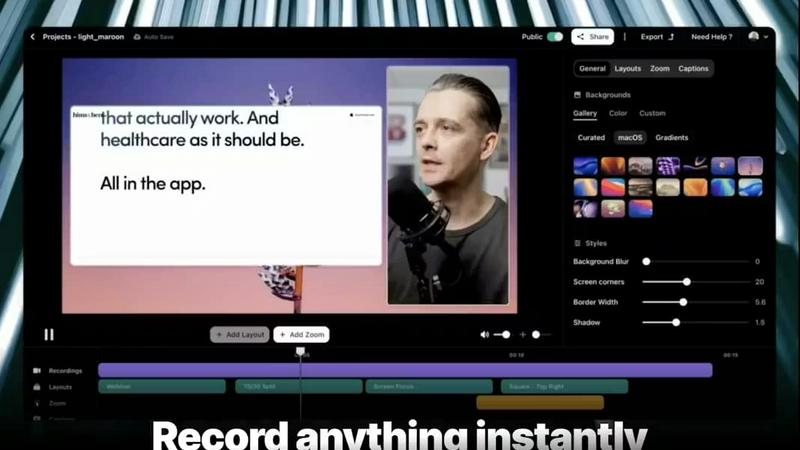
Transform your screen recordings into engaging, polished videos with AI editing, voiceovers, and real-time analytics.
Last updated: February 26, 2026
Visual Comparison
FilexHost

Vibrantsnap
Feature Comparison
FilexHost
Instant Subdomains
FileXHost provides instant subdomains for every uploaded file, allowing users to share links in the format of your-file.filex.host. This feature requires zero setup, making it incredibly convenient for quick sharing.
Free SSL Encryption
Every link generated by FileXHost comes with free SSL encryption, ensuring that all shared files are securely transmitted. This feature protects user data and builds trust with recipients by providing a secure environment for file sharing.
Smart View Modes
FileXHost offers smart view modes that allow users to choose how their files are presented. Options include direct rendering for immediate viewing or a download page depending on the recipient's needs, enhancing flexibility in sharing.
Built-in File Viewers
With built-in viewers for various file types, FileXHost supports formats like PDFs, images, videos, and archives. The platform automatically renders files to provide an optimal viewing experience directly in the browser, eliminating the need for additional software.
Vibrantsnap
Built-in Video Analytics
Vibrantsnap provides insightful video analytics that allow users to track who watched their videos, how many times they were viewed, and where viewers lose interest. This feature requires no setup and helps users identify areas for improvement, making it easier to refine their approach and fuel growth.
Auto-Cut and Auto-Layout
Save valuable time with Vibrantsnap's auto-cut and auto-layout functionality. This feature efficiently trims silences and applies professional layouts in just two clicks, ensuring that users can quickly produce high-quality videos without the need for extensive editing skills.
AI Voiceover
Enhance your videos with Vibrantsnap's AI voiceover feature. This tool uses advanced voice synthesis technology to provide clear, professional narration, making your product demonstrations more engaging and easier to understand for viewers.
Instant Sharing and Embedding
Once your video is ready, sharing it is seamless with Vibrantsnap. Users can quickly share their polished videos across various platforms or embed them directly on their websites, maximizing reach and making it easy to convert viewers into customers.
Use Cases
FilexHost
Professional Reports Sharing
Professionals can utilize FileXHost to share client reports and presentations effortlessly. The ability to generate shareable links instantly allows for quick distribution and feedback, streamlining communication processes.
Developer Landing Pages
Developers can host landing pages or mock APIs using FileXHost without the hassle of server management. The platform's drag-and-drop interface makes it easy to upload HTML files or ZIP archives, allowing for rapid deployment.
Digital Products Distribution
Creators can distribute digital products, such as eBooks or software, through FileXHost. The secure sharing options, including password protection and link expiration, ensure that products are delivered safely and privately.
Educational Content Sharing
Educators can share lecture notes, multimedia resources, and study materials with students. FileXHost's ability to host various file types and render them for easy access makes it a valuable tool in educational settings.
Vibrantsnap
Product Demonstrations
Vibrantsnap is perfect for creating product demonstration videos that showcase the features and benefits of your product in a concise, engaging manner. This helps potential customers quickly understand your offering and drives conversions.
Tutorials and How-To Guides
Use Vibrantsnap to create instructional videos that guide users through complex processes, ensuring they grasp the necessary steps to utilize your product effectively. Engaging tutorials enhance user experience and reduce support queries.
Sales Pitches
Founders can leverage Vibrantsnap for creating compelling sales pitches that highlight product value and unique selling points. With professional videos, they can capture the attention of potential clients and improve conversion rates.
Marketing Campaigns
Vibrantsnap can be utilized for crafting videos as part of marketing campaigns. By embedding calls-to-action and sharing insightful content, users can effectively engage their audience and drive traffic to their landing pages.
Overview
About FilexHost
FileXHost is a powerful and intuitive file hosting platform designed to simplify the process of sharing files of any type. Whether you need to share documents, media files, spreadsheets, or entire websites, FileXHost offers a seamless solution that eliminates traditional barriers to file sharing. With its "Drop & Share" workflow, users can easily drag and drop files to receive instant, secure URLs for sharing without the need for complex server setups or DNS configurations. This service caters to a wide audience, including professionals sharing client reports, developers hosting landing pages, and creators distributing digital products. The main value proposition of FileXHost lies in its user-friendly interface and efficient file rendering capabilities, ensuring that recipients experience the files as intended without unnecessary downloads or plugins.
About Vibrantsnap
Vibrantsnap is an innovative AI-powered video editing tool designed specifically for founders, marketers, and creators who want to enhance their product demonstrations and tutorials. It addresses a common challenge faced by many businesses: converting visitors into customers. Often, potential users struggle to grasp the essence of a product quickly due to long explanations and static visuals. Vibrantsnap simplifies this process by allowing users to create engaging, polished product videos in minutes. By utilizing advanced features like auto-editing, professional voiceovers, and built-in analytics, Vibrantsnap empowers users to tell their product stories effectively, resulting in higher conversion rates. This tool is perfect for solo founders, growing businesses, and anyone looking to showcase their product's value swiftly and effectively.
Frequently Asked Questions
FilexHost FAQ
What is FileXHost?
FileXHost is an online file hosting and sharing service that allows users to upload and share various file types easily. It simplifies the process of file distribution with instant links and smart rendering options.
Is it really free?
Yes, FileXHost offers a free plan that allows users to host up to 1,000 files with a maximum size of 25MB each. This plan is ad-supported and includes a 7-day expiry for hosted files.
What file types are supported?
FileXHost supports a wide range of file types, including documents (PDF, TXT), spreadsheets (XLSX, CSV), images (JPG, PNG), media files (MP4, MP3), and archives (ZIP), ensuring versatility for users.
How do I update my site?
To update your hosted files on FileXHost, simply upload the new version of the file using the drag-and-drop feature. The platform will automatically generate a new link for the updated file, making the process seamless.
Vibrantsnap FAQ
How does Vibrantsnap improve video creation?
Vibrantsnap streamlines the video creation process by automating editing tasks such as cutting silences, applying layouts, and enhancing audio. This allows users to produce polished videos in minutes without needing any video editing experience.
Can I track the performance of my videos?
Yes, Vibrantsnap includes built-in video analytics that allow you to monitor views, clicks, and viewer engagement in real-time. This data can help you understand what works and where improvements are needed.
Is there a free trial available?
Absolutely! Vibrantsnap offers a free trial, allowing users to test the platform and its features before committing to a paid plan. This lets potential users explore how Vibrantsnap can benefit their video marketing efforts.
What types of videos can I create with Vibrantsnap?
With Vibrantsnap, you can create various video types, including product demos, tutorials, sales pitches, and promotional videos for marketing campaigns. The tool is versatile and adapts to various use cases, making it ideal for different creators.
Alternatives
FilexHost Alternatives
FilexHost is an innovative file hosting service that allows users to swiftly upload and share files through a simple drag-and-drop interface. It falls under the category of productivity and management tools, designed to streamline the process of sharing various file types without the need for extensive technical knowledge. Users often seek alternatives to FilexHost due to factors such as pricing, specific feature sets, or platform compatibility. Whether it's the need for larger file sizes, enhanced security options, or additional analytics, understanding one’s requirements is crucial for finding the right fit. When choosing an alternative to FilexHost, it is important to consider key features, user experience, and the overall ease of use. Look for services that offer reliable performance, security measures such as SSL encryption, and flexible storage options to accommodate various needs. Additionally, assess the support for different file types and the availability of analytics or customization features to ensure the platform aligns with your specific use case.
Vibrantsnap Alternatives
Vibrantsnap is a powerful screen recording tool designed to create polished product demos quickly and efficiently. As part of the productivity and management category, it leverages AI technology to streamline the process of video creation, adding voiceovers and captions in minutes. Many users seek alternatives to Vibrantsnap due to various reasons, such as pricing concerns, specific feature needs, or compatibility with different platforms. When choosing an alternative, users should consider factors like ease of use, editing capabilities, video analytics, and whether the tool meets their specific recording and demonstration requirements. Additionally, assessing customer support, integration options, and user reviews can significantly influence the decision-making process.