
Linkfinder AI vs TemplateFox
Side-by-side comparison to help you choose the right product.

Linkfinder AI
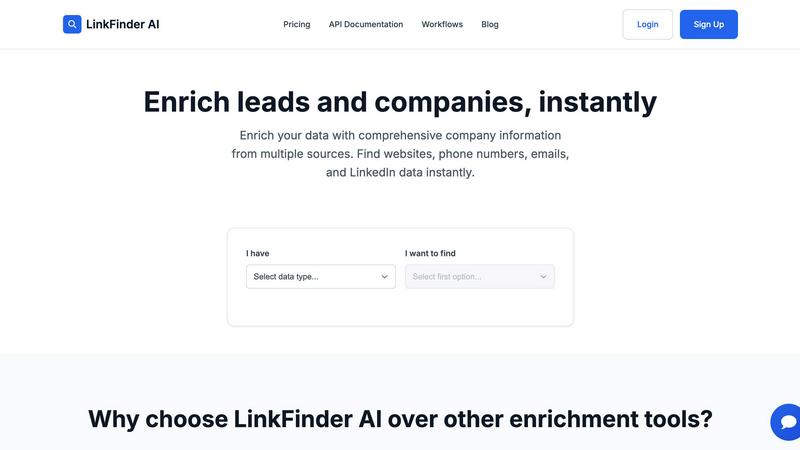
LinkFinder AI instantly enriches your leads with complete company details and contact information.
Last updated: February 27, 2026

TemplateFox
Visually design dynamic PDF templates and generate thousands automatically via API or Zapier.
Last updated: February 28, 2026
Visual Comparison
Linkfinder AI
TemplateFox

Feature Comparison
Linkfinder AI
Multi-Source Data Enrichment
Linkfinder AI does not rely on a single data point. Its robust engine simultaneously cross-references and validates information from a diverse array of sources, including LinkedIn, authoritative company databases, and public records. This multi-pronged approach ensures you receive the most complete and accurate picture possible, filling in critical gaps like company websites, phone numbers, employee counts, and professional email addresses that other tools might miss.
Batch Processing & CSV Upload
Designed for efficiency at scale, this feature allows users to upload thousands of records at once via a simple CSV file. Whether you have a list of company names or LinkedIn profile URLs, Linkfinder AI can process the entire batch in minutes, not hours. This eliminates the tediousness of manual, one-by-one searches and is perfect for sales teams and marketing agencies preparing for large-scale outreach campaigns or data hygiene projects.
Real-Time API Integration
For seamless workflow automation, Linkfinder AI offers a powerful and well-documented API. This allows businesses to integrate instant data enrichment directly into their existing systems, such as CRM platforms, lead capture forms, or marketing automation tools. As new leads come in, the API can automatically enrich their records in real-time, ensuring your team always has the most current information without any manual intervention.
Intuitive User Interface
The platform is built with user experience as a priority, featuring a clean, straightforward interface that requires no training or technical expertise to navigate. Users can easily upload data, select enrichment parameters, and download results through a self-service dashboard. This design philosophy ensures that anyone on the team can leverage powerful data enrichment, accelerating adoption and maximizing productivity from day one.
TemplateFox
Intuitive Drag-and-Drop Editor
TemplateFox features a powerful WYSIWYG (What You See Is What You Get) editor that allows users to design professional PDF templates visually. Without requiring any knowledge of HTML, CSS, or programming, you can drag, drop, and configure elements like text boxes, images, tables, and barcodes. The editor provides a real-time preview of your template, ensuring the final PDF looks exactly as designed. Each component has a dedicated properties panel for fine-tuning details such as borders, colors, sizing, and positioning, giving you complete creative control over the document's layout and aesthetics.
Dynamic Data Binding & Expressions
Go beyond simple text replacement with TemplateFox's advanced dynamic data system. You can inject any data from your application or workflow into the template using placeholder expressions. The platform supports over 100 built-in functions to format dates, calculate totals, round numbers, and manipulate text on the fly. You can also use system variables like {{sys.page_number}} and {{sys.current_date}} automatically. This feature ensures that documents like invoices can dynamically calculate totals and taxes, while certificates can personalize recipient details, all from a single template design.
Smart Tables & Automatic Pagination
Creating data-heavy documents is simplified with intelligent table components. Tables in TemplateFox are designed to grow automatically with your input data. Whether you have 3 line items or 300, the table will expand, adding rows and seamlessly spanning across multiple pages as needed. Headers can be configured to repeat on every new page for clarity. This automation handles complex formatting, ensuring professional presentation for documents like packing slips, reports, and statements without any manual layout adjustments.
Built-in Barcode & QR Code Generation
TemplateFox includes native support for generating scannable barcodes and QR codes directly within your PDFs. This feature supports popular formats like Code128, EAN-13, and QR codes, which are generated on-the-fly based on your dynamic data (e.g., order numbers, tracking IDs, or URLs). This eliminates the need for external image generation or manual insertion, making it effortless to create shipping labels, asset tracking sheets, and promotional materials that are ready for scanning and integration into logistics or inventory systems.
Use Cases
Linkfinder AI
Supercharging Sales Prospecting
Sales teams can use Linkfinder AI to rapidly build targeted prospect lists. By starting with just a company name or LinkedIn URL, reps can instantly enrich records with direct phone numbers, verified email addresses, and company insights. This comprehensive data allows for highly personalized and effective cold outreach, significantly increasing connection and conversion rates while saving countless hours of manual research.
Enhancing Marketing Campaigns
Marketers can leverage the tool to segment and personalize campaigns with precision. Enriching a lead database with firmographic data (like industry, company size, and location) enables the creation of hyper-targeted messaging and content. This leads to improved email deliverability, higher engagement rates, and a better return on marketing investment by ensuring communications are relevant to the recipient's specific context.
Streamlining Recruitment & Talent Sourcing
Recruiters and talent acquisition specialists can utilize Linkfinder AI to source and vet candidates more efficiently. By enriching LinkedIn profile data, they can quickly gather comprehensive professional backgrounds, current company details, and contact information. This accelerates the candidate sourcing process, helps build talent pipelines, and provides richer context for initial outreach and interviews.
Conducting Competitive & Market Intelligence
Business analysts and strategists can employ the platform for thorough market research. By enriching data on a set of competitor companies or a target industry, users can gather key intelligence such as employee growth trends, technological stacks, or key personnel changes. This enriched data supports strategic decision-making, partnership identification, and comprehensive competitive landscape analysis.
TemplateFox
Automated Invoice & Billing Generation
Businesses can fully automate their accounts receivable workflow. By connecting TemplateFox to their CRM or accounting software via Zapier, Make, or a direct API call, they can trigger the generation of a customized, professional invoice PDF whenever a sale is completed or a payment is due. Dynamic data binding pulls in customer details, itemized products, prices, and taxes, while the smart table formats the list neatly. The finished PDF can then be automatically emailed to the client or saved to a cloud storage platform, saving countless hours of manual work.
Mass Certificate & Diploma Creation
Educational institutions, training providers, and event organizers can use TemplateFox to personalize and generate certificates at scale. A single beautifully designed template can be used to produce thousands of unique certificates. By feeding a spreadsheet of recipient names, course titles, and dates into the API, each variable is dynamically populated. Features like built-in functions allow for date formatting, and the system ensures consistent, high-quality output for every participant, making award distribution efficient and professional.
E-commerce Order Fulfillment Documents
E-commerce stores can streamline their shipping process by automating the creation of packing slips and shipping labels. When an order is placed in platforms like Shopify or Airtable, an automation can send the order data to TemplateFox. The template incorporates the customer's shipping address, order details in an auto-expanding table, and a dynamically generated barcode for the tracking number. The resulting PDF can be printed directly in the warehouse, ensuring accuracy and speeding up the packing and dispatch cycle significantly.
Custom Report Generation
Agencies, SaaS companies, and consultants can automate the creation of client reports, statements, or analytics summaries. Data from internal databases or analytics tools can be sent via API to populate pre-designed report templates. Using dynamic expressions, the system can calculate key metrics, format data, and control content flow. Features like automatic headers and footers ensure branding is consistent on every page, while smart tables cleanly present datasets, resulting in polished, client-ready documents generated without manual intervention.
Overview
About Linkfinder AI
Linkfinder AI is a premier data enrichment platform engineered to automate and enhance the process of gathering accurate company and contact information. It serves as a powerful engine for sales teams, marketers, recruiters, and business analysts who need reliable data to fuel their strategies. The core value proposition lies in its ability to transform sparse lead data into comprehensive, actionable profiles within minutes. By intelligently aggregating and validating information from a multitude of sources—including LinkedIn profiles, company databases, and public records—Linkfinder AI ensures users receive data with a 95% accuracy guarantee. This tool is indispensable for supercharging lead generation, personalizing outreach campaigns, conducting in-depth market research, and maintaining clean CRM databases. With a focus on speed, ease of use, and integration, Linkfinder AI empowers organizations of all sizes to replace manual research with automated, scalable, and highly accurate data enrichment workflows.
About TemplateFox
TemplateFox is a comprehensive Software-as-a-Service (SaaS) platform engineered to automate and scale professional PDF document generation. It serves as a critical tool for businesses, developers, and indie hackers who need to produce high-volume, customized documents such as invoices, certificates, reports, and packing slips without manual effort. The core value proposition lies in its powerful yet accessible two-part system: a visual, drag-and-drop WYSIWYG editor for designing templates and a robust API for generating thousands of unique PDFs on demand. This eliminates the traditional need for coding in HTML or CSS, making advanced PDF creation accessible to users of all technical skill levels. With seamless integrations via popular no-code platforms like Zapier and Make, as well as a direct API, TemplateFox fits effortlessly into existing workflows. The service is built for speed and reliability, delivering generated documents in 1-3 seconds via signed URLs or direct downloads. Offering a generous free tier and scalable paid plans, TemplateFox provides an efficient, cost-effective solution for automating complex document workflows, ensuring consistency, professionalism, and significant time savings for its users.
Frequently Asked Questions
Linkfinder AI FAQ
How accurate is the data enrichment?
Linkfinder AI guarantees a 95% accuracy rate for its enriched data. This high level of confidence is achieved through a rigorous multi-source validation process. The platform cross-references information from LinkedIn, various proprietary databases, and public records, ensuring that the data provided is not only comprehensive but also current and reliable for your business operations.
What types of data can I enrich?
You can enrich a wide variety of initial data points. The platform accepts inputs such as Company Name, LinkedIn Company URL, LinkedIn Profile URL, Lead Full Name, and LinkedIn Post URL. From these, it returns comprehensive information including company websites, phone numbers, email addresses, employee counts, industry classifications, and associated LinkedIn profile data.
Do you provide API access?
Yes, Linkfinder AI offers full API access, which is included in its Professional pricing plan. The API is well-documented and designed for easy integration, allowing developers to embed real-time data enrichment capabilities directly into their own applications, websites, CRM systems, or automated workflows for seamless data processing.
Can I process multiple entries at once?
Absolutely. Linkfinder AI is built for scale with its batch processing capability. You can upload a CSV file containing thousands of records for enrichment. The system will process the entire batch simultaneously, delivering a complete, enriched CSV file back to you in a matter of minutes, making it ideal for handling large datasets efficiently.
TemplateFox FAQ
Do I need coding skills to use TemplateFox?
No, you do not need any coding skills to use TemplateFox effectively. The primary method for creating templates is through the visual, drag-and-drop WYSIWYG editor, which requires no knowledge of HTML or CSS. For generating PDFs, you can use the pre-built, no-code integrations with platforms like Zapier, Make, Airtable, and Bubble. Of course, developers also have access to a full-featured REST API for deeper integration if desired, but coding is entirely optional.
How fast is the PDF generation?
TemplateFox is built for speed and performance. The service typically generates and delivers your PDF documents within 1 to 3 seconds. The output is provided via a secure, signed URL that can be used to download the file, or you can receive the PDF as a direct binary response through the API. This rapid generation time makes it suitable for real-time applications, such as generating documents in response to user actions on a website or within an application workflow.
What types of barcodes and QR codes are supported?
TemplateFox has built-in support for generating several standard and widely used barcode and QR code formats. This includes linear barcodes like Code128 and EAN-13, as well as QR codes. These codes are generated dynamically based on the data you provide in your API request or automation, ensuring they are scanner-ready and perfectly integrated into your document layout, such as on shipping labels or asset tracking sheets.
Is there a free plan available?
Yes, TemplateFox offers a generous free tier to get started. The free plan includes 60 PDF generations per month at no cost and does not require a credit card to sign up. This allows you to fully test the template designer, experiment with dynamic data, and integrate with no-code automations before committing to a paid plan. When your needs grow, scalable and affordable paid plans are available with higher volume limits and additional features.
Alternatives
Linkfinder AI Alternatives
Linkfinder AI is a data enrichment tool in the marketing and sales technology category. It specializes in quickly appending comprehensive company details, such as emails, websites, and LinkedIn profiles, to existing contact lists. This process helps teams enhance their lead data for more effective outreach and research. Users often explore alternatives to find a solution that better fits their specific requirements. Common reasons include budget constraints, the need for different feature sets like CRM integrations or specific data points, and platform compatibility needs. The search for a tool with a different user experience or data sourcing methodology is also frequent. When evaluating other data enrichment platforms, key considerations should include data accuracy and freshness, the breadth of contact and firmographic information provided, and ease of use. Scalability through API access, transparent pricing models, and robust compliance with data privacy regulations are also critical factors to assess for a long-term partnership.
TemplateFox Alternatives
TemplateFox is a SaaS platform in the Productivity & Management category that automates professional PDF generation. It allows users to visually design templates and produce thousands of customized documents via API or Zapier, making it a powerful tool for automating document workflows. Users may explore alternatives for various reasons. Common considerations include specific budget constraints, the need for different feature sets like advanced data handling or branding controls, or a requirement to integrate with a particular tech stack or platform not currently supported. When evaluating alternatives, key factors to assess include the ease of the template design process, the robustness of data binding and automation capabilities, API reliability and speed, security standards for sensitive data, and the overall pricing model relative to your expected document volume. The goal is to find a solution that balances power, simplicity, and cost for your specific use case.