
SeeDance Ai vs Shrinkpad
Side-by-side comparison to help you choose the right product.

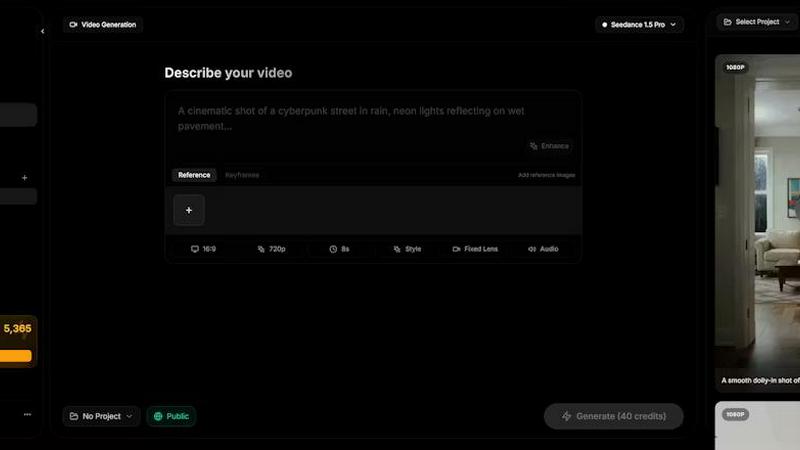
Seedance AI is a multimodal video generator that creates polished, sound-synced videos from text, images, audio, or video inputs.
Last updated: April 13, 2026

Shrinkpad
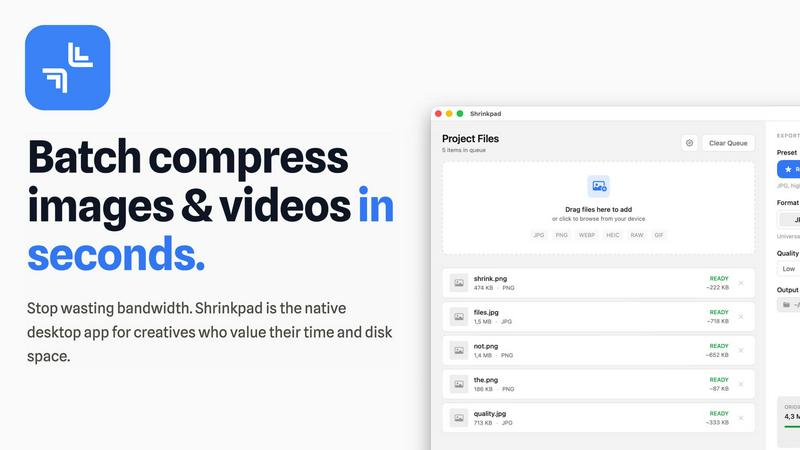
Shrinkpad batch compresses images and videos on Mac, saving space and time with optimal quality and zero manual effort.
Last updated: February 28, 2026
Visual Comparison
SeeDance Ai
Shrinkpad
Feature Comparison
SeeDance Ai
Multimodal Reference System
This core feature allows users to upload and tag up to 12 reference files—including images, videos, and audio clips—directly within their text prompt using the @ symbol (e.g., @Image1, @Video1). This system treats uploaded assets as precise instructions, enabling creators to specify exact character faces, camera movements from reference clips, and audio beats. It eliminates the guesswork of traditional text-only prompting, providing granular control over the final generated video's visual and auditory elements.
Native Audio-Visual Synchronization
Unlike tools that add sound as a post-processing step, SeeDance AI generates audio and video simultaneously within the same model pass. This ensures perfect timing, where sound effects, footsteps, background music, and character dialogue are intrinsically synced to the visual action on a frame-by-frame basis. The result is professional-grade coherence, making post-production sound design optional and significantly streamlining the creation of polished, ready-to-publish content.
Consistent Character & Identity Lock
A common flaw in AI video is character drift, where a subject's appearance changes between shots. SeeDance AI employs a cross-attention reference system that locks in facial geometry, clothing, style, and even fine details like logos and text across different scenes and shots. This ensures 100% consistency, making the platform exceptionally powerful for serialized content, branded campaigns, and any project requiring a recognizable character or product to appear multiple times.
Precise Motion & Camera Control
Users can achieve exact cinematic movements by uploading a reference video. The platform can analyze and replicate specific camera behaviors such as dolly zooms, tracking shots, orbital movements, or handheld shakes. Furthermore, it applies this same fidelity to human motion, allowing complex choreography, dance routines, or action sequences from a reference to be accurately transferred to generated characters, respecting skeletal integrity and realistic physics.
Shrinkpad
Lightning Fast Compression
Shrinkpad is optimized for Apple Silicon, allowing users to process thousands of files in mere minutes. Utilizing multi-threaded compression, it ensures that even extensive batches are handled efficiently without compromising performance.
Automatic Compression Settings
The application automatically analyzes the visual complexity of your files to apply the ideal compression ratio. This feature eliminates guesswork, ensuring that users achieve optimal results without artifacts, thus preserving the quality of the media.
Folder Mode
Shrinkpad's Folder Mode allows users to drag and drop entire folders, which the app automatically scans for images and videos. This feature streamlines the workflow by enabling batch processing of all detected media files with a single action, saving time and effort.
Privacy First Approach
With Shrinkpad, all processing occurs locally on the user's machine, ensuring that no files are uploaded to the cloud. This focus on privacy means that sensitive assets remain secure and confidential, giving users peace of mind while optimizing their media.
Use Cases
SeeDance Ai
Marketing & Advertising Clips
Create high-impact promotional videos, product demos, and branded content without the cost of a full production crew. The ability to maintain consistent product shots and spokesperson avatars across multiple scenes ensures professional, cohesive campaigns that can be rapidly iterated and deployed for social media, websites, and digital ads.
Social Media & Viral Content
Produce engaging, trend-driven content for platforms like TikTok, Instagram Reels, and YouTube Shorts. The multi-shot sequencing and synced audio capabilities are perfect for creating dynamic dance videos, comedic skits, and visually captivating clips designed to capture attention and drive engagement in a fast-paced social media environment.
Creative Storytelling & Short Films
Empower independent filmmakers and digital artists to bring narrative ideas to life. The director-level control over shot composition, character consistency, and integrated sound design allows for the creation of short films, music videos, and animated stories with a cinematic feel, all generated from text and reference inputs.
Educational & Explainer Videos
Develop clear and compelling instructional content. The platform can visualize complex concepts, animate diagrams, and use consistent presenter avatars to create smooth, professional explainer videos. The native audio sync is particularly valuable for ensuring narration matches on-screen action perfectly.
Shrinkpad
Streamlining Media for Web Usage
Photographers or web designers can utilize Shrinkpad to compress large image files before uploading them to websites. This reduces load times and improves user experience without sacrificing quality, ultimately enhancing site performance.
Optimizing Assets for App Development
Developers can take advantage of Shrinkpad to compress high-resolution images and videos used in applications. By reducing file sizes, they can create lighter apps that load faster, leading to better performance on user devices.
Reducing Storage Footprint
Content creators who regularly handle large media libraries can use Shrinkpad to reclaim valuable disk space. By efficiently compressing files, they can maintain an extensive collection of assets without overwhelming their storage capacity.
Simplifying Batch Processing for Teams
Small studios and creative teams can leverage Shrinkpad's bulk processing capabilities to optimize multiple assets at once. This feature minimizes manual work and accelerates project timelines, allowing teams to focus on creativity rather than file management.
Overview
About SeeDance Ai
SeeDance AI is a state-of-the-art multimodal AI video generation platform designed for professional creators and marketers. It transforms text prompts, images, audio clips, and video references into high-quality, cinematic multi-shot videos with native audio-visual synchronization. The platform addresses critical industry pain points like "anatomical drift," inconsistent character identity, and unsynchronized sound by generating video and audio together in a single, coherent model pass. With director-level control over motion, camera work, and scene composition, SeeDance AI functions as an automated production pipeline rather than a simple clip generator. It is ideal for producing marketing content, social media clips, dance and choreography videos, and narrative storytelling, offering a specialized hub for workflows that demand high-fidelity output, smooth physics, and strict prompt adherence without flickering or degradation in quality.
About Shrinkpad
Shrinkpad is a robust, native macOS application designed specifically for the batch compression of images and videos directly on your Mac. This tool effectively tackles the prevalent challenges of large media files that consume valuable storage space and hinder workflow efficiency. The central value proposition of Shrinkpad is threefold: it delivers exceptional speed through local processing, ensures uncompromising privacy by keeping your files on your device, and achieves significant file size reductions without noticeable quality loss. Users can easily drag and drop hundreds of files or entire folders, configure their desired compression settings, and process everything in a matter of seconds. Unlike web-based solutions, Shrinkpad operates entirely locally using macOS frameworks, guaranteeing that sensitive files remain on your device and eliminating reliance on internet connections or cloud services. It is crafted for professionals, including photographers, designers, content creators, developers, and anyone who frequently manages high-resolution images, 4K videos, or large batches of assets, providing a solution to optimize their work for storage, web usage, or application development.
Frequently Asked Questions
SeeDance Ai FAQ
What is SeeDance AI?
SeeDance AI is a multimodal AI video generation platform. It converts text prompts along with optional image, audio, or video references into cinematic, multi-shot video clips with synchronized sound. It distinguishes itself by generating audio and video together in one pass, ensuring high fidelity, consistent characters, and realistic motion for professional-grade output.
How does the @ reference system work?
The @ reference system allows you to upload assets (images, videos, audio) and tag them directly in your text prompt. For example, writing "A character with the face of @Image1 dancing to the beat of @Audio1" instructs the model to use those specific references as direct inputs. This provides precise control over visual elements, motion, and sound, moving beyond vague text descriptions.
Can SeeDance AI create consistent characters across different videos?
Yes. A key feature of SeeDance AI is its ability to maintain character consistency. Using its cross-attention reference system, it locks in details like facial features, hairstyle, and clothing from a reference image. This ensures the same character can appear identically across multiple generated scenes and videos, which is essential for serialized content.
What are the available AI models on SeeDance AI?
The platform offers several model versions, including SeeDance 2.0, SeeDance 1.5 Pro, SeeDance 1.0, and SeeDance 1.0 Pro. Each iteration offers improvements in areas like motion realism, prompt adherence, and audio-visual synchronization, with SeeDance 2.0 representing the most advanced capabilities for professional workflows.
Shrinkpad FAQ
Can I use Shrinkpad for free?
Yes, Shrinkpad offers a Free Starter version that includes essential tools for casual use, allowing users to compress images with a limit of 10 files per batch.
What file formats does Shrinkpad support?
Shrinkpad supports a wide range of formats, including JPG, PNG, WEBP, AVIF for images, and MP4, MOV for videos, ensuring compatibility with most media types.
Does Shrinkpad support video compression?
Absolutely, Shrinkpad allows users to compress various video formats alongside images, making it a versatile tool for multimedia optimization.
How do I get support?
For support, users can reach out via email at [email protected]. Additionally, the Shrinkpad website features a FAQ section to assist with common inquiries.
Alternatives
SeeDance Ai Alternatives
SeeDance Ai is a specialized AI video generation platform focused on creating cinematic, multi-shot videos from text, images, audio, and video inputs. It belongs to the advanced category of AI cinematography tools, distinguished by its emphasis on director-level control and high-fidelity motion physics. Users often explore alternatives for various practical reasons. These can include budget constraints, as professional AI tools may have pricing tiers that don't align with every user's needs. Others might seek different feature sets, such as simpler interfaces, specific export formats, or integration with other creative platforms. The search can also be driven by a need for a different use case focus, like more abstract animation versus the realistic human motion SeeDance Ai excels in. When evaluating an alternative, key considerations should include the core output quality, particularly in motion smoothness and anatomical consistency. Assess the tool's specialization—whether it's a generalist video generator or tailored for specific styles like marketing or dance. Finally, examine the control offered over the final product, the transparency of pricing, and the security of your data and generated assets.
Shrinkpad Alternatives
Shrinkpad is a native macOS application designed specifically for batch compressing images and videos. It falls into the category of media optimization tools, aimed at users who need to manage large files efficiently while maintaining privacy and processing speed. Many users seek alternatives to Shrinkpad due to various reasons, including pricing, specific feature sets, or compatibility with different platforms. When looking for an alternative, it’s essential to consider factors such as processing speed, the ability to handle mixed media files, ease of use, and whether the tool prioritizes local processing for enhanced privacy. Additionally, users should evaluate the flexibility in compression settings and the overall effectiveness in maintaining file quality after compression.