
NB2 Hub vs RemoveTexts
Side-by-side comparison to help you choose the right product.

Nano Banana Pro instantly generates accurate 4K images from text or photos for professional creative work.
Last updated: February 28, 2026

RemoveTexts
RemoveTexts is an AI tool that effortlessly removes text from images in seconds, ensuring clean visuals without any editing skills needed.
Last updated: March 11, 2026
Visual Comparison
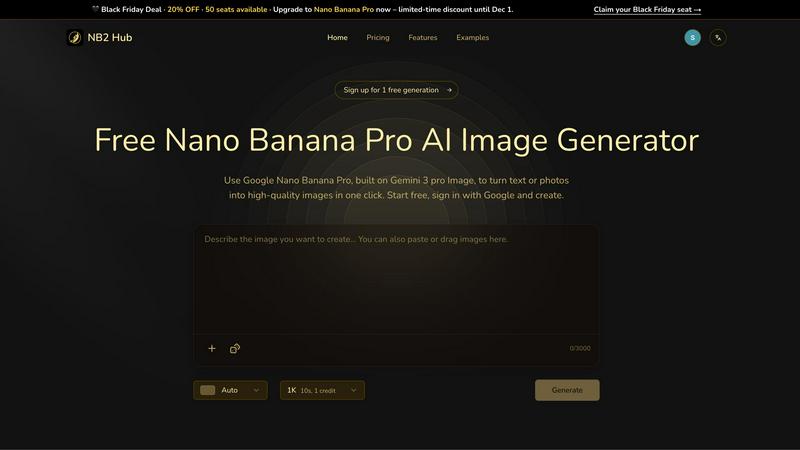
NB2 Hub
RemoveTexts

Feature Comparison
NB2 Hub
Faithful Text and Image Remix
This feature allows users to upload a reference image and provide a short text prompt. Nano Banana Pro intelligently preserves the core layout, composition, and lighting of the original while upgrading details, textures, and specific elements as instructed. It is ideal for iterating on product shots, refining user interface designs, or creating new versions of comic panels and illustrations without starting from scratch, ensuring the output remains structurally faithful to the source.
Crisp Text Inside Images
NB2 Hub specializes in generating clean, legible on-image text, from headlines to full paragraphs, directly within the AI-generated visual. It handles multilingual typography with precision, avoiding common AI artifacts like blurring or halo effects around letters. This makes it perfect for creating professional posters, advertisement banners, social media cover images, and any graphic where readable text is a critical component of the design, eliminating the need for post-generation editing.
Multi-Reference Fusion & Identity Consistency
This advanced capability enables the fusion of elements from multiple uploaded reference images into a single, cohesive output. More importantly, it maintains strict consistency for characters, products, logos, and other brand elements across different generated shots. This is invaluable for creating storyboards, multi-angle product sets, or campaign visuals where a subject must look identical in various scenes, ensuring a unified and professional brand identity.
Pro-Level Lighting & Camera Control
Users gain fine-grained artistic control over the final image's appearance with tools to adjust virtual camera settings. This includes modifying lens choices, framing, depth of field, color grading, and lighting conditions—such as transforming a day scene to night. It allows for local edits and dramatic effects like chiaroscuro, empowering creators to achieve specific cinematic moods and professional polish directly through their prompts.
RemoveTexts
Paint to Remove
This feature allows users to brush over specific areas of text they wish to remove, providing precise control over the editing process. Users can select only the text they want gone, ensuring that the rest of the image remains intact.
Auto Remove All
With the Auto Remove All feature, the AI automatically detects and removes all text elements from an image with just one click. This function is perfect for users who want a quick and effortless solution to clean their images in seconds.
Edit & Replace Text
This unique feature enables users to not only remove existing text but also replace it with new text while matching the original font style. This is particularly beneficial for those who want to edit images without losing their visual integrity.
Remove Objects
In addition to text, RemoveTexts allows users to erase unwanted objects, logos, and other visual elements from images. This versatility makes it suitable for a wide range of editing tasks, enhancing the overall usability of the tool.
Use Cases
NB2 Hub
Advertising and Marketing Creatives
Marketing teams and agencies can leverage NB2 Hub to rapidly produce high-quality ad visuals, social media posts, and promotional banners. The ability to generate crisp text and integrate brand elements consistently allows for the quick creation of multiple campaign variants, A/B testing materials, and platform-specific content, significantly speeding up the creative workflow and reducing dependency on stock photography.
Product Design and Mockups
Designers and e-commerce businesses can use the platform to visualize products in realistic settings. By applying logos and patterns onto 3D objects or generating lifestyle shots from prompts, NB2 Hub facilitates the creation of compelling product mockups, packaging concepts, and branded scene visualizations before physical prototypes are made, aiding in design decisions and marketing presentations.
Content Creation for Social Media
Bloggers, influencers, and social media managers can generate a constant stream of unique, engaging visuals to accompany their content. From creating eye-catching thumbnails and informative infographics to remixing existing photos for new posts, the tool helps maintain a fresh and professional visual feed that stands out in crowded social media landscapes.
Storyboarding and Conceptual Art
Filmmakers, game developers, and writers can utilize the multi-reference fusion and identity consistency features to create coherent storyboards and concept art. By maintaining character and setting consistency across multiple frames, teams can visualize scenes, characters, and environments quickly, facilitating better pre-production planning and creative alignment.
RemoveTexts
E-commerce Product Photo Editing
Online sellers can use RemoveTexts to eliminate watermarks or distracting text from product images, ensuring that their visuals are clean and professional. This helps improve product presentation and boosts sales potential.
Social Media Content Creation
Content creators can quickly remove unwanted text or logos from images before posting on social media platforms. This feature helps maintain a polished aesthetic that aligns with branding.
Legal Document Redaction
Legal professionals can utilize RemoveTexts to redact sensitive information from images of documents, ensuring confidentiality while preserving the overall appearance of the documents being shared.
Academic and Research Publications
Researchers and academics can remove watermarks and other text from images used in their publications, allowing for clearer visuals that enhance their written work. This ensures that readers focus on the content rather than distractions.
Overview
About NB2 Hub
NB2 Hub is a cutting-edge AI image generation platform built upon the powerful Google Nano Banana Pro model, which itself utilizes the advanced Gemini 3 Pro Image framework. This tool is engineered to transform textual descriptions and reference images into stunning, high-fidelity visuals with exceptional quality and remarkable character consistency. Designed for a broad spectrum of users, including digital creators, marketing professionals, graphic designers, and businesses of all sizes, NB2 Hub democratizes access to professional-grade image creation. Its core value proposition lies in delivering production-ready, 4K quality images with unprecedented speed and control, directly from a simple, user-friendly web interface. The platform excels at tasks that traditionally require significant manual effort, such as generating crisp, legible text within images, faithfully remixing layouts from references, and maintaining visual consistency across a series of shots. With the ability to start for free by signing in with a Google account, users can immediately explore its capabilities for applications ranging from social media content and advertising creatives to product mockups and UI/UX design iterations, making it a versatile and indispensable tool for enhancing any visual content strategy.
About RemoveTexts
RemoveTexts is an innovative, AI-powered image editing tool designed to effortlessly remove unwanted text from images in mere seconds. Ideal for anyone from casual users to professionals, it streamlines the process of cleaning up images without requiring any design skills. Whether you need to eliminate watermarks from product photos, erase captions from screenshots, or remove text overlays from graphics, RemoveTexts provides a fast and efficient solution. The tool employs advanced deep learning inpainting technology to analyze surrounding pixels, ensuring that the background is seamlessly reconstructed after text removal. This makes it possible to achieve professional-grade results, making the tool indispensable for creators, marketers, and designers alike. With over 100,000 images processed and a growing user base of more than 50,000 worldwide, RemoveTexts is quickly becoming the go-to choice for anyone looking to maintain clean visuals.
Frequently Asked Questions
NB2 Hub FAQ
How do I start using NB2 Hub?
You can begin using NB2 Hub immediately for free by visiting their website and signing in with your Google account. This grants you access to generate images, including some at 4K quality, allowing you to explore the core features and capabilities of the Nano Banana Pro model before considering any premium upgrades.
What is the Nano Banana Pro model?
Nano Banana Pro is the powerful AI image generation model that powers NB2 Hub. It is developed by Google and built on the Gemini 3 Pro Image framework. This model is specifically engineered for production work, offering superior capabilities in layout fidelity, text generation within images, and high-resolution 4K output compared to standard image AI models.
What kind of image control does NB2 Hub offer?
NB2 Hub offers extensive control through advanced prompting. Key controls include precise aspect ratio and size adjustment (1K/2K/4K), faithful remixing of reference images, multi-element fusion, detailed lighting and camera parameter adjustments, and the generation of accurate, readable text. This allows users to guide the AI toward very specific and professional results.
Can I use NB2 Hub for commercial projects?
Yes, the images generated by NB2 Hub can be used for commercial purposes, including advertising, product marketing, and content creation. It is designed as a professional tool for businesses and creators. Users should review the platform's specific Terms of Service for detailed licensing information related to their chosen plan.
RemoveTexts FAQ
How does RemoveTexts work?
RemoveTexts uses advanced AI technology to analyze images and intelligently reconstruct the background after removing text. This deep learning inpainting ensures that the results are seamless and professional.
What file formats does RemoveTexts support?
RemoveTexts supports image uploads in JPG, PNG, and WebP formats, allowing users to work with various types of images without restrictions.
Is there a limit to the image size I can upload?
Yes, RemoveTexts allows users to upload images up to 10 MB in size. This ensures that the tool can handle high-quality images while maintaining quick processing times.
Can I use RemoveTexts on mobile devices?
Yes, RemoveTexts is a web-based tool, making it accessible on any device with an internet connection, including smartphones and tablets. This accessibility makes it easy to remove text on the go.
Alternatives
NB2 Hub Alternatives
NB2 Hub is an AI image generator in the Image & Photo category, powered by Google's Nano Banana Pro technology. It allows users to create high-quality 4K visuals from text prompts or reference images, offering features like faithful image remixing and crisp text generation. Users often explore alternatives for various reasons. These can include budget constraints, as some may seek different pricing models or free tiers. Others might require specific features not available, need integration with different platforms, or simply want to compare performance and output quality before making a final decision. When evaluating alternatives, consider the core AI model's capabilities, especially for tasks like text-in-image generation or maintaining character consistency. Assess the output resolution, user interface ease-of-use, and the overall cost structure. It's also wise to check for features that match your specific needs, such as multilingual support or factual grounding for accurate visualizations.
RemoveTexts Alternatives
RemoveTexts is an innovative AI-powered image editing tool designed for the seamless removal of unwanted text from images. It falls into the category of image and photo editing software, allowing users to easily clean up images without the need for complex software like Photoshop. Users often seek alternatives for various reasons, including pricing, specific feature sets, or compatibility with different platforms. An effective alternative should offer similar capabilities, ease of use, and support for various file types to ensure it meets user needs. When selecting an alternative to RemoveTexts, it's essential to consider the range of features offered, such as the ability to remove text automatically or manually, the quality of image output, and the user interface's simplicity. Additionally, support for multiple languages and fast processing times can significantly enhance the user experience, making the tool more versatile for different applications.