
MeetingMind vs Prompt Builder
Side-by-side comparison to help you choose the right product.

MeetingMind
MeetingMind automatically records, transcribes, and summarizes your Zoom meetings into searchable notes.
Last updated: March 1, 2026

Prompt Builder
Prompt Builder helps you create, refine, and manage optimized AI prompts for various models in one seamless platform.
Last updated: April 13, 2026
Visual Comparison
MeetingMind
Prompt Builder
Feature Comparison
MeetingMind
Automatic Zoom Detection & Recording
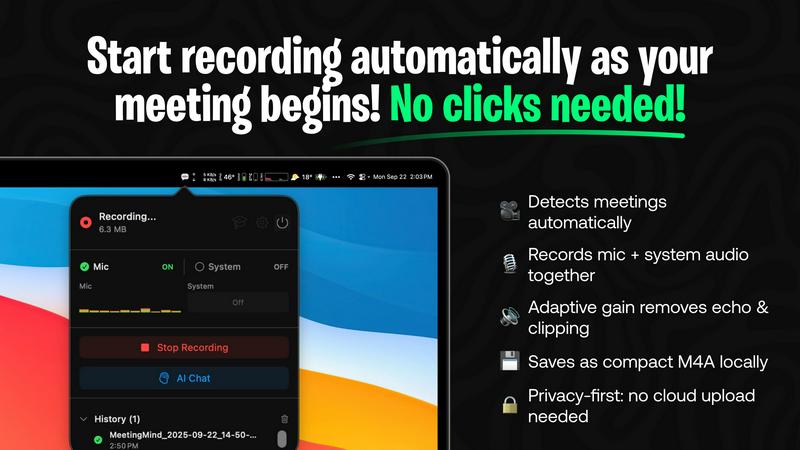
MeetingMind intelligently monitors your system and automatically detects when you start or join a Zoom meeting, initiating recording without any manual clicks or commands. This seamless integration ensures you never forget to hit record, capturing the entire meeting from the very beginning. It records both microphone and system audio with adaptive gain control for crystal-clear playback, guaranteeing every participant is heard.
On-Device AI Processing & Privacy
All core processing is performed locally on your Mac. This privacy-first architecture means your meeting audio, transcripts, and AI-generated summaries are never uploaded to the cloud or external servers. Your sensitive discussions remain completely confidential and secure on your own device, making MeetingMind a trusted tool for handling proprietary business information or personal conversations.
Intelligent Transcripts & AI Summaries
Using powerful AI, MeetingMind provides real-time, speaker-attributed transcripts during your meeting. After the meeting concludes, it generates concise summaries, extracts key insights, and identifies action items. You can choose between a local AI model via Ollama for maximum privacy or a cloud-based option via OpenRouter for different model capabilities, with all outputs formatted in easy-to-read markdown.
Menu Bar Integration & Markdown Export
The application operates discreetly from your macOS menu bar, sitting quietly out of sight until needed. This non-intrusive design keeps your workspace clean. All results--including the full transcript, AI summary, and action items--are automatically saved as well-formatted markdown files. This allows for easy sharing, archiving, or integration into your existing note-taking and project management workflows.
Prompt Builder
Prompt Generator
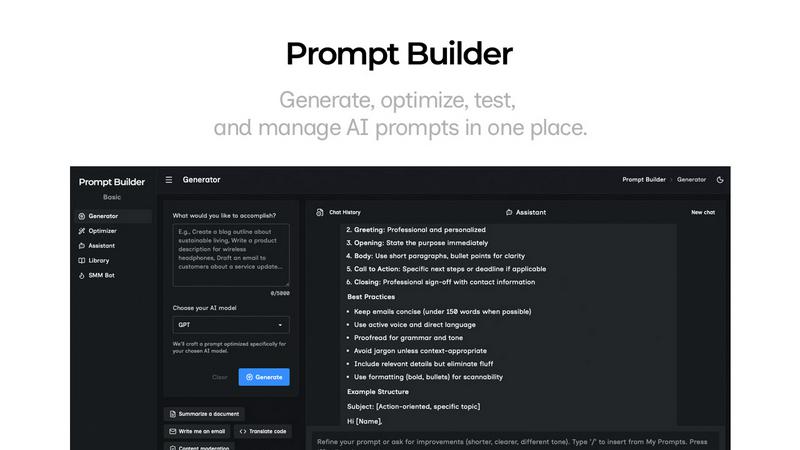
The Prompt Generator allows users to describe their ideas and select a target AI model to receive a professionally crafted prompt optimized for that specific model. This feature minimizes the time spent crafting prompts and ensures they are tailored for better results.
Chat Refinement
Users can refine their prompts directly within a built-in chat workspace. This feature enables quick iterations, allowing users to modify their prompts based on immediate feedback and suggestions from an assistant model, ensuring clarity and effectiveness.
Prompt Optimizer
The Prompt Optimizer feature lets users paste existing prompts or select them from their Library to receive enhanced versions. It focuses on improving clarity, adding constraints, and suggesting output formats, making it easier for users to produce high-quality prompts quickly.
Prompt Library
The Prompt Library is a centralized place for users to save, organize, and reuse their best prompts across different projects and teams. This feature includes search and filter options by category and model, enabling users to access their prompts efficiently and explore community-contributed prompts.
Use Cases
MeetingMind
Daily Stand-ups and Team Syncs
For agile teams conducting daily stand-up meetings, MeetingMind automatically captures each member's update without anyone needing to divert attention to note-taking. The resulting transcript and AI-generated summary provide a perfect, searchable record of blockers, progress, and plans, ensuring nothing is forgotten or miscommunicated as the team moves through their sprint.
Client Consultations and Reviews
Professionals such as consultants, lawyers, or therapists can use MeetingMind to fully focus on their client during sensitive discussions. The local processing guarantees client confidentiality, while the accurate transcript and summary serve as a reliable record of agreements, concerns, and next steps, which can be easily formatted into follow-up emails or reports.
Brainstorming and Creative Sessions
During fast-paced brainstorming meetings where ideas flow rapidly, manually capturing every thought is nearly impossible. MeetingMind records the entire creative session, allowing all participants to contribute freely. The transcript preserves every idea for later review, and the AI can help categorize and highlight the most promising concepts discussed.
Project Kick-offs and Planning Meetings
For project managers leading complex planning meetings with numerous action items and decisions, MeetingMind is an indispensable tool. It captures all details and deadlines assigned to specific individuals. The post-meeting markdown output can be directly used to populate project plans or task managers, ensuring accountability and clear reference materials for the entire project lifecycle.
Prompt Builder
Content Creation
Content creators can utilize Prompt Builder to generate high-quality prompts for blog posts, articles, and social media updates. By refining prompts based on audience engagement, they can produce more targeted and effective content in less time.
AI Development
Developers working on AI applications can leverage Prompt Builder to craft and test prompts that interact with various AI models. This ensures that the prompts they use are optimized for the model's strengths, leading to more accurate and relevant outputs.
Educational Purposes
Teachers and educators can use Prompt Builder to create tailored prompts for assignments or interactive learning experiences. The ability to save and refine prompts allows for more personalized learning, catering to different student needs and levels.
Marketing Campaigns
Marketing professionals can generate tailored prompts for social media, email campaigns, and advertisements. By utilizing the platform's chat refinement and community resources, they can craft compelling messages that resonate with their target audiences.
Overview
About MeetingMind
MeetingMind is an intelligent meeting assistant for macOS designed to revolutionize how professionals capture and utilize information from their virtual meetings. It specifically targets users of platforms like Zoom, automating the entire process of recording, transcribing, and summarizing discussions. The core value proposition is eliminating the distraction of manual note-taking, allowing participants to stay fully engaged in the conversation while having confidence that every detail is being captured accurately. Its advanced on-device AI generates real-time, speaker-attributed transcripts and post-meeting summaries in clean markdown format. A defining characteristic of MeetingMind is its unwavering commitment to privacy; all audio processing and AI analysis occur locally on your Mac, ensuring sensitive meeting content never leaves your device. Whether you are a project manager tracking action items, a team leader facilitating brainstorming sessions, or a consultant conducting client reviews, MeetingMind ensures you never miss a critical point, decision, or task again, transforming meetings from passive events into actionable, searchable knowledge assets.
About Prompt Builder
Prompt Builder is an innovative prompt engineering workspace designed to streamline the process of writing, testing, and saving prompts for various AI models. This tool is tailored for anyone who engages with AI, from casual users to professional developers. The primary value proposition of Prompt Builder lies in its ability to transform a simple idea into a fully optimized prompt in seconds, allowing users to refine their prompts in a chat interface, save different versions, and run them effortlessly when needed. It supports a wide array of AI models, including GPT, Claude, Gemini, Llama, Mistral, DeepSeek, Grok, and Perplexity, making it a versatile choice for users across different platforms. With features like an Optimizer for enhancing existing prompts, a Library for storing reusable prompts, and an easy-to-use assistant for quick testing, Prompt Builder provides an all-in-one solution to maximize productivity and achieve more consistent, high-quality outputs.
Frequently Asked Questions
MeetingMind FAQ
How does the free 60 minutes per day work?
The free tier of MeetingMind provides users with 60 minutes of total recording time per calendar day. This is designed to be perfect for daily stand-ups, short syncs, or one-on-one meetings. The app automatically manages this allowance, and the timer resets each day. All features, including automatic detection, transcription, and AI summaries, are fully available within this free daily limit.
Is my meeting data kept private?
Yes, absolutely. MeetingMind is built with a privacy-first architecture. All audio recording, speech-to-text transcription, and AI processing for summaries happen locally on your Mac. Your meeting data never leaves your computer to be sent to external servers or the cloud, ensuring complete confidentiality and security for even the most sensitive discussions.
What is included in the one-time Unlimited purchase?
The Unlimited version is a one-time purchase (not a subscription) that removes the daily 60-minute recording limit, granting you unlimited recording time. It includes all features from the free tier—automatic Zoom detection, live transcription, AI summaries, and local processing—plus lifetime access to future application updates with no recurring fees.
Do I need to inform participants I am recording?
Yes, you must always inform all participants before recording any meeting. MeetingMind is a tool to help you capture your meetings, but you are solely responsible for obtaining proper consent and complying with all applicable laws and regulations regarding the recording of conversations. Never record a meeting without prior disclosure to and permission from all involved parties.
Prompt Builder FAQ
How does Prompt Builder improve prompt generation?
Prompt Builder enhances prompt generation by providing a structured approach that allows users to create, refine, and save prompts tailored for specific AI models. This reduces the time and effort needed to craft effective prompts.
What AI models are supported by Prompt Builder?
Prompt Builder supports a variety of AI models, including GPT, Claude, Gemini, Llama, Mistral, DeepSeek, Grok, Perplexity, and more. This wide compatibility ensures that users can work with their preferred models seamlessly.
Is there a limit to the number of prompts I can generate?
Yes, users can start with a free plan that allows 25 assistant requests per month without requiring a credit card. This gives users an opportunity to test the platform’s features before committing to a paid plan.
Can I collaborate with others using Prompt Builder?
Yes, Prompt Builder's Library feature allows users to save and organize prompts that can be shared and reused across teams and projects, promoting collaboration and efficiency in prompt development.
Alternatives
MeetingMind Alternatives
MeetingMind is an AI-powered meeting assistant in the productivity and management software category. It automatically records, transcribes, and summarizes Zoom meetings into searchable notes, allowing professionals to focus on the discussion rather than manual note-taking. Users often explore alternatives for various reasons, such as budget constraints, the need for different features, compatibility with other meeting platforms, or specific security and deployment requirements. The right tool depends heavily on individual or organizational workflows. When evaluating alternatives, key considerations include the accuracy of transcription, integration with your primary communication tools, data privacy policies, cost structure, and the overall user experience. Identifying which core features are non-negotiable for your team is the best starting point.
Prompt Builder Alternatives
Prompt Builder is a comprehensive prompt engineering workspace designed for users to write, test, and manage AI prompts efficiently. It streamlines the process of turning ideas into actionable prompts across various models like GPT, Claude, and others. As part of the AI Assistants category, it caters to individuals and teams looking to enhance their productivity with AI-generated content. Users often seek alternatives to Prompt Builder for various reasons, including pricing structures, feature sets, and compatibility with specific platforms. When choosing an alternative, it is essential to consider factors such as user interface, ease of integration with existing tools, and the availability of community resources. Ensuring that the chosen solution aligns with personal or organizational needs is crucial for maximizing effectiveness in prompt creation and management.