
MeetingMind vs Perkoon
Side-by-side comparison to help you choose the right product.

MeetingMind
MeetingMind automatically records, transcribes, and summarizes your Zoom meetings into searchable notes.
Last updated: March 1, 2026

Perkoon enables free, unlimited peer-to-peer file transfers without signup, ensuring your files remain private and.
Last updated: March 4, 2026
Visual Comparison
MeetingMind
Perkoon

Feature Comparison
MeetingMind
Automatic Zoom Detection & Recording
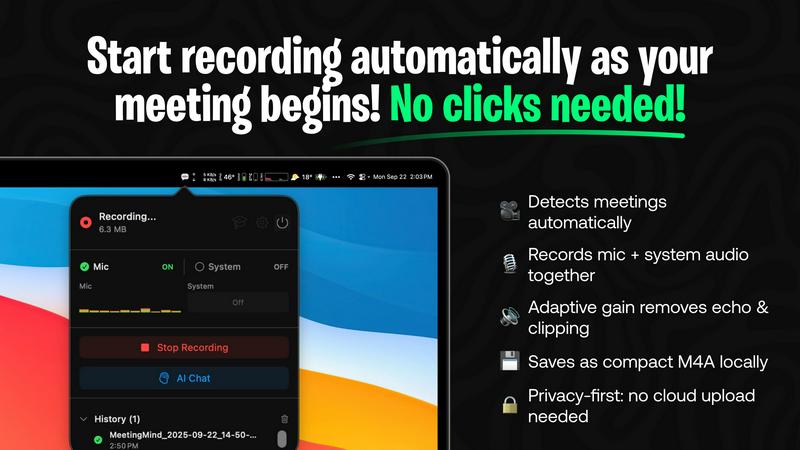
MeetingMind intelligently monitors your system and automatically detects when you start or join a Zoom meeting, initiating recording without any manual clicks or commands. This seamless integration ensures you never forget to hit record, capturing the entire meeting from the very beginning. It records both microphone and system audio with adaptive gain control for crystal-clear playback, guaranteeing every participant is heard.
On-Device AI Processing & Privacy
All core processing is performed locally on your Mac. This privacy-first architecture means your meeting audio, transcripts, and AI-generated summaries are never uploaded to the cloud or external servers. Your sensitive discussions remain completely confidential and secure on your own device, making MeetingMind a trusted tool for handling proprietary business information or personal conversations.
Intelligent Transcripts & AI Summaries
Using powerful AI, MeetingMind provides real-time, speaker-attributed transcripts during your meeting. After the meeting concludes, it generates concise summaries, extracts key insights, and identifies action items. You can choose between a local AI model via Ollama for maximum privacy or a cloud-based option via OpenRouter for different model capabilities, with all outputs formatted in easy-to-read markdown.
Menu Bar Integration & Markdown Export
The application operates discreetly from your macOS menu bar, sitting quietly out of sight until needed. This non-intrusive design keeps your workspace clean. All results--including the full transcript, AI summary, and action items--are automatically saved as well-formatted markdown files. This allows for easy sharing, archiving, or integration into your existing note-taking and project management workflows.
Perkoon
Peer-to-Peer File Transfer
Perkoon’s flagship feature utilizes P2P technology to facilitate direct file transfers between users' browsers. This method ensures that files are sent without limits, accounts, or delays, making it a truly free service. Since the files never pass through a central server, users enjoy enhanced privacy and security.
Encrypted Cloud Storage
When the recipient is offline, Perkoon provides secure cloud storage for file transfers. This paid feature ensures that files remain encrypted while stored on Perkoon’s servers, giving users peace of mind that their data is protected until it can be delivered.
AI Integration
Perkoon is built for the age of AI, featuring built-in automation tools that allow AI agents to interact with the service. This functionality streamlines the file transfer process, making it easy for machines to send and receive files without requiring manual input or screen scraping.
Referral and Rewards Program
Perkoon offers a unique referral program that incentivizes users to share the service with others. When a user refers a friend who then joins and transfers files, both parties receive extra storage, creating a mutually beneficial ecosystem that encourages growth and community engagement.
Use Cases
MeetingMind
Daily Stand-ups and Team Syncs
For agile teams conducting daily stand-up meetings, MeetingMind automatically captures each member's update without anyone needing to divert attention to note-taking. The resulting transcript and AI-generated summary provide a perfect, searchable record of blockers, progress, and plans, ensuring nothing is forgotten or miscommunicated as the team moves through their sprint.
Client Consultations and Reviews
Professionals such as consultants, lawyers, or therapists can use MeetingMind to fully focus on their client during sensitive discussions. The local processing guarantees client confidentiality, while the accurate transcript and summary serve as a reliable record of agreements, concerns, and next steps, which can be easily formatted into follow-up emails or reports.
Brainstorming and Creative Sessions
During fast-paced brainstorming meetings where ideas flow rapidly, manually capturing every thought is nearly impossible. MeetingMind records the entire creative session, allowing all participants to contribute freely. The transcript preserves every idea for later review, and the AI can help categorize and highlight the most promising concepts discussed.
Project Kick-offs and Planning Meetings
For project managers leading complex planning meetings with numerous action items and decisions, MeetingMind is an indispensable tool. It captures all details and deadlines assigned to specific individuals. The post-meeting markdown output can be directly used to populate project plans or task managers, ensuring accountability and clear reference materials for the entire project lifecycle.
Perkoon
Personal File Sharing
Individuals can easily share large files with friends or family without worrying about size limits or the need for an account. Whether it's sending photos, videos, or documents, Perkoon ensures a seamless transfer experience.
Business Collaborations
Teams can utilize Perkoon to share large files securely during projects. The P2P transfer method allows for instant file delivery, facilitating collaboration without the frustrations of traditional file-sharing methods.
Offline File Delivery
Users can send files to recipients who are not currently online by utilizing Perkoon’s encrypted cloud storage. This feature is particularly useful for delivering important documents or large files that need to be accessed later.
Automation for Developers
Developers can integrate Perkoon into their applications or workflows using the built-in AI integration. This allows for automated file transfers and interactions, enhancing productivity and simplifying processes within tech environments.
Overview
About MeetingMind
MeetingMind is an intelligent meeting assistant for macOS designed to revolutionize how professionals capture and utilize information from their virtual meetings. It specifically targets users of platforms like Zoom, automating the entire process of recording, transcribing, and summarizing discussions. The core value proposition is eliminating the distraction of manual note-taking, allowing participants to stay fully engaged in the conversation while having confidence that every detail is being captured accurately. Its advanced on-device AI generates real-time, speaker-attributed transcripts and post-meeting summaries in clean markdown format. A defining characteristic of MeetingMind is its unwavering commitment to privacy; all audio processing and AI analysis occur locally on your Mac, ensuring sensitive meeting content never leaves your device. Whether you are a project manager tracking action items, a team leader facilitating brainstorming sessions, or a consultant conducting client reviews, MeetingMind ensures you never miss a critical point, decision, or task again, transforming meetings from passive events into actionable, searchable knowledge assets.
About Perkoon
Perkoon is an innovative file transfer service designed for individuals and businesses seeking a straightforward and reliable way to move files without the usual complications associated with traditional services. It stands out by prioritizing user privacy and offering a hassle-free experience without hidden fees or mandatory sign-ups. Through its unique peer-to-peer (P2P) technology, Perkoon allows users to send files directly between browsers in real-time, eliminating size limits and ensuring that the data remains private. This feature is entirely free, as it incurs no costs for Perkoon. For situations where the recipient is offline, Perkoon provides an encrypted cloud storage option, enabling seamless file retrieval at a minimal cost that supports server operations. Additionally, Perkoon is designed with automation in mind, featuring built-in tools that allow AI agents to interact with the service directly. This makes it an ideal solution for both everyday users and tech-savvy individuals who require more from their file transfer services.
Frequently Asked Questions
MeetingMind FAQ
How does the free 60 minutes per day work?
The free tier of MeetingMind provides users with 60 minutes of total recording time per calendar day. This is designed to be perfect for daily stand-ups, short syncs, or one-on-one meetings. The app automatically manages this allowance, and the timer resets each day. All features, including automatic detection, transcription, and AI summaries, are fully available within this free daily limit.
Is my meeting data kept private?
Yes, absolutely. MeetingMind is built with a privacy-first architecture. All audio recording, speech-to-text transcription, and AI processing for summaries happen locally on your Mac. Your meeting data never leaves your computer to be sent to external servers or the cloud, ensuring complete confidentiality and security for even the most sensitive discussions.
What is included in the one-time Unlimited purchase?
The Unlimited version is a one-time purchase (not a subscription) that removes the daily 60-minute recording limit, granting you unlimited recording time. It includes all features from the free tier—automatic Zoom detection, live transcription, AI summaries, and local processing—plus lifetime access to future application updates with no recurring fees.
Do I need to inform participants I am recording?
Yes, you must always inform all participants before recording any meeting. MeetingMind is a tool to help you capture your meetings, but you are solely responsible for obtaining proper consent and complying with all applicable laws and regulations regarding the recording of conversations. Never record a meeting without prior disclosure to and permission from all involved parties.
Perkoon FAQ
What makes Perkoon free?
Perkoon’s P2P file transfer service is free because it operates without the costs associated with central servers. The company only charges for encrypted cloud storage, which covers server expenses while keeping the primary service accessible to all users.
Is my data safe with Perkoon?
Yes, your data is safe with Perkoon. P2P transfers do not touch the servers, ensuring privacy. For cloud storage, files are encrypted, and Perkoon cannot view the content being transferred, providing users with confidence in their data security.
Which browsers are compatible with Perkoon?
Perkoon works seamlessly with Chrome, Edge, and Brave, offering no limits on file transfers. However, users of Firefox and Safari may encounter some restrictions due to browser limitations.
Can I use Perkoon for machine-to-machine transfers?
Absolutely. Perkoon is designed to accommodate automated processes and machine-to-machine interactions. The dedicated integration allows AI agents to communicate with the service directly, facilitating efficient transfers without manual intervention.
Alternatives
MeetingMind Alternatives
MeetingMind is an AI-powered meeting assistant in the productivity and management software category. It automatically records, transcribes, and summarizes Zoom meetings into searchable notes, allowing professionals to focus on the discussion rather than manual note-taking. Users often explore alternatives for various reasons, such as budget constraints, the need for different features, compatibility with other meeting platforms, or specific security and deployment requirements. The right tool depends heavily on individual or organizational workflows. When evaluating alternatives, key considerations include the accuracy of transcription, integration with your primary communication tools, data privacy policies, cost structure, and the overall user experience. Identifying which core features are non-negotiable for your team is the best starting point.
Perkoon Alternatives
Perkoon is a peer-to-peer file transfer service that allows users to send files directly between browsers without any signup requirements. It falls under the productivity and management category, providing a hassle-free way to move files securely. Users often seek alternatives to Perkoon for various reasons, including the desire for specific features, pricing structures, or compatibility with different platforms. It’s essential to consider factors such as ease of use, security measures, and whether the service meets your unique file transfer needs when exploring alternatives. When searching for an alternative to Perkoon, prioritize services that offer similar functionalities, such as unlimited file sizes and privacy-focused operations. Look for platforms that cater to your specific use case, whether you need cloud storage options, automation tools, or user-friendly interfaces. Additionally, ensure that any alternative maintains a commitment to user privacy and data security, as these are crucial elements for a reliable file transfer service.