
Fieldtics vs Invoice Guru
Side-by-side comparison to help you choose the right product.

Fieldtics
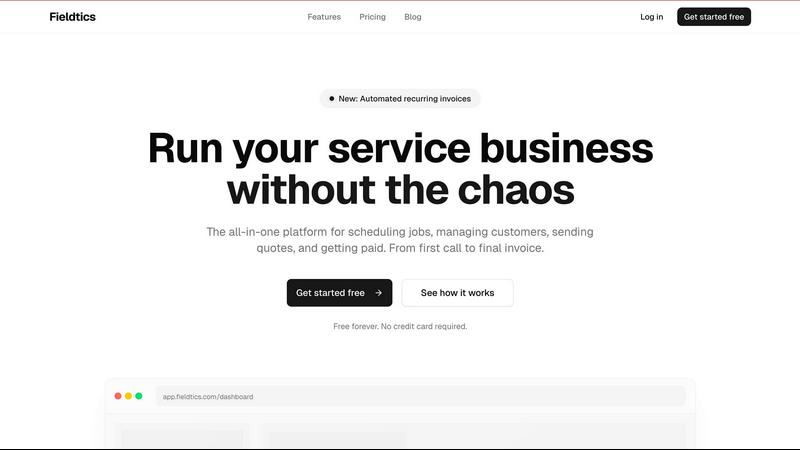
Fieldtics is an all-in-one platform that simplifies scheduling, customer management, invoicing, and payments for.
Last updated: February 26, 2026

Invoice Guru
Invoice Guru enables UK tradespeople to create HMRC-compliant invoices in under a minute for effortless billing.
Last updated: February 28, 2026
Visual Comparison
Fieldtics
Invoice Guru

Feature Comparison
Fieldtics
Smart Job Scheduling
Fieldtics offers an intelligent job scheduling feature that allows users to assign tasks, set deadlines, and monitor job progress in real-time. This ensures that every job moves forward smoothly, minimizing downtime and maximizing productivity.
Customer Relationship Management (CRM)
The integrated CRM system helps businesses manage customer interactions effectively. It enables users to track leads, manage customer information, and maintain a history of communications, enhancing customer satisfaction and retention.
Invoicing and Payment Processing
With Fieldtics, generating invoices and processing payments is effortless. Users can create professional invoices, send them to clients instantly, and receive payments online, streamlining the financial aspect of their operations and improving cash flow.
Customization and Integration
Fieldtics allows businesses to customize their dashboards and workflows according to their specific needs. Furthermore, it integrates smoothly with various existing tools, enabling users to automate processes and keep all their data centralized and easily accessible.
Invoice Guru
Instant Invoice Creation
Invoice Guru allows users to create and send professional invoices in less than a minute. The app automatically incorporates your logo, VAT, payment terms, and due date, making the process quick and hassle-free.
Automatic Invoice Numbering
The application features automatic numbering and dating of invoices based on your fiscal year settings. This ensures that your financial records are organized and compliant with accounting standards.
OCR Receipt Scanner (AI)
Utilizing advanced AI technology, the OCR receipt scanner enables users to snap a photo of their receipts. The app reads all relevant details and saves them as expense entries, eliminating the need for manual data entry.
Smart Payment Tracking
Invoice Guru automatically matches incoming bank transactions with unpaid invoices, allowing users to easily track which clients have paid and which invoices are still outstanding. This feature simplifies cash flow management.
Use Cases
Fieldtics
Service Scheduling for Teams
Fieldtics can be used by teams to schedule service appointments efficiently. With its smart scheduling feature, users can assign jobs to team members based on availability and location, ensuring optimal resource allocation.
Managing Customer Relationships
Businesses can utilize Fieldtics to enhance customer relationship management. By tracking interactions and maintaining detailed customer profiles, teams can provide personalized services that improve client loyalty and satisfaction.
Streamlining Invoicing Processes
Fieldtics simplifies the invoicing process for service businesses. Users can create and send invoices quickly, track payment statuses, and manage recurring billing, making it easier to maintain steady cash flow.
Time and Expense Tracking
Fieldtics enables businesses to track time spent on jobs and manage expenses effectively. This feature helps in monitoring project profitability and ensuring that all costs are accounted for, leading to better financial management.
Invoice Guru
On-Site Invoice Generation
Tradespeople can create and send invoices instantly while on-site after completing a job. This ensures timely billing and faster payments, improving cash flow.
Expense Tracking for Freelancers
Freelancers can utilize the OCR receipt scanner to quickly log expenses by simply photographing their receipts. This feature saves time and reduces the hassle of manual entry.
Multi-Currency Transactions
For businesses operating internationally, Invoice Guru supports multiple currencies and languages. Users can easily create invoices tailored to their clients' locations without any additional complexity.
Compliance Management
Invoice Guru's built-in compliance features help businesses adhere to regulations such as the MTD and KSeF. This allows business owners to focus on their operations without worrying about compliance issues.
Overview
About Fieldtics
Fieldtics is a powerful, all-in-one platform specifically designed for service businesses to streamline their daily operations and enhance efficiency. It offers a comprehensive suite of tools that allow businesses to manage every aspect of their workflow, from smart job scheduling and customer relationship management to invoicing and payment processing. Whether your team is in the office or out in the field, Fieldtics ensures seamless communication and collaboration through its web and mobile applications. The platform is customizable, enabling businesses to tailor their dashboards, branding, and menus to reflect their unique identities. Additionally, Fieldtics integrates effortlessly with existing tools, automating workflows and centralizing data. This empowers businesses to manage leads, track time and expenses, and handle recurring invoices, ultimately providing the clarity and control necessary for effective growth.
About Invoice Guru
Invoice Guru is a mobile-first invoicing and accounting application designed specifically for tradespeople, freelancers, and small service businesses that need to manage their finances while on the move. Unlike traditional desktop accounting software, Invoice Guru is tailored for professionals such as plumbers, electricians, builders, painters, and cleaners. The application allows users to create, send, and track professional invoices in under 60 seconds from their smartphones or tablets. Its core value proposition lies in its speed, simplicity, and intelligent automation, which significantly reduces administrative overhead. Key features include AI-powered OCR receipt scanning, automatic bank payment matching, and smart payment reminders. Moreover, Invoice Guru ensures future-proof compliance with regulations like the UK's Making Tax Digital (MTD) and Poland's KSeF, allowing business owners to operate with confidence. Developed by a tradesperson who understands the challenges of running a small service business, Invoice Guru provides a tailored, efficient, and compliant financial management solution that evolves with your business needs.
Frequently Asked Questions
Fieldtics FAQ
What types of businesses can benefit from Fieldtics?
Fieldtics is primarily designed for service-based businesses, including those in cleaning, electrical work, landscaping, plumbing, and similar industries that require job scheduling and customer management.
Is there a free trial available for Fieldtics?
Yes, Fieldtics offers a free forever plan that allows users to access essential features without the need for a credit card. This provides an opportunity to explore the platform before committing to a paid plan.
Can I customize the Fieldtics dashboard?
Absolutely. Fieldtics allows users to customize their dashboards, branding, and menus, ensuring that the platform aligns with their business identity and meets their operational needs.
How does Fieldtics handle invoicing and payments?
Fieldtics simplifies invoicing by allowing users to generate, send, and manage invoices directly through the platform. It also supports online payment processing, making transactions seamless for both businesses and clients.
Invoice Guru FAQ
How does Invoice Guru ensure compliance with tax regulations?
Invoice Guru is designed to comply with regulations like the UK's Making Tax Digital (MTD) and Poland's KSeF. Regular updates ensure that the software remains compliant with any changes in tax laws.
Can I customize my invoices with my company logo?
Yes, Invoice Guru allows users to customize invoices with their company logo, name, address, tax number, and Terms & Conditions, ensuring a professional appearance that reflects your brand.
Is there a limit on the number of invoices I can create?
The free plan allows up to 10 invoices. For users needing more, the Basic and Pro plans offer unlimited invoices along with additional features tailored for growing businesses.
What payment methods does Invoice Guru support?
Invoice Guru supports several payment methods including bank transfers, PayPal, and credit card payments via Stripe, giving clients multiple options for settling their invoices.
Alternatives
Fieldtics Alternatives
Fieldtics is an all-in-one platform designed for service businesses, focusing on streamlining essential operations such as scheduling, customer management, invoicing, and payment processing. This comprehensive tool aims to reduce operational chaos by bringing together vital functions in a user-friendly interface. Service teams benefit from the flexibility of both web and mobile applications, ensuring connectivity and efficiency whether in the office or out in the field. Users often seek alternatives to Fieldtics due to various reasons such as pricing limitations, specific feature requirements, or the need for compatibility with other platforms. When choosing an alternative, it's crucial to assess the features that best align with your business needs, the ease of use, integration capabilities, and overall cost-effectiveness. A well-rounded alternative should not only meet your current demands but also support future growth and scalability.
Invoice Guru Alternatives
Invoice Guru is a mobile-first invoicing and accounting application tailored for UK tradespeople, freelancers, and small service businesses. It simplifies financial management by allowing users to create compliant invoices in under a minute, streamlining the process for professionals who often work on the go. Given its specific focus, users may seek alternatives due to factors such as pricing, additional features, or compatibility with other platforms and tools they use. When looking for an alternative, it's essential to consider factors such as ease of use, the range of features offered, mobile compatibility, customer support, and compliance with industry regulations. Additionally, assessing integration capabilities with other software and the overall cost-effectiveness will help ensure that the chosen solution meets your business needs without compromising efficiency.