
Img Editor vs Imgezy
Side-by-side comparison to help you choose the right product.

Img Editor
Create stunning AI-generated images from text in seconds with Img Editor's advanced image generation technology.
Last updated: February 28, 2026

Imgezy
Imgezy is an AI photo editor that effortlessly removes objects and changes backgrounds for stunning, professional.
Last updated: March 1, 2026
Visual Comparison
Img Editor

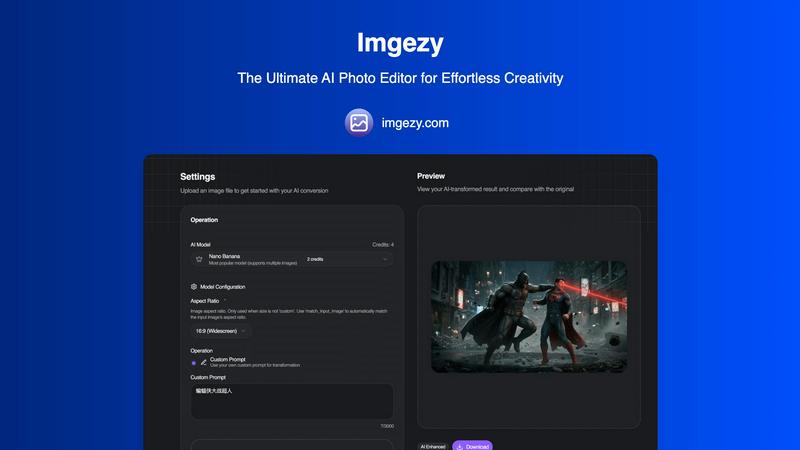
Imgezy
Feature Comparison
Img Editor
AI-Powered Image Generation
Img Editor utilizes cutting-edge AI algorithms to generate images from text descriptions, transforming user ideas into visual art within seconds. This feature is perfect for artists seeking inspiration or for anyone who wants to visualize their concepts quickly and effortlessly.
Intelligent Image Editing
With Img Editor, users can edit existing images using simple text prompts. This feature allows for intuitive adjustments, enabling users to refine their visuals according to their specific needs, whether for personal projects or professional presentations.
Community Engagement and Bonus Generations
Img Editor promotes a vibrant community where users can engage with others and share their creations. By participating in gallery submissions or community activities, users can earn unlimited bonus image generations, enhancing the creative experience and fostering collaboration.
Multiple Image Quality Options
Users can select from various image quality settings, including 1K, 2K, and 4K resolutions. This flexibility allows users to create visuals that meet their specific requirements, whether for web use, print, or digital displays, ensuring high quality and detail in every creation.
Imgezy
Object Removal
Imgezy's object removal feature utilizes advanced AI to identify and eliminate unwanted elements from photos. Whether it's distracting tourists or unwanted objects, the AI reconstructs the background seamlessly, ensuring your images look pristine and professional.
Background Replacement
This feature allows users to change backgrounds instantly, transforming ordinary scenes into extraordinary ones. Users can select from a range of stunning landscapes or solid colors, providing endless creative possibilities for their photos.
Photo Enhancement
Imgezy automatically enhances photos by adjusting colors, lighting, and sharpness, making images more vibrant and visually appealing. This feature ensures that your photos pop, giving them a polished and professional look without any manual adjustments.
Batch Processing
With the batch processing feature, users can edit multiple images simultaneously, saving significant time on large projects. This is particularly beneficial for professionals who need to edit a series of images quickly and efficiently while maintaining high-quality standards.
Use Cases
Img Editor
Digital Art Creation for Artists
Artists can leverage Img Editor to create original artworks from text prompts, tapping into the power of AI to explore new styles and concepts. This feature serves as a source of inspiration and a tool for rapid prototyping of artistic ideas.
Marketing Content Generation
Marketers can utilize Img Editor to generate eye-catching visuals for campaigns, social media posts, and advertisements. The ability to create tailored images that resonate with target audiences enhances the effectiveness of marketing strategies.
Educational Resources and Illustrations
Educators can use Img Editor to create custom illustrations and graphics for teaching materials. By generating relevant visuals, educators can enhance engagement and understanding in their lessons, catering to diverse learning styles.
Hobbyist Projects and Personal Use
Hobbyists and casual users can enjoy Img Editor for personal projects, such as creating custom images for gifts, home decor, or personal blogs. The platform's accessibility allows anyone to explore their creativity without financial constraints.
Imgezy
Social Media Content Creation
Social media influencers and marketers can use Imgezy to create eye-catching content quickly. With the ability to edit and enhance images in seconds, they can consistently produce high-quality visuals that engage their followers and elevate their brand.
E-commerce Product Photography
E-commerce entrepreneurs can leverage Imgezy to enhance product images, remove distractions, and create appealing backgrounds. This ensures that their products stand out, ultimately increasing sales and customer interest.
Travel Photography
Travel enthusiasts can use Imgezy to enhance their travel photos by removing unwanted objects or adjusting backgrounds to reflect their experiences accurately. This helps in creating memorable visuals that encapsulate their adventures.
Event Photography
Photographers working on events can utilize Imgezy to quickly edit images by removing photobombers or enhancing the overall aesthetics of the photos. This feature allows them to deliver professional-quality images to clients in a fraction of the time.
Overview
About Img Editor
Img Editor is a revolutionary AI-powered platform that offers advanced image generation and editing capabilities entirely for free. Designed to cater to a diverse audience including artists, designers, marketers, content creators, and hobbyists, Img Editor democratizes access to professional-grade digital art tools. Its dual-mode functionality allows users to create entirely new images from text prompts or make intelligent edits to existing images. With 10 free image generations available daily, users can also earn unlimited bonus generations through active community participation. The platform's AI understands natural language, delivering stunning visuals in various styles and resolutions, ranging from 1K to ultra-quality 4K outputs. Img Editor's primary value proposition lies in its combination of high-end AI capabilities with a user-friendly interface, ensuring that sophisticated image creation is accessible to everyone regardless of their budget or skill level.
About Imgezy
Imgezy is an innovative AI-powered photo editing platform that revolutionizes the way users manipulate images. Designed to make professional-grade photo editing accessible to everyone, Imgezy allows users to make complex edits through simple text-based instructions. Whether you want to remove a distracting object or change the background to a picturesque landscape, Imgezy transforms your verbal description into a stunningly edited image within seconds. This platform caters to a diverse audience, including individual creators, social media influencers, e-commerce entrepreneurs, and professional photographers, all seeking to enhance their visual content without the steep learning curve associated with traditional editing software. With over 200,000 satisfied users, Imgezy emphasizes speed, simplicity, and high-quality output, enabling anyone, regardless of their technical skill level, to produce beautiful images effortlessly. Its powerful algorithms ensure pixel-perfect accuracy in tasks like object removal and background replacement, ultimately streamlining workflows and enhancing productivity.
Frequently Asked Questions
Img Editor FAQ
How many images can I generate daily with Img Editor?
Users can generate up to 10 images for free each day. Additionally, by participating in community activities, users can earn unlimited bonus generations, enhancing their creative opportunities.
What image quality options are available on Img Editor?
Img Editor offers several image quality settings, including 1K for standard quality, 2K for high quality, and 4K for ultra-high quality. Users can choose the resolution that best fits their project needs.
Can I edit existing images on Img Editor?
Yes, Img Editor features an intelligent image editing tool that allows users to make adjustments to existing images using text prompts. This functionality enables intuitive and user-friendly modifications.
Is Img Editor completely free to use?
Yes, Img Editor is entirely free, providing users with access to advanced AI image generation and editing tools without any cost barriers. Users can also earn bonuses through community engagement to further enhance their experience.
Imgezy FAQ
How does Imgezy work?
Imgezy uses advanced AI algorithms to analyze your image and execute edits based on your text-based instructions. Simply describe what you want, and the AI does the rest.
What types of images can I edit with Imgezy?
Imgezy supports all major image formats, including JPG, PNG, and WebP, allowing you to upload and edit a wide range of photos effortlessly.
Is there a limit to how many images I can edit?
Imgezy offers various pricing plans with different credit allocations. Depending on your plan, you can edit anywhere from a few hundred to thousands of images each month.
Do I need any prior editing experience to use Imgezy?
No, Imgezy is designed for users of all skill levels. You only need to describe the edits you want, and the AI will handle the technical aspects of photo editing for you.
Alternatives
Img Editor Alternatives
Img Editor is a cutting-edge AI image generation and editing platform that operates within the Image & Photo category. It allows users to create stunning visuals from text descriptions and modify existing images through intuitive text prompts. The platform is designed to cater to a broad audience, including artists, designers, marketers, and content creators, by offering robust tools without the burden of costs commonly associated with professional-grade image creation. Users often seek alternatives to Img Editor for various reasons, such as specific feature requirements, platform compatibility, or pricing structures that better fit their needs. When choosing an alternative, it is essential to consider factors such as ease of use, the quality of output images, customization options, and the availability of advanced editing features. Additionally, understanding the technology behind the platform and its ability to meet individual creative demands can significantly influence the decision-making process.
Imgezy Alternatives
Imgezy is an advanced AI photo editing platform that allows users to perform complex image manipulations through simple text-based commands. This innovative tool is designed to cater to a wide range of users, from social media enthusiasts to professional photographers, making high-quality image editing accessible to everyone. As users seek alternatives to Imgezy, common reasons include exploring different pricing structures, varying features, or platform compatibility that better meets their specific needs. When searching for an alternative, it is essential to consider factors such as ease of use, the range of editing capabilities, and the quality of output. Users should also evaluate the platform's support for different file formats and integration with other tools they may be using. A good alternative should provide similar functionality while offering unique advantages that align with the user's editing objectives and preferences.