
Fusedash vs Threat Watch
Side-by-side comparison to help you choose the right product.

Fusedash transforms raw data into interactive dashboards and charts for instant insights and informed decision-making.
Last updated: March 4, 2026

Threat Watch
Instantly assess your cybersecurity health with a free scan for critical vulnerabilities.
Last updated: March 1, 2026
Visual Comparison
Fusedash

Threat Watch
Feature Comparison
Fusedash
Flexible Views
Fusedash allows users to create tailored dashboards, charts, maps, or report-style views from the same dataset, ensuring that different teams receive the specific insights they need without unnecessary back and forth. This customization enables stakeholders to focus on what matters most to them.
AI Chart Generator
The AI Chart Generator in Fusedash enables users to swiftly create clear and compelling visuals from CSVs or APIs. It helps users select the appropriate chart type, apply necessary comparisons, and refine labels, ensuring that the charts accurately communicate the intended story. Generated charts can be easily integrated into dashboards or used as standalone visuals.
Dashboard Software
Fusedash combines the capabilities of dashboards and reporting in a single workspace. This feature allows users to monitor KPIs while also providing contextual narrative reporting that explains changes, their significance, and future implications. This integration helps maintain alignment among teams and reduces discrepancies in reporting.
AI Chat
With the AI Chat feature, Fusedash enables users to engage with their data using plain language. Users can ask questions, explore breakdowns, and receive suggestions for relevant charts or metrics, transforming insights into shareable dashboard views that can be utilized immediately.
Threat Watch
Comprehensive Cyber Health Assessment
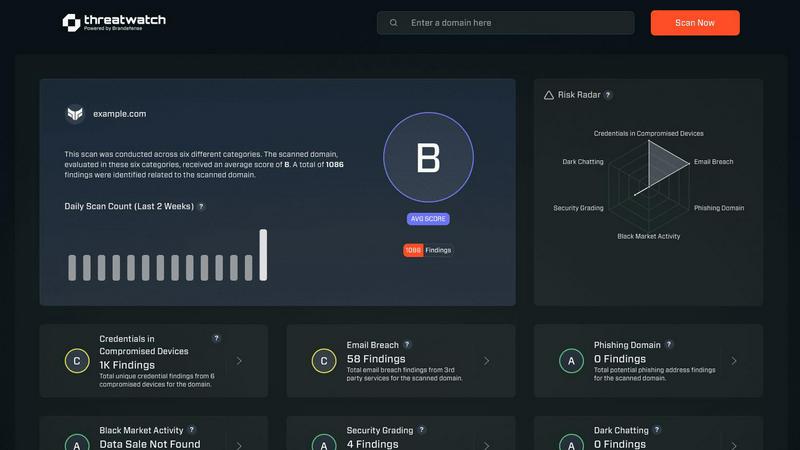
Threat Watch provides a unified, real-time dashboard that evaluates an organization's overall cybersecurity posture. It systematically scans and analyzes multiple critical security categories, delivering a clear and consolidated view of risks. This holistic assessment transforms disparate data points into an understandable security health score, enabling teams to quickly grasp their current standing and identify areas requiring immediate attention.
Automated Compromised Credentials Detection
The platform continuously monitors data breaches and leak repositories to identify if employee credentials, such as emails and passwords, have been exposed. This automated surveillance extends beyond public databases to include dark web sources, ensuring that stolen login information is flagged promptly. This allows security teams to enforce password resets and implement multi-factor authentication before accounts can be abused.
Breached Account and Phishing Risk Monitoring
Threat Watch actively tracks instances where corporate email accounts appear in known data breaches or are being used in phishing campaigns. It identifies if company domains are being spoofed or impersonated, alerting organizations to active phishing threats targeting their employees or customers. This early warning system is crucial for preempting social engineering attacks and protecting brand reputation.
External Attack Surface Analysis
The solution automates the discovery and assessment of an organization's externally visible digital assets, including domains, IP addresses, and associated services. It identifies misconfigurations, outdated software, and unintended exposures that could serve as entry points for attackers. This continuous mapping provides a clear picture of the external attack surface, enabling proactive hardening of defenses.
Use Cases
Fusedash
Marketing Performance Monitoring
Marketing teams can leverage Fusedash to create dynamic dashboards that track campaign performance in real time. By visualizing key metrics and trends, marketers can swiftly adjust strategies to optimize ROI and improve engagement.
Operational Efficiency Analysis
Operations teams can utilize Fusedash to visualize workflows and processes. By monitoring key performance indicators, they can identify bottlenecks and areas for improvement, leading to enhanced operational efficiency and productivity.
Financial Reporting
Finance teams can benefit from Fusedash by creating comprehensive financial reports and dashboards that provide a clear view of revenue, expenses, and key financial metrics. This transparency aids in informed decision-making and strategic planning.
Sales Performance Tracking
Sales teams can use Fusedash to analyze sales data and performance metrics. By creating dashboards that highlight top-performing products, sales trends, and regional performance, teams can adjust their strategies to drive sales growth effectively.
Threat Watch
Proactive Risk Management for IT Security Teams
Security operations and IT teams use Threat Watch to shift from a reactive, alert-driven model to a proactive risk management stance. By having a centralized, real-time view of external threats like compromised credentials and dark web exposures, teams can prioritize remediation efforts based on actual risk, allocate resources more effectively, and prevent incidents before they escalate into full-scale breaches.
Compliance and Audit Readiness
Compliance officers and auditors leverage the platform to demonstrate due diligence in monitoring third-party and digital risks. The comprehensive reports and historical data provided by Threat Watch serve as evidence of continuous security monitoring, helping organizations meet regulatory requirements for data protection, risk assessment, and incident response preparedness across various frameworks.
Executive and Board-Level Security Reporting
Business leaders and board members utilize Threat Watch's clear, dashboard-driven insights to understand the organization's cyber risk in business terms. The platform translates technical vulnerabilities into prioritized business risks, facilitating informed decision-making regarding security investments and providing assurance that the digital attack surface is being actively managed.
Vendor and Third-Party Risk Assessment
Organizations extend their security monitoring to assess the cyber health of key partners and vendors. By analyzing the external digital footprint of third parties, businesses can identify if a supplier's breached data or exposed assets pose a downstream risk to their own network, enabling more informed vendor risk management and contract discussions.
Overview
About Fusedash
Fusedash is an advanced AI-powered data visualization platform designed to streamline the process of transforming connected data into clear and actionable insights. It serves as a comprehensive workspace for teams to create visually engaging dashboards, interactive charts, detailed maps, and narrative reports without the need to replicate the same logic across multiple disconnected tools. The platform's core value proposition lies in providing consistency and efficiency; users can define key performance indicators (KPIs) and metrics once and then apply these consistent definitions across various views and reports. This ensures that all stakeholders, from leadership to marketing and operations, are aligned and relying on the same trustworthy data. Fusedash is particularly beneficial for teams tired of cumbersome manual reporting cycles and inconsistent data narratives. It empowers users to monitor real-time data and delve into the reasons behind trends by exploring segments, regions, or time periods. With integrated AI capabilities such as natural language data chat and smart visualization assistance, Fusedash simplifies data exploration and reporting, transforming raw data into a reliable source of truth that drives organizational alignment and action.
About Threat Watch
Threat Watch is a unified cybersecurity intelligence platform designed to provide organizations with a comprehensive and real-time view of their digital security posture. It functions as a centralized hub for cyber health assessment, continuously analyzing an organization's external digital footprint, assets, vulnerabilities, and exposures. The platform's core mission is to transform complex, fragmented threat data into a clear, actionable picture of risk. By automating the discovery and assessment of critical security categories, Threat Watch empowers IT security teams, compliance officers, and business leaders to move from reactive defense to proactive risk management. Its primary value proposition lies in its speed and clarity; it rapidly identifies issues like compromised credentials, breached accounts, phishing risks, and dark web exposures, allowing teams to prioritize and mitigate threats faster than traditional manual methods. It is ideally suited for businesses of all sizes seeking to understand their external attack surface and strengthen their defenses against evolving cyber threats. The platform's "Uncover your Cyber Security Health, Fast!" approach delivers immediate insights, enabling organizations to take swift, informed action to secure their digital perimeter.
Frequently Asked Questions
Fusedash FAQ
What types of data can I connect to Fusedash?
Fusedash allows users to connect a variety of data sources, including CSV files, APIs, and even public datasets. This flexibility ensures that users can aggregate their data seamlessly for comprehensive analysis.
Is Fusedash suitable for non-technical users?
Yes, Fusedash is designed to be user-friendly and accessible, enabling non-technical users to create insightful dashboards and reports without needing advanced data skills. Its AI features further simplify the process of data visualization.
Can I share my dashboards with other team members?
Absolutely. Fusedash allows users to share dashboards and reports easily, ensuring that all stakeholders have access to consistent and transparent data views, which fosters collaboration and alignment across teams.
How does Fusedash ensure data consistency?
Fusedash enables users to define key metrics and KPIs once, which can then be reused across all views and reports. This eliminates discrepancies and ensures that all teams are referring to the same reliable data for their analyses.
Threat Watch FAQ
What does Threat Watch actually scan and monitor?
Threat Watch performs a non-intrusive external scan of your organization's digital footprint. It monitors for compromised employee credentials in data breaches, detects corporate accounts involved in phishing schemes, identifies exposed company data on the dark web, and analyzes publicly accessible assets for vulnerabilities. It does not require internal network access or agents installed on your systems.
How quickly can I see results after starting a scan?
The platform is designed for speed and immediate insight. Upon initiating a scan, Threat Watch begins processing data from its continuously updated intelligence feeds. You can start seeing initial results, such as identified compromised credentials or breached accounts, very quickly, allowing for rapid assessment of your critical security health categories.
Is Threat Watch suitable for a small business without a dedicated security team?
Absolutely. Threat Watch is built for organizations of all sizes. Its centralized dashboard and clear, prioritized findings are designed to be actionable even for users without deep cybersecurity expertise. Small businesses can use it to understand their external risk exposure, take simple corrective actions like password changes, and significantly improve their security posture.
How does Threat Watch help in preventing a cyber attack?
Threat Watch enables prevention by focusing on pre-attack indicators. By identifying stolen credentials, phishing setups, and exposed assets before they are actively weaponized by attackers, the platform provides a crucial window for remediation. This allows you to reset passwords, take down phishing sites, and patch vulnerabilities proactively, closing doors that attackers would otherwise use to gain entry.
Alternatives
Fusedash Alternatives
Fusedash is an AI-powered data visualization platform that falls within the Analytics & Data and Business Intelligence categories. It helps teams convert their raw data into actionable insights through clear dashboards and charts, promoting a unified workspace where metrics and KPIs are consistently applied across various reports and views. Users often seek alternatives to Fusedash for several reasons, including pricing, specific feature sets, or varying platform requirements that better fit their organizational needs. When choosing an alternative, it's essential to consider factors such as ease of use, integration capabilities, scalability, and the ability to provide real-time insights while maintaining data accuracy and consistency.
Threat Watch Alternatives
Threat Watch is a cybersecurity intelligence platform that provides businesses with a real-time, actionable view of their external digital security posture. It automates the discovery of vulnerabilities like exposed credentials and dark web exposures, delivering a clear cyber health score to guide risk management. Users explore alternatives for various reasons, including budget constraints, specific feature requirements not covered by a single platform, or the need to integrate with an existing security tech stack. The search often stems from a desire to compare capabilities, pricing models, or scalability for different organizational sizes. When evaluating alternatives, key considerations should include the scope of external attack surface monitoring, the depth and speed of threat intelligence, the clarity of risk prioritization, and the overall value relative to cost. The goal is to find a solution that effectively transforms complex threat data into proactive, defensible actions.