
File Studio vs Yardyly
Side-by-side comparison to help you choose the right product.

File Studio
File Studio provides powerful offline tools to securely convert, edit, and manage files and PDFs on your computer.
Last updated: February 26, 2026

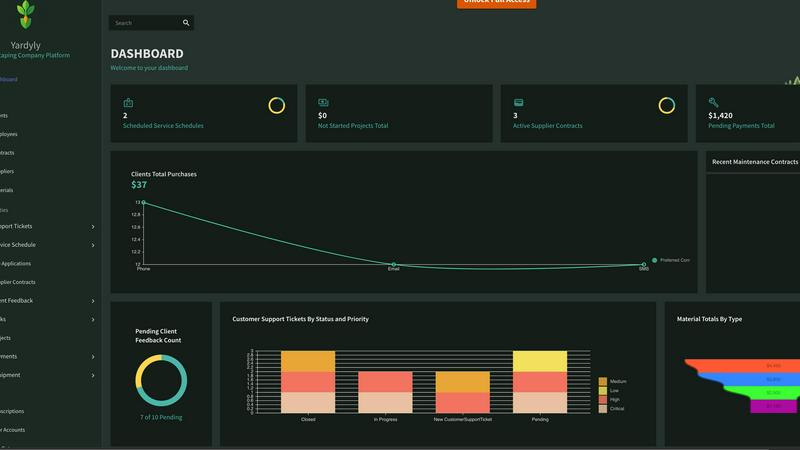
Yardyly is an all-in-one software that simplifies managing and growing your landscaping business efficiently.
Last updated: March 4, 2026
Visual Comparison
File Studio

Yardyly
Feature Comparison
File Studio
5 PDF Tools
File Studio provides users with essential PDF management tools, including the ability to merge multiple PDFs, split documents into individual pages, reorder and rotate spreads, and remove passwords. All these tasks are performed offline, ensuring that users maintain complete control over their sensitive documents without uploading them anywhere.
10 Image Tools
With support for over 20 different image formats, File Studio equips users with tools to convert, resize, compress, crop, and add watermarks to their images. This versatility allows users to handle various file types including HEIC, WebP, AVIF, and 14 different RAW formats, making it an ideal choice for photographers and graphic designers.
Batch Processing
File Studio excels in its ability to process multiple files simultaneously, making it possible to convert, resize, or compress entire folders with just a single command. This batch processing feature enhances productivity and efficiency, allowing users to manage large volumes of files in one go without compromising on quality.
100% Offline Functionality
One of the standout features of File Studio is its commitment to offline processing. All file operations take place locally on the user's device, meaning that no uploads or accounts are required. This guarantees the privacy and security of sensitive documents, as users can complete their tasks without ever exposing their data to the internet.
About Yardyly
Custom Setup
Yardyly offers a highly customizable setup, allowing users to tailor the application to their specific business needs. You can adjust settings and create custom fields for any aspect of your operations, making it a versatile tool for various landscaping scenarios.
Operational Insight
Gain comprehensive visibility into your daily operations with Yardyly's operational insight feature. Easily track tasks, schedules, and support tickets, enabling you to monitor progress and ensure that everything runs smoothly.
Finance Tracker
Keep your finances in check with Yardyly's finance tracker. This feature allows you to monitor all financial transactions, including supplier contracts and client payments, ensuring precise fiscal control and improved financial health.
Automated Scheduling
Optimize team efficiency with Yardyly's automated scheduling capabilities. The drag-and-drop interface allows for seamless planning and resource allocation, making it easier to manage employee schedules and service appointments.
Use Cases
File Studio
Secure Document Management
File Studio is perfect for professionals who need to manage sensitive documents securely. Whether it is contracts, passports, or identification cards, users can perform all necessary operations without the risk of exposing their data online.
Photo Editing and Conversion
For photographers, File Studio serves as an all-in-one solution for editing and converting images. Users can easily convert HEIC files from their iPhones to JPG, resize images for web uploads, and apply compression without any quality loss, all from a single application.
Efficient File Organization
Remote workers and freelancers often deal with multiple files and formats. File Studio simplifies the organization of documents by allowing users to merge, split, and rearrange PDFs, making it easier to create cohesive presentations or reports.
Streamlined Workflow
With its batch processing capabilities, File Studio allows users to handle hundreds of files at once, significantly streamlining workflows. This is especially beneficial for projects that require managing large datasets or preparing numerous files for submission.
Yardyly
Solo Landscaping Entrepreneur
For a solo operator just starting in the landscaping industry, Yardyly simplifies business management. With features like online booking and invoicing, you can focus on cultivating beautiful landscapes while the software handles administrative tasks.
Growing Landscaping Team
As your landscaping team grows, Yardyly helps streamline communication and coordination. Team members can easily update job statuses and share feedback, ensuring everyone is aligned and projects are completed efficiently.
Client Engagement
Yardyly enhances client engagement by allowing you to gather real-time feedback on services provided. This feature fosters better relationships with clients, as their input can be directly incorporated into ongoing projects and future planning.
Resource Management
For landscaping companies managing multiple projects, Yardyly provides a centralized hub for resource management. You can track equipment usage and oversee project budgets, ensuring that resources are allocated effectively and projects remain on budget.
Overview
About File Studio
File Studio is a powerful desktop application tailored for managing PDFs and images with a strong emphasis on privacy and security. Designed for users who prefer offline solutions, it is perfect for photographers, freelancers, and remote workers who often handle sensitive documents such as passports, IDs, and contracts. With File Studio, users can perform a variety of file management tasks without the concern of uploading their data to the cloud. The application offers a unique value proposition by allowing users to merge, split, reorder, rotate, and password-protect PDF files while also converting them among over 20 formats, including HEIC, WebP, AVIF, and various RAW types. Its one-time purchase model eliminates the need for subscriptions or accounts, making it accessible for both Mac and Windows users who seek reliable and efficient file management tools.
About Yardyly
Yardyly is a comprehensive digital solution tailored specifically for landscaping, lawn care, and outdoor service businesses. This all-in-one platform is designed to address the unique challenges faced by the green industry, enabling users to streamline their operations and enhance productivity. By integrating essential tools such as online booking, job scheduling, customer relationship management (CRM), invoicing, and team coordination, Yardyly transforms the way landscaping companies manage their daily tasks. Whether you are a solo entrepreneur or leading a larger team, Yardyly simplifies administrative processes and fosters better communication with clients and crew. Its mobile-friendly interface allows for management on-the-go, ensuring that you can check schedules, update job statuses, and track revenue anytime, anywhere. Ultimately, Yardyly empowers you to focus on creating stunning outdoor spaces while cultivating your business's success.
Frequently Asked Questions
File Studio FAQ
Is my data ever uploaded?
No. File Studio processes everything locally on your device. Your files never leave your computer, ensuring 100% offline processing and maximum privacy.
Do you offer a free trial?
Yes. File Studio provides a free trial, allowing users to explore its features and functionalities before making a purchase decision.
What file formats does File Studio support?
File Studio supports over 20 different formats, including popular image formats like HEIC, JPG, WebP, AVIF, and a variety of RAW types, as well as comprehensive PDF management capabilities.
Can I use File Studio on both Mac and Windows?
Yes. File Studio is designed to work seamlessly on both Mac and Windows operating systems, making it accessible to a wide range of users without compatibility issues.
Yardyly FAQ
What types of businesses can benefit from Yardyly?
Yardyly is specifically designed for landscaping, lawn care, and outdoor service businesses. It caters to both individual operators and larger teams, making it versatile for various business sizes and needs.
Is Yardyly easy to use for someone not tech-savvy?
Yes, Yardyly is built with an intuitive drag-and-drop interface that simplifies navigation. This user-friendly design allows even those with limited technical skills to manage their landscaping operations effectively.
Can I access Yardyly on mobile devices?
Absolutely. Yardyly is designed to be mobile-friendly, allowing you to manage your business operations, check schedules, and update job statuses from any device, whether you are in the office or on the go.
How does Yardyly enhance team collaboration?
Yardyly improves team collaboration through features that allow team members to communicate seamlessly. Updates on job statuses and task assignments can be shared in real-time, ensuring everyone is on the same page and working efficiently.
Alternatives
File Studio Alternatives
File Studio is a powerful desktop application designed for productivity and management, allowing users to convert, edit, and manage files and PDFs offline. It is particularly appealing to those who value privacy and security, as it processes documents entirely on your local machine. However, users often seek alternatives due to various reasons such as pricing, the breadth of features, user experience, or compatibility with different operating systems. When looking for an alternative to File Studio, consider factors such as the specific tools offered, ease of use, and whether the application meets your particular platform needs. Additionally, assess the pricing structure—whether it involves subscriptions or a one-time payment—as well as the level of offline functionality to ensure that your sensitive information remains secure.
Yardyly Alternatives
Yardyly is an all-in-one software solution designed specifically for the landscaping, lawn care, and outdoor service industry. By providing essential tools such as online booking, job scheduling, customer management, invoicing, and team coordination, it serves as a centralized hub for businesses aiming to enhance their operational efficiency. Users often seek alternatives to Yardyly for various reasons, such as budget constraints, specific feature requirements, or compatibility with existing platforms. When choosing an alternative, it’s important to consider factors like ease of use, the scalability of features, customer support, and integration capabilities to ensure that the solution aligns with your business needs and growth plans.