
DocuExtractor vs Zovo
Side-by-side comparison to help you choose the right product.

DocuExtractor
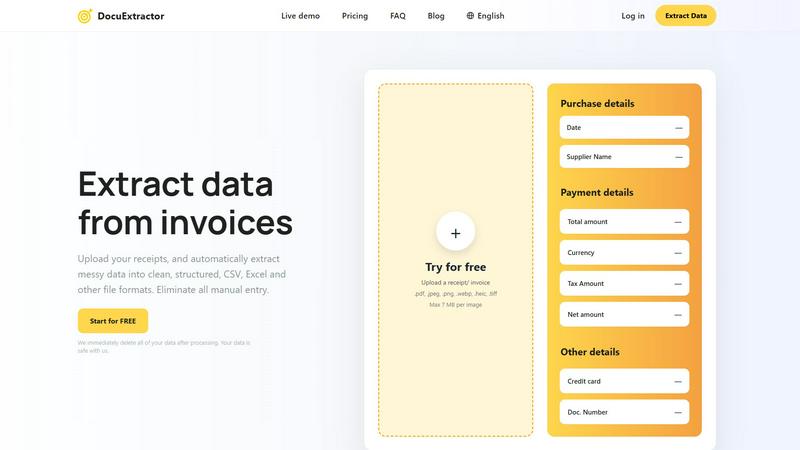
DocuExtractor swiftly transforms messy receipts and invoices into organized Excel or CSV files for effortless data.
Last updated: February 28, 2026

Zovo offers 20 privacy-focused Chrome extensions for developers and writers with one subscription for all tools.
Last updated: February 26, 2026
Visual Comparison
DocuExtractor
Zovo

Feature Comparison
DocuExtractor
Advanced OCR Technology
DocuExtractor leverages state-of-the-art Optical Character Recognition technology to accurately read and extract data from a wide variety of document types. This ensures high precision in data extraction, significantly reducing the chances of human error typically associated with manual entry.
Batch Processing Capability
Users can upload multiple documents at once, allowing for batch processing. This feature saves valuable time, enabling accountants and bookkeepers to handle large volumes of receipts and invoices efficiently, without the need to process each document individually.
Seamless Data Export
Once data is extracted, DocuExtractor allows users to download it in popular formats such as CSV and Excel. This seamless export process ensures that the data is readily available for import into various accounting software, enhancing overall workflow efficiency.
Multilingual Support
DocuExtractor supports over 45 languages, featuring automatic language detection. This is particularly beneficial for global organizations or professionals dealing with documents in multiple languages, ensuring accurate data extraction regardless of the document's origin.
Zovo
BeLikeNative
BeLikeNative helps users write like native speakers with just one keystroke. It supports 80 languages, making it an invaluable tool for multilingual users who want to enhance their writing skills quickly and effortlessly.
Tab Suspender Pro
Tab Suspender Pro automatically suspends inactive tabs to save memory and improve browser performance. With smart detection and memory tracking features, users can enjoy a smoother browsing experience without the hassle of manually managing their tabs.
JSON Formatter Pro
JSON Formatter Pro allows users to format, validate, and explore JSON data right in their browser. It offers beautification and minification options, as well as a tree explorer for easy navigation, making it an essential tool for developers working with JSON.
Clipboard History Pro
Clipboard History Pro ensures that users never lose copied text again. With the ability to store up to 10,000 clips, it features instant search and smart paste functionality, allowing users to retrieve and use their copied content efficiently.
Use Cases
DocuExtractor
Streamlining Financial Workflows
Accountants can use DocuExtractor to automate the extraction of data from invoices and receipts, saving hours of manual entry each week. This enables them to focus on more strategic tasks, such as financial analysis and planning.
Enhancing Data Accuracy
Bookkeepers benefit from the high accuracy rate of DocuExtractor, allowing them to confidently process financial documents without the worry of transcription errors. This improves the reliability of financial reports and records.
Quick Document Management
Businesses can quickly manage their financial documents by utilizing DocuExtractor for batch processing. This is particularly useful during tax season or financial audits, where time-efficient data handling can make a significant difference.
Supporting Remote Teams
With DocuExtractor's cloud-based platform, remote teams can collaborate seamlessly. Team members can upload documents from different locations, ensuring that everyone has access to the latest data and insights without delays.
Zovo
Enhancing Writing Skills
With BeLikeNative, users can improve their writing in real-time, making it ideal for students, professionals, and anyone needing to communicate effectively in multiple languages. It simplifies the writing process by providing instant rewrites.
Optimizing Browser Performance
Tab Suspender Pro is perfect for users who frequently juggle multiple tabs. By automatically suspending inactive tabs, it helps in reducing memory usage and keeping the browser responsive, making it a must-have for power users.
Simplifying JSON Workflows
Developers and data analysts can greatly benefit from JSON Formatter Pro, which streamlines the process of working with JSON data. It allows users to view, validate, and manipulate JSON with ease, thus speeding up their workflows significantly.
Managing Clipboard Content
Clipboard History Pro is a game-changer for anyone who frequently copies and pastes text. Whether for research, writing, or coding, this tool allows users to access previously copied items instantly, enhancing productivity and efficiency.
Overview
About DocuExtractor
DocuExtractor is a cutting-edge document conversion and data extraction software designed to streamline the often tedious process of manual data entry. This innovative tool automates the extraction of vital data from various financial documents, making it an essential solution for professionals such as accountants and bookkeepers. By transforming unstructured and disorganized documents—including receipts, invoices, bank statements, PDFs, and JPG files—into clean, structured data, DocuExtractor enhances productivity and ensures accuracy. Utilizing advanced Optical Character Recognition (OCR) technology, combined with deep learning and artificial intelligence, DocuExtractor efficiently identifies and extracts key information fields such as dates, supplier names, total amounts, tax details, and document numbers. The extracted data is then seamlessly converted into organized formats like CSV and Excel, making it easy to import into accounting software or conduct further analysis. The primary value proposition of DocuExtractor lies in its ability to save time, reduce human error, and significantly improve workflow efficiency, allowing financial teams to focus on higher-value tasks rather than be bogged down by manual data entry.
About Zovo
Zovo is a comprehensive suite of 20 Chrome extensions crafted by a solo developer with over 10 years of experience and an impressive track record of $400K+ earned on Upwork, boasting a 100% success rate. The flagship extension, BeLikeNative, empowers more than 3,300 users to write like native speakers by providing one-keystroke rewrites in an impressive 80 languages. This suite includes essential tools such as Tab Suspender Pro, JSON Formatter Pro, Clipboard History Pro, Form Filler Pro, Session Manager Pro, Regex Tester Pro, and Web Scraper Lite, among others. Each extension is built with a strong commitment to privacy, ensuring that user data never leaves their device. With no data harvesting and no outside investors, Zovo prioritizes user control by allowing users to vote on features and influence the development roadmap. New extensions are released monthly, with early access provided to members. Additionally, many tools are available for free online at zovo.one, making Zovo a valuable resource for anyone looking to enhance their browser experience without compromising their privacy.
Frequently Asked Questions
DocuExtractor FAQ
How does DocuExtractor ensure data security?
DocuExtractor prioritizes data security by immediately deleting all processed documents after extraction. This practice ensures that sensitive financial information is kept safe and secure, giving users peace of mind.
Can I use DocuExtractor for multiple document types?
Yes, DocuExtractor is designed to handle a variety of document types, including receipts, invoices, bank statements, PDFs, and JPG files. This versatility makes it an ideal tool for various financial data extraction needs.
What formats can I export my data to?
Users can export extracted data in popular formats such as CSV and Excel. This flexibility allows for easy integration with various accounting software and further data analysis.
Is there a limit to how many documents I can process at once?
DocuExtractor allows for batch processing, enabling users to upload multiple documents at a time. However, each document must not exceed the maximum size limit of 7 MB for optimal processing efficiency.
Zovo FAQ
What type of data does Zovo collect?
Zovo is committed to user privacy and does not collect any personal data. All operations are performed locally on the user's device, ensuring that no data is harvested or transmitted.
How can I request new features for Zovo extensions?
Users can submit feature requests directly through the Zovo platform. The developer reads every request, and the most requested features are prioritized for development.
Is there a community for Zovo users?
Yes, Zovo has a dedicated Discord community where users can interact, share feedback, and discuss features. This platform fosters collaboration and helps shape the future of Zovo extensions.
Are Zovo extensions free to use?
Many Zovo tools are available for free online at zovo.one. However, some extensions may have premium features that require a subscription for full access, providing users with options to suit their needs.
Alternatives
DocuExtractor Alternatives
DocuExtractor is a sophisticated document conversion and data extraction software designed to automate the tedious process of manual data entry, particularly in the financial sector. This tool is essential for professionals like accountants and bookkeepers who regularly manage an array of messy documents, such as receipts and invoices. By transforming unstructured data into organized formats like Excel and CSV, DocuExtractor enables users to streamline their workflow and significantly enhance productivity. Users often seek alternatives to DocuExtractor for various reasons, including pricing, specific feature requirements, or compatibility with different platforms. The landscape of data extraction tools is vast, and organizations may find that their unique needs align better with other solutions. When selecting an alternative, it is important to evaluate factors such as ease of use, accuracy of data extraction, support for multiple file formats, and the ability to handle batch processing effectively.
Zovo Alternatives
Zovo is a comprehensive suite of 20 privacy-first Chrome extensions designed specifically for developers and writers. This collection includes tools such as JSON Formatter, Tab Suspender, and Clipboard History, all created by a solo developer with extensive experience. Users often seek alternatives to Zovo due to various factors such as pricing, specific feature needs, or compatibility with different platforms. It’s essential to consider the overall functionality, user experience, and privacy policies of any alternative to ensure it meets your unique requirements. When searching for an alternative, look for solutions that offer similar functionalities without compromising on user privacy. Evaluate the available features, ease of use, and customer support options. Additionally, consider whether the alternative allows for user feedback and feature requests, as this can enhance your overall experience and satisfaction with the tool.