
DocuExtractor
DocuExtractor swiftly transforms messy receipts and invoices into organized Excel or CSV files for effortless data.
Visit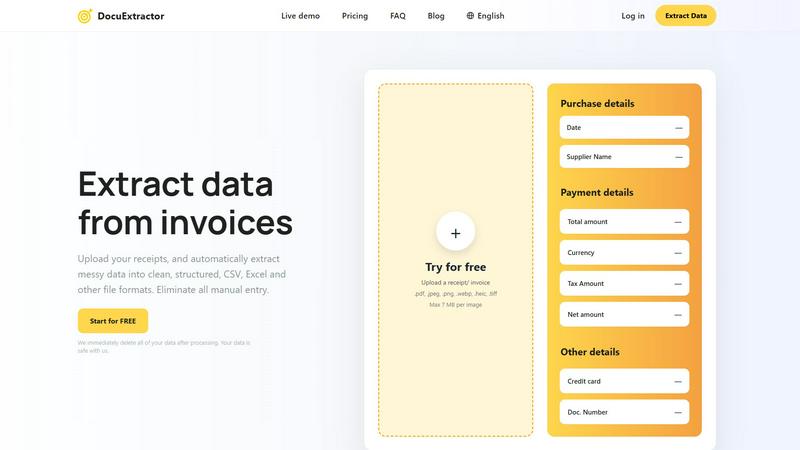
About DocuExtractor
DocuExtractor is a cutting-edge document conversion and data extraction software designed to streamline the often tedious process of manual data entry. This innovative tool automates the extraction of vital data from various financial documents, making it an essential solution for professionals such as accountants and bookkeepers. By transforming unstructured and disorganized documents—including receipts, invoices, bank statements, PDFs, and JPG files—into clean, structured data, DocuExtractor enhances productivity and ensures accuracy. Utilizing advanced Optical Character Recognition (OCR) technology, combined with deep learning and artificial intelligence, DocuExtractor efficiently identifies and extracts key information fields such as dates, supplier names, total amounts, tax details, and document numbers. The extracted data is then seamlessly converted into organized formats like CSV and Excel, making it easy to import into accounting software or conduct further analysis. The primary value proposition of DocuExtractor lies in its ability to save time, reduce human error, and significantly improve workflow efficiency, allowing financial teams to focus on higher-value tasks rather than be bogged down by manual data entry.
Features of DocuExtractor
Advanced OCR Technology
DocuExtractor leverages state-of-the-art Optical Character Recognition technology to accurately read and extract data from a wide variety of document types. This ensures high precision in data extraction, significantly reducing the chances of human error typically associated with manual entry.
Batch Processing Capability
Users can upload multiple documents at once, allowing for batch processing. This feature saves valuable time, enabling accountants and bookkeepers to handle large volumes of receipts and invoices efficiently, without the need to process each document individually.
Seamless Data Export
Once data is extracted, DocuExtractor allows users to download it in popular formats such as CSV and Excel. This seamless export process ensures that the data is readily available for import into various accounting software, enhancing overall workflow efficiency.
Multilingual Support
DocuExtractor supports over 45 languages, featuring automatic language detection. This is particularly beneficial for global organizations or professionals dealing with documents in multiple languages, ensuring accurate data extraction regardless of the document's origin.
Use Cases of DocuExtractor
Streamlining Financial Workflows
Accountants can use DocuExtractor to automate the extraction of data from invoices and receipts, saving hours of manual entry each week. This enables them to focus on more strategic tasks, such as financial analysis and planning.
Enhancing Data Accuracy
Bookkeepers benefit from the high accuracy rate of DocuExtractor, allowing them to confidently process financial documents without the worry of transcription errors. This improves the reliability of financial reports and records.
Quick Document Management
Businesses can quickly manage their financial documents by utilizing DocuExtractor for batch processing. This is particularly useful during tax season or financial audits, where time-efficient data handling can make a significant difference.
Supporting Remote Teams
With DocuExtractor's cloud-based platform, remote teams can collaborate seamlessly. Team members can upload documents from different locations, ensuring that everyone has access to the latest data and insights without delays.
Frequently Asked Questions
How does DocuExtractor ensure data security?
DocuExtractor prioritizes data security by immediately deleting all processed documents after extraction. This practice ensures that sensitive financial information is kept safe and secure, giving users peace of mind.
Can I use DocuExtractor for multiple document types?
Yes, DocuExtractor is designed to handle a variety of document types, including receipts, invoices, bank statements, PDFs, and JPG files. This versatility makes it an ideal tool for various financial data extraction needs.
What formats can I export my data to?
Users can export extracted data in popular formats such as CSV and Excel. This flexibility allows for easy integration with various accounting software and further data analysis.
Is there a limit to how many documents I can process at once?
DocuExtractor allows for batch processing, enabling users to upload multiple documents at a time. However, each document must not exceed the maximum size limit of 7 MB for optimal processing efficiency.
Explore more in this category:
Similar to DocuExtractor

AI Email Filter sorts incoming mail into folders using plain-language prompts you write. Works with any IMAP mailbox; bring your own LLM if you want.

No-code 2D game editor: visual node logic, drag-and-drop scenes, live preview. Exports to Windows, macOS, Linux, Android, iOS, Web.

Free collection of online developer utilities, code formatters, and digital converters designed to streamline your daily workflow.

All-in-One POS, Inventory & Accounting Software for Bangladeshi Businesses

Online tally counter for tracking attendance, workouts, inventory, visitors, sports scores, habits, and everyday counting tasks.

The #1 Native Form Builder Plugin for Framer - No Code, No Embeds, No External Platforms.


A free launch checklist for SaaS, apps, AI tools and more. Every step says why it matters and when you can skip it.