
Coursebricks vs FilexHost
Side-by-side comparison to help you choose the right product.
Coursebricks
Coursebricks is a comprehensive platform for managing training courses, registrations, CRM, and automating workflows.
Last updated: March 1, 2026

FilexHost
Easily host and share any file with a simple drag and drop, getting a live URL in seconds.
Last updated: February 26, 2026
Visual Comparison
Coursebricks
FilexHost

Feature Comparison
Coursebricks
Course Scheduling
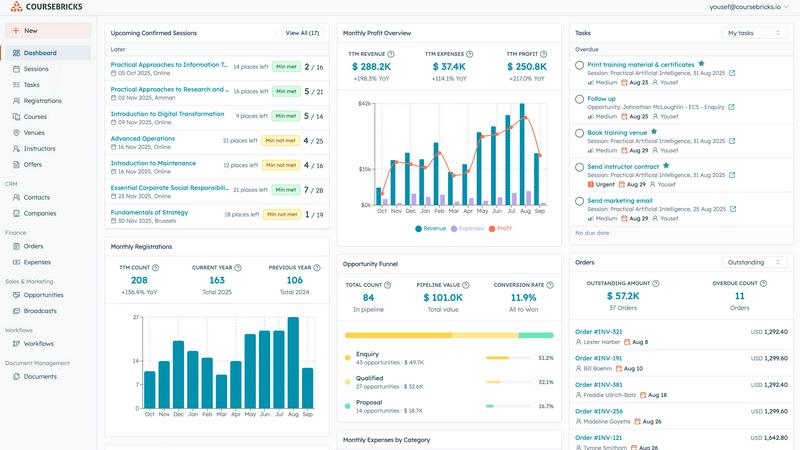
Manage your entire course schedule from one unified view. With Coursebricks, you can assign instructors, venues, and training materials to each course, track availability, and manage conflicts without the hassle of switching between multiple spreadsheets.
Website Integration
Display and sell your courses directly through your own branded website. Coursebricks enables you to accept registrations seamlessly, offering both card payments and invoice-based bookings while capturing all customer data automatically in your CRM.
Automations & Workflows
Automate critical communications with ease. Coursebricks allows you to send automated confirmation emails, share training materials, follow up with payment reminders, distribute surveys, and deliver certificates, ensuring all communications are efficiently tracked.
Email Marketing & Broadcasts
Increase course enrollment with targeted email campaigns using advanced filtering. Coursebricks helps you send personalized promotions to the right audience, boosting fill rates and generating more leads through automated, segmented campaigns that convert effectively.
FilexHost
Instant Subdomains
FileXHost provides instant subdomains for every uploaded file, allowing users to share links in the format of your-file.filex.host. This feature requires zero setup, making it incredibly convenient for quick sharing.
Free SSL Encryption
Every link generated by FileXHost comes with free SSL encryption, ensuring that all shared files are securely transmitted. This feature protects user data and builds trust with recipients by providing a secure environment for file sharing.
Smart View Modes
FileXHost offers smart view modes that allow users to choose how their files are presented. Options include direct rendering for immediate viewing or a download page depending on the recipient's needs, enhancing flexibility in sharing.
Built-in File Viewers
With built-in viewers for various file types, FileXHost supports formats like PDFs, images, videos, and archives. The platform automatically renders files to provide an optimal viewing experience directly in the browser, eliminating the need for additional software.
Use Cases
Coursebricks
Corporate Training Programs
Organizations can utilize Coursebricks to manage internal training initiatives, ensuring that employee development programs are organized and efficient. With features like scheduling and automated communications, companies can enhance their training operations.
Educational Institutions
Schools and universities can leverage Coursebricks to streamline course offerings, manage registrations, and facilitate payments. This integration simplifies the administration of educational programs and enhances the learning experience for students.
Professional Development Workshops
Training providers can use Coursebricks to offer professional development workshops, manage venue bookings, and handle participant registrations. The platform's automation capabilities streamline the entire process from marketing to follow-up communications.
Freelance Trainers
Independent trainers can benefit from Coursebricks by managing their courses, venues, and client communications all in one place. The platform allows them to maintain a professional appearance while automating tasks, freeing up time to focus on delivering quality training.
FilexHost
Professional Reports Sharing
Professionals can utilize FileXHost to share client reports and presentations effortlessly. The ability to generate shareable links instantly allows for quick distribution and feedback, streamlining communication processes.
Developer Landing Pages
Developers can host landing pages or mock APIs using FileXHost without the hassle of server management. The platform's drag-and-drop interface makes it easy to upload HTML files or ZIP archives, allowing for rapid deployment.
Digital Products Distribution
Creators can distribute digital products, such as eBooks or software, through FileXHost. The secure sharing options, including password protection and link expiration, ensure that products are delivered safely and privately.
Educational Content Sharing
Educators can share lecture notes, multimedia resources, and study materials with students. FileXHost's ability to host various file types and render them for easy access makes it a valuable tool in educational settings.
Overview
About Coursebricks
Coursebricks is a comprehensive, all-in-one training management software platform tailored for training providers, corporate learning departments, and educational institutions. This platform streamlines and automates the entire lifecycle of organizing and delivering professional training, allowing organizations to eliminate administrative complexity and scale their operations effectively. By consolidating crucial functions like course scheduling, registrations, payments, customer relationship management (CRM), and detailed reporting, Coursebricks provides a unified system that enhances operational efficiency.
The main value proposition lies in empowering training organizations with complete control over their processes, freeing them from the limitations of fragmented tools. Users can publish courses directly to their own branded websites, accept payments without incurring additional platform fees, and automate essential communications such as confirmations, reminders, and digital certificate delivery. With Coursebricks, businesses can transform operational chaos into a streamlined process, allowing them to focus on delivering exceptional learning experiences while gaining valuable insights and flexibility necessary for growth.
About FilexHost
FileXHost is a powerful and intuitive file hosting platform designed to simplify the process of sharing files of any type. Whether you need to share documents, media files, spreadsheets, or entire websites, FileXHost offers a seamless solution that eliminates traditional barriers to file sharing. With its "Drop & Share" workflow, users can easily drag and drop files to receive instant, secure URLs for sharing without the need for complex server setups or DNS configurations. This service caters to a wide audience, including professionals sharing client reports, developers hosting landing pages, and creators distributing digital products. The main value proposition of FileXHost lies in its user-friendly interface and efficient file rendering capabilities, ensuring that recipients experience the files as intended without unnecessary downloads or plugins.
Frequently Asked Questions
Coursebricks FAQ
What is a training management system?
A training management system is a software solution that helps organizations manage the entire lifecycle of training programs, from scheduling and registrations to payments and reporting. It centralizes various administrative tasks into one platform.
Do I need technical knowledge to use Coursebricks?
No, Coursebricks is designed to be user-friendly and intuitive. Users do not need extensive technical knowledge to navigate the platform, as it provides clear guidance and support to help you maximize its features.
Can Coursebricks be customized to fit our processes?
Yes, Coursebricks allows for customization to fit the specific needs of your organization. You can create custom fields, forms, and automate workflows tailored to your training management processes.
Is my data secure?
Coursebricks prioritizes data security and employs robust measures to protect user information. Regular backups and security protocols are in place to ensure that your data remains safe and accessible.
FilexHost FAQ
What is FileXHost?
FileXHost is an online file hosting and sharing service that allows users to upload and share various file types easily. It simplifies the process of file distribution with instant links and smart rendering options.
Is it really free?
Yes, FileXHost offers a free plan that allows users to host up to 1,000 files with a maximum size of 25MB each. This plan is ad-supported and includes a 7-day expiry for hosted files.
What file types are supported?
FileXHost supports a wide range of file types, including documents (PDF, TXT), spreadsheets (XLSX, CSV), images (JPG, PNG), media files (MP4, MP3), and archives (ZIP), ensuring versatility for users.
How do I update my site?
To update your hosted files on FileXHost, simply upload the new version of the file using the drag-and-drop feature. The platform will automatically generate a new link for the updated file, making the process seamless.
Alternatives
Coursebricks Alternatives
Coursebricks is an all-in-one training management platform designed to simplify the planning and execution of professional training programs. It falls under the productivity and management category, catering to training providers, corporate learning departments, and educational institutions. Users often seek alternatives to Coursebricks for various reasons, including pricing concerns, specific feature sets, or compatibility with existing systems. When evaluating alternatives, it is essential to consider factors such as ease of use, integration capabilities, customer support, and the scalability of the solution to ensure it aligns with your organization’s needs. Choosing the right platform involves understanding your specific training management requirements, such as scheduling, CRM functionalities, payment processing options, and reporting capabilities. A thorough assessment of these features will help you identify the most suitable alternative that can effectively support your training operations without compromising on quality or efficiency.
FilexHost Alternatives
FilexHost is an innovative file hosting service that allows users to swiftly upload and share files through a simple drag-and-drop interface. It falls under the category of productivity and management tools, designed to streamline the process of sharing various file types without the need for extensive technical knowledge. Users often seek alternatives to FilexHost due to factors such as pricing, specific feature sets, or platform compatibility. Whether it's the need for larger file sizes, enhanced security options, or additional analytics, understanding one’s requirements is crucial for finding the right fit. When choosing an alternative to FilexHost, it is important to consider key features, user experience, and the overall ease of use. Look for services that offer reliable performance, security measures such as SSL encryption, and flexible storage options to accommodate various needs. Additionally, assess the support for different file types and the availability of analytics or customization features to ensure the platform aligns with your specific use case.