
conceptviz vs Prompt Builder
Side-by-side comparison to help you choose the right product.

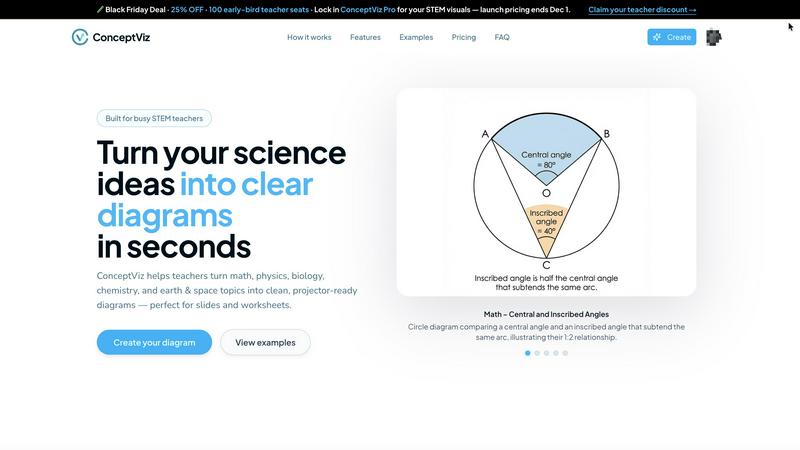
ConceptViz transforms plain-English descriptions into clear, accurate STEM diagrams in minutes for effective teaching.
Last updated: March 1, 2026

Prompt Builder
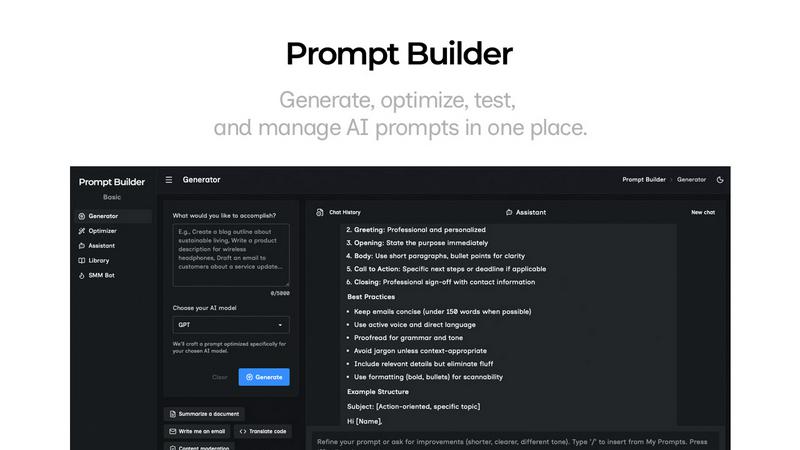
Prompt Builder helps you create, refine, and manage optimized AI prompts for various models in one seamless platform.
Last updated: April 13, 2026
Visual Comparison
conceptviz
Prompt Builder
Feature Comparison
conceptviz
User-Friendly Interface
ConceptViz offers a simple, intuitive interface that allows users to sign in and select their subject matter effortlessly. This makes it accessible for educators and students with varying degrees of technical expertise, enabling them to focus on content rather than navigation.
Plain English Descriptions
Users can describe the diagrams they need in plain English, making the tool approachable for everyone. This feature eliminates the need for specialized terminology, allowing educators to express their ideas freely and receive tailored visuals based on their descriptions.
Projector-Ready Diagrams
All diagrams generated by ConceptViz are designed to be high-resolution and projector-ready. This ensures that visuals maintain clarity and legibility, from the front row to the back of the classroom, making it easier for students to engage with the material.
Subject and Grade Presets
ConceptViz includes quick presets for various subjects and U.S. grade bands, which facilitate the creation of diagrams specifically tailored to different educational levels. This feature allows educators to quickly generate relevant content without the need for extensive customization.
Prompt Builder
Prompt Generator
The Prompt Generator allows users to describe their ideas and select a target AI model to receive a professionally crafted prompt optimized for that specific model. This feature minimizes the time spent crafting prompts and ensures they are tailored for better results.
Chat Refinement
Users can refine their prompts directly within a built-in chat workspace. This feature enables quick iterations, allowing users to modify their prompts based on immediate feedback and suggestions from an assistant model, ensuring clarity and effectiveness.
Prompt Optimizer
The Prompt Optimizer feature lets users paste existing prompts or select them from their Library to receive enhanced versions. It focuses on improving clarity, adding constraints, and suggesting output formats, making it easier for users to produce high-quality prompts quickly.
Prompt Library
The Prompt Library is a centralized place for users to save, organize, and reuse their best prompts across different projects and teams. This feature includes search and filter options by category and model, enabling users to access their prompts efficiently and explore community-contributed prompts.
Use Cases
conceptviz
Classroom Teaching
Educators can use ConceptViz to create customized diagrams for lesson plans, making complex scientific concepts easier to understand for students. This enhances the overall learning experience and supports diverse educational approaches.
Student Projects
Students can utilize ConceptViz to visually represent their research topics or science projects, allowing them to communicate their findings effectively. This encourages creativity and reinforces their understanding of the subject matter.
Lab Instructions
Researchers and educators can generate clear lab instruction diagrams that guide students through experiments. This helps to minimize confusion and increases the likelihood of successful outcomes in laboratory settings.
Assessments and Worksheets
ConceptViz can be used to create visually engaging assessments and worksheets that challenge students while providing clear instructions. This aids in evaluating student comprehension and reinforces learning objectives.
Prompt Builder
Content Creation
Content creators can utilize Prompt Builder to generate high-quality prompts for blog posts, articles, and social media updates. By refining prompts based on audience engagement, they can produce more targeted and effective content in less time.
AI Development
Developers working on AI applications can leverage Prompt Builder to craft and test prompts that interact with various AI models. This ensures that the prompts they use are optimized for the model's strengths, leading to more accurate and relevant outputs.
Educational Purposes
Teachers and educators can use Prompt Builder to create tailored prompts for assignments or interactive learning experiences. The ability to save and refine prompts allows for more personalized learning, catering to different student needs and levels.
Marketing Campaigns
Marketing professionals can generate tailored prompts for social media, email campaigns, and advertisements. By utilizing the platform's chat refinement and community resources, they can craft compelling messages that resonate with their target audiences.
Overview
About conceptviz
ConceptViz is an innovative tool tailored for STEM educators, students, and researchers, designed to facilitate the creation of professional-quality diagrams effortlessly. This platform caters to a wide spectrum of educational needs, from K-12 classrooms to advanced research environments, enhancing the process of visual communication in science and mathematics. By allowing users to generate clear, projector-ready visuals in three simple steps, ConceptViz streamlines the development of lesson plans, lab instructions, and assessments. With support across various subjects—such as physics, biology, chemistry, earth and space science, and math—ConceptViz proves to be an invaluable asset for educators at all levels. Users can articulate their diagram requirements in plain English, and the tool transforms these ideas into high-quality visuals, saving time and improving the learning experience. By concentrating on clarity, consistency, and usability, ConceptViz empowers educators to convey complex scientific concepts in an accessible and engaging manner, ensuring that students can grasp essential ideas with ease.
About Prompt Builder
Prompt Builder is an innovative prompt engineering workspace designed to streamline the process of writing, testing, and saving prompts for various AI models. This tool is tailored for anyone who engages with AI, from casual users to professional developers. The primary value proposition of Prompt Builder lies in its ability to transform a simple idea into a fully optimized prompt in seconds, allowing users to refine their prompts in a chat interface, save different versions, and run them effortlessly when needed. It supports a wide array of AI models, including GPT, Claude, Gemini, Llama, Mistral, DeepSeek, Grok, and Perplexity, making it a versatile choice for users across different platforms. With features like an Optimizer for enhancing existing prompts, a Library for storing reusable prompts, and an easy-to-use assistant for quick testing, Prompt Builder provides an all-in-one solution to maximize productivity and achieve more consistent, high-quality outputs.
Frequently Asked Questions
conceptviz FAQ
What subjects does ConceptViz support?
ConceptViz supports a variety of subjects, including physics, biology, chemistry, earth and space science, and math, making it suitable for K-12 and higher education settings.
How do I create a diagram with ConceptViz?
Creating a diagram is simple: sign in, select your subject and grade level, describe the diagram you need in plain English, and ConceptViz will generate the visual for you to download and use.
Is there a free trial available for ConceptViz?
Yes, ConceptViz offers a free 4K Ultra HD trial, allowing users to explore the platform and create diagrams without the need for a credit card.
Can I use the diagrams in my presentations?
Absolutely! The diagrams created by ConceptViz are high-resolution and projector-ready, making them perfect for use in presentations, slideshows, and printed materials.
Prompt Builder FAQ
How does Prompt Builder improve prompt generation?
Prompt Builder enhances prompt generation by providing a structured approach that allows users to create, refine, and save prompts tailored for specific AI models. This reduces the time and effort needed to craft effective prompts.
What AI models are supported by Prompt Builder?
Prompt Builder supports a variety of AI models, including GPT, Claude, Gemini, Llama, Mistral, DeepSeek, Grok, Perplexity, and more. This wide compatibility ensures that users can work with their preferred models seamlessly.
Is there a limit to the number of prompts I can generate?
Yes, users can start with a free plan that allows 25 assistant requests per month without requiring a credit card. This gives users an opportunity to test the platform’s features before committing to a paid plan.
Can I collaborate with others using Prompt Builder?
Yes, Prompt Builder's Library feature allows users to save and organize prompts that can be shared and reused across teams and projects, promoting collaboration and efficiency in prompt development.
Alternatives
conceptviz Alternatives
ConceptViz is an innovative tool designed to simplify STEM teaching by enabling educators, students, and researchers to create professional-quality diagrams quickly and efficiently. As a part of the education and learning category, it focuses on enhancing visual communication, making complex scientific concepts accessible and engaging. Users often seek alternatives to ConceptViz for various reasons, including pricing, specific feature needs, or compatibility with different platforms. When searching for an alternative, it's essential to consider factors such as ease of use, subject-specific functionalities, quality of visuals, and overall value for educational purposes. --- [{"question": "What is conceptviz?", "answer": "ConceptViz is a tool that helps STEM educators and students generate clear and accurate diagrams from plain-English descriptions in minutes."}, {"question": "Who is conceptviz for?", "answer": "ConceptViz is designed for STEM educators, students, and researchers across various educational levels, from K-12 to advanced studies."}, {"question": "Is conceptviz free?", "answer": "The pricing details for ConceptViz are not specified, but users should check the official website for current subscription options."}, {"question": "What are the main features of conceptviz?", "answer": "Main features of ConceptViz include easy diagram creation, subject-specific presets, high-quality visuals, and a user-friendly interface."}]
Prompt Builder Alternatives
Prompt Builder is a comprehensive prompt engineering workspace designed for users to write, test, and manage AI prompts efficiently. It streamlines the process of turning ideas into actionable prompts across various models like GPT, Claude, and others. As part of the AI Assistants category, it caters to individuals and teams looking to enhance their productivity with AI-generated content. Users often seek alternatives to Prompt Builder for various reasons, including pricing structures, feature sets, and compatibility with specific platforms. When choosing an alternative, it is essential to consider factors such as user interface, ease of integration with existing tools, and the availability of community resources. Ensuring that the chosen solution aligns with personal or organizational needs is crucial for maximizing effectiveness in prompt creation and management.