
Clinic Comply vs Refbox
Side-by-side comparison to help you choose the right product.

Clinic Comply
ClinicComply is the all-in-one platform that keeps Australian medical practices accreditation-ready.
Last updated: March 19, 2026

Refbox keeps your reference images, videos, and notes visible above your workspace for instant access.
Last updated: February 28, 2026
Visual Comparison
Clinic Comply
Refbox

Feature Comparison
Clinic Comply
RACGP Accreditation Management
This feature provides a complete digital framework for the RACGP 5th Edition Standards. Every criterion is broken down into a guided, actionable checklist within the platform. Users can upload evidence documents—such as policies, registers, and procedure manuals—and link them directly to the specific checklist items they satisfy. This creates a structured, auditable trail of compliance. The system automatically calculates a live, framework-specific compliance score and allows for the one-click generation of a formatted evidence pack for assessor visits, eliminating last-minute documentation scrambles.
Integrated Privacy Act & NDB Scheme Compliance
Clinic Comply consolidates obligations under the Australian Privacy Act and the Notifiable Data Breaches (NDB) Scheme into a streamlined workflow. The platform helps practices manage their APP compliance, track annual policy reviews, and maintain necessary registers. For the NDB Scheme, it provides a step-by-step breach response plan template to guide teams through the mandatory process. All related documentation is centrally stored and linked to the relevant legal requirements, ensuring privacy governance is systematic and demonstrable.
IT Vendor Compliance Portal
A dedicated portal designed to simplify the arduous task of collecting and managing compliance documentation from IT vendors and Managed Service Providers (MSPs). Instead of endless email chains, users can send secure, branded upload links directly to their vendors. Vendors upload documents like Data Processing Agreements, Security Policies, and risk assessments directly into the platform. These documents are automatically filed in the practice's evidence library and linked to the corresponding RACGP or privacy checklist criteria, providing full visibility and auditability of third-party risk management.
Centralized Framework & Deadline Dashboard
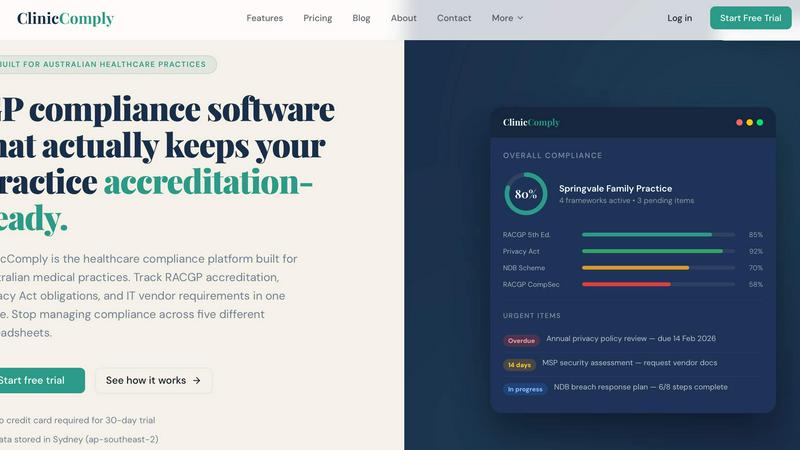
The platform offers a unified dashboard that gives an immediate overview of a practice's compliance health across all active frameworks. It displays an overall compliance percentage, the status of each framework (e.g., RACGP, Privacy Act), and highlights urgent or overdue action items with clear deadlines. This feature enables clinic managers to assign tasks to team members, track progress in real-time, and ensure nothing falls through the cracks, facilitating proactive compliance management rather than reactive firefighting.
Refbox
Always-on-Top Floating Frames
This is the cornerstone feature of Refbox. Users can pin any image, video, GIF, or note into a resizable frame that floats above all other application windows. This ensures your reference material is always visible right beside your working canvas, whether you're in Photoshop, Blender, or a code editor. Frames can be minimized, locked in place, or auto-hidden to clean up your workspace, providing ultimate control over your desktop real estate and focus.
Comprehensive Media Support & Organization
Refbox supports a wide array of media types beyond standard images. You can import and view videos, animated GIFs (with playback controls), SVG files, and even take instant website screenshots by pasting a URL. All media is organized into customizable Collections within a sidebar, allowing you to separate references by project, client, or theme. Drag-and-drop makes building and managing these collections intuitive and fast.
Advanced Creative Utilities
The app includes a suite of specialized tools that cater to professional creative needs. This includes a color picker to sample colors directly from any reference media, an image cropper to focus on specific details, and pixel rendering mode for authentic pixel art viewing. For motion work, you can scrub through GIFs frame-by-frame. Notes support Markdown formatting and checklists, making it easy to add textual context or task lists alongside visual inspiration.
Streamlined Workflow Shortcuts
Refbox is designed for keyboard-driven efficiency. You can quickly swap between floating references using arrow keys, change collections with a single click, and use customizable global shortcuts to show, hide, or manipulate frames without touching the mouse. These little touches, like copying media to the clipboard or saving it directly to your system, save countless clicks and hours over a long project, keeping you in a productive rhythm.
Use Cases
Clinic Comply
Preparing for an RACGP Accreditation Survey
A GP practice uses Clinic Comply in the months leading up to its triennial accreditation visit. The team works through the pre-mapped RACGP 5th Edition checklists, uploading and linking evidence as they complete each criterion. The practice manager uses the live compliance score to identify and prioritize gaps. One week before the assessor arrives, they use the "one-click evidence pack" feature to download a complete, organized digital file of all necessary documentation, ensuring a smooth and confident survey process.
Managing Annual Privacy Compliance Obligations
A multi-site medical practice utilizes the platform to ensure consistent adherence to the Privacy Act across all locations. The system automatically flags the annual privacy policy review deadline. The compliance officer updates the policy within Clinic Comply, which then becomes the single current version accessible to all staff. They also use the platform to maintain the register of information handling processes and to train staff using the latest, centrally stored documents, demonstrating robust privacy governance.
Streamlining IT Security Audits with Vendors
A clinic needing to fulfill the IT security criteria of RACGP CompSec must obtain security assessments from its MSP. Instead of manual follow-ups, the clinic manager sends a secure upload request via the Vendor Portal. The MSP uploads the required documents directly. The documents are instantly cataloged in the clinic's evidence library and linked to the specific CompSec checklist items, completing the audit trail and saving weeks of administrative chasing.
Onboarding a New Practice Manager
When a new practice manager joins a clinic, they need to quickly understand the practice's compliance status. They log into Clinic Comply and immediately see the dashboard overview: which frameworks are active, the current compliance scores, and any pending action items. They can drill down into each framework to see historical evidence, understand what has been completed, and see what needs attention, allowing for a rapid and comprehensive handover.
Refbox
Digital Illustration & Concept Art
Illustrators and concept artists can gather mood boards, anatomical references, color palettes, and style inspirations into dedicated Refbox collections. By floating these references over applications like Photoshop or Clip Studio Paint, artists can constantly view their guides without breaking concentration. The color picker and zoom features allow for precise color matching and detail study directly from the floating frames.
UI/UX & Graphic Design
UI/UX designers and graphic designers use Refbox to keep brand guidelines, competitor screenshots, typography samples, and layout inspirations instantly accessible. While designing in Figma or Adobe XD, having logos, color hex codes, and component libraries pinned on-screen ensures design consistency and speeds up the iteration process, eliminating the need to search through files or browser tabs.
3D Modeling & Animation
For 3D artists and animators, Refbox is ideal for holding character turnarounds, texture references, environment concepts, and motion study videos. The ability to play video references or scrub through GIFs frame-by-frame in a floating window is invaluable for replicating complex movements and poses in software like Blender or Maya, all while keeping the main viewport uncluttered.
Photography & Mood Boarding
Photographers and art directors can use Refbox to compile shot lists, lighting setups, composition examples, and model poses. The app functions as a dynamic, always-visible mood board during shoots or editing sessions in Lightroom. The notes feature is perfect for adding shot details or client feedback right next to the corresponding visual reference.
Overview
About Clinic Comply
Clinic Comply is a purpose-built healthcare compliance management platform designed exclusively for Australian medical practices. It addresses the significant administrative burden of maintaining accreditation and meeting regulatory obligations by replacing fragmented systems like spreadsheets, shared drives, and email threads with a single, centralized source of truth. The platform is tailored for General Practitioners, clinic managers, practice administrators, and healthcare compliance officers who need to efficiently manage standards such as the RACGP 5th Edition, the Privacy Act 1988 (including APPs and the Notifiable Data Breaches Scheme), and various state-based health record acts. Its core value proposition lies in transforming compliance from a reactive, stressful scramble into a systematic, proactive process. By providing guided checklists mapped directly to assessor criteria, a secure evidence library, and automated tracking, Clinic Comply ensures practices remain perpetually accreditation-ready. This allows healthcare professionals to reallocate valuable time and resources away from administrative tasks and back towards their primary focus: delivering exceptional patient care.
About Refbox
Refbox is an innovative desktop application engineered to eliminate workflow friction for creative professionals. It serves as a dynamic, floating reference library that pins images, GIFs, videos, and notes in always-on-top frames directly over any other application. This core functionality means designers, animators, illustrators, and artists no longer need to constantly alt-tab between folders, browsers, and their primary work software. By keeping inspiration and critical references perpetually visible, Refbox promotes an immersive, distraction-free state of flow. Users can effortlessly drag and drop media from their computer or the web into a resizable sidebar, organizing them into customizable collections for any project. With advanced capabilities like frame-by-frame GIF scrubbing, Markdown-enabled notes, pixel-perfect rendering for pixel art, and intuitive keyboard shortcuts, Refbox transforms a cluttered, multi-window process into a streamlined and visually organized experience. It is built specifically for professionals who cannot afford distractions and need instant, seamless access to their visual resources to boost both speed and accuracy in their creative work.
Frequently Asked Questions
Clinic Comply FAQ
What compliance frameworks does Clinic Comply support?
Clinic Comply is built specifically for Australian healthcare standards. It includes dedicated, pre-mapped frameworks for the RACGP 5th Edition, the Privacy Act 1988 (APPs), the Notifiable Data Breaches (NDB) Scheme, RACGP CompSec, My Health Record, HDAA Dental, AGPAL, NDIS Standards, the Victorian Health Records Act, and the NSW HRIP Act. The platform is updated as Australian standards evolve, with future frameworks like the RACGP 6th Edition added upon release.
How does the platform help with RACGP accreditation?
The platform transforms the RACGP standards from a PDF document into an interactive, actionable checklist. Each criterion is broken down, allowing your team to mark items as complete, upload evidence (e.g., policies, staff training records), and link that evidence directly to the requirement. It provides a real-time compliance score for the RACGP framework and enables you to generate a structured, downloadable evidence pack for your assessor, ensuring you are always prepared for a survey.
Is my practice's data stored securely in Australia?
Yes. Clinic Comply prioritizes data sovereignty and security for healthcare practices. All customer data is stored on servers located in Sydney, within the AWS ap-southeast-2 region. This ensures that sensitive practice and compliance information remains within Australian jurisdiction, adhering to best practices and regulatory expectations for data storage in the healthcare sector.
How does the IT Vendor Portal work?
The Vendor Portal eliminates the inefficiency of emailing vendors for compliance documents. From within your Clinic Comply account, you can generate a secure, unique upload link for a specific vendor or request. You send this link to your vendor (e.g., your IT MSP), and they use it to upload the requested document (like a security policy) directly. Once uploaded, the document is automatically saved to your central evidence library and can be linked to the relevant compliance checklist item.
Refbox FAQ
What platforms does Refbox support?
Refbox is currently available as a desktop application for macOS and Windows operating systems. It is designed to run locally on your machine, providing low-latency performance and seamless integration with your desktop workflow, independent of a web browser.
How do I get media into Refbox?
You can add media through simple drag-and-drop from your computer's file explorer directly into the Refbox sidebar or a floating frame. You can also copy images or videos from your web browser or other applications and paste them directly into Refbox. For website references, simply copy a URL and paste it to generate an instant screenshot.
Can I use Refbox with multiple monitors?
Yes, Refbox works seamlessly across multiple monitor setups. The application window and the individual floating reference frames can be moved and positioned on any connected display. This allows you to dedicate one screen entirely to your references or spread them out as needed for an expansive workspace.
Is there a free trial available?
Yes, Refbox offers a free trial that allows you to test all the core features of the application. This lets you experience the floating reference workflow, media support, and organizational tools firsthand to see how it integrates into your creative process before making a purchase decision.
Alternatives
Clinic Comply Alternatives
Clinic Comply is a specialized productivity and management platform designed to streamline healthcare compliance for Australian medical practices. It centralizes the tracking of accreditation, privacy laws, and vendor management, moving clinics away from inefficient manual methods like spreadsheets. Users may explore alternatives for various reasons, including budget constraints, the need for different feature sets, or a preference for a platform that integrates with other practice management software. Some may seek solutions with a broader or narrower scope of compliance coverage. When evaluating other options, key considerations should include its specific focus on Australian healthcare regulations, ease of use, the quality of customer support, and how well it integrates with your clinic's existing digital ecosystem. The right tool should demonstrably save time and reduce compliance risk.
Refbox Alternatives
Refbox is a productivity application designed to enhance creative workflows. It belongs to the category of reference management and window-pinning tools, allowing users to keep images, videos, and notes in floating windows above their primary workspace. This eliminates constant app switching and helps maintain focus. Users often explore alternatives for various reasons. These can include budget constraints, the need for specific features not offered, compatibility with different operating systems, or a preference for a different user interface and organizational method. Finding the right fit depends on individual workflow demands. When evaluating alternatives, key considerations are core functionality like window pinning, supported media types, and organizational features. Also assess performance impact, ease of use, and how well the tool integrates into your existing creative or productivity software ecosystem to ensure a seamless experience.