
Changeflow vs Phishly
Side-by-side comparison to help you choose the right product.

Changeflow
Changeflow uses AI to track and summarize only the critical website changes that matter to your business.
Last updated: March 4, 2026

Phishly
Phishly uses AI to instantly detect phishing emails with a simple one-click scan in Gmail and web tools.
Visual Comparison
Changeflow

Phishly
Feature Comparison
Changeflow
AI-Powered Change Intelligence
Changeflow's core AI doesn't just detect that a page changed; it reads and comprehends the content to identify what specifically changed and evaluates its importance based on your instructions. This intelligent filtering ensures you are only notified about relevant updates, dramatically reducing noise and false positives compared to traditional monitoring tools that rely on simple HTML diffs or screenshots.
Natural Language Setup & Smart Link Following
Configuration requires no technical skills or RSS feeds. You interact with an AI chatbot to describe your monitoring goals in plain English. Furthermore, Changeflow can turn any page containing links into a dynamic intelligence feed. It automatically follows new links, reads the target pages, assesses their relevance to your query, and summarizes the crucial information, effectively automating the discovery and tracking of new content sources.
Enterprise-Grade Page Unblocking
Built on over a decade of experience, Changeflow employs advanced anti-blocking technology to reliably monitor complex websites that often thwart other tools. This includes sites with JavaScript-rendered content, login barriers, and other defensive measures, achieving a 99.9% success rate. This ensures consistent and dependable data collection for mission-critical monitoring tasks.
Interactive Change Viewer & Site Version Control
When a change is detected, you can investigate it forensically with the interactive change viewer, which highlights the exact modifications. Coupled with Site Version Control, this feature provides timestamped, navigable archives of every monitored page, allowing you to travel back in time to see exactly what a page looked like on any given date, which is invaluable for audit trails and compliance.
Phishly
Instant Email Scanning
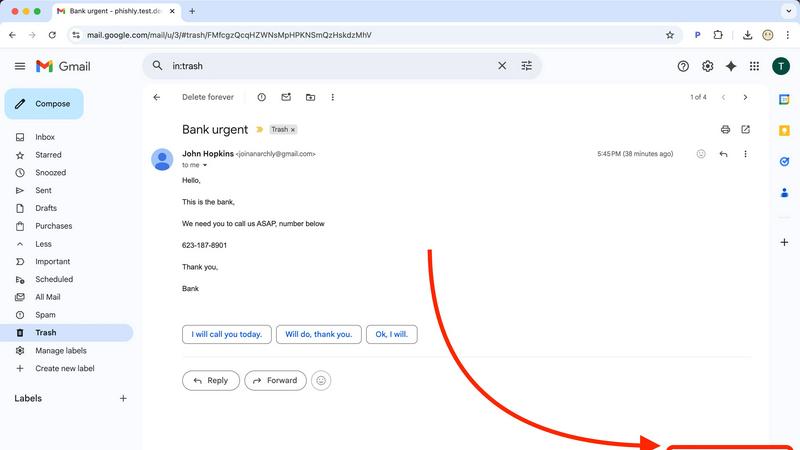
Phishly offers a seamless email scanning feature that allows users to quickly evaluate any email in their Gmail inbox. By simply clicking "Scan with Phishly," users can leverage the power of AI to detect potential phishing threats instantly, ensuring a rapid response to suspicious emails.
Risk Assessment Categorization
Upon scanning an email, Phishly provides a clear risk assessment that categorizes the email as Safe, Medium Risk, or High Risk. This straightforward classification helps users easily understand the level of threat posed by the email, alongside detailed explanations of the factors contributing to the assessment.
Privacy-Focused Analysis
Phishly prioritizes user privacy by only analyzing emails that users explicitly select for scanning. This feature guarantees that personal information remains protected, allowing users to maintain control over their data while still benefiting from advanced phishing detection capabilities.
User-Friendly Interface
Designed with simplicity in mind, Phishly's interface requires no technical knowledge, making it accessible to everyone. The intuitive design ensures that users can effortlessly navigate the tool, scan emails, and interpret risk assessments without any prior experience in cybersecurity.
Use Cases
Changeflow
Competitive Intelligence & Pricing Monitoring
Business and marketing teams use Changeflow to automatically track competitor websites for changes in pricing, product specifications, promotional offers, and strategic announcements. The AI filters out minor blog updates or irrelevant changes, delivering clear summaries of only the competitive moves that impact market positioning and pricing strategy.
Legal & Regulatory Compliance Tracking
Legal librarians and compliance officers at top-tier firms monitor court dockets, regulatory bodies (like the FDA and SEC), and government portals for new filings, guidance updates, and rule changes. Changeflow's precision ensures no critical regulatory update is missed, with archives providing proof of past publication states for compliance reporting.
News & Brand Mention Monitoring
Communications and PR teams track news sites, industry publications, and forums for mentions of their company, executives, or key topics. By following link pages and using natural language queries, Changeflow builds a comprehensive feed of relevant coverage and sentiment, helping teams manage brand reputation and media relations proactively.
Market & Supply Chain Intelligence
Procurement and strategy teams monitor vendor sites, industry reports, and commodity boards for changes that affect supply chains, material costs, or market conditions. Changeflow provides timely alerts on tariff updates, shipping status changes, or new industry standards, enabling faster, more informed business decisions.
Phishly
Personal Email Security
Individuals can use Phishly to protect their personal email accounts from phishing attacks. By scanning suspicious emails, users can confidently identify legitimate communications and avoid falling victim to scams, enhancing their overall email security.
Small Business Protection
Small businesses can leverage Phishly to safeguard their email communications against phishing threats. By integrating the tool into their workflow, employees can quickly assess the safety of emails, reducing the risk of data breaches and financial losses caused by phishing attempts.
Educational Institutions
Educational institutions can utilize Phishly to educate staff and students about phishing threats. By encouraging the use of the scanning tool, institutions can foster a culture of awareness and vigilance, helping to protect sensitive information from cybercriminals.
Remote Work Environments
In remote work settings, Phishly provides an essential layer of security for distributed teams. Employees can scan emails received from clients or colleagues, ensuring that they only engage with legitimate requests and safeguarding company data from potential phishing attacks.
Overview
About Changeflow
Changeflow is an advanced web monitoring and change detection platform designed to transform how businesses track online information. It goes beyond simple page monitoring by utilizing sophisticated AI to understand context, filter out irrelevant noise, and deliver concise summaries of only the meaningful changes. The core value proposition is saving significant time and effort by eliminating manual checks and false alerts, providing reliable, actionable intelligence instead. Users simply describe what they want to track in plain English and point the AI agent at a target page; Changeflow handles the complex tasks of navigating websites (including those with login walls and heavy JavaScript), following links, and determining relevance. It is built for professional and enterprise use, trusted by Fortune 500 and Am Law 200 firms for its reliability. With features like shared workspaces, API access, and Site Version Control for historical page archives, Changeflow serves as a central intelligence hub for teams across competitive intelligence, legal, compliance, and market research functions, having already checked over a billion pages.
About Phishly
Phishly is an innovative AI-driven phishing detection platform designed to enhance email security for individuals and small businesses. Available as a Chrome extension for Gmail and a web tool, Phishly empowers users to quickly assess the legitimacy of emails. With just a click on "Scan with Phishly" or by pasting suspicious emails into the web interface, users can receive instant analysis. Utilizing advanced AI technology, Phishly identifies potential phishing threats by detecting red flags such as suspicious domains, urgent language, spoofed senders, and social engineering tactics. The platform categorizes emails into clear risk assessments—Safe, Medium Risk, and High Risk—each accompanied by detailed explanations. Phishly is particularly suited for those seeking straightforward phishing protection without the complexities often associated with enterprise-level solutions. The platform respects user privacy by only analyzing emails that users explicitly choose to scan, ensuring that no personal data is compromised. No technical expertise is required, and the service is free to use, providing immediate answers when users are uncertain about an email's authenticity.
Frequently Asked Questions
Changeflow FAQ
How does Changeflow differ from other website monitoring tools?
Unlike basic tools that simply alert you to any HTML change or provide side-by-side screenshots, Changeflow uses AI to understand the semantic meaning of content. It reads the page like a human would, determines the context of changes based on your specific instructions, and delivers a concise summary of only the important updates. This eliminates the need to manually sift through "something changed" alerts to find the relevant signal.
Can Changeflow monitor websites that require a login?
Yes. Changeflow's enterprise-grade page unblocking technology is designed to handle challenging sites, including those with login walls. The platform employs sophisticated methods to navigate these barriers reliably, making it effective for monitoring intranet pages, subscription-based news sites, or private portals where critical information is housed.
How do I set up a page or feed to monitor?
Setup is designed to be simple and non-technical. You provide the URL and use plain English to describe to the AI agent what kind of changes or information you care about on that page. For example, you could say, "Monitor this page for new court case filings" or "Track this product page for price changes." The AI configures the monitoring based on your description.
How are teams able to collaborate using Changeflow?
Changeflow offers shared workspaces that allow entire teams to access and manage monitored feeds, view change histories, and set up notifications collectively. This ensures everyone is aligned with the same intelligence stream. Additionally, centralized user administration and billing simplify management for team leads and administrators.
Phishly FAQ
How does Phishly detect phishing threats?
Phishly uses advanced AI algorithms to analyze emails for various phishing indicators, such as suspicious domains, urgent language, and spoofed sender addresses. This comprehensive analysis helps identify potential threats effectively.
Is Phishly free to use?
Yes, Phishly is completely free to use. Users can scan emails and receive risk assessments without any cost, making it accessible for everyone, including individuals and small businesses.
Do I need technical skills to use Phishly?
No, Phishly is designed for users of all skill levels. Its user-friendly interface ensures that anyone can easily navigate the tool, scan emails, and understand risk assessments without requiring technical expertise.
What happens to my email data when I use Phishly?
Phishly respects user privacy by only analyzing emails that users explicitly choose to scan. No data from emails is stored or shared, ensuring that your personal information remains secure while using the platform.