
Phishly
Phishly uses AI to instantly detect phishing emails with a simple one-click scan in Gmail and web tools.
Visit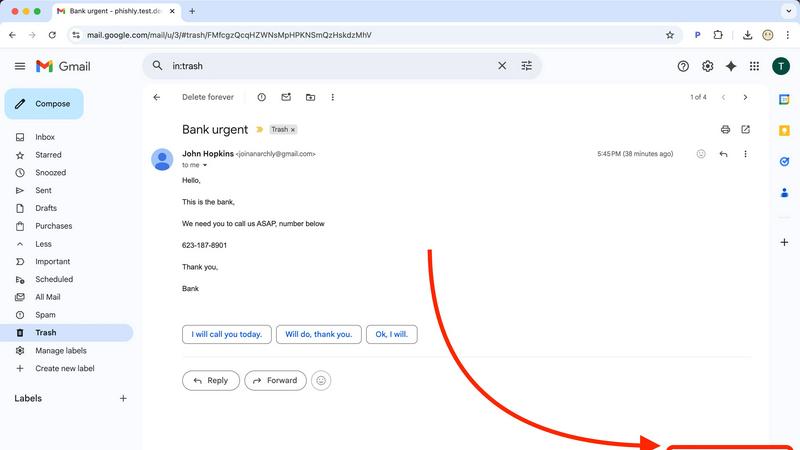
About Phishly
Phishly is an innovative AI-driven phishing detection platform designed to enhance email security for individuals and small businesses. Available as a Chrome extension for Gmail and a web tool, Phishly empowers users to quickly assess the legitimacy of emails. With just a click on "Scan with Phishly" or by pasting suspicious emails into the web interface, users can receive instant analysis. Utilizing advanced AI technology, Phishly identifies potential phishing threats by detecting red flags such as suspicious domains, urgent language, spoofed senders, and social engineering tactics. The platform categorizes emails into clear risk assessments—Safe, Medium Risk, and High Risk—each accompanied by detailed explanations. Phishly is particularly suited for those seeking straightforward phishing protection without the complexities often associated with enterprise-level solutions. The platform respects user privacy by only analyzing emails that users explicitly choose to scan, ensuring that no personal data is compromised. No technical expertise is required, and the service is free to use, providing immediate answers when users are uncertain about an email's authenticity.
Features of Phishly
Instant Email Scanning
Phishly offers a seamless email scanning feature that allows users to quickly evaluate any email in their Gmail inbox. By simply clicking "Scan with Phishly," users can leverage the power of AI to detect potential phishing threats instantly, ensuring a rapid response to suspicious emails.
Risk Assessment Categorization
Upon scanning an email, Phishly provides a clear risk assessment that categorizes the email as Safe, Medium Risk, or High Risk. This straightforward classification helps users easily understand the level of threat posed by the email, alongside detailed explanations of the factors contributing to the assessment.
Privacy-Focused Analysis
Phishly prioritizes user privacy by only analyzing emails that users explicitly select for scanning. This feature guarantees that personal information remains protected, allowing users to maintain control over their data while still benefiting from advanced phishing detection capabilities.
User-Friendly Interface
Designed with simplicity in mind, Phishly's interface requires no technical knowledge, making it accessible to everyone. The intuitive design ensures that users can effortlessly navigate the tool, scan emails, and interpret risk assessments without any prior experience in cybersecurity.
Use Cases of Phishly
Personal Email Security
Individuals can use Phishly to protect their personal email accounts from phishing attacks. By scanning suspicious emails, users can confidently identify legitimate communications and avoid falling victim to scams, enhancing their overall email security.
Small Business Protection
Small businesses can leverage Phishly to safeguard their email communications against phishing threats. By integrating the tool into their workflow, employees can quickly assess the safety of emails, reducing the risk of data breaches and financial losses caused by phishing attempts.
Educational Institutions
Educational institutions can utilize Phishly to educate staff and students about phishing threats. By encouraging the use of the scanning tool, institutions can foster a culture of awareness and vigilance, helping to protect sensitive information from cybercriminals.
Remote Work Environments
In remote work settings, Phishly provides an essential layer of security for distributed teams. Employees can scan emails received from clients or colleagues, ensuring that they only engage with legitimate requests and safeguarding company data from potential phishing attacks.
Frequently Asked Questions
How does Phishly detect phishing threats?
Phishly uses advanced AI algorithms to analyze emails for various phishing indicators, such as suspicious domains, urgent language, and spoofed sender addresses. This comprehensive analysis helps identify potential threats effectively.
Is Phishly free to use?
Yes, Phishly is completely free to use. Users can scan emails and receive risk assessments without any cost, making it accessible for everyone, including individuals and small businesses.
Do I need technical skills to use Phishly?
No, Phishly is designed for users of all skill levels. Its user-friendly interface ensures that anyone can easily navigate the tool, scan emails, and understand risk assessments without requiring technical expertise.
What happens to my email data when I use Phishly?
Phishly respects user privacy by only analyzing emails that users explicitly choose to scan. No data from emails is stored or shared, ensuring that your personal information remains secure while using the platform.
Explore more in this category:
Similar to Phishly

Build Mode is a Mac app that turns focused sessions into visible progress, so you can see the work adding up before the results arrive.

Capture any workflow in your browser and export a branded, step-by-step SOP with screenshots. €5 per document, no subscription.

PerPageFax lets you send a fax online from any browser for a flat $0.50 per page — no account, no subscription, no fax machine.

Track staff & time. Free trial. Cloud/on-prem.

Free construction calculators with transparent formulas, steps, assumptions, and metric or imperial units.

AI finds your lost links. Summarizes & tags URLs.

Follow news, blogs, newsletters, and podcasts in a free RSS reader, with AI summaries, top stories, full-text search, saved searches, and a catalog.
