
Changeflow vs MeetingMind
Side-by-side comparison to help you choose the right product.

Changeflow
Changeflow uses AI to track and summarize only the critical website changes that matter to your business.
Last updated: March 4, 2026

MeetingMind
MeetingMind automatically records, transcribes, and summarizes your Zoom meetings into searchable notes.
Last updated: March 1, 2026
Visual Comparison
Changeflow

MeetingMind
Feature Comparison
Changeflow
AI-Powered Change Intelligence
Changeflow's core AI doesn't just detect that a page changed; it reads and comprehends the content to identify what specifically changed and evaluates its importance based on your instructions. This intelligent filtering ensures you are only notified about relevant updates, dramatically reducing noise and false positives compared to traditional monitoring tools that rely on simple HTML diffs or screenshots.
Natural Language Setup & Smart Link Following
Configuration requires no technical skills or RSS feeds. You interact with an AI chatbot to describe your monitoring goals in plain English. Furthermore, Changeflow can turn any page containing links into a dynamic intelligence feed. It automatically follows new links, reads the target pages, assesses their relevance to your query, and summarizes the crucial information, effectively automating the discovery and tracking of new content sources.
Enterprise-Grade Page Unblocking
Built on over a decade of experience, Changeflow employs advanced anti-blocking technology to reliably monitor complex websites that often thwart other tools. This includes sites with JavaScript-rendered content, login barriers, and other defensive measures, achieving a 99.9% success rate. This ensures consistent and dependable data collection for mission-critical monitoring tasks.
Interactive Change Viewer & Site Version Control
When a change is detected, you can investigate it forensically with the interactive change viewer, which highlights the exact modifications. Coupled with Site Version Control, this feature provides timestamped, navigable archives of every monitored page, allowing you to travel back in time to see exactly what a page looked like on any given date, which is invaluable for audit trails and compliance.
MeetingMind
Automatic Zoom Detection & Recording
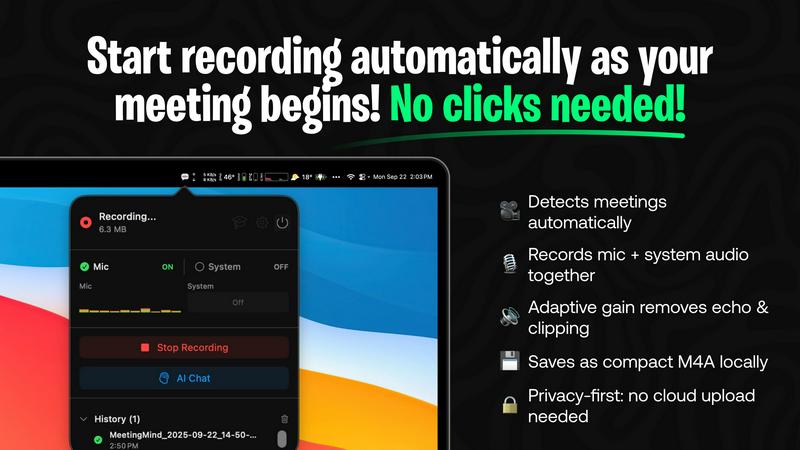
MeetingMind intelligently monitors your system and automatically detects when you start or join a Zoom meeting, initiating recording without any manual clicks or commands. This seamless integration ensures you never forget to hit record, capturing the entire meeting from the very beginning. It records both microphone and system audio with adaptive gain control for crystal-clear playback, guaranteeing every participant is heard.
On-Device AI Processing & Privacy
All core processing is performed locally on your Mac. This privacy-first architecture means your meeting audio, transcripts, and AI-generated summaries are never uploaded to the cloud or external servers. Your sensitive discussions remain completely confidential and secure on your own device, making MeetingMind a trusted tool for handling proprietary business information or personal conversations.
Intelligent Transcripts & AI Summaries
Using powerful AI, MeetingMind provides real-time, speaker-attributed transcripts during your meeting. After the meeting concludes, it generates concise summaries, extracts key insights, and identifies action items. You can choose between a local AI model via Ollama for maximum privacy or a cloud-based option via OpenRouter for different model capabilities, with all outputs formatted in easy-to-read markdown.
Menu Bar Integration & Markdown Export
The application operates discreetly from your macOS menu bar, sitting quietly out of sight until needed. This non-intrusive design keeps your workspace clean. All results--including the full transcript, AI summary, and action items--are automatically saved as well-formatted markdown files. This allows for easy sharing, archiving, or integration into your existing note-taking and project management workflows.
Use Cases
Changeflow
Competitive Intelligence & Pricing Monitoring
Business and marketing teams use Changeflow to automatically track competitor websites for changes in pricing, product specifications, promotional offers, and strategic announcements. The AI filters out minor blog updates or irrelevant changes, delivering clear summaries of only the competitive moves that impact market positioning and pricing strategy.
Legal & Regulatory Compliance Tracking
Legal librarians and compliance officers at top-tier firms monitor court dockets, regulatory bodies (like the FDA and SEC), and government portals for new filings, guidance updates, and rule changes. Changeflow's precision ensures no critical regulatory update is missed, with archives providing proof of past publication states for compliance reporting.
News & Brand Mention Monitoring
Communications and PR teams track news sites, industry publications, and forums for mentions of their company, executives, or key topics. By following link pages and using natural language queries, Changeflow builds a comprehensive feed of relevant coverage and sentiment, helping teams manage brand reputation and media relations proactively.
Market & Supply Chain Intelligence
Procurement and strategy teams monitor vendor sites, industry reports, and commodity boards for changes that affect supply chains, material costs, or market conditions. Changeflow provides timely alerts on tariff updates, shipping status changes, or new industry standards, enabling faster, more informed business decisions.
MeetingMind
Daily Stand-ups and Team Syncs
For agile teams conducting daily stand-up meetings, MeetingMind automatically captures each member's update without anyone needing to divert attention to note-taking. The resulting transcript and AI-generated summary provide a perfect, searchable record of blockers, progress, and plans, ensuring nothing is forgotten or miscommunicated as the team moves through their sprint.
Client Consultations and Reviews
Professionals such as consultants, lawyers, or therapists can use MeetingMind to fully focus on their client during sensitive discussions. The local processing guarantees client confidentiality, while the accurate transcript and summary serve as a reliable record of agreements, concerns, and next steps, which can be easily formatted into follow-up emails or reports.
Brainstorming and Creative Sessions
During fast-paced brainstorming meetings where ideas flow rapidly, manually capturing every thought is nearly impossible. MeetingMind records the entire creative session, allowing all participants to contribute freely. The transcript preserves every idea for later review, and the AI can help categorize and highlight the most promising concepts discussed.
Project Kick-offs and Planning Meetings
For project managers leading complex planning meetings with numerous action items and decisions, MeetingMind is an indispensable tool. It captures all details and deadlines assigned to specific individuals. The post-meeting markdown output can be directly used to populate project plans or task managers, ensuring accountability and clear reference materials for the entire project lifecycle.
Overview
About Changeflow
Changeflow is an advanced web monitoring and change detection platform designed to transform how businesses track online information. It goes beyond simple page monitoring by utilizing sophisticated AI to understand context, filter out irrelevant noise, and deliver concise summaries of only the meaningful changes. The core value proposition is saving significant time and effort by eliminating manual checks and false alerts, providing reliable, actionable intelligence instead. Users simply describe what they want to track in plain English and point the AI agent at a target page; Changeflow handles the complex tasks of navigating websites (including those with login walls and heavy JavaScript), following links, and determining relevance. It is built for professional and enterprise use, trusted by Fortune 500 and Am Law 200 firms for its reliability. With features like shared workspaces, API access, and Site Version Control for historical page archives, Changeflow serves as a central intelligence hub for teams across competitive intelligence, legal, compliance, and market research functions, having already checked over a billion pages.
About MeetingMind
MeetingMind is an intelligent meeting assistant for macOS designed to revolutionize how professionals capture and utilize information from their virtual meetings. It specifically targets users of platforms like Zoom, automating the entire process of recording, transcribing, and summarizing discussions. The core value proposition is eliminating the distraction of manual note-taking, allowing participants to stay fully engaged in the conversation while having confidence that every detail is being captured accurately. Its advanced on-device AI generates real-time, speaker-attributed transcripts and post-meeting summaries in clean markdown format. A defining characteristic of MeetingMind is its unwavering commitment to privacy; all audio processing and AI analysis occur locally on your Mac, ensuring sensitive meeting content never leaves your device. Whether you are a project manager tracking action items, a team leader facilitating brainstorming sessions, or a consultant conducting client reviews, MeetingMind ensures you never miss a critical point, decision, or task again, transforming meetings from passive events into actionable, searchable knowledge assets.
Frequently Asked Questions
Changeflow FAQ
How does Changeflow differ from other website monitoring tools?
Unlike basic tools that simply alert you to any HTML change or provide side-by-side screenshots, Changeflow uses AI to understand the semantic meaning of content. It reads the page like a human would, determines the context of changes based on your specific instructions, and delivers a concise summary of only the important updates. This eliminates the need to manually sift through "something changed" alerts to find the relevant signal.
Can Changeflow monitor websites that require a login?
Yes. Changeflow's enterprise-grade page unblocking technology is designed to handle challenging sites, including those with login walls. The platform employs sophisticated methods to navigate these barriers reliably, making it effective for monitoring intranet pages, subscription-based news sites, or private portals where critical information is housed.
How do I set up a page or feed to monitor?
Setup is designed to be simple and non-technical. You provide the URL and use plain English to describe to the AI agent what kind of changes or information you care about on that page. For example, you could say, "Monitor this page for new court case filings" or "Track this product page for price changes." The AI configures the monitoring based on your description.
How are teams able to collaborate using Changeflow?
Changeflow offers shared workspaces that allow entire teams to access and manage monitored feeds, view change histories, and set up notifications collectively. This ensures everyone is aligned with the same intelligence stream. Additionally, centralized user administration and billing simplify management for team leads and administrators.
MeetingMind FAQ
How does the free 60 minutes per day work?
The free tier of MeetingMind provides users with 60 minutes of total recording time per calendar day. This is designed to be perfect for daily stand-ups, short syncs, or one-on-one meetings. The app automatically manages this allowance, and the timer resets each day. All features, including automatic detection, transcription, and AI summaries, are fully available within this free daily limit.
Is my meeting data kept private?
Yes, absolutely. MeetingMind is built with a privacy-first architecture. All audio recording, speech-to-text transcription, and AI processing for summaries happen locally on your Mac. Your meeting data never leaves your computer to be sent to external servers or the cloud, ensuring complete confidentiality and security for even the most sensitive discussions.
What is included in the one-time Unlimited purchase?
The Unlimited version is a one-time purchase (not a subscription) that removes the daily 60-minute recording limit, granting you unlimited recording time. It includes all features from the free tier—automatic Zoom detection, live transcription, AI summaries, and local processing—plus lifetime access to future application updates with no recurring fees.
Do I need to inform participants I am recording?
Yes, you must always inform all participants before recording any meeting. MeetingMind is a tool to help you capture your meetings, but you are solely responsible for obtaining proper consent and complying with all applicable laws and regulations regarding the recording of conversations. Never record a meeting without prior disclosure to and permission from all involved parties.
Alternatives
Changeflow Alternatives
Changeflow is an AI-driven market and competitor insights platform, specializing in monitoring web pages for meaningful changes. It belongs to the productivity and management software category, helping teams track critical information automatically. Users often explore alternatives for various reasons, such as budget constraints, specific feature requirements not covered by their current plan, or the need for integration with a different tech stack. Some may seek simpler tools for basic monitoring or more specialized solutions for niche use cases. When evaluating alternatives, consider the core capabilities: the ability to accurately monitor complex, JavaScript-heavy pages, the quality of AI analysis that summarizes important changes, and collaboration features for teams. Reliability, ease of setup, and the depth of historical data archiving are also key factors to assess for your specific monitoring needs.
MeetingMind Alternatives
MeetingMind is an AI-powered meeting assistant in the productivity and management software category. It automatically records, transcribes, and summarizes Zoom meetings into searchable notes, allowing professionals to focus on the discussion rather than manual note-taking. Users often explore alternatives for various reasons, such as budget constraints, the need for different features, compatibility with other meeting platforms, or specific security and deployment requirements. The right tool depends heavily on individual or organizational workflows. When evaluating alternatives, key considerations include the accuracy of transcription, integration with your primary communication tools, data privacy policies, cost structure, and the overall user experience. Identifying which core features are non-negotiable for your team is the best starting point.