
Before after Picture Maker vs NanoImg
Side-by-side comparison to help you choose the right product.

Before after Picture Maker
Create stunning before and after images effortlessly with our AI comparison builder in just three simple steps.
Last updated: February 26, 2026
NanoImg is your all-in-one platform to generate and edit studio-quality images with AI.
Last updated: March 1, 2026
Visual Comparison
Before after Picture Maker
NanoImg
Feature Comparison
Before after Picture Maker
Easy Image Upload
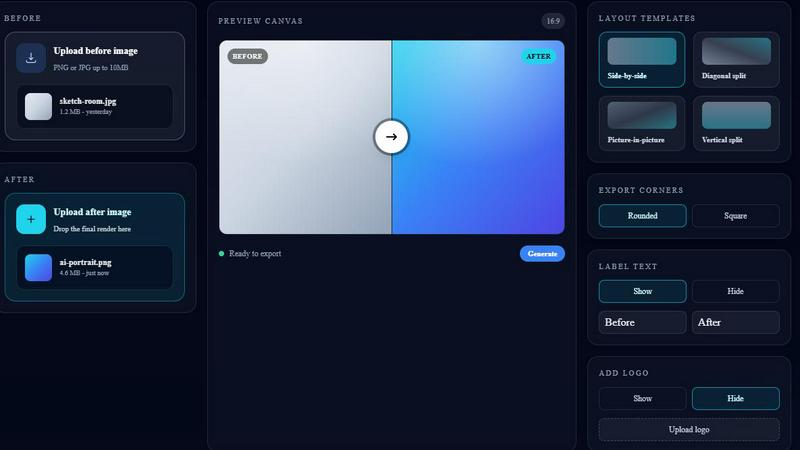
The Before after Picture Maker makes it incredibly easy to upload your images. Users can simply drag and drop their original 'before' image and the AI-generated 'after' image into the designated upload areas. Supporting formats like PNG and JPG, this feature ensures versatility and convenience, allowing files up to 10MB to be processed effortlessly.
Customizable Layout Templates
The platform offers a diverse range of layout templates to suit various presentation needs. Users can select from side-by-side, diagonal split, vertical split, or picture-in-picture formats. This level of customization allows for tailored visuals that fit the specific context of your project, whether for marketing, social media, or portfolio showcases.
Export Options
Before after Picture Maker provides users with multiple export options to refine their images further. You can choose between rounded or square corners for your comparison visuals, as well as customize label text and add a logo. This flexibility ensures that each image can be tailored to meet branding requirements and aesthetic preferences.
SEO Optimization
Built with SEO in mind, Before after Picture Maker enables users to create clear and optimized comparison images. This feature is particularly beneficial for improving search visibility, thanks to keywords such as “before after image maker,” “AI comparison image,” and “side-by-side comparison.” This ensures that your visuals not only look good but also reach the intended audience effectively.
NanoImg
All-in-One AI Model Hub
NanoImg provides centralized access to a curated selection of the best AI image models, including Nano Banana Pro, Seedream 4.0, Flux Kontext, Sora 2, and GPT Image 1. This feature allows users to select the optimal model for their specific need—whether it's the fastest generation speed, best text rendering, superior editing capabilities, or cinematic video generation—without needing to switch between different platforms or services, streamlining the creative workflow significantly.
Natural Language Image Editor
The platform features an advanced AI photo editor that understands and executes commands written in plain English. Users can upload an image and instruct the editor to perform complex edits like "remove reflections," "change the outfit to formal wear," or "apply a neon background." This intuitive system maintains character and style consistency across edits, making sophisticated photo manipulation accessible to users without any technical expertise in traditional editing software like Photoshop.
Template-Driven Generation for Speed
To accelerate content creation, NanoImg offers a library of plug-and-play templates designed for immediate use in high-demand areas such as social media posts, e-commerce product scenes, advertising banners, and digital art. Users can select a template and generate a customized, professional-grade image in about 10 seconds by simply providing a basic description, drastically reducing the time from concept to final visual asset.
Multi-Tool AI Effects Suite
Beyond core generation and editing, NanoImg hosts an extensive suite of over 80 specialized AI tools and effects. This includes popular features like Face Swap, Photo to Anime, Black and White filters, Glitch effects, Vignette effects, and character generators (e.g., Spongebob Meme, Bratz Doll). This organized toolkit allows users to apply trendy, specific visual transformations with a single click, catering to viral content trends and niche creative requirements.
Use Cases
Before after Picture Maker
Portfolio Showcases
Artists and designers can leverage Before after Picture Maker to create compelling portfolio showcases that highlight their work's evolution. By presenting before and after images, they can effectively demonstrate their skills and the impact of their creative process on the final product.
AI Art Progress
For creators working in AI-generated art, this tool serves as a perfect platform to display the progression of their work. By showcasing the transformation from initial drafts to the final AI-enhanced artwork, artists can engage their audience and illustrate the capabilities of AI in creative processes.
Product Transformations
Businesses can utilize Before after Picture Maker to visually communicate product transformations. Whether it's a before-and-after demonstration of a renovation, new product launch, or service improvement, this tool provides a clear visual narrative that can enhance marketing materials and customer understanding.
Social Media Proof
In the digital age, social proof is essential for building credibility. Before after Picture Maker allows users to create eye-catching visual comparisons for social media platforms, demonstrating results and transformations that can engage followers and encourage shares, ultimately driving brand awareness.
NanoImg
Social Media Content Creation
Marketers and influencers can use NanoImg to produce a high volume of engaging, on-brand visual content for platforms like Instagram, TikTok, and Facebook. By leveraging quick-turnaround templates and the natural language editor, users can generate viral memes, polished promotional graphics, and consistent character-based content in seconds, helping to maintain a frequent posting schedule and boost audience engagement rates dramatically.
E-commerce Product Visualization
Online store owners and managers can generate photorealistic product photos, lifestyle scenes, and mockups without the cost and time of organizing professional photoshoots. Using AI models like Flux Kontext for editing, they can place products in various contexts, change colors or styles, and create hundreds of marketing variations while perfectly maintaining brand consistency, ultimately improving product presentation and conversion rates.
Marketing and Advertising Campaigns
Agencies and in-house marketing teams can rapidly prototype and produce final visuals for ad campaigns, email newsletters, and website banners. The platform's ability to follow natural language instructions allows for quick iteration on client feedback—such as "make it more energetic" or "focus on the product"—enabling the creation of compelling campaign assets that align closely with strategic marketing goals and brand guidelines.
Creative Illustration and Digital Art
Artists and designers can utilize NanoImg as a brainstorming and creation tool to generate unique illustrations, concept art, and character designs. The fusion capabilities of models like Nano Banana allow for blending multiple image concepts, while tools like Photo to Sketch or Line Drawing provide artistic filters. This empowers creatives to explore new styles, overcome creative blocks, and produce original artwork efficiently.
Overview
About Before after Picture Maker
Before after Picture Maker is an innovative, lightweight Software as a Service (SaaS) solution designed specifically for creators, marketers, and teams that require polished before and after visuals quickly and efficiently. This tool allows users to seamlessly upload their original images alongside AI-generated results, enabling them to create stunning comparison visuals in mere moments. With a variety of customizable templates, including side-by-side, diagonal, vertical, and picture-in-picture layouts, users can easily showcase transformations, progress, or product enhancements. The intuitive interface simplifies the process: upload images, choose a layout, and generate a ready-to-share comparison image with just a click. Perfect for portfolios, marketing campaigns, and social media, Before after Picture Maker streamlines visual storytelling, making it an essential tool for anyone looking to demonstrate change or improvement visually.
About NanoImg
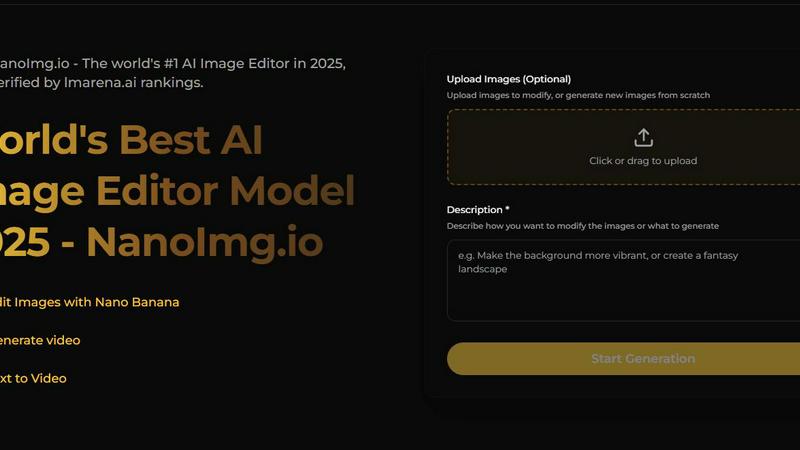
NanoImg is a comprehensive, browser-based platform that consolidates the power of multiple cutting-edge artificial intelligence models into a single, intuitive workspace for image generation and editing. It is designed to democratize professional-grade visual content creation by eliminating traditional barriers such as complex software, steep learning curves, and the need for specialized prompt engineering skills. The platform integrates top-tier AI models like Nano Banana, Seedream, Flux AI, Sora 2, and GPT Image 1, offering users a versatile toolkit for any creative task. Users can generate a new image in approximately 10 seconds by simply describing their vision or by starting from plug-and-play templates tailored for e-commerce, social media, advertising, and digital art. For editing, its natural language processing understands commands like "remove the background" or "make it pop," allowing for precise adjustments while maintaining stylistic consistency. NanoImg serves a broad audience, from complete beginners seeking fast, friction-free creation to professional designers, marketers, and content creators who require efficient, high-quality outputs for social media content, product mockups, marketing campaigns, and artistic projects, all accessible directly from a web browser without any software installation.
Frequently Asked Questions
Before after Picture Maker FAQ
How do I upload images to Before after Picture Maker?
To upload images, simply drag and drop your original 'before' image and the AI-generated 'after' image into their respective upload areas on the platform. The tool supports PNG and JPG formats up to 10MB.
What layout templates does Before after Picture Maker offer?
Before after Picture Maker offers a variety of layout templates, including side-by-side, diagonal split, vertical split, and picture-in-picture formats. This allows users to choose the best presentation style for their specific needs.
Can I customize my comparison images?
Yes, users can customize their comparison images by selecting rounded or square corners, adding label text, and uploading a logo. This ensures that the final image aligns with your branding requirements.
Is Before after Picture Maker optimized for SEO?
Absolutely. The tool is designed to create clear and optimized comparison images that can enhance search visibility using keywords relevant to before/after comparisons. This helps ensure your visuals reach a broader audience.
NanoImg FAQ
What AI models are available on NanoImg?
NanoImg provides access to several state-of-the-art AI models in one platform. Key models include Nano Banana (best for overall generation and character consistency), Seedream 4.0 (fastest speed and 4K resolution), GPT Image 1 (superior text rendering within images), Flux Kontext (best for precise, style-preserving edits), and Sora 2 (for generating high-quality, cinematic videos). Users can choose the model that best fits their specific task.
Do I need to install any software to use NanoImg?
No installation is required. NanoImg is a completely browser-based platform. You can access all its features, including image generation, editing, and the suite of AI tools, directly through your web browser. This ensures easy access from any device with an internet connection, eliminating download and compatibility issues.
How does the natural language editing work?
The natural language editing feature allows you to edit images by typing commands in plain English. After uploading an image, you can describe the changes you want—for example, "remove the person in the background," "make the sky more dramatic," or "add a vintage filter." The AI understands these instructions and applies the corresponding edits to your image while striving to maintain its original style and quality.
Is there a free plan to try NanoImg?
Yes, NanoImg offers a free tier that allows users to generate and edit images online at no cost. This provides an opportunity to explore the platform's core capabilities, test different AI models, and use various AI tools before committing to any paid plans, making advanced AI image creation accessible to everyone.
Alternatives
Before after Picture Maker Alternatives
Before/After Picture Maker is a lightweight software-as-a-service (SaaS) tool designed for creators and teams who need to produce polished before-and-after visuals quickly and efficiently. It falls under the category of design tools, allowing users to upload original images alongside AI-generated results. Users can choose from various customizable templates and features to craft visually appealing comparisons. Many users seek alternatives to Before/After Picture Maker for several reasons, including pricing, specific feature sets, or compatibility with their preferred platforms. When considering alternatives, it's essential to evaluate aspects such as user interface, customization options, integration capabilities, and overall value for the intended use case. Ensuring that the alternative meets both functional and budgetary needs will help users find the right fit for their projects.
NanoImg Alternatives
NanoImg is a comprehensive, browser-based AI image generation and editing platform. It falls into the category of all-in-one creative tools that leverage multiple advanced AI models to produce studio-quality visuals from simple text descriptions. This consolidation aims to simplify the workflow for users who need both creation and sophisticated editing in one place. Users often explore alternatives for various practical reasons. These can include budget constraints, as pricing models differ significantly across the market. Others may seek platforms with a specific, specialized AI model not offered by NanoImg, or they might require different deployment options, such as a desktop application versus a web service. The need for a particular feature set, user interface style, or integration capability also drives this search. When evaluating an alternative, consider your primary use case. Key factors include the quality and style of the AI's output, the depth and ease of the editing tools, and the overall cost structure. It's also wise to assess the platform's learning curve, the speed of generation, and whether it supports the specific creative tasks you perform most often, from social media graphics to product mockups.