
AllForms vs documentorium
Side-by-side comparison to help you choose the right product.

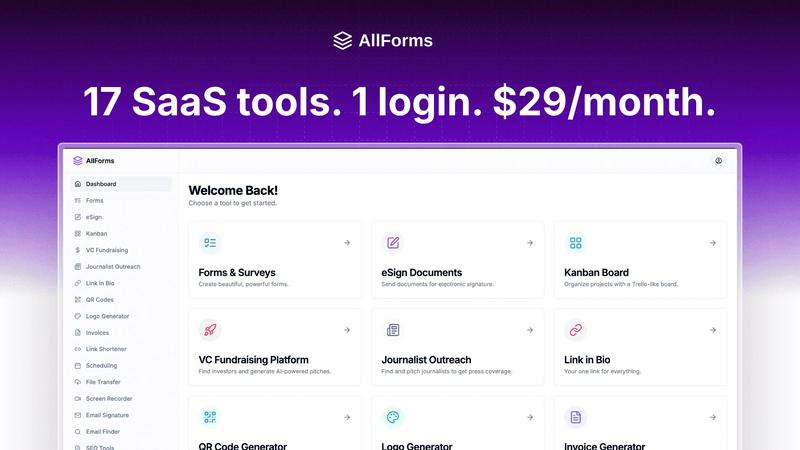
AllForms unifies 17 essential SaaS tools into a single, user-friendly platform for just $29 a month, saving you money.
Last updated: March 1, 2026

documentorium
Documentorium creates professional contractor documents and PDFs using guided forms for your trade.
Last updated: March 26, 2026
Visual Comparison
AllForms
documentorium

Feature Comparison
AllForms
Legally Binding E-Signing
AllForms offers a secure and legally binding e-signing feature that allows users to send contracts and documents for signatures seamlessly. This feature tracks the progress of documents, providing instant notifications when actions are taken, ensuring that your agreements are handled efficiently and securely.
Intelligent Appointment Scheduling
With AllForms' intelligent appointment scheduling tool, users can easily set their availability and let clients book meetings seamlessly. This eliminates the back-and-forth communication often associated with scheduling, saving time and ensuring that appointments are never missed.
Unlimited Form Creation
AllForms enables users to create unlimited forms with its intuitive drag-and-drop builder. This feature provides access to beautiful templates that can be customized for various purposes, whether for surveys, feedback collection, or lead generation, simplifying data collection for businesses.
AI-Powered Chat Assistant
The AI-powered chat assistant included in AllForms enhances customer support by automating responses to common inquiries. This feature improves user engagement, streamlines communication, and allows businesses to focus on more complex tasks while providing quick answers to clients.
documentorium
Trade-Specific Template Library
documentorium offers a curated catalog of more than 200 document templates organized into 26 trade-specific categories. This means an electrician's service report template will have fields for circuit breakers and amperage, while a plumber's estimate will include line items for pipe materials and fixture installations. This specialization removes guesswork and ensures every document is relevant and professionally structured for the specific job at hand, far surpassing generic office software.
Guided Form-Filling Interface
The platform uses an intuitive, step-by-step form interface to guide users through document creation. Users are prompted to enter information into logical, clearly labeled fields rather than manipulating a complex layout. This structured approach minimizes errors, saves time, and ensures all necessary details are captured efficiently, making the process straightforward even for those who are not tech-savvy.
Instant PDF Generation and Output
Upon completing a guided form, documentorium instantly compiles the information into a clean, professionally formatted PDF document. This PDF is immediately ready for printing, emailing to clients, or digital archiving. The system handles all design, layout, and formatting automatically, delivering a polished result without any manual design work required from the user.
Complete Document History and Prefill
Every document created is saved in the user's personal account history. This archive allows for easy retrieval, re-downloading, and reference. Furthermore, the system can intelligently prefill information from past documents into new ones, such as pulling client details or standard service descriptions, dramatically speeding up the creation of recurring documents like invoices or maintenance reports.
Use Cases
AllForms
Streamlining Client Onboarding
Businesses can utilize AllForms to streamline their client onboarding process. By integrating e-signing, appointment scheduling, and form creation, companies can ensure a smooth transition from initial contact to contract finalization, enhancing the client experience.
Managing Marketing Campaigns
AllForms can be used to manage marketing campaigns effectively. The platform's SEO and marketing utilities, combined with form and email capabilities, allow businesses to create targeted campaigns, collect leads, and analyze performance—all in one place.
Improving Customer Support
Companies can enhance their customer support systems by leveraging the AI-powered chat assistant. This feature allows businesses to provide quick responses to customer queries, improving satisfaction and freeing up human resources for more complex issues.
Facilitating Team Collaboration
AllForms serves as a collaborative tool for teams by integrating various functionalities into one platform. Team members can easily share documents, schedule meetings, and track project progress, fostering a more connected and efficient work environment.
documentorium
Creating a Detailed Service Proposal
A solar installation company can use documentorium to generate a comprehensive and professional proposal for a residential client. By selecting the solar-specific proposal template, they can quickly input system specifications, energy production estimates, equipment details, warranty terms, and the total project cost. The resulting polished PDF builds client trust and clearly communicates the project's value and scope.
Issuing a Formal Quote or Estimate
A contractor visiting a job site can use the mobile-friendly platform to create a detailed quote on the spot. Using a trade-specific template, they can itemize materials, labor costs, timelines, and terms. The instant generation of a professional PDF quote allows them to present it to the homeowner immediately, improving the likelihood of securing the job without delay.
Managing Work Orders and Service Reports
An HVAC technician completing a maintenance call can fill out a guided service report template directly on a tablet. They can document diagnostics, parts used, services performed, and recommendations. The resulting PDF serves as an official record for the client, a billing document for the office, and a historical log for future service visits, all created in minutes.
Handling Change Orders and Contract Modifications
For a roofing project where additional work is requested, the project manager can swiftly generate a formal change order. Using the appropriate template, they can detail the scope change, associated costs, and adjusted timeline. This creates a clear, professional document for client approval, protecting the business and ensuring transparent communication regarding project alterations.
Overview
About AllForms
AllForms is a groundbreaking all-in-one SaaS platform meticulously crafted to address the challenges faced by entrepreneurs, small to medium-sized businesses, startups, and freelancers. It consolidates and replaces a fragmented array of costly business tools into a single, cohesive solution. With AllForms, users can access legally binding e-signing, intelligent appointment scheduling, unlimited form creation, an AI-powered chat assistant, and a full suite of SEO and marketing utilities—all from one user-friendly interface. The primary value proposition of AllForms is its exceptional cost efficiency and streamlined operations, allowing users to replace multiple subscriptions and disjointed workflows with a single platform. By combining the functionalities of up to 17 popular tools, including DocuSign, Calendly, TypeForm, ChatGPT, and Semrush, AllForms not only enhances productivity but also ensures brand consistency. This powerful tool accelerates business processes from client acquisition to contract finalization, making it an invaluable asset for modern businesses seeking to optimize their operations and reduce software costs.
About documentorium
documentorium is a specialized document engine designed exclusively for tradespeople and service professionals. It eliminates the frustration of starting from a blank page by providing a comprehensive library of over 200 guided templates across 26 distinct trade categories. This includes electricians, plumbers, contractors, HVAC technicians, roofers, and solar installers, among others. The platform's core value proposition is enabling these professionals to generate clean, professional, and print-ready business documents in seconds. Instead of generic forms, each template features fields and terminology built specifically for the user's trade, ensuring accuracy and relevance. From initial quotes and estimates to final invoices, warranties, and change orders, documentorium streamlines the entire documentation workflow. It combines the efficiency of guided digital forms with the professionalism of polished PDF output, all while maintaining a complete history of documents for easy reference and repurposing.
Frequently Asked Questions
AllForms FAQ
What types of businesses can benefit from AllForms?
AllForms is designed for entrepreneurs, small to medium-sized businesses, startups, and freelancers who need to consolidate their business tools and reduce costs while enhancing productivity.
How does AllForms ensure data security?
AllForms employs advanced security measures to protect user data, including encryption for e-signatures and secure storage for documents, ensuring that sensitive information remains confidential and secure.
Is there a free trial available for AllForms?
Yes, AllForms offers a 7-day free trial, allowing potential users to explore its features and functionalities without any upfront commitment.
What happens if I am not satisfied with AllForms?
AllForms provides a 30-day money-back guarantee, ensuring that users can cancel their subscription at any time and receive a full refund if they are not satisfied with the service.
documentorium FAQ
Can I cancel my subscription anytime?
Yes, you can cancel your subscription at any time directly from your account settings. Your access to the platform will remain active until the end of your current billing period. There are no penalties or lock-in contracts, providing full flexibility for your business.
What happens to my documents when the free trial ends?
All documents you created during your trial period remain saved in your account history. You can view and download these existing PDFs at any time. To create or edit new documents after the trial, you will need to activate a paid subscription. No data or documents are deleted when the trial expires.
Do I lose access to my old documents if I don't subscribe?
No, you do not lose your documents. Your document history is preserved, and you retain the ability to view and download any PDFs you created while you had an active account (including during a trial). A subscription is required to create, edit, or generate new documents, but your historical library remains accessible.
Does documentorium provide legal advice for contracts?
No, documentorium does not provide legal advice. The platform is a tool for generating professional document formats and PDFs based on the information you provide. It is recommended that you consult with a legal professional to ensure that any contracts, terms, or agreements you create meet your specific legal requirements and local regulations.
Alternatives
AllForms Alternatives
AllForms is an innovative all-in-one SaaS platform designed to streamline business operations by consolidating multiple essential tools into a single interface. It caters primarily to entrepreneurs, small to medium-sized businesses, startups, and freelancers who are overwhelmed by the need to juggle numerous software subscriptions and workflows. Users often seek alternatives to AllForms due to varying needs in pricing, features, or platform compatibility, as well as the desire for specialized functionalities. When searching for an alternative to AllForms, it's important to consider factors such as pricing structures, the range of features offered, integration capabilities with existing tools, and user experience. A suitable alternative should not only provide comparable functionalities but also enhance productivity and simplify operations while fitting within budget constraints.
documentorium Alternatives
documentorium is a specialized document generation tool in the productivity and management category, designed specifically for skilled tradespeople. It provides guided templates for creating professional business documents like quotes, invoices, and work orders, streamlining paperwork for contractors. Users often explore alternatives for various reasons, such as budget constraints, the need for different feature sets like integrated scheduling or CRM, or a preference for a different platform like a mobile-first app or a more comprehensive business suite. The specific needs of a business can drive the search for a different solution. When evaluating alternatives, key factors to consider include the depth of trade-specific templates, ease of use, output quality, pricing transparency, and how well the tool integrates with your existing workflow. The goal is to find a system that saves time while enhancing professionalism.