
AI Photo Generator vs poseup
Side-by-side comparison to help you choose the right product.

AI Photo Generator
Create stunning, photorealistic AI photos from text or your own images with a free, fast, and professional workflow.
Last updated: March 11, 2026

poseup
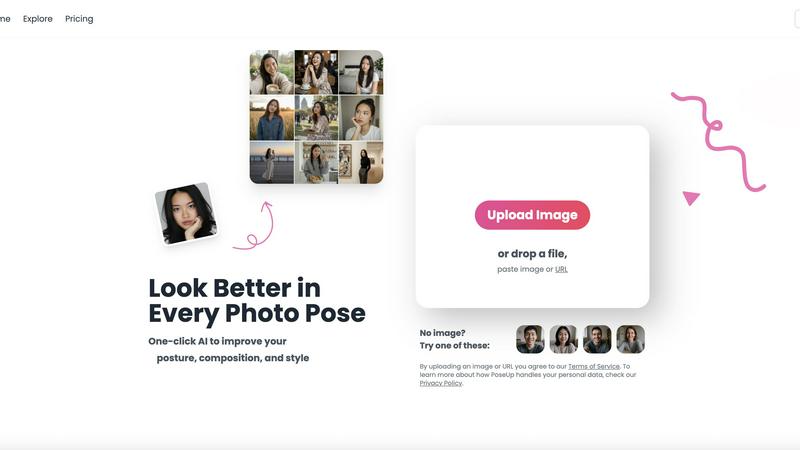
PoseUp instantly improves your photo poses and posture with one-click AI enhancement.
Last updated: February 28, 2026
Visual Comparison
AI Photo Generator

poseup
Feature Comparison
AI Photo Generator
Ultra-Fast, High-Fidelity Generation
The platform is built on optimized cloud architecture to deliver photorealistic images in seconds, not minutes. It supports high-resolution exports and is tuned for prompt fidelity, ensuring the generated visuals accurately reflect user descriptions regarding lighting, composition, and fine details. This speed enables rapid iteration for A/B testing and campaign ideation without compromising on commercial-grade output quality.
Dual-Path Creative Workflow
Users can choose between two systematic production paths. The Text-to-Image path allows for prompt-driven generation from scratch using detailed descriptions. The Image-to-Image path enables controlled edits by uploading a reference photo to preserve structure or style, then applying natural language instructions to change elements like background, mood, or composition, ensuring brand and identity consistency.
Extensive Model & Style Library
The tool provides access to a vast selection of fine-tuned AI models and presets, such as Flux Kontext Pro, Ideogram V3, and Midjourney, each suited for different needs like ultra-realistic photography, anime, oil painting, or 3D renders. This library allows users to select the perfect model for specific workflows, whether for product scenes, portraits, or creative illustrations, ensuring the right balance of speed and detail.
Free-First, Browser-Based Editor
As a completely browser-based AI photo editor online, it requires no software installation. The platform offers a generous free plan, allowing users to test prompt strategies, compare model outputs, and refine concepts before committing resources. This lowers the barrier to entry and supports a scalable workflow from initial experimentation to final, paid batch production.
poseup
One-Click AI Pose Enhancement
PoseUp's flagship feature is its one-click simplicity. Users simply upload a photo, and the AI automatically analyzes the subject's pose, posture, and composition. It then applies intelligent adjustments to correct slouching, improve stance alignment, and create a more balanced and aesthetically pleasing frame. This eliminates the need for manual tweaking, making professional-grade photo enhancement accessible to everyone, regardless of their editing experience or photography knowledge.
Intelligent Posture Correction & Composition Analysis
The platform employs advanced AI algorithms specifically trained to detect human form and spatial arrangement. It goes beyond simple filters to analyze key elements like body angles, limb positioning, and the subject's placement within the frame. The AI suggests and implements corrections that make poses look more natural, confident, and visually appealing, effectively fixing common issues like awkward arm placement or a subject being off-center.
Multi-Format Support & Easy Upload
PoseUp ensures broad compatibility by accepting various popular image formats, including JPG, PNG, WEBP, and HEIC. The upload process is streamlined and user-friendly, allowing users to drag and drop files, paste image URLs, or select images from their device. With a file size limit of 5MB, it accommodates most standard-resolution photos, making the enhancement process quick and hassle-free from the start.
Specialized Scene Optimization
The AI is designed to deliver professional results across diverse photography scenarios. Whether the photo is a casual lifestyle shot, an outdoor adventure image, a professional headshot, a fitness showcase, or even a coffee shop work photo, PoseUp's technology adapts its enhancements to suit the context. This ensures the final image maintains a natural look appropriate for its setting while elevating its overall quality.
Use Cases
AI Photo Generator
Social Media & Content Creation
Content creators can efficiently generate unique, eye-catching thumbnails, social media posts, and blog illustrations. The tool's ability to produce copyright-free assets on demand helps maintain a consistent and engaging visual brand across platforms without the need for stock photography or extensive graphic design work.
Marketing & Advertising Campaigns
Marketers and entrepreneurs can create stunning, professional visuals for digital ads, website banners, email campaigns, and presentations. The fast variant generation supports A/B testing of different visual concepts, while the realistic output is ideal for crafting compelling product scenes and branded campaign imagery on a budget.
Professional Portrait & Headshot Generation
Individuals and businesses can create profile-ready portraits and consistent character visuals. Using the image-to-image workflow, a simple selfie can be transformed into a professional LinkedIn headshot or stylized into an epic cinematic character, ideal for personal branding, team pages, or creative projects.
Product Visualization & E-commerce
E-commerce managers and designers can generate high-quality, photorealistic images of products in various settings and lighting conditions. This is invaluable for creating lifestyle shots, filling product pages, and producing campaign visuals without the cost and time associated with traditional photoshoots.
poseup
Social Media Content Creation
Social media creators, influencers, and everyday users can use PoseUp to ensure every photo posted is feed-worthy. The tool instantly improves selfies, outfit photos, and lifestyle shots by perfecting posture and composition, helping to maintain a polished and professional online aesthetic. This saves hours of manual editing and boosts engagement with higher-quality visual content.
Personal Photo Album Enhancement
Individuals can revitalize their personal photo collections, including family portraits, vacation pictures, and candid moments with friends. PoseUp can correct unintentional slouching or awkward group poses, turning good memories into great photographs that everyone looks their best in, ready for printing or digital sharing.
Professional Photography Workflow
Photographers can integrate PoseUp into their workflow as a powerful first-pass editing assistant. It can quickly batch-enhance poses from a photoshoot, providing a solid foundation before fine-tuning in professional software. This significantly speeds up the editing process, allowing photographers to focus on creative adjustments and client delivery.
Fitness & Wellness Progress Showcasing
Fitness enthusiasts, athletes, and coaches can use PoseUp to accurately showcase form and physique in progress photos or demonstration shots. The AI ensures posture is correct and the body is framed optimally, providing clear, professional-looking images that better highlight fitness achievements and proper technique for social media or personal tracking.
Overview
About AI Photo Generator
AI Photo Generator (aiphotogenerator.dev) is a premier creative platform designed to democratize professional-grade visual creation. It leverages cutting-edge neural network technology to transform simple text descriptions or existing photographs into stunning, high-quality digital art. The core mission is to eliminate technical barriers, making sophisticated design and photorealism accessible to users regardless of their artistic skill level. The platform operates on two primary, streamlined workflows: a powerful text-to-image generator for creating scenes from scratch and an intuitive image-to-image editor for transforming and refining uploaded photos. It caters to a broad audience, including content creators, marketers, entrepreneurs, and designers who need fast, cost-effective, and copyright-free visuals for campaigns, social media, websites, and presentations. With a free-to-start model and a suite of specialized AI models like Flux, Ideogram, and Qwen, it offers an optimized balance of speed, fidelity, and creative control for both experimentation and professional production.
About poseup
PoseUp is an AI-powered photo enhancement platform designed to transform ordinary images into professional-looking photographs with a single click. Its core technology intelligently analyzes human poses, posture, and overall composition within a photo, identifying areas for improvement such as awkward stances, slouching, or unbalanced framing. The AI then applies precise, automated adjustments to create a more flattering, confident, and aesthetically pleasing result. This process democratizes advanced photo correction, making it accessible to users of all skill levels without requiring expertise in complex editing software or professional photography training.
The tool supports a wide range of image formats including JPG, PNG, WEBP, and HEIC, accepting files up to 5MB. PoseUp is built for a diverse audience, from social media creators and influencers seeking perfect feed-worthy shots, to individuals improving personal photos like selfies and family portraits. It also serves professional photographers as a rapid editing assistant and fitness enthusiasts aiming to showcase their form accurately. By automating technical refinements, PoseUp empowers users to instantly achieve a "professional photographer-level" effect, saving significant time and effort while elevating the quality of any photo containing people.
Frequently Asked Questions
AI Photo Generator FAQ
What is AI Photo Generator?
AI Photo Generator is an online platform that uses advanced artificial intelligence to create images from text descriptions or to edit existing photos based on text instructions. It combines multiple state-of-the-art AI models in one interface to offer fast, high-quality image generation for personal and commercial use.
Is there a free plan available?
Yes, AI Photo Generator offers a free-to-start plan. This allows users to test the platform's core functionalities, experiment with different prompts and models, and generate initial images without any cost, providing a risk-free way to evaluate the tool's capabilities.
Can I use the generated images for commercial purposes?
Yes, images generated on the platform are cleared for commercial use. This means you can legally use the created visuals in advertising, on your website, in products, and for other business-related purposes, providing a valuable resource for creating original marketing assets.
How does the Image-to-Image feature work?
The Image-to-Image feature allows you to upload a reference photo. The AI then uses this image as a structural or stylistic baseline. You can provide natural language instructions (e.g., "change the background to a beach," "make it sunset") to direct specific edits while preserving key elements from the original, such as a person's likeness or a product's form.
poseup FAQ
What types of photos does PoseUp work best with?
PoseUp is specifically optimized for photos containing one or more human subjects where pose, posture, and composition are key. It works excellently for portraits, selfies, couple photos, group shots, and fitness images. The AI analyzes the human form to make intelligent adjustments, so its primary enhancements are applied to people within the frame.
How does the AI ensure my photo still looks natural after enhancement?
The AI is trained to make subtle, realistic adjustments that enhance the subject's natural appearance. Instead of applying drastic, unrealistic transformations, it focuses on correcting posture flaws and compositional imbalances that already exist. The goal is to make you look like the best version of yourself, preserving your original likeness and the photo's authentic feel.
What image formats and file sizes are supported?
PoseUp supports common image formats including JPG, PNG, WEBP, and HEIC. The maximum file size for upload is 5MB. This covers the majority of images taken on smartphones and digital cameras, ensuring wide accessibility. For best results, use clear, well-lit photos where the subject is easily distinguishable.
Is there a free way to try PoseUp?
Yes, new users can get started with free credits. The website offers "Get 50 free credits" for newcomers to test the platform's core enhancement features. This allows you to process several photos and experience the AI's capabilities before committing to a paid plan.
Alternatives
AI Photo Generator Alternatives
AI Photo Generator is a leading platform in the AI image generation category, designed to transform text prompts and existing photos into professional digital art. It empowers users to create high-quality visuals without needing advanced technical skills, making it a popular choice for creators and marketers. Users often seek alternatives for various reasons, including budget constraints, specific feature requirements not offered by one platform, or a need for different artistic styles and output controls. The search for the right tool is driven by individual project needs and workflow preferences. When evaluating alternatives, key factors to consider include the quality and style of image outputs, pricing models and subscription flexibility, the range of editing and customization tools available, and the overall speed and reliability of the generation process. Assessing these elements will help you find the best fit for your creative goals.
poseup Alternatives
PoseUp is an AI-powered tool in the image and photo enhancement category. It specializes in automatically improving human poses, posture, and photo composition with a single click, making professional-looking results accessible to users without editing expertise. Users often seek alternatives to tools like PoseUp for various reasons. Common factors include different pricing models or budget constraints, the need for specific features not offered, compatibility with certain operating systems or workflows, and preferences for tools that offer more manual control or integrate with other software platforms. When evaluating an alternative, consider the core capabilities for pose and posture correction, the ease of use and automation level, supported file formats and size limits, output quality and realism of adjustments, and overall value for your specific use case, whether for personal photos, social media, or professional work.