
AI Formatter vs CleanPaste.org
Side-by-side comparison to help you choose the right product.
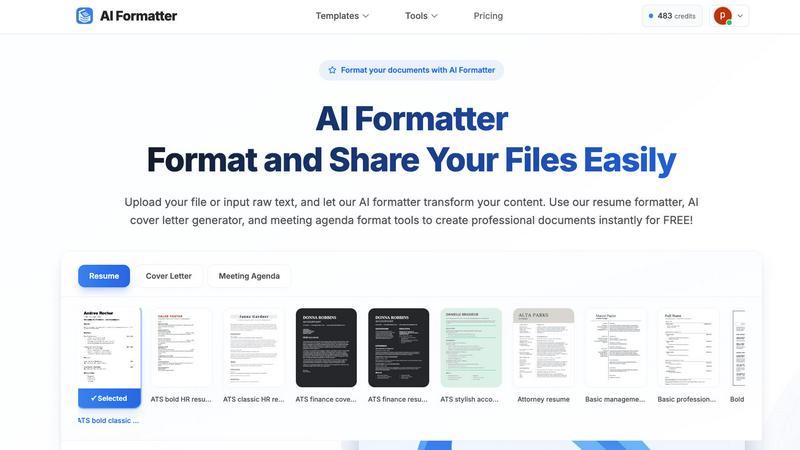
Effortlessly transform raw text into professional documents using AI Formatter's extensive library of templates.
Last updated: March 1, 2026

CleanPaste.org
CleanPaste.org instantly removes invisible characters and AI watermarks from text for free, ensuring clean and.
Last updated: March 2, 2026
Visual Comparison
AI Formatter
CleanPaste.org

Feature Comparison
AI Formatter
Extensive Template Library
AI Formatter provides users with access to a vast library of over 162 professional templates. These templates are optimized for ATS compliance, ensuring that resumes, cover letters, and other documents pass automated screening systems effectively.
Real-Time Document Editing
With the built-in real-time editor, users can easily customize their formatted documents. This feature allows for immediate adjustments in fonts, colors, and layouts, ensuring that each document meets personal branding and professional standards.
Multi-Format Export Options
AI Formatter supports various export formats, including PDF, Word, and TXT. This flexibility allows users to download their documents in the format that best suits their needs, facilitating easy sharing and submission.
AI-Powered Formatting
The AI-driven formatting technology processes uploaded content and transforms it into a well-structured document within seconds. This automation saves users significant time while ensuring high-quality presentation and professional standards.
CleanPaste.org
Instant Processing
CleanPaste.org delivers immediate results, allowing users to paste their text and receive a cleaned version within seconds. This feature enhances efficiency and ensures that users can quickly move on to other tasks.
Watermark Removal Mode
This specialized mode effectively strips AI watermarks from the text while preserving the original content. Users can trust that their cleaned text will not raise any red flags when submitted for review or publication.
Invisible Character Detection
The tool utilizes advanced algorithms to identify and eliminate invisible characters, zero-width spaces, and hidden metadata that may compromise the integrity of the text. This ensures that the content remains clean and professional.
User-Friendly Interface
CleanPaste.org is designed with simplicity in mind. Users can easily navigate the platform without technical expertise, making it accessible for everyone from students to seasoned professionals.
Use Cases
AI Formatter
Job Seekers
Job seekers can utilize AI Formatter to create polished resumes and cover letters that align with industry standards. The ATS optimization feature ensures that their documents stand out during the application process.
Professionals
Professionals can benefit from AI Formatter by generating well-structured meeting agendas and reports, enhancing their communication and presentation skills in corporate environments.
Businesses
Businesses can create professional invoices and receipts using AI Formatter, streamlining their billing processes and improving client interactions with visually appealing documents.
Academics
Students and educators can use AI Formatter to format research papers, presentations, and other academic documents, ensuring that their work meets institutional standards and is presented professionally.
CleanPaste.org
For Students
Students can use CleanPaste.org to remove hidden characters from essays or assignments, ensuring their submissions are polished and free from any AI-related formatting issues. This helps maintain academic integrity and enhances the quality of their work.
For Content Creators & Bloggers
Content creators can leverage CleanPaste.org to ensure that their drafts are devoid of invisible characters and AI watermarks. This allows them to maintain a consistent and authentic brand voice while connecting with their audience effectively.
For Professionals
Professionals across various fields can utilize CleanPaste.org to refine emails, reports, and presentations. By cleaning up AI-assisted drafts, they can ensure their communications are clear, professional, and free of distracting hidden elements.
For Freelancers
Freelancers often rely on AI tools for assistance in generating content. CleanPaste.org allows them to quickly clean their work, ensuring that it meets client expectations and passes detection tests seamlessly.
Overview
About AI Formatter
AI Formatter, developed by Sun Sky LLC, is an innovative AI-driven document formatting platform tailored for individuals and businesses seeking to create professional documents with ease. This cloud-based SaaS solution significantly reduces the time and effort required to format unstructured text or uploaded files, including popular formats like Word, PDF, and TXT. The platform allows users to convert their content into polished, ATS-optimized documents in seconds, boasting an impressive ATS pass rate of over 95%. This feature is particularly beneficial for job seekers and professionals aiming to enhance their chances of securing interviews. With a library of over 100 templates designed for various professional documents such as resumes, cover letters, meeting agendas, and invoices, users can ensure their documents are visually appealing and tailored to their specific industry needs. The real-time online editor offers full customization options, enabling users to adjust fonts, colors, and layouts effortlessly. Furthermore, multi-format exports and secure sharing options make AI Formatter an indispensable tool for job seekers, professionals, businesses, and academics alike. Starting with 10 free credits, users can explore the platform's extensive capabilities, with subscription plans ranging from Free to Enterprise tier at $199.99 per month for unlimited formatting.
About CleanPaste.org
CleanPaste.org is an innovative online tool that specializes in removing AI watermarks and hidden metadata from text, making it an essential resource for a wide range of users including students, content creators, and professionals. This platform is designed with user-friendliness in mind, allowing individuals to effortlessly paste their text and receive a cleaned version in real-time. With no sign-up required and absolutely no hidden fees, CleanPaste.org stands out as a completely free service that prioritizes accessibility and convenience. The tool has gained the trust of over 480,000 users, who rely on it to enhance the authenticity and originality of their content. By ensuring that AI-generated text appears entirely human-like, CleanPaste.org empowers users to submit their work with confidence, fostering a sense of autonomy in content creation.
Frequently Asked Questions
AI Formatter FAQ
What file formats does AI Formatter support?
AI Formatter supports various file formats, including PDF, DOC, DOCX, and TXT, allowing users to upload their documents or input raw text for formatting.
Can I customize my formatted documents?
Yes, AI Formatter features a real-time editor that allows users to customize their documents. You can adjust fonts, colors, layouts, and other design elements to match your preferences.
Is there a free version of AI Formatter available?
Yes, AI Formatter offers a free tier which starts with 10 free credits. Users can explore the platform's capabilities before choosing a subscription plan that fits their needs.
How does AI Formatter ensure ATS compatibility?
AI Formatter uses a library of ATS-optimized templates and AI-driven formatting technology to create documents that meet the requirements of automated screening systems, enhancing the chances of getting noticed by recruiters.
CleanPaste.org FAQ
How does CleanPaste.org remove invisible characters?
CleanPaste.org employs advanced algorithms to detect and eliminate invisible characters, zero-width spaces, hidden metadata, and AI watermarks from your text. Users can simply paste their content and click clean for instant results.
Is CleanPaste.org truly free? What's the catch?
Yes, CleanPaste.org is completely free to use. There are no hidden fees or usage limits, and no sign-up is required. The platform aims to provide a user-friendly tool for everyone seeking to clean their text effectively.
What types of hidden characters does CleanPaste.org remove?
The tool is capable of removing various invisible characters, including zero-width spaces, hidden metadata, AI watermarks, and other formatting artifacts. All features are available to users at no cost.
How can I trust the effectiveness of CleanPaste.org?
CleanPaste.org has been trusted by over 480,000 users, including students, professionals, and content creators. Positive user feedback and successful tests against AI detection tools demonstrate its reliability and effectiveness.
Alternatives
AI Formatter Alternatives
AI Formatter is a cloud-based SaaS tool developed by Sun Sky LLC, designed to revolutionize the document formatting process. It falls under the category of productivity and management software, offering users the ability to transform raw text into polished, ATS-optimized documents through a library of over 100 professional templates. Many users seek alternatives to AI Formatter for various reasons, including pricing, specific feature requirements, or compatibility with their existing platforms. When choosing an alternative, it is essential to consider factors such as template variety, customization options, user interface, and overall cost-effectiveness to ensure the selected tool meets their unique needs.
CleanPaste.org Alternatives
CleanPaste.org is a free online tool that specializes in removing invisible characters and AI watermarks from text. As a part of the AI Assistants category, it caters to a diverse user base, including students, content creators, and professionals who seek to enhance the authenticity of their written material. Users often look for alternatives due to various reasons, such as the need for additional features, different pricing structures, or specific platform compatibility that better suits their individual requirements. When searching for alternatives, it is essential to consider factors like the tool's ease of use, the range of features offered, and whether it effectively meets your unique needs. Additionally, evaluating the reputation of the service and its user feedback can provide valuable insights into its reliability and functionality. A good alternative should not only perform watermark removal but also enhance text quality and ensure a seamless user experience.