
xyOps
xyOps is an all-in-one workflow automation system for orchestrating infrastructure with job scheduling, monitoring, alerting, and ticketing.
Visit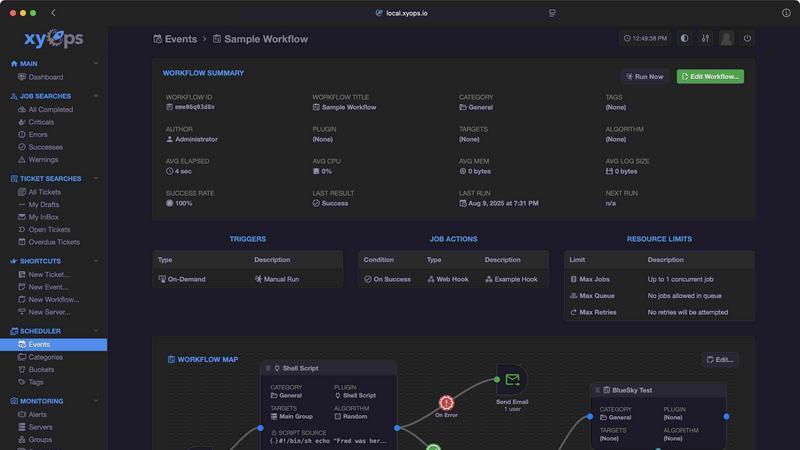
About xyOps
xyOps is a next-generation, open-source system designed to unify job scheduling, workflow automation, server monitoring, alerting, and incident response into a single, cohesive platform. Built specifically for developers and operations teams, xyOps provides complete control over the automation stack without requiring users to surrender data, freedom, or visibility. The platform is open, extensible, and designed to run anywhere, from a single server to a fleet of thousands. Unlike many competing tools, xyOps does not hide features behind paywalls or push telemetry data back to any external entity. Its core value proposition lies in combining traditionally separate functions into one integrated system, allowing teams to schedule jobs across their entire infrastructure, track performance metrics in real time, set complex alerts, and manage incident response through a built-in ticketing system. The platform features a visual workflow builder for connecting events, triggers, actions, and monitors into meaningful pipelines, alongside a flexible job scheduler that goes far beyond traditional cron capabilities. With support for plugins written in any language, a growing marketplace of ready-made integrations, and a BSD 3-Clause license that guarantees the software remains free and open source forever, xyOps empowers teams to build robust automation systems without vendor lock-in or hidden costs. The platform is particularly valuable for organizations that want to maintain full ownership of their data and infrastructure while benefiting from enterprise-grade automation capabilities.
Features of xyOps
Visual Workflow Builder
The visual workflow builder allows users to chain multiple jobs together with conditional logic, enabling complex automation sequences without writing extensive code. Users can pass data and even files between workflow steps, assign specific actions to events such as notifications or webhooks, and attach limiters including timeouts, memory caps, and log size caps. The builder supports running jobs in parallel or creating custom queues, giving teams precise control over how their automation pipelines execute.
Flexible Job Scheduler
The job scheduler goes far beyond traditional cron capabilities by allowing users to target individual servers or entire server groups with a single schedule. Multiple schedules can be assigned to the same event, and blackout ranges can be defined for holidays or planned downtime. The scheduler supports crontab import for migrating existing jobs, one-time single-shot jobs for immediate execution, and plugin-based scheduler extensions for custom scheduling logic.
Active Job Tracking
xyOps provides real-time visibility into job execution by allowing any number of jobs to run in parallel, with an optional maximum parallel limit that queues the rest automatically. Users receive real-time progress updates along with estimated time remaining for each job. The system enforces resource limits such as CPU and memory usage per job, and jobs can emit their own progress and statistics. Custom actions can be triggered based on job results, enabling automated responses to success or failure.
Smart Alerts and Integrated Ticketing
The alerting system features trigger expressions with flexible rules for creating complex notification conditions. Alerts can be delivered via email, webhook, or custom notification channels, and each alert includes a snapshot of the server at the time of the event. Critically, alerts can automatically create tickets within the built-in ticketing system or trigger job executions for remediation. Active alerts can also prevent new jobs from launching, providing a safety mechanism for infrastructure stability.
Use Cases of xyOps
Infrastructure Automation and Orchestration
Operations teams can use xyOps to automate routine infrastructure tasks such as system updates, backup creation, log rotation, and service restarts across hundreds or thousands of servers. The visual workflow builder allows chaining these tasks into complex sequences with conditional logic, while the job scheduler ensures they run at appropriate times. Server monitoring provides real-time visibility into resource usage, and smart alerts notify teams immediately when any automation step fails or produces unexpected results.
CI/CD Pipeline Management
Development teams can integrate xyOps into their continuous integration and continuous deployment pipelines by using the built-in ticketing system and API to trigger jobs based on code commits or build completions. Workflows can automatically deploy code to staging environments, run test suites, and promote builds to production only when all conditions are met. The plugin marketplace provides ready-made integrations with popular tools like GitHub, GitLab, and Docker, while custom plugins can be written in any language for specialized deployment scenarios.
Incident Response and Remediation
When monitoring detects a server issue such as high CPU usage, disk space running low, or a service becoming unresponsive, xyOps can automatically create a ticket in the integrated ticketing system and trigger a remediation workflow. This workflow might restart the affected service, scale up resources, or notify the on-call team through multiple channels. The alert snapshot provides immediate context for responders, and the ticketing system tracks the entire incident lifecycle from detection to resolution.
Scheduled Data Processing and ETL
Data engineering teams can leverage xyOps to schedule and manage extract, transform, and load workflows that process large datasets on a regular basis. The job scheduler supports complex timing patterns including blackout periods for maintenance windows, while the active job tracking provides real-time progress updates for long-running data transformations. The ability to pass files between workflow steps enables multi-stage processing pipelines, and resource limiters prevent any single job from consuming excessive CPU or memory.
Frequently Asked Questions
What makes xyOps different from traditional job schedulers like cron?
xyOps goes far beyond cron by providing a unified platform that combines job scheduling with workflow automation, server monitoring, alerting, and incident response. While cron only allows time-based job execution, xyOps supports complex workflows with conditional logic, real-time job tracking with resource limits, server monitoring dashboards, smart alerts that can trigger automated responses, and a built-in ticketing system for incident management. Additionally, xyOps can scale from a single server to thousands of workers and supports plugins written in any language.
Is xyOps truly free and open source, and what license does it use?
Yes, xyOps is 100% free and open source under the BSD 3-Clause license, and the developers have committed that it will always remain so. The license will never be modified, split, or amended with additional restrictive terms. No new code or contributions will ever be accepted under a non-OSI-approved license. All current and future app features will remain open source forever, and professional support plans are offered separately without affecting the open source codebase.
How does xyOps handle scalability for large server fleets?
xyOps is built to scale from five servers to five thousand or more. It supports running multiple hot backup instances that can take over immediately on power loss without interrupting any running jobs. The platform scales to thousands of worker servers in a cluster, and servers can be grouped manually or automatically based on hostname. Agents can be easily installed on macOS, Linux, and Windows systems, making it suitable for heterogeneous environments.
Can I extend xyOps with custom functionality, and what languages are supported?
Yes, xyOps uses a simple JSON over STDIO Plugin API that requires no SDK and supports all programming languages. Users can define custom parameters with UI form fields for their plugins. There are multiple plugin types available including Event, Action, Monitor, and Trigger plugins. Additionally, xyOps has a Plugin Marketplace with a growing library of ready-made plugins, both official and community-based, and users can easily add MCP servers as plugins or write and publish their own plugins to the store.
Similar to xyOps

Audio to Video AI turns podcasts, narration, voice recordings, and music into visual content with prompts, reference images, flexible settings, and do

Find an AI tool by the job you need done, not the buzzword.

An AI tools directory that turns down money. 146 listings, 20 categories, no sponsored placement and no affiliate ordering.

Get your SaaS tool discovered. Free listing, honest screening, a dofollow link — and no way for anyone to outbid you.

Tools Network is a curated directory of the best AI tools across 25+ categories — from writing and image generation to coding and marketing.

AI employee that gets work done directly in Slack

Done-for-You SaaS Visibility for Search & AI | UseWok

Schedule and publish social content across 10 platforms with one dashboard, API, and MCP built for teams and AI agents.