
Online Keyboard Shortcuts
OnlineShortcuts.com delivers organized, cross-platform keyboard shortcuts for Windows, macOS, and Linux to boost productivity and reduce mouse.
Visit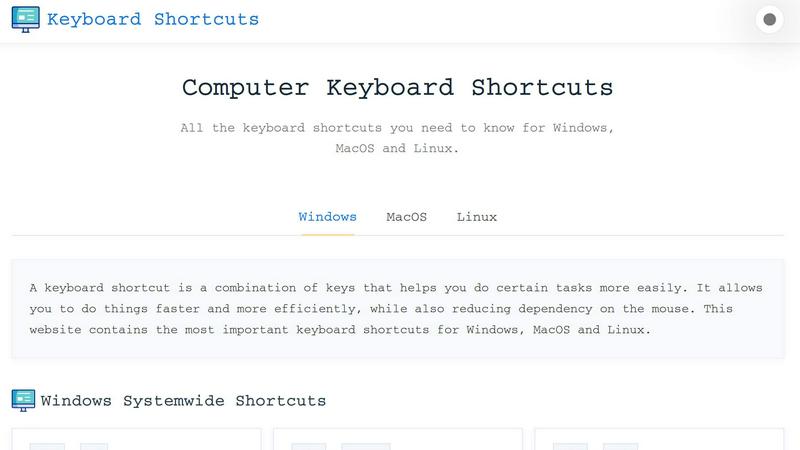
About Online Keyboard Shortcuts
Online Keyboard Shortcuts, available at OnlineShortcuts.com, is a comprehensive, free, and ad-free reference guide designed to boost your productivity by centralizing the most essential keyboard shortcuts for Windows, macOS, and Linux operating systems. The core purpose of this tool is to eliminate the friction of navigating through menus and relying heavily on a mouse, allowing you to execute common commands with a simple key combination. Whether you are a software developer, a data analyst, a writer, or a casual computer user, mastering keyboard shortcuts can dramatically reduce the time spent on repetitive tasks. The website organizes shortcuts into clear, categorized tables, making it easy to find exactly what you need. It covers system-wide shortcuts, operating system-specific key combinations (like the Windows Key shortcuts), and application-specific shortcuts for tools like Command Prompt, File Explorer, and web browsers. The value proposition is straightforward: it provides a single, reliable source of truth for keyboard shortcuts, complete with downloadable cheatsheets in PDF and PNG formats for offline use. The interface is clean, responsive, and works seamlessly across mobile devices, tablets, and desktops, ensuring you always have access to this productivity resource. By reducing dependency on the mouse, users can achieve a more fluid and efficient workflow, ultimately saving time and reducing physical strain.
Features of Online Keyboard Shortcuts
Comprehensive Operating System Coverage
The website provides a meticulously curated list of keyboard shortcuts for three major operating systems: Windows, macOS, and Linux. Each OS section is further broken down into system-wide shortcuts and specific key combinations, such as the Windows Key shortcuts for Windows. This ensures that users on any platform can find the exact shortcuts they need to navigate their system, manage windows, and access settings quickly. The inclusion of Linux shortcuts makes it a valuable resource for developers and system administrators who work across multiple environments, offering a single repository for cross-platform knowledge.
Application-Specific Shortcut Libraries
Beyond system-wide commands, the site dedicates sections to application-specific shortcuts for common tools. This includes detailed tables for Command Prompt (copy, paste, view history), File Explorer (new folder, properties, preview pane), text editing (bold, italic, undo, redo), and web browsers (new tab, refresh, reopen closed tab). This feature is invaluable for power users who spend significant time within these applications, as it provides a quick reference to optimize their workflow within each specific tool, reducing the need to search through application menus or remember obscure commands.
Downloadable Cheatsheets for Offline Access
Recognizing that users may not always have internet access or prefer a physical reference, the website offers downloadable cheatsheets. Users can download the entire set of shortcuts as a PDF file or as PNG images in both dark and light themes. This feature allows for easy printing, sharing, or saving to a local device for quick offline consultation. The availability of multiple formats ensures that users can integrate the cheatsheet into their preferred workflow, whether it is a printed poster on their desk or an image on their smartphone.
Clean, Responsive, and Ad-Free Interface
The website is designed with a focus on usability and accessibility. It features a clean, organized layout with categorized sections that are easy to navigate. The interface is fully responsive, meaning it adapts seamlessly to different screen sizes, from desktop monitors to mobile phones and tablets. Crucially, the site is 100% free and contains no ads, upsells, or adtech spyware. This commitment to a distraction-free experience ensures that users can focus entirely on finding and learning the shortcuts without any interruptions or privacy concerns.
Use Cases of Online Keyboard Shortcuts
Accelerating Daily Workflow for Office Professionals
Office workers who spend hours in word processors, spreadsheets, and email clients can dramatically increase their efficiency by using keyboard shortcuts. For instance, using Ctrl+C and Ctrl+V for copy-paste, Ctrl+Z for undo, and Alt+Tab to switch between applications eliminates the need to constantly reach for the mouse. The website provides a quick reference for these essential text editing and navigation shortcuts, helping professionals reduce repetitive strain and complete tasks such as formatting documents, managing files, and switching contexts much faster.
Enhancing Developer and System Administrator Productivity
Developers and system administrators often work across multiple terminals, code editors, and virtual desktops. The site’s coverage of Command Prompt shortcuts (like F7 for command history) and virtual desktop management shortcuts (Win+Ctrl+D to create a new desktop) is highly valuable. These users can learn to navigate their development environment without lifting their hands from the keyboard, enabling them to execute complex workflows, manage multiple projects, and troubleshoot systems with greater speed and precision, directly impacting their coding and system management efficiency.
Streamlining Web Browsing and Research
For researchers, students, and anyone who spends significant time online, the web browser shortcuts section is a game-changer. Commands like Ctrl+T to open a new tab, Ctrl+W to close the current tab, Ctrl+Shift+T to reopen a closed tab, and Ctrl+L to jump to the address bar allow for rapid navigation and multitasking. This use case helps users manage dozens of open tabs, quickly search for information, and refresh pages without interrupting their flow, making the research process significantly more fluid and less dependent on mouse clicks.
Creating a More Accessible Computing Experience
For users with mobility or repetitive strain injuries, reducing mouse usage can be a critical accessibility need. Keyboard shortcuts provide an alternative way to control the computer, allowing users to perform all major functions using only the keyboard. The website serves as a comprehensive guide for these users to learn and master these commands. From locking the screen (Win+L) to opening the Start Menu (Ctrl+Esc) and managing windows, the shortcuts empower users to interact with their computer in a way that is more comfortable and less physically demanding.
Frequently Asked Questions
What is the purpose of Online Keyboard Shortcuts?
Online Keyboard Shortcuts is a comprehensive, free online guide designed to help users improve their productivity by learning and using keyboard shortcuts. It provides a centralized repository of the most important keyboard shortcuts for Windows, macOS, and Linux operating systems, as well as shortcuts for common applications like Command Prompt, File Explorer, and web browsers. The goal is to help users perform tasks faster, more efficiently, and with less reliance on a mouse.
How do I use the website to find a specific shortcut?
Using the website is straightforward. Simply browse the main sections labeled Windows, MacOS, or Linux. Within each section, shortcuts are organized into clear, categorized tables such as "Systemwide Keyboard Shortcuts," "Windows Key Shortcuts," and "Application Specific Keyboard Shortcuts." You can scan the tables to find the shortcut you need. The layout is designed to be intuitive and responsive, making it easy to navigate on any device.
Are the keyboard shortcuts on the site accurate and up-to-date?
The shortcuts are curated to be as accurate as possible for the specified software versions. However, software updates from operating system vendors and application developers can sometimes change hotkeys. The site recommends that users verify shortcuts with the specific version of the software they are running. The team aims to keep the information current, but users should always check if a shortcut does not work as expected.
Can I download the keyboard shortcuts for offline use?
Yes, the website offers downloadable cheatsheets. You can download the entire set of shortcuts as a PDF file or as PNG images in both dark and light themes. These files are available for free and can be saved to your computer, printed, or viewed on your mobile device. This feature is particularly useful for users who want a physical reference or need access to the shortcuts without an internet connection.
Explore more in this category:
Similar to Online Keyboard Shortcuts

A free launch checklist for SaaS, apps, AI tools and more. Every step says why it matters and when you can skip it.

Practical, independent guides to home repairs, maintenance, costs, troubleshooting, and everyday fixes.

Highlight faster. Study in flow with custom shortcuts and a workflow built around you. Print smarter, or turn any page into a tiled poster.

Build Mode is a Mac app that turns focused sessions into visible progress, so you can see the work adding up before the results arrive.

Free, no-signup Unicode text tools: superscript, fancy fonts, case converter, symbols. Fast and private.

Free, open-source scheduler. Web/mobile/API. Fees.

