
Meme Library
A free meme manager with text search, backup, and private on-device storage for fast recall and easy sharing.
Visit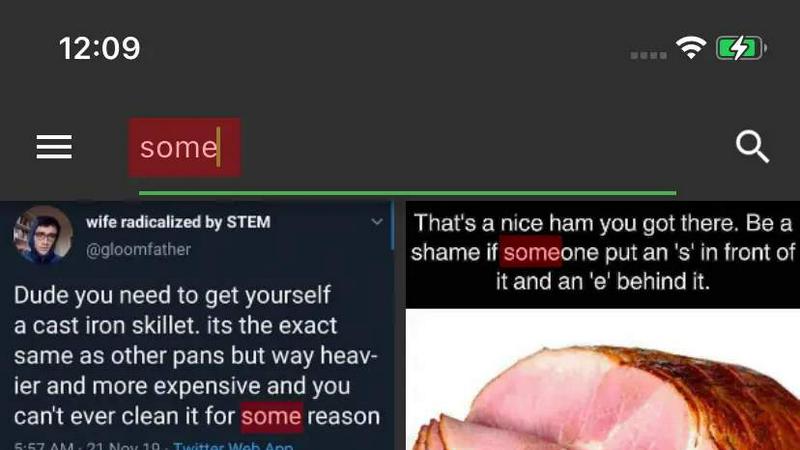
About Meme Library
Meme Library is a dedicated mobile application designed to solve a very specific and increasingly common problem: the chaotic, disorganized state of meme collections on personal devices. In an era where visual communication through memes, reaction images, and screenshots has become a primary mode of digital expression, this app provides a private, searchable, and streamlined home for your entire collection. The core purpose of Meme Library is to transform a scattered gallery of hundreds or thousands of images into a functional, easily navigable vault. It allows users to save memes from virtually any source, including Instagram, Reddit, web browsers, and the device camera roll, all funneled into one centralized location. The most powerful feature is its ability to search memes by the actual text contained within the image itself, making it possible to find a specific reaction meme or a screenshot of a tweet without endless manual scrolling. Designed for meme enthusiasts, content creators, and anyone who relies on quick visual responses in their daily chats, the app prioritizes speed, privacy, and utility. It operates entirely on-device with no social feed, no forced sharing, and no tracking, ensuring that your collection remains your own. Furthermore, optional backup and restore functionality ensures that your curated library can survive phone upgrades or app reinstalls, offering peace of mind for those who have invested significant time in building their collection. Meme Library is a lightweight, clean, and focused tool that brings order to the delightful chaos of meme culture.
Features of Meme Library
Text Search Inside Images
This is the flagship feature that sets Meme Library apart from a standard photo gallery. The app utilizes optical character recognition (OCR) technology to scan and index all text found within your saved memes. This includes captions, jokes, text overlays, screenshots of tweets, and even text within screenshots of other screenshots. The result is a powerful search function where you can type a keyword, phrase, or even a partial word, and the app will instantly return all relevant memes containing that text. This eliminates the frustration of trying to remember which folder or date a specific meme was saved and transforms your collection into a fully searchable database of visual content.
Save From Anywhere
Meme Library is designed to be the final destination for all your meme-saving needs, offering seamless integration with your device's operating system. You can save memes directly from popular platforms like Instagram, Reddit, and Twitter using the standard share sheet. Additionally, you can import images from your camera roll, download them from any web browser, or even capture new ones on the fly. This universal "save from anywhere" functionality ensures that no meme is left behind in a forgotten app or a cluttered gallery. The process is designed to be quick and intuitive, requiring just a few taps to add any image to your organized library.
Backup and Restore
Understanding the emotional and practical value of a curated meme collection, Meme Library provides a robust backup and restore system. This feature allows users to create a secure, encrypted backup of their entire library, including all images and their associated text indexes. This backup can be stored in a cloud service of your choice (like Google Drive or iCloud) or locally. If you upgrade to a new phone, experience a device failure, or simply need to reinstall the app, you can easily restore your entire collection with all its organization intact. This ensures that your carefully built library of reaction memes and niche jokes is never truly lost.
Private by Default
In a digital landscape filled with social feeds, data tracking, and forced sharing, Meme Library takes a firm stance on user privacy. The application is designed to be completely private by default, meaning all your memes and data reside solely on your device. There is no social feed, no public profile, and no feature that encourages or requires you to share your collection with others. The app contains no analytics trackers, no advertising networks, and does not collect any personal usage data. This makes it a safe and trustworthy vault for your personal collection, free from the surveillance and algorithmic manipulation common in other social media and content apps.
Use Cases of Meme Library
The Ultimate Reaction Meme Arsenal
For anyone who relies on the perfect reaction meme in group chats or on social media, Meme Library is an essential tool. Instead of scrolling through a massive, unorganized camera roll to find that one specific image of a celebrity making a funny face, you can simply search for a keyword related to the reaction, such as "shocked," "laughing," or "confused." The text search feature can even find memes based on the text within the reaction itself. This turns your collection into a lightning-fast arsenal for digital communication, ensuring you always have the perfect visual response ready to deploy in seconds.
Organizing Niche Joke Collections
Internet humor is vast and highly specific, often involving inside jokes, obscure references, or niche topics. Meme Library allows users to organize these specialized collections with ease. You can save memes from specific subreddits, Discord servers, or niche online communities into a single, searchable vault. The ability to search by text within the image is particularly useful here, as you can find a meme based on a specific line of dialogue or a unique punchline that is central to that niche community. This transforms a scattered set of screenshots into a cohesive, browsable archive of your personal internet humor history.
Archiving Screenshots and Visual Notes
Beyond traditional memes, the app is an excellent tool for archiving screenshots that contain important information. This could include screenshots of Tweets with useful advice, Instagram infographics, cooking recipes, coding snippets, or inspirational quotes. By saving these into Meme Library, you can search for them later based on the text they contain, effectively turning your image collection into a visual bookmarking system. This is far more efficient than relying on a phone's default screenshot folder, which offers no search functionality and quickly becomes a cluttered mess.
Safe Migration During Phone Upgrades
Upgrading to a new smartphone is often a stressful time for digital hoarders, especially those with extensive meme collections that have been curated over years. Meme Library's backup and restore feature directly addresses this use case. Before switching phones, a user can perform a one-tap backup of their entire library. After setting up the new device and installing the app, a simple restore process brings back every single meme, along with the powerful text search index. This ensures that the user's investment in building their collection is preserved, and they can pick up right where they left off on their new device without any data loss.
Frequently Asked Questions
How does the text search inside images work?
Meme Library uses a technology called Optical Character Recognition (OCR) to analyze the text embedded within your saved images. When you save a meme, the app scans it for any visible text, such as captions, jokes, or text in screenshots. This text is then indexed and stored locally on your device. When you perform a search, the app compares your query against this index and instantly returns all memes that contain matching text. This process is fast, private, and works offline on your device.
Can I save memes from any app or website?
Yes, Meme Library is designed to be a universal destination for saving memes. You can save images from virtually any app or website by using your device's standard share sheet. Simply open the image you want, tap the share icon, and select Meme Library from the list of options. This works for apps like Instagram, Reddit, Twitter, web browsers, and your default photo gallery.
Is my meme collection stored on a server or shared with others?
No. Meme Library is built with a "private by default" philosophy. All your memes, text indexes, and personal data are stored exclusively on your local device. The app does not have any social features, does not upload your data to any external server (unless you choose to use the optional backup feature to your own cloud storage), and contains no tracking or analytics software. Your collection is yours alone.
How do I restore my collection if I get a new phone?
To restore your collection, you first need to have created a backup on your old device using the app's built-in Backup feature. This backup file should be saved to a cloud service like Google Drive or iCloud, or to a local computer. On your new phone, install Meme Library and select the Restore option. You will then be prompted to locate and select the backup file you created. The app will then import all your memes and their associated text indexes, fully restoring your library.
Explore more in this category:
Similar to Meme Library

Apps and files on an infinite canvas where people and AI agents work together.

Analyze Mac storage, map disk usage, and safely clean rebuildable clutter with Nijia, a native macOS utility with a 7-day full-feature trial.

Panzoe is an all-in-one AI platform for personal productivity, business automation, AI assistants, content creation, and custom AI solutions.

AI Email Filter sorts incoming mail into folders using plain-language prompts you write. Works with any IMAP mailbox; bring your own LLM if you want.

No-code 2D game editor: visual node logic, drag-and-drop scenes, live preview. Exports to Windows, macOS, Linux, Android, iOS, Web.

Free collection of online developer utilities, code formatters, and digital converters designed to streamline your daily workflow.

Online tally counter for tracking attendance, workouts, inventory, visitors, sports scores, habits, and everyday counting tasks.

The #1 Native Form Builder Plugin for Framer - No Code, No Embeds, No External Platforms.