
ButterKit
ButterKit simplifies app development by streamlining the creation of stunning App Store screenshots and metadata for all languages.
Visit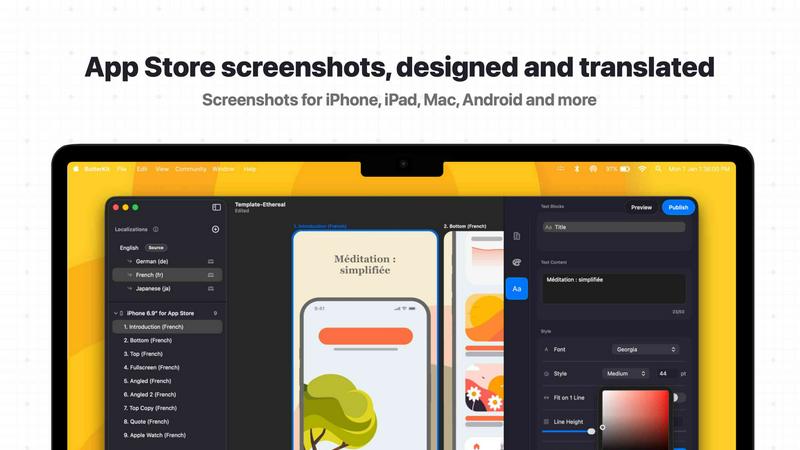
About ButterKit
ButterKit is a native macOS application designed specifically for Apple developers to simplify and automate the entire App Store publishing workflow. This powerful tool addresses the often tedious and time-consuming process of preparing screenshots, localizing metadata, and uploading assets to App Store Connect. ButterKit enables users to capture screenshots directly from the Xcode Simulator and instantly place them into stunning photorealistic 3D device frames, creating polished marketing materials that drive conversions. The application goes beyond simple screenshot capture by offering advanced AI-powered translation capabilities that convert app metadata into all 50 App Store Connect languages, eliminating the traditional hassle of localization. ButterKit integrates seamlessly with the App Store Connect API, allowing developers to upload their finished screenshots and metadata with a single click. Whether users prefer starting from professionally designed templates or building custom designs from scratch, ButterKit provides the flexibility to match any brand aesthetic. A key differentiator is its ability to link entire folders for input and output, making it a natural fit for CI/CD pipelines and Fastlane workflows commonly used by professional development teams. Created by a solo developer who understands the pain points of app publishing, ButterKit is trusted by thousands of developers, design studios, and marketing agencies worldwide to streamline their App Store presence and reach more users across all global markets.
Features of ButterKit
Capture Screenshots with Multiple Methods
ButterKit offers three distinct ways to get your screenshots into the application. You can drag and drop PNG or JPG screenshot images directly onto 3D device frames for instant placement. The integrated Capture Tool works directly with Xcode and Simulator, allowing you to capture screenshots without leaving your development environment, saving significant time during iteration cycles. Additionally, you can link an entire folder of images, such as those generated by Fastlane or Xcode UI tests, and ButterKit will automatically process all screenshots with their respective localizations.
Real 3D Device Rendering Engine
ButterKit is built on a powerful 3D rendering engine that utilizes Apple's Metal framework for high performance, delivering up to 120 frames per second during editing. The application includes high resolution photorealistic 3D devices that make your screenshots look polished and professional. Users can easily adjust device angles, orientations, and positions to achieve the exact visual presentation they want. The 3D devices are designed to be intuitive and fun to manipulate, giving developers complete creative control over their App Store visuals.
Professional Design and Editing Tools
The application provides a comprehensive suite of design tools that rival professional graphic software. Users can span 3D devices across multiple artboards and create seamless panoramic backgrounds that tie all screenshots together into a cohesive visual story. Full font, gradient, and background editing controls are included, allowing for complete customization. High quality templates are bundled directly into the app, and users can access a growing community marketplace of templates and add-ons to expand their design options further.
AI-Powered Translation and Direct Publishing
ButterKit leverages advanced AI models to translate both screenshots and app metadata into all 50 App Store Connect localizations in seconds. Designs remain perfectly synced across all languages, ensuring consistency. The application integrates directly with the App Store Connect API, enabling batch export of images or one-click upload of designs directly to App Store Connect. Screenshots are automatically organized in the correct order, and users can preview how their app's story will appear on every device and in every language before publishing.
Use Cases of ButterKit
Independent App Developers Streamlining Publishing
Solo developers who manage their own App Store presence can dramatically reduce the time spent on screenshot creation and localization. Instead of manually capturing screenshots, designing frames, and translating metadata, developers can use ButterKit to automate the entire pipeline. The ability to link folders from Fastlane or Xcode UI tests means that screenshots generated during automated testing are automatically processed, framed, and ready for upload, freeing developers to focus on coding and product improvement.
Design Agencies Producing Client App Store Assets
Design studios and marketing agencies that handle multiple client apps can use ButterKit to maintain consistent, high quality output across all projects. The template system allows agencies to create branded templates that match each client's visual identity, then quickly apply them to new screenshots. The translation feature enables agencies to offer localization services to clients expanding into international markets without requiring additional translation tools or services, making it a comprehensive solution for client deliverables.
Enterprise Development Teams with CI/CD Pipelines
Large development teams with established continuous integration and continuous deployment workflows can integrate ButterKit directly into their automated processes. By linking entire folders of screenshots generated during automated UI testing, ButterKit can process hundreds of screenshots across multiple device types and languages without manual intervention. This automation ensures that App Store assets are always up to date with the latest app version, reducing the risk of publishing outdated screenshots that could confuse users.
Marketing Teams Preparing App Store Optimization
Marketing professionals responsible for App Store Optimization can use ButterKit to rapidly create and test different visual strategies. The ability to quickly swap screenshots, adjust device frames, and preview results across all languages allows for A/B testing of creative approaches. The photorealistic 3D devices help create screenshots that stand out in search results and category listings, potentially improving conversion rates as reported by users who have seen substantial improvements after switching to ButterKit.
Frequently Asked Questions
How does ButterKit integrate with Xcode and the Simulator?
ButterKit includes a dedicated Capture Tool that works directly with Xcode and the iOS Simulator. When you run your app in the Simulator, you can use the Capture Tool to take screenshots without leaving your development environment. This integration saves time because you don't need to manually save screenshots from the Simulator and then import them into a separate tool. The Capture Tool allows for rapid iteration, letting you make design changes and immediately see how they look in 3D device frames.
Can ButterKit handle screenshots generated by Fastlane or Xcode UI tests?
Yes, ButterKit is designed to work seamlessly with automated screenshot generation workflows. You can link an entire folder of images that were generated by Fastlane, Xcode UI tests, or any other automated process. ButterKit will automatically process all screenshots in the folder, applying your chosen device frames and design templates. This makes it an excellent addition to CI/CD pipelines, as screenshots can be generated, framed, and prepared for upload without any manual intervention.
How does the AI translation feature work and which languages are supported?
ButterKit uses advanced AI models to translate both your screenshot text and app metadata into all 50 App Store Connect localizations. The translation process takes only seconds and ensures that your designs remain perfectly synced across all languages. This means that if you update a screenshot for one language, the corresponding screenshots for all other languages are automatically updated to maintain consistency. The feature eliminates the need to manually translate and resize text for each localization, saving hours of work.
Is ButterKit compatible with existing App Store Connect workflows?
Absolutely. ButterKit integrates directly with the App Store Connect API, allowing you to upload your finished screenshots and metadata with a single click. The application automatically organizes screenshots in the correct order and assigns them to the appropriate device types. You can also batch export images if you prefer to upload them manually. Before publishing, you can preview how your app's story will look on every device and in every language, ensuring everything is perfect before going live.
Similar to ButterKit

Moderation, routing, intent and scoring for any text over one Jev-compatible API, hosted in the EU.

A free directory of 950+ projects built on Laya, the open-source decision model. Updated daily.

The #1 Native Form Builder Plugin for Framer - No Code, No Embeds, No External Platforms.

Generate and edit production-ready images with GPT Image 2 API using detailed prompts, reference images, clear text rendering, and developer-friendly

Create videos from prompts and images with RunwayAI, an independent runway ai video generator with practical output controls.


Free, no-signup Unicode text tools: superscript, fancy fonts, case converter, symbols. Fast and private.