
BoltShot
BoltShot is an ultra-fast screenshot API that transforms any URL into perfect screenshots with no browser operations required.
Visit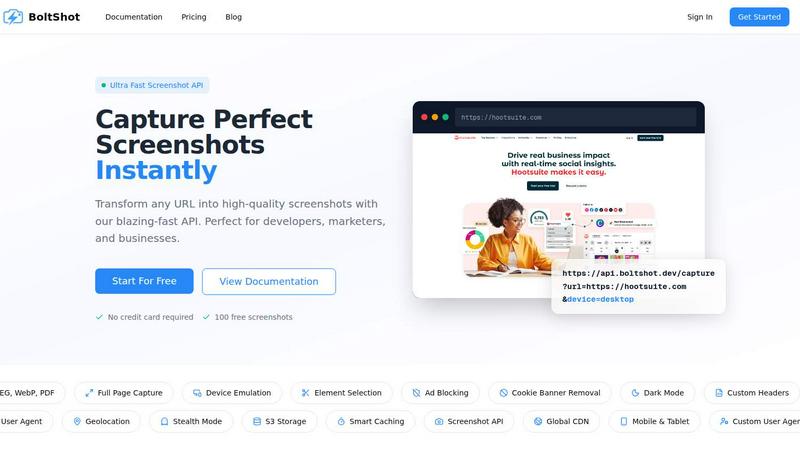
About BoltShot
BoltShot is a high-performance website screenshot API designed to transform any URL into a pixel-perfect, high-quality image or document through a simple, single API request. It eliminates the complexity of managing headless browser infrastructure, such as Puppeteer or Selenium, by providing a robust, cloud-based solution that handles all rendering, scaling, and delivery. The API supports multiple output formats including PNG, JPEG, WebP, and PDF, and offers extensive customization options like full-page capture, device emulation for mobile, tablet, and desktop, and custom viewport settings for flexible rendering. Beyond basic captures, BoltShot includes intelligent features such as ad blocking, automatic cookie banner removal, and smart caching to produce clean, efficient results. For advanced workflows, it provides capabilities like S3 uploads with CDN delivery, custom user agents, geolocation emulation, stealth mode, and custom headers. Designed for developers, marketers, and businesses, BoltShot integrates seamlessly into workflows for e-commerce previews, automated reporting, web archiving, testing, and compliance monitoring. Its core value proposition is simplicity and speed: users get ultra-fast, reliable screenshots without the operational overhead of maintaining browser clusters, making it an essential tool for any team that needs to capture and share web content at scale. With a free tier offering 100 screenshots and no credit card required, BoltShot lowers the barrier to entry for high-quality web capture.
Features of BoltShot
Multi-Format Output and Full Page Capture
BoltShot supports a versatile range of output formats, including PNG, JPEG, WebP, and PDF, allowing users to choose the best format for their specific use case, whether it's a lightweight image for a preview or a printable document for archiving. The full-page capture feature automatically scrolls through an entire webpage to capture content that extends beyond the initial viewport, ensuring that no information is missed. This is particularly useful for capturing long articles, product listings, or dashboards where the complete visual context is essential.
Device Emulation and Custom Viewports
The API provides robust device emulation capabilities, enabling users to capture screenshots as they would appear on mobile phones, tablets, and desktop computers. This is critical for responsive design testing and ensuring that a website looks correct across all platforms. Additionally, BoltShot offers custom viewport settings, giving developers the flexibility to define exact pixel dimensions for their captures. This level of control is ideal for creating consistent visual assets for documentation, marketing materials, or UI testing.
Clean Capture with Ad Blocking and Cookie Banner Removal
BoltShot includes intelligent clean capture features that automatically remove common web distractions. The ad blocking functionality filters out advertisements from screenshots, resulting in cleaner, more professional images. Simultaneously, the cookie banner removal feature detects and eliminates consent popups and overlay notifications that can obscure the main content. These automated processes save significant manual editing time and ensure that every screenshot is focused on the intended content without clutter.
Advanced Capabilities: Stealth Mode, Geolocation, and S3 Storage
For users requiring more sophisticated captures, BoltShot offers advanced features like stealth mode, which helps avoid detection by websites that may block automated screenshot tools. Geolocation emulation allows users to simulate browsing from different geographic locations, which is essential for testing region-specific content or compliance monitoring. The built-in S3 storage integration, coupled with a global CDN, ensures that screenshots are uploaded, stored, and delivered with high speed and reliability. Smart caching further optimizes performance by serving previously captured screenshots instantly, reducing response times to under 100ms.
Use Cases of BoltShot
Automated Visual Regression Testing
Development teams can integrate BoltShot into their CI/CD pipelines to automatically capture screenshots of web applications after each deployment. By comparing these screenshots against baseline images, teams can quickly identify visual regressions, layout shifts, or unintended UI changes. This use case eliminates the need for manual visual inspection and helps maintain a consistent user experience across updates. The device emulation feature is particularly valuable here, as it allows testing across multiple screen sizes simultaneously.
E-Commerce Product Previews and Social Sharing
E-commerce platforms can use BoltShot to generate high-quality, consistent product previews for use in marketing materials, social media posts, or email campaigns. By capturing full-page screenshots of product pages, businesses can create visual assets that showcase the entire product detail page, including images, descriptions, and reviews. The clean capture features ensure that these previews are free from ads and popups, making them suitable for professional use. The API's speed allows for real-time generation of these assets as new products are added.
Web Archiving and Compliance Monitoring
Organizations that need to maintain a historical record of web pages for legal, regulatory, or archival purposes can rely on BoltShot for reliable, timestamped captures. The PDF output format is ideal for creating immutable records that can be stored and retrieved for audits. The geolocation emulation and custom user agent features allow compliance teams to capture how a website appears to users in different regions, ensuring that content and disclosures are consistent with local regulations. The S3 storage and CDN delivery provide a secure, scalable infrastructure for long-term archiving.
Dynamic Content Generation for Reports and Dashboards
Businesses that produce automated reports or dashboards can use BoltShot to embed live web content directly into their documents. For example, a financial analytics platform can capture screenshots of real-time charts and graphs and include them in a daily PDF report. The API's ability to accept custom headers and user agents allows it to authenticate with protected dashboards, ensuring that the captured content is accurate and up-to-date. The smart caching feature ensures that repeated captures of the same URL are served instantly, making this workflow highly efficient.
Frequently Asked Questions
How do I get started with BoltShot?
Getting started is simple and requires no credit card. You can sign up for a free account on the BoltShot website, which grants you 100 free screenshots to test the API. After signing up, you will receive an API key that you can use to make your first capture request. The documentation provides comprehensive examples for popular programming languages, including cURL, Python, and JavaScript, to help you integrate the API into your application quickly.
What output formats does BoltShot support?
BoltShot supports four primary output formats: PNG, JPEG, WebP, and PDF. PNG is ideal for high-quality images with transparency, while JPEG offers smaller file sizes suitable for web use. WebP provides superior compression and quality for modern web applications, and PDF is perfect for creating printable or archivable documents. You can specify the desired format as a parameter in your API request, allowing you to choose the best format for your specific use case.
Can BoltShot capture a specific element on a page?
Yes, BoltShot allows you to capture specific elements on a webpage using CSS selectors. This feature is extremely useful when you only need a portion of a page, such as a product image, a chart, or a specific text block. By providing a CSS selector in your API request, the API will render the page and then crop the screenshot to include only the targeted element, saving you the effort of manually editing the image afterward.
How does BoltShot handle caching and performance?
BoltShot features a smart caching system that stores previously captured screenshots. When you request a URL that has been captured before, and caching is enabled, the API will serve the cached version instantly, resulting in response times of under 100ms. You can control the cache behavior using parameters like cacheEnabled and cacheTtl (time-to-live). This caching mechanism significantly improves performance for repeated captures and reduces the load on your application.
Pricing of BoltShot
BoltShot offers a straightforward pricing model designed to scale with your needs. The free tier provides 100 screenshots per month with no credit card required, allowing you to evaluate the service risk-free. For higher volume requirements, BoltShot offers paid plans that include increased screenshot quotas, priority support, and access to advanced features like S3 storage and custom caching configurations. Specific pricing details for these plans are available on the BoltShot pricing page on their website, and they offer flexible options for both individual developers and large enterprises.
Similar to BoltShot

No-code 2D game editor: visual node logic, drag-and-drop scenes, live preview. Exports to Windows, macOS, Linux, Android, iOS, Web.

Moderation, routing, intent and scoring for any text over one Jev-compatible API, hosted in the EU.

A free directory of 950+ projects built on Laya, the open-source decision model. Updated daily.

A free browser-based toolkit for creating, cutting, converting, and previewing sprite sheet animations.

The #1 Native Form Builder Plugin for Framer - No Code, No Embeds, No External Platforms.

Generate and edit production-ready images with GPT Image 2 API using detailed prompts, reference images, clear text rendering, and developer-friendly

Create videos from prompts and images with RunwayAI, an independent runway ai video generator with practical output controls.
