
Prompt Builder vs URL to Any
Side-by-side comparison to help you choose the right product.

Prompt Builder
Prompt Builder helps you create, refine, and manage optimized AI prompts for various models in one seamless platform.
Last updated: April 13, 2026

URL to Any
URL to Any is your free all-in-one toolkit for instantly converting any webpage into Markdown, PDF, images, and more.
Last updated: March 2, 2026
Visual Comparison
Prompt Builder
URL to Any
Feature Comparison
Prompt Builder
Prompt Generator
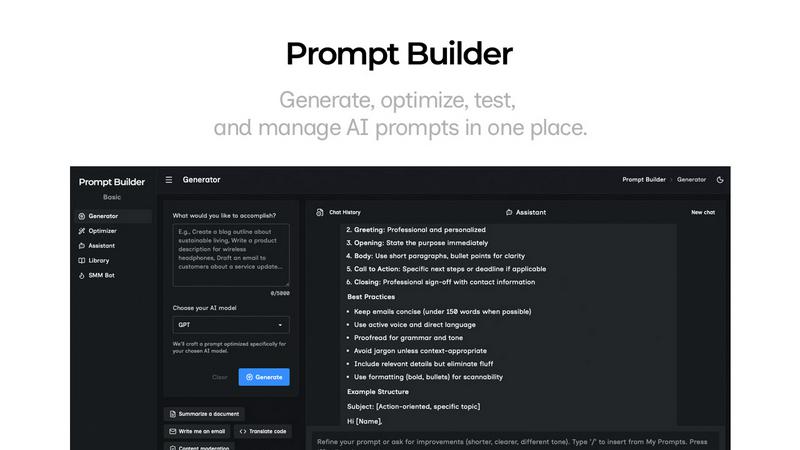
The Prompt Generator allows users to describe their ideas and select a target AI model to receive a professionally crafted prompt optimized for that specific model. This feature minimizes the time spent crafting prompts and ensures they are tailored for better results.
Chat Refinement
Users can refine their prompts directly within a built-in chat workspace. This feature enables quick iterations, allowing users to modify their prompts based on immediate feedback and suggestions from an assistant model, ensuring clarity and effectiveness.
Prompt Optimizer
The Prompt Optimizer feature lets users paste existing prompts or select them from their Library to receive enhanced versions. It focuses on improving clarity, adding constraints, and suggesting output formats, making it easier for users to produce high-quality prompts quickly.
Prompt Library
The Prompt Library is a centralized place for users to save, organize, and reuse their best prompts across different projects and teams. This feature includes search and filter options by category and model, enabling users to access their prompts efficiently and explore community-contributed prompts.
URL to Any
Multi-Format Conversion Hub
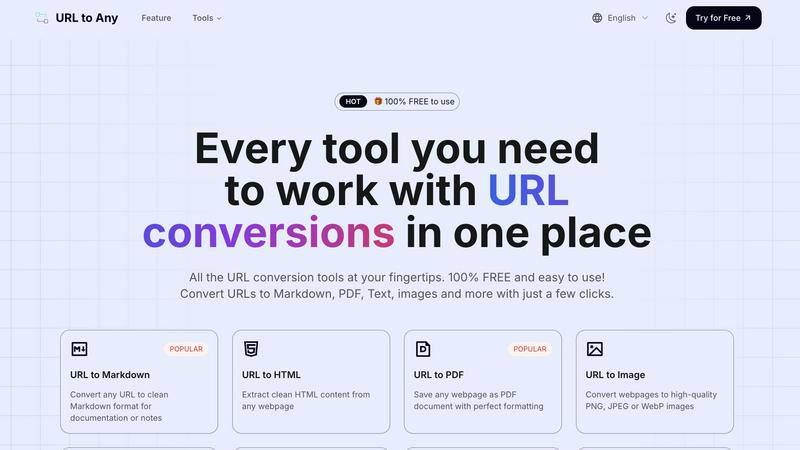
URL to Any consolidates a vast array of conversion tools into one intuitive interface. Users can transform a single URL into numerous formats like Markdown for documentation, PDF for archiving, high-quality images for presentations, and structured data formats like JSON and XML for development projects. This eliminates the hassle of switching between different websites or tools, providing a unified and efficient workflow for all web content conversion tasks.
Advanced Content Extraction Tools
Beyond basic conversion, the platform offers specialized extraction tools for in-depth web analysis. This includes the URL Meta Tags Extractor to audit SEO elements and social media cards, the URL Heading Extractor for structural analysis, and the URL Extractor to pull every link from a site into a downloadable TXT or CSV file. These features are invaluable for developers, SEO specialists, and digital marketers who need to inspect and analyze website architecture and metadata.
AI-Powered Summarization
The integrated AI Summarizer tool leverages advanced artificial intelligence to instantly condense lengthy webpage articles, reports, or blog posts into concise, coherent summaries. This feature saves immense time for students, researchers, and professionals who need to quickly grasp the core ideas of online content without reading through entire pages, enhancing research efficiency and content curation.
Secure & Instant Cloud Processing
All conversions are handled swiftly in the cloud, requiring no software downloads or system resources from the user's device. The process is not only lightning-fast but also secure and private; your data is processed on-the-fly and is never stored on the servers. This ensures both convenience and peace of mind, allowing for secure conversions from any device, anywhere, at any time.
Use Cases
Prompt Builder
Content Creation
Content creators can utilize Prompt Builder to generate high-quality prompts for blog posts, articles, and social media updates. By refining prompts based on audience engagement, they can produce more targeted and effective content in less time.
AI Development
Developers working on AI applications can leverage Prompt Builder to craft and test prompts that interact with various AI models. This ensures that the prompts they use are optimized for the model's strengths, leading to more accurate and relevant outputs.
Educational Purposes
Teachers and educators can use Prompt Builder to create tailored prompts for assignments or interactive learning experiences. The ability to save and refine prompts allows for more personalized learning, catering to different student needs and levels.
Marketing Campaigns
Marketing professionals can generate tailored prompts for social media, email campaigns, and advertisements. By utilizing the platform's chat refinement and community resources, they can craft compelling messages that resonate with their target audiences.
URL to Any
Academic Research and Documentation
Students and researchers can effortlessly convert online articles, studies, or reference pages into clean PDFs for offline reading and archiving, or into Markdown/Text formats for easy quoting and note-taking within their research documents. The AI Summarizer further aids in quickly digesting source material.
Content Creation and Development
Bloggers, technical writers, and developers can use the tool to convert web content into Markdown for seamless integration into their own blogs or documentation. Extracting clean HTML or converting site data to JSON/XML is also crucial for web scraping projects, data migration, or analyzing website structure during development.
Professional Reporting and Presentations
Professionals can capture dynamic web data, such as live charts or reports, as high-quality PNG or JPEG images to embed in PowerPoint presentations, Google Slides, or internal reports. Converting key resource pages to PDF ensures consistent formatting for official records and client deliverables.
Digital Marketing and SEO Audits
Marketers can generate QR codes from campaign landing pages for print materials and use the meta tag and heading extractors to perform quick competitor SEO analysis. The ability to extract all URLs from a domain helps in auditing site structure and identifying broken links for improved website health.
Overview
About Prompt Builder
Prompt Builder is an innovative prompt engineering workspace designed to streamline the process of writing, testing, and saving prompts for various AI models. This tool is tailored for anyone who engages with AI, from casual users to professional developers. The primary value proposition of Prompt Builder lies in its ability to transform a simple idea into a fully optimized prompt in seconds, allowing users to refine their prompts in a chat interface, save different versions, and run them effortlessly when needed. It supports a wide array of AI models, including GPT, Claude, Gemini, Llama, Mistral, DeepSeek, Grok, and Perplexity, making it a versatile choice for users across different platforms. With features like an Optimizer for enhancing existing prompts, a Library for storing reusable prompts, and an easy-to-use assistant for quick testing, Prompt Builder provides an all-in-one solution to maximize productivity and achieve more consistent, high-quality outputs.
About URL to Any
URL to Any is a comprehensive, free-to-use web content conversion platform designed to streamline how individuals and teams interact with online information. At its core, it is a versatile suite of tools that transforms any webpage URL into a wide array of practical formats. This eliminates the need for multiple, disparate applications or complex manual processes. Whether you are a content creator needing clean Markdown for documentation, a researcher archiving webpages as PDFs, a developer extracting structured data in JSON or XML, or a marketer generating QR codes for easy sharing, URL to Any provides a centralized solution. Its primary value proposition lies in its exceptional ease of use, requiring no registration or software installation, and its powerful, cloud-based processing engine that delivers fast, high-quality results. By supporting over ten output formats—including PDF, Markdown, HTML, various image types (PNG, JPEG, WebP), Text, JSON, XML, and even MP3 for audio conversion—it caters to a diverse set of professional and personal needs, making web content more portable, editable, and actionable.
Frequently Asked Questions
Prompt Builder FAQ
How does Prompt Builder improve prompt generation?
Prompt Builder enhances prompt generation by providing a structured approach that allows users to create, refine, and save prompts tailored for specific AI models. This reduces the time and effort needed to craft effective prompts.
What AI models are supported by Prompt Builder?
Prompt Builder supports a variety of AI models, including GPT, Claude, Gemini, Llama, Mistral, DeepSeek, Grok, Perplexity, and more. This wide compatibility ensures that users can work with their preferred models seamlessly.
Is there a limit to the number of prompts I can generate?
Yes, users can start with a free plan that allows 25 assistant requests per month without requiring a credit card. This gives users an opportunity to test the platform’s features before committing to a paid plan.
Can I collaborate with others using Prompt Builder?
Yes, Prompt Builder's Library feature allows users to save and organize prompts that can be shared and reused across teams and projects, promoting collaboration and efficiency in prompt development.
URL to Any FAQ
Is URL to Any really free to use?
Yes, URL to Any is 100% free to use. Every tool featured on the platform, from URL to PDF and Markdown conversions to the AI Summarizer and meta tag extraction, is available without any cost, registration, or hidden fees. You can process URLs and access all features immediately.
What formats can I convert a URL to?
The platform supports a wide and growing range of formats. The primary outputs include Markdown, PDF, Text, and Images (PNG, JPEG, WebP). Additionally, you can convert to structured data formats like JSON and XML, generate QR Codes, and even create audio files (MP3). Specialized tools also allow for encoding/decoding and URL extraction.
How does URL to Any handle privacy and data security?
Privacy is a core principle. URL to Any processes all conversions securely in the cloud. Crucially, the content of the URLs you convert is never permanently stored on their servers. The processing is typically done in real-time, and your data is not retained, sold, or used for any other purpose, ensuring your conversions are private.
Do I need to install any software or browser extension?
No installation is required to use the main website tools; everything runs directly in your web browser. However, for added convenience, URL to Any offers an optional browser extension. Installing this extension can provide quicker access to conversion tools directly from your browser's toolbar, streamlining your workflow further.
Alternatives
Prompt Builder Alternatives
Prompt Builder is a comprehensive prompt engineering workspace designed for users to write, test, and manage AI prompts efficiently. It streamlines the process of turning ideas into actionable prompts across various models like GPT, Claude, and others. As part of the AI Assistants category, it caters to individuals and teams looking to enhance their productivity with AI-generated content. Users often seek alternatives to Prompt Builder for various reasons, including pricing structures, feature sets, and compatibility with specific platforms. When choosing an alternative, it is essential to consider factors such as user interface, ease of integration with existing tools, and the availability of community resources. Ensuring that the chosen solution aligns with personal or organizational needs is crucial for maximizing effectiveness in prompt creation and management.
URL to Any Alternatives
URL to Any is a versatile AI-powered web content conversion tool. It belongs to the broader category of AI assistants designed to streamline digital workflows. This tool specializes in transforming URLs into various formats like Markdown, PDF, HTML, and images with a focus on ease of use and accessibility. Users often seek alternatives for several common reasons. These can include the need for different pricing models, such as subscription tiers with advanced features. Others may require specific platform integrations, more specialized output formats, or enhanced collaboration tools for team use that go beyond the core conversion functionality. When evaluating an alternative, key considerations should include the range of supported formats, overall ease of use, and any associated costs. It's also wise to assess the tool's processing speed, the quality of the converted output, and whether it offers additional value through features like batch processing, API access, or enhanced privacy controls.