
RemoveTexts vs TinyFast
Side-by-side comparison to help you choose the right product.

RemoveTexts
RemoveTexts is an AI tool that effortlessly removes text from images in seconds, ensuring clean visuals without any editing skills needed.
Last updated: March 11, 2026

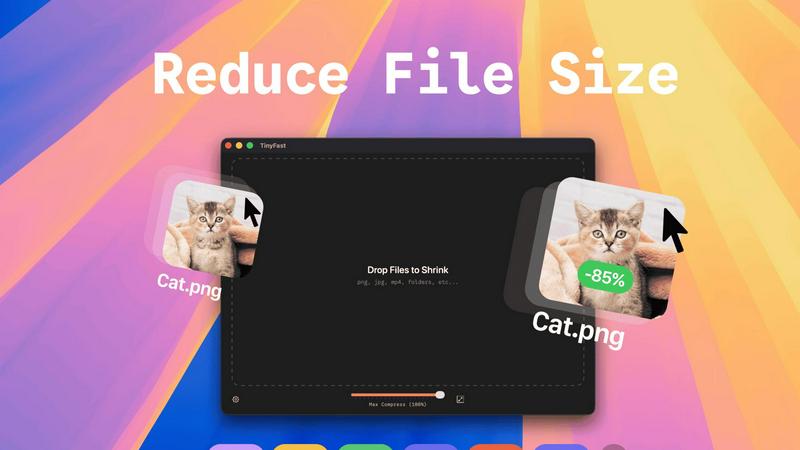
TinyFast privately compresses images, videos, and PDFs locally on your Mac with simple drag and drop.
Last updated: February 28, 2026
Visual Comparison
RemoveTexts

TinyFast
Feature Comparison
RemoveTexts
Paint to Remove
This feature allows users to brush over specific areas of text they wish to remove, providing precise control over the editing process. Users can select only the text they want gone, ensuring that the rest of the image remains intact.
Auto Remove All
With the Auto Remove All feature, the AI automatically detects and removes all text elements from an image with just one click. This function is perfect for users who want a quick and effortless solution to clean their images in seconds.
Edit & Replace Text
This unique feature enables users to not only remove existing text but also replace it with new text while matching the original font style. This is particularly beneficial for those who want to edit images without losing their visual integrity.
Remove Objects
In addition to text, RemoveTexts allows users to erase unwanted objects, logos, and other visual elements from images. This versatility makes it suitable for a wide range of editing tasks, enhancing the overall usability of the tool.
TinyFast
Blazing-Fast Local Compression
TinyFast utilizes optimized native engines built specifically for speed on macOS. This allows users to shrink even large files in seconds, bypassing the lengthy wait times typically associated with uploading to and downloading from online services. The processing power is harnessed directly from your Mac, ensuring instantaneous results without any dependency on internet bandwidth or remote server queues.
100% Local & Private Processing
Privacy is a fundamental design principle of TinyFast. Your files never leave your machine—there are no uploads, no cloud servers, and no third-party storage. This total privacy-by-design approach is crucial for professionals handling confidential client work, projects under Non-Disclosure Agreements (NDAs), or any sensitive assets, guaranteeing complete control and security over your digital content at all times.
Batch & Drag-Drop Simplicity
The application boasts an exceptionally user-friendly interface centered around drag-and-drop functionality. Users can simply drag in individual files or entire folders filled with mixed content. TinyFast automatically processes the batch and delivers the optimized, size-reduced output in seconds. This streamlined process removes complexity and saves significant time compared to handling files one by one through traditional methods.
Universal File Format Support
TinyFast supports a comprehensive range of common file types used across various professions. This includes a wide spectrum of image formats (PNG, JPG, TIFF, HEIC, WEBP, GIF, BMP, SVG), video files (MP4, MOV, M4V), documents (PDF, DOCX), code files (JS, CSS, JSON), and audio (MP3). This versatility makes it a single, go-to tool for compressing diverse project assets without needing multiple specialized applications.
Use Cases
RemoveTexts
E-commerce Product Photo Editing
Online sellers can use RemoveTexts to eliminate watermarks or distracting text from product images, ensuring that their visuals are clean and professional. This helps improve product presentation and boosts sales potential.
Social Media Content Creation
Content creators can quickly remove unwanted text or logos from images before posting on social media platforms. This feature helps maintain a polished aesthetic that aligns with branding.
Legal Document Redaction
Legal professionals can utilize RemoveTexts to redact sensitive information from images of documents, ensuring confidentiality while preserving the overall appearance of the documents being shared.
Academic and Research Publications
Researchers and academics can remove watermarks and other text from images used in their publications, allowing for clearer visuals that enhance their written work. This ensures that readers focus on the content rather than distractions.
TinyFast
Web Developers Optimizing Site Assets
Web developers can use TinyFast to batch compress images, SVG icons, CSS, and JavaScript files directly on their Mac before deploying a website. This reduces page load times, improves Core Web Vitals scores, and enhances user experience, all while ensuring proprietary code and design assets remain secure and never exposed to external servers during the optimization process.
Designers Preparing Client Deliverables
Graphic and UI/UX designers often need to send large portfolios, mockups, or final asset packages to clients or team members. TinyFast allows them to quickly compress folders of high-resolution PNGs, JPEGs, and PDFs locally, creating manageable file sizes for email or shared drives without compromising the privacy of unreleased work or client-sensitive material.
Content Creators Managing Media Libraries
Video editors, photographers, and podcasters can utilize TinyFast to shrink raw MP4, MOV, and MP3 files for draft reviews, social media previews, or archival purposes. The ability to compress videos and audio quickly on-device streamlines their workflow, saves storage space, and facilitates faster sharing without uploading full-quality originals to potentially unsecure online platforms.
Professionals Emailing Large Documents
Any professional who needs to email large reports, presentations (PDF, DOCX), or batches of scanned documents can rely on TinyFast to reduce file sizes below typical email attachment limits. This is done instantly and locally, ensuring confidential business documents and contracts remain private and are delivered promptly without the security risk of online file converters.
Overview
About RemoveTexts
RemoveTexts is an innovative, AI-powered image editing tool designed to effortlessly remove unwanted text from images in mere seconds. Ideal for anyone from casual users to professionals, it streamlines the process of cleaning up images without requiring any design skills. Whether you need to eliminate watermarks from product photos, erase captions from screenshots, or remove text overlays from graphics, RemoveTexts provides a fast and efficient solution. The tool employs advanced deep learning inpainting technology to analyze surrounding pixels, ensuring that the background is seamlessly reconstructed after text removal. This makes it possible to achieve professional-grade results, making the tool indispensable for creators, marketers, and designers alike. With over 100,000 images processed and a growing user base of more than 50,000 worldwide, RemoveTexts is quickly becoming the go-to choice for anyone looking to maintain clean visuals.
About TinyFast
TinyFast is a specialized macOS application engineered for high-speed, local file compression. It serves as an essential productivity tool for developers, designers, content creators, and professionals who regularly handle digital assets. The core function of TinyFast is to significantly reduce the file size of a wide array of media and documents—including images (PNG, JPEG, WebP, GIF, SVG), videos (MP4, MOV), documents (PDF, DOCX), code files (JS, CSS, JSON), and audio (MP3)—directly on the user's Mac computer. Its primary value proposition is a powerful triad of speed, privacy, and simplicity. By processing all files locally, TinyFast completely eliminates the security risks, privacy concerns, and time delays associated with uploading sensitive or large files to unknown online servers. The application features an intuitive drag-and-drop interface that supports batch processing of entire folders, delivering optimized output in mere seconds. Built with a steadfast focus on workflow efficiency and data integrity, TinyFast provides a reliable, always-available solution that respects the confidentiality of your work, making it the trusted choice for over 500 Mac users who need fast and secure file shrinking.
Frequently Asked Questions
RemoveTexts FAQ
How does RemoveTexts work?
RemoveTexts uses advanced AI technology to analyze images and intelligently reconstruct the background after removing text. This deep learning inpainting ensures that the results are seamless and professional.
What file formats does RemoveTexts support?
RemoveTexts supports image uploads in JPG, PNG, and WebP formats, allowing users to work with various types of images without restrictions.
Is there a limit to the image size I can upload?
Yes, RemoveTexts allows users to upload images up to 10 MB in size. This ensures that the tool can handle high-quality images while maintaining quick processing times.
Can I use RemoveTexts on mobile devices?
Yes, RemoveTexts is a web-based tool, making it accessible on any device with an internet connection, including smartphones and tablets. This accessibility makes it easy to remove text on the go.
TinyFast FAQ
Is my data secure with TinyFast?
Absolutely. TinyFast is designed with a core principle of total privacy. All compression happens locally on your Mac. Your files are never uploaded to the internet, sent to cloud servers, or stored by any third party. This ensures maximum security, making it safe for confidential business documents, client work, and personal files.
What file types does TinyFast support?
TinyFast supports a wide variety of common file formats. This includes images (PNG, JPG, TIFF, HEIC, WEBP, GIF, BMP, SVG), videos (MP4, MOV, M4V), documents (PDF, DOCX), code files (JS, CSS, JSON), and audio files (MP3). You can drag and drop mixed file types and folders for batch processing.
How does the free version work?
The free version of TinyFast allows you to compress up to 5 files per day with full access to all features. This provides an excellent way to test the application's speed, quality, and ease of use within your own workflow before deciding to upgrade to an unlimited plan for heavier usage.
Can I compress entire folders at once?
Yes, batch processing is a key feature. You can drag and drop an entire folder containing supported files onto the TinyFast interface. The application will automatically process all compatible files within that folder and its subfolders, outputting the compressed versions in seconds, which dramatically improves workflow efficiency.
Alternatives
RemoveTexts Alternatives
RemoveTexts is an innovative AI-powered image editing tool designed for the seamless removal of unwanted text from images. It falls into the category of image and photo editing software, allowing users to easily clean up images without the need for complex software like Photoshop. Users often seek alternatives for various reasons, including pricing, specific feature sets, or compatibility with different platforms. An effective alternative should offer similar capabilities, ease of use, and support for various file types to ensure it meets user needs. When selecting an alternative to RemoveTexts, it's essential to consider the range of features offered, such as the ability to remove text automatically or manually, the quality of image output, and the user interface's simplicity. Additionally, support for multiple languages and fast processing times can significantly enhance the user experience, making the tool more versatile for different applications.
TinyFast Alternatives
TinyFast is a specialized macOS application for local file compression, falling into the category of productivity and optimization tools for tech professionals. It processes images, videos, and documents directly on your computer, prioritizing speed, privacy, and a streamlined drag-and-drop workflow. Users may explore alternatives for various reasons, such as budget constraints, a need for cross-platform compatibility beyond macOS, or specific feature requirements not covered by a single tool. Some might seek more advanced customization options or different integration capabilities with their existing software stack. When evaluating other options, key considerations include the processing method (local versus cloud-based), supported file formats, compression speed and quality controls, overall cost, and platform availability. The ideal choice balances these factors with your specific workflow demands and security requirements.