
Changeflow vs TinyFast
Side-by-side comparison to help you choose the right product.

Changeflow
Changeflow uses AI to track and summarize only the critical website changes that matter to your business.
Last updated: March 4, 2026

TinyFast privately compresses images, videos, and PDFs locally on your Mac with simple drag and drop.
Last updated: February 28, 2026
Visual Comparison
Changeflow

TinyFast
Feature Comparison
Changeflow
AI-Powered Change Intelligence
Changeflow's core AI doesn't just detect that a page changed; it reads and comprehends the content to identify what specifically changed and evaluates its importance based on your instructions. This intelligent filtering ensures you are only notified about relevant updates, dramatically reducing noise and false positives compared to traditional monitoring tools that rely on simple HTML diffs or screenshots.
Natural Language Setup & Smart Link Following
Configuration requires no technical skills or RSS feeds. You interact with an AI chatbot to describe your monitoring goals in plain English. Furthermore, Changeflow can turn any page containing links into a dynamic intelligence feed. It automatically follows new links, reads the target pages, assesses their relevance to your query, and summarizes the crucial information, effectively automating the discovery and tracking of new content sources.
Enterprise-Grade Page Unblocking
Built on over a decade of experience, Changeflow employs advanced anti-blocking technology to reliably monitor complex websites that often thwart other tools. This includes sites with JavaScript-rendered content, login barriers, and other defensive measures, achieving a 99.9% success rate. This ensures consistent and dependable data collection for mission-critical monitoring tasks.
Interactive Change Viewer & Site Version Control
When a change is detected, you can investigate it forensically with the interactive change viewer, which highlights the exact modifications. Coupled with Site Version Control, this feature provides timestamped, navigable archives of every monitored page, allowing you to travel back in time to see exactly what a page looked like on any given date, which is invaluable for audit trails and compliance.
TinyFast
Blazing-Fast Local Compression
TinyFast utilizes optimized native engines built specifically for speed on macOS. This allows users to shrink even large files in seconds, bypassing the lengthy wait times typically associated with uploading to and downloading from online services. The processing power is harnessed directly from your Mac, ensuring instantaneous results without any dependency on internet bandwidth or remote server queues.
100% Local & Private Processing
Privacy is a fundamental design principle of TinyFast. Your files never leave your machine—there are no uploads, no cloud servers, and no third-party storage. This total privacy-by-design approach is crucial for professionals handling confidential client work, projects under Non-Disclosure Agreements (NDAs), or any sensitive assets, guaranteeing complete control and security over your digital content at all times.
Batch & Drag-Drop Simplicity
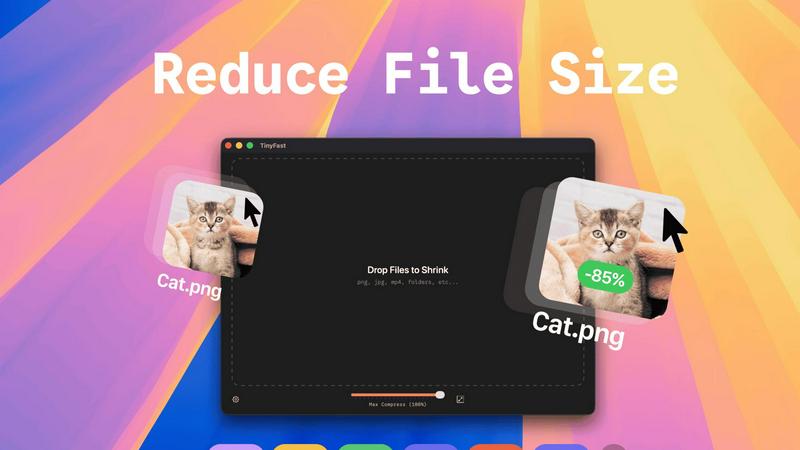
The application boasts an exceptionally user-friendly interface centered around drag-and-drop functionality. Users can simply drag in individual files or entire folders filled with mixed content. TinyFast automatically processes the batch and delivers the optimized, size-reduced output in seconds. This streamlined process removes complexity and saves significant time compared to handling files one by one through traditional methods.
Universal File Format Support
TinyFast supports a comprehensive range of common file types used across various professions. This includes a wide spectrum of image formats (PNG, JPG, TIFF, HEIC, WEBP, GIF, BMP, SVG), video files (MP4, MOV, M4V), documents (PDF, DOCX), code files (JS, CSS, JSON), and audio (MP3). This versatility makes it a single, go-to tool for compressing diverse project assets without needing multiple specialized applications.
Use Cases
Changeflow
Competitive Intelligence & Pricing Monitoring
Business and marketing teams use Changeflow to automatically track competitor websites for changes in pricing, product specifications, promotional offers, and strategic announcements. The AI filters out minor blog updates or irrelevant changes, delivering clear summaries of only the competitive moves that impact market positioning and pricing strategy.
Legal & Regulatory Compliance Tracking
Legal librarians and compliance officers at top-tier firms monitor court dockets, regulatory bodies (like the FDA and SEC), and government portals for new filings, guidance updates, and rule changes. Changeflow's precision ensures no critical regulatory update is missed, with archives providing proof of past publication states for compliance reporting.
News & Brand Mention Monitoring
Communications and PR teams track news sites, industry publications, and forums for mentions of their company, executives, or key topics. By following link pages and using natural language queries, Changeflow builds a comprehensive feed of relevant coverage and sentiment, helping teams manage brand reputation and media relations proactively.
Market & Supply Chain Intelligence
Procurement and strategy teams monitor vendor sites, industry reports, and commodity boards for changes that affect supply chains, material costs, or market conditions. Changeflow provides timely alerts on tariff updates, shipping status changes, or new industry standards, enabling faster, more informed business decisions.
TinyFast
Web Developers Optimizing Site Assets
Web developers can use TinyFast to batch compress images, SVG icons, CSS, and JavaScript files directly on their Mac before deploying a website. This reduces page load times, improves Core Web Vitals scores, and enhances user experience, all while ensuring proprietary code and design assets remain secure and never exposed to external servers during the optimization process.
Designers Preparing Client Deliverables
Graphic and UI/UX designers often need to send large portfolios, mockups, or final asset packages to clients or team members. TinyFast allows them to quickly compress folders of high-resolution PNGs, JPEGs, and PDFs locally, creating manageable file sizes for email or shared drives without compromising the privacy of unreleased work or client-sensitive material.
Content Creators Managing Media Libraries
Video editors, photographers, and podcasters can utilize TinyFast to shrink raw MP4, MOV, and MP3 files for draft reviews, social media previews, or archival purposes. The ability to compress videos and audio quickly on-device streamlines their workflow, saves storage space, and facilitates faster sharing without uploading full-quality originals to potentially unsecure online platforms.
Professionals Emailing Large Documents
Any professional who needs to email large reports, presentations (PDF, DOCX), or batches of scanned documents can rely on TinyFast to reduce file sizes below typical email attachment limits. This is done instantly and locally, ensuring confidential business documents and contracts remain private and are delivered promptly without the security risk of online file converters.
Pricing Comparison
Changeflow
Changeflow offers straightforward, tiered pricing plans designed for business use, all including core features like AI-powered change detection and expert support.
Plus Plan ($19/month): Ideal for getting started, this plan allows monitoring of 20 pages. It includes email & chat support, onboarding assistance, flexible check frequencies (hourly, daily, weekly), storage for 10 page versions, and 2 notification email addresses.
Business Plan ($149/month): Designed for teams needing greater scale, this plan supports monitoring for 500 pages. It includes all Plus features, plus enhanced expert support, storage for 20 page versions, 5 notification addresses, bulk import capabilities (from CSV, Excel, or site crawls), and access to the premium page unblocker for maximum reliability.
TinyFast
TinyFast offers a free tier and two premium plans to unlock unlimited usage. The Free plan allows compression of up to 5 files per day with access to all features. The Lifetime Plan is a one-time payment of €17.99, granting unlimited local compressions, lifetime updates, and support for future development. The Monthly Subscription costs €2.99 per month (after a 3-day trial) and also provides unlimited compressions and feature access. All plans are purchased directly within the Mac application.
Overview
About Changeflow
Changeflow is an advanced web monitoring and change detection platform designed to transform how businesses track online information. It goes beyond simple page monitoring by utilizing sophisticated AI to understand context, filter out irrelevant noise, and deliver concise summaries of only the meaningful changes. The core value proposition is saving significant time and effort by eliminating manual checks and false alerts, providing reliable, actionable intelligence instead. Users simply describe what they want to track in plain English and point the AI agent at a target page; Changeflow handles the complex tasks of navigating websites (including those with login walls and heavy JavaScript), following links, and determining relevance. It is built for professional and enterprise use, trusted by Fortune 500 and Am Law 200 firms for its reliability. With features like shared workspaces, API access, and Site Version Control for historical page archives, Changeflow serves as a central intelligence hub for teams across competitive intelligence, legal, compliance, and market research functions, having already checked over a billion pages.
About TinyFast
TinyFast is a specialized macOS application engineered for high-speed, local file compression. It serves as an essential productivity tool for developers, designers, content creators, and professionals who regularly handle digital assets. The core function of TinyFast is to significantly reduce the file size of a wide array of media and documents—including images (PNG, JPEG, WebP, GIF, SVG), videos (MP4, MOV), documents (PDF, DOCX), code files (JS, CSS, JSON), and audio (MP3)—directly on the user's Mac computer. Its primary value proposition is a powerful triad of speed, privacy, and simplicity. By processing all files locally, TinyFast completely eliminates the security risks, privacy concerns, and time delays associated with uploading sensitive or large files to unknown online servers. The application features an intuitive drag-and-drop interface that supports batch processing of entire folders, delivering optimized output in mere seconds. Built with a steadfast focus on workflow efficiency and data integrity, TinyFast provides a reliable, always-available solution that respects the confidentiality of your work, making it the trusted choice for over 500 Mac users who need fast and secure file shrinking.
Frequently Asked Questions
Changeflow FAQ
How does Changeflow differ from other website monitoring tools?
Unlike basic tools that simply alert you to any HTML change or provide side-by-side screenshots, Changeflow uses AI to understand the semantic meaning of content. It reads the page like a human would, determines the context of changes based on your specific instructions, and delivers a concise summary of only the important updates. This eliminates the need to manually sift through "something changed" alerts to find the relevant signal.
Can Changeflow monitor websites that require a login?
Yes. Changeflow's enterprise-grade page unblocking technology is designed to handle challenging sites, including those with login walls. The platform employs sophisticated methods to navigate these barriers reliably, making it effective for monitoring intranet pages, subscription-based news sites, or private portals where critical information is housed.
How do I set up a page or feed to monitor?
Setup is designed to be simple and non-technical. You provide the URL and use plain English to describe to the AI agent what kind of changes or information you care about on that page. For example, you could say, "Monitor this page for new court case filings" or "Track this product page for price changes." The AI configures the monitoring based on your description.
How are teams able to collaborate using Changeflow?
Changeflow offers shared workspaces that allow entire teams to access and manage monitored feeds, view change histories, and set up notifications collectively. This ensures everyone is aligned with the same intelligence stream. Additionally, centralized user administration and billing simplify management for team leads and administrators.
TinyFast FAQ
Is my data secure with TinyFast?
Absolutely. TinyFast is designed with a core principle of total privacy. All compression happens locally on your Mac. Your files are never uploaded to the internet, sent to cloud servers, or stored by any third party. This ensures maximum security, making it safe for confidential business documents, client work, and personal files.
What file types does TinyFast support?
TinyFast supports a wide variety of common file formats. This includes images (PNG, JPG, TIFF, HEIC, WEBP, GIF, BMP, SVG), videos (MP4, MOV, M4V), documents (PDF, DOCX), code files (JS, CSS, JSON), and audio files (MP3). You can drag and drop mixed file types and folders for batch processing.
How does the free version work?
The free version of TinyFast allows you to compress up to 5 files per day with full access to all features. This provides an excellent way to test the application's speed, quality, and ease of use within your own workflow before deciding to upgrade to an unlimited plan for heavier usage.
Can I compress entire folders at once?
Yes, batch processing is a key feature. You can drag and drop an entire folder containing supported files onto the TinyFast interface. The application will automatically process all compatible files within that folder and its subfolders, outputting the compressed versions in seconds, which dramatically improves workflow efficiency.
Alternatives
Changeflow Alternatives
Changeflow is an AI-driven market and competitor insights platform, specializing in monitoring web pages for meaningful changes. It belongs to the productivity and management software category, helping teams track critical information automatically. Users often explore alternatives for various reasons, such as budget constraints, specific feature requirements not covered by their current plan, or the need for integration with a different tech stack. Some may seek simpler tools for basic monitoring or more specialized solutions for niche use cases. When evaluating alternatives, consider the core capabilities: the ability to accurately monitor complex, JavaScript-heavy pages, the quality of AI analysis that summarizes important changes, and collaboration features for teams. Reliability, ease of setup, and the depth of historical data archiving are also key factors to assess for your specific monitoring needs.
TinyFast Alternatives
TinyFast is a specialized macOS application for local file compression, falling into the category of productivity and optimization tools for tech professionals. It processes images, videos, and documents directly on your computer, prioritizing speed, privacy, and a streamlined drag-and-drop workflow. Users may explore alternatives for various reasons, such as budget constraints, a need for cross-platform compatibility beyond macOS, or specific feature requirements not covered by a single tool. Some might seek more advanced customization options or different integration capabilities with their existing software stack. When evaluating other options, key considerations include the processing method (local versus cloud-based), supported file formats, compression speed and quality controls, overall cost, and platform availability. The ideal choice balances these factors with your specific workflow demands and security requirements.