
RemoveTexts vs Seedream 4.5
Side-by-side comparison to help you choose the right product.

RemoveTexts
RemoveTexts is an AI tool that effortlessly removes text from images in seconds, ensuring clean visuals without any editing skills needed.
Last updated: March 11, 2026

Seedream 4.5
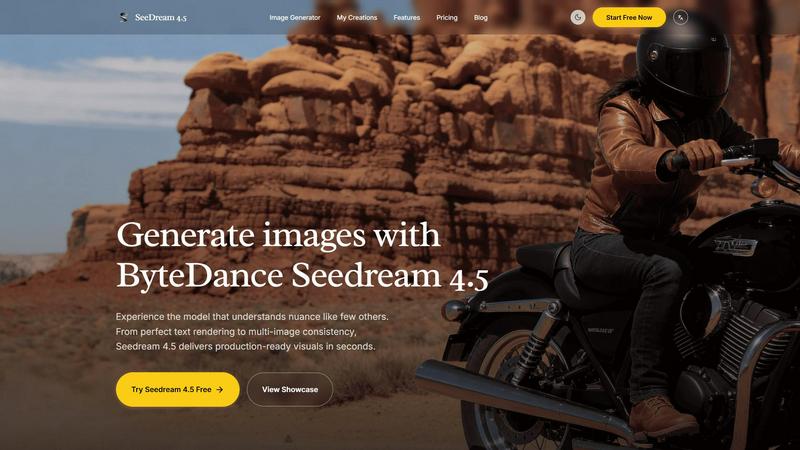
Seedream 4.5 generates nuanced, production-ready images from your text in seconds.
Last updated: February 28, 2026
Visual Comparison
RemoveTexts

Seedream 4.5
Feature Comparison
RemoveTexts
Paint to Remove
This feature allows users to brush over specific areas of text they wish to remove, providing precise control over the editing process. Users can select only the text they want gone, ensuring that the rest of the image remains intact.
Auto Remove All
With the Auto Remove All feature, the AI automatically detects and removes all text elements from an image with just one click. This function is perfect for users who want a quick and effortless solution to clean their images in seconds.
Edit & Replace Text
This unique feature enables users to not only remove existing text but also replace it with new text while matching the original font style. This is particularly beneficial for those who want to edit images without losing their visual integrity.
Remove Objects
In addition to text, RemoveTexts allows users to erase unwanted objects, logos, and other visual elements from images. This versatility makes it suitable for a wide range of editing tasks, enhancing the overall usability of the tool.
Seedream 4.5
Nuanced Prompt Understanding
Seedream 4.5 excels at interpreting complex, detailed, and layered textual descriptions. It goes beyond basic object recognition to grasp specific aesthetics, emotions, compositional elements (like camera angles and lens effects), and subtle stylistic requests, such as "authentic cheap CCTV degradation" or "warm nostalgic film-style." This deep comprehension allows for highly accurate translation of creative vision into the final image.
Production-Ready Visual Fidelity
The model is engineered to generate images that meet professional commercial standards from the first attempt. It delivers photorealistic quality, native 4K resolution support, and impeccable attention to critical details like textures, lighting, and material properties. This eliminates the need for extensive post-generation editing, providing assets that are immediately usable in marketing materials, concept art, and design projects.
Advanced Multi-Image Consistency
A key professional feature is the ability to maintain stylistic and character consistency across multiple generated images. By supporting over 14 reference images, users can guide the model to produce a series of visuals with coherent characters, settings, color palettes, and artistic styles, which is essential for storyboarding, brand campaigns, and product visualization.
Granular Generation & Editing Controls
Seedream 4.5 provides users with precise control over the output. The interface includes adjustable parameters for output quality (Basic/High), multiple aspect ratios (1:1, 9:16, 16:9, etc.), and dedicated modes for Text-to-Image and Image Editing. This granularity ensures the generated content perfectly fits its intended platform and purpose, from social media banners to print materials.
Use Cases
RemoveTexts
E-commerce Product Photo Editing
Online sellers can use RemoveTexts to eliminate watermarks or distracting text from product images, ensuring that their visuals are clean and professional. This helps improve product presentation and boosts sales potential.
Social Media Content Creation
Content creators can quickly remove unwanted text or logos from images before posting on social media platforms. This feature helps maintain a polished aesthetic that aligns with branding.
Legal Document Redaction
Legal professionals can utilize RemoveTexts to redact sensitive information from images of documents, ensuring confidentiality while preserving the overall appearance of the documents being shared.
Academic and Research Publications
Researchers and academics can remove watermarks and other text from images used in their publications, allowing for clearer visuals that enhance their written work. This ensures that readers focus on the content rather than distractions.
Seedream 4.5
Marketing & Advertising Asset Creation
Marketing teams can rapidly produce high-quality, on-brand visuals for campaigns, social media posts, website banners, and product mockups. The model's ability to render perfect text, logos, and specific scenes accelerates content production cycles and allows for easy A/B testing of different visual concepts without costly photoshoots.
Concept Art & Storyboarding
Concept artists, game developers, and filmmakers can use Seedream 4.5 to visualize characters, environments, and key scenes quickly. The multi-image consistency feature is invaluable for creating a coherent set of concept art or storyboard frames that maintain character design and atmosphere throughout a narrative sequence.
Product & Lifestyle Photography
E-commerce businesses and designers can generate photorealistic lifestyle images showcasing products in various settings. This includes creating scenes that would be difficult or expensive to stage physically, such as specific interior designs, exotic locations, or unique model interactions, all while maintaining product accuracy.
Creative Content & Illustration
Individual creators, bloggers, and illustrators can leverage the model to bring unique ideas to life, from fantastical character art and book illustrations to stylized blog graphics. The nuanced prompt understanding allows for the exploration of highly specific and creative themes, enabling the generation of unique artwork that stands out.
Overview
About RemoveTexts
RemoveTexts is an innovative, AI-powered image editing tool designed to effortlessly remove unwanted text from images in mere seconds. Ideal for anyone from casual users to professionals, it streamlines the process of cleaning up images without requiring any design skills. Whether you need to eliminate watermarks from product photos, erase captions from screenshots, or remove text overlays from graphics, RemoveTexts provides a fast and efficient solution. The tool employs advanced deep learning inpainting technology to analyze surrounding pixels, ensuring that the background is seamlessly reconstructed after text removal. This makes it possible to achieve professional-grade results, making the tool indispensable for creators, marketers, and designers alike. With over 100,000 images processed and a growing user base of more than 50,000 worldwide, RemoveTexts is quickly becoming the go-to choice for anyone looking to maintain clean visuals.
About Seedream 4.5
Seedream 4.5 is a state-of-the-art AI image generation model developed by ByteDance, engineered to deliver professional-grade, production-ready visuals. It is designed to bridge the critical gap between creative ideation and final asset delivery for creators, designers, marketers, and businesses. The model's core value proposition lies in its unprecedented combination of speed, reliability, and high-fidelity output, enabling users to generate commercially viable imagery without traditional time and resource constraints. Seedream 4.5 distinguishes itself through an exceptional understanding of nuanced and complex creative requests, handling intricate details, specific styles, and multi-faceted scenes with precision. It is optimized for professional workflows where quality, consistency, and efficiency are non-negotiable, offering tools for granular control, precise editing, and maintaining stylistic coherence across projects. By supporting native 4K resolution and flawless execution of challenging elements like text rendering, it stands as a powerful solution for transforming detailed prompts into stunning visual realities in seconds.
Frequently Asked Questions
RemoveTexts FAQ
How does RemoveTexts work?
RemoveTexts uses advanced AI technology to analyze images and intelligently reconstruct the background after removing text. This deep learning inpainting ensures that the results are seamless and professional.
What file formats does RemoveTexts support?
RemoveTexts supports image uploads in JPG, PNG, and WebP formats, allowing users to work with various types of images without restrictions.
Is there a limit to the image size I can upload?
Yes, RemoveTexts allows users to upload images up to 10 MB in size. This ensures that the tool can handle high-quality images while maintaining quick processing times.
Can I use RemoveTexts on mobile devices?
Yes, RemoveTexts is a web-based tool, making it accessible on any device with an internet connection, including smartphones and tablets. This accessibility makes it easy to remove text on the go.
Seedream 4.5 FAQ
What makes Seedream 4.5 different from other AI image generators?
Seedream 4.5 is specifically engineered for professional, production-ready output. Its key differentiators are its superior understanding of complex and nuanced prompts, industry-leading consistency across multiple images using reference guides, and exceptional performance on challenging details like legible text rendering and photorealistic textures, which are often pain points in other models.
How many images can I generate for free?
The provided context indicates a "Try Seedream 4.5 Free" option, but does not specify the exact number of free generations or any limitations. Users are encouraged to visit the official Seedream website or platform to view the most current free tier details and any associated usage limits.
What is the "Reference Image" feature used for?
The Reference Image feature allows you to upload up to 5 (or more, as indicated by "14+ reference support") images to guide the generation. This is used to achieve multi-image consistency, such as maintaining a character's appearance, replicating a specific art style, or matching the color palette and mood of existing brand assets across new images.
Can I use images generated by Seedream 4.5 for commercial purposes?
Based on its description as a tool for creating "commercially viable imagery" for businesses and professionals, it is designed for commercial use. However, the specific licensing terms, copyright ownership, and any usage restrictions should be reviewed in the official Terms of Service or licensing agreement provided by ByteDance for the Seedream 4.5 model.
Alternatives
RemoveTexts Alternatives
RemoveTexts is an innovative AI-powered image editing tool designed for the seamless removal of unwanted text from images. It falls into the category of image and photo editing software, allowing users to easily clean up images without the need for complex software like Photoshop. Users often seek alternatives for various reasons, including pricing, specific feature sets, or compatibility with different platforms. An effective alternative should offer similar capabilities, ease of use, and support for various file types to ensure it meets user needs. When selecting an alternative to RemoveTexts, it's essential to consider the range of features offered, such as the ability to remove text automatically or manually, the quality of image output, and the user interface's simplicity. Additionally, support for multiple languages and fast processing times can significantly enhance the user experience, making the tool more versatile for different applications.
Seedream 4.5 Alternatives
Seedream 4.5 is a state-of-the-art AI image generation model developed by ByteDance. It belongs to the image and photo category, specializing in creating production-ready, nuanced visuals from text descriptions in seconds. It is engineered for professional use, offering high-fidelity outputs with features like perfect text rendering and character consistency. Users often explore alternatives for various reasons. These can include budget constraints, as professional-grade AI tools may have premium pricing. Others might seek different feature sets, such as unique artistic styles, specific integration capabilities, or platforms with different usage terms and accessibility. The need for a tool that aligns with a particular workflow or creative niche is a common driver. When evaluating alternatives, key considerations include the quality and resolution of generated images, the model's ability to follow complex prompts accurately, and the cost structure. It's also important to assess features critical to your projects, such as consistency for character generation, editing capabilities, and the overall reliability and speed of the platform for your specific use case.